Platform Landing Zone
Company-wide foundation for governance, identity, security, networking, cost controls, and automation.
Open Platform Landing ZoneLast updated on


Standardized multi-layer blueprint guiding product teams through secure, compliant platform onboarding into localized STACKIT environments and Network Areas.
Every successful project journey starts with a maturity check. Product teams use our automated assessment to map their target application architecture against organizational cloud compliance guidelines.
Includes initial assessment questionnaires, team mapping templates, and kick-off workshop assets.
Before provisioning starts, teams align on the split between the platform landing zone (organization-wide guardrails, connectivity, identity) and the application landing zone their workload will live in.
A landing zone is the structured cloud foundation that defines how your organization operates on STACKIT from day 1. It combines governance, identity, security, network design, cost controls, and automation into one coherent baseline.
Without this foundation, migration waves typically stall due to missing approvals, inconsistent controls, and repeated platform decisions.
The following visual summarizes the core components that should be addressed for a reliable platform baseline.
Start the landing-zone stream as early as possible, in parallel with discovery.
The practical model is a dual track: establish the platform baseline early, then refine application landing zone templates as discovery insights mature.
Platform Landing Zone
Company-wide foundation for governance, identity, security, networking, cost controls, and automation.
Open Platform Landing ZoneApplication Landing Zone
Workload-specific implementation patterns derived from the platform baseline and discovery findings.
Open Application Landing ZoneTo design a landing zone effectively, enterprises usually provide:
To accelerate delivery, STACKIT provides concrete best practices and reusable templates:







STACKIT
The sovereign European cloud provider behind the framework, delivering IaaS and PaaS from German and Austrian data centers with full digital independence.
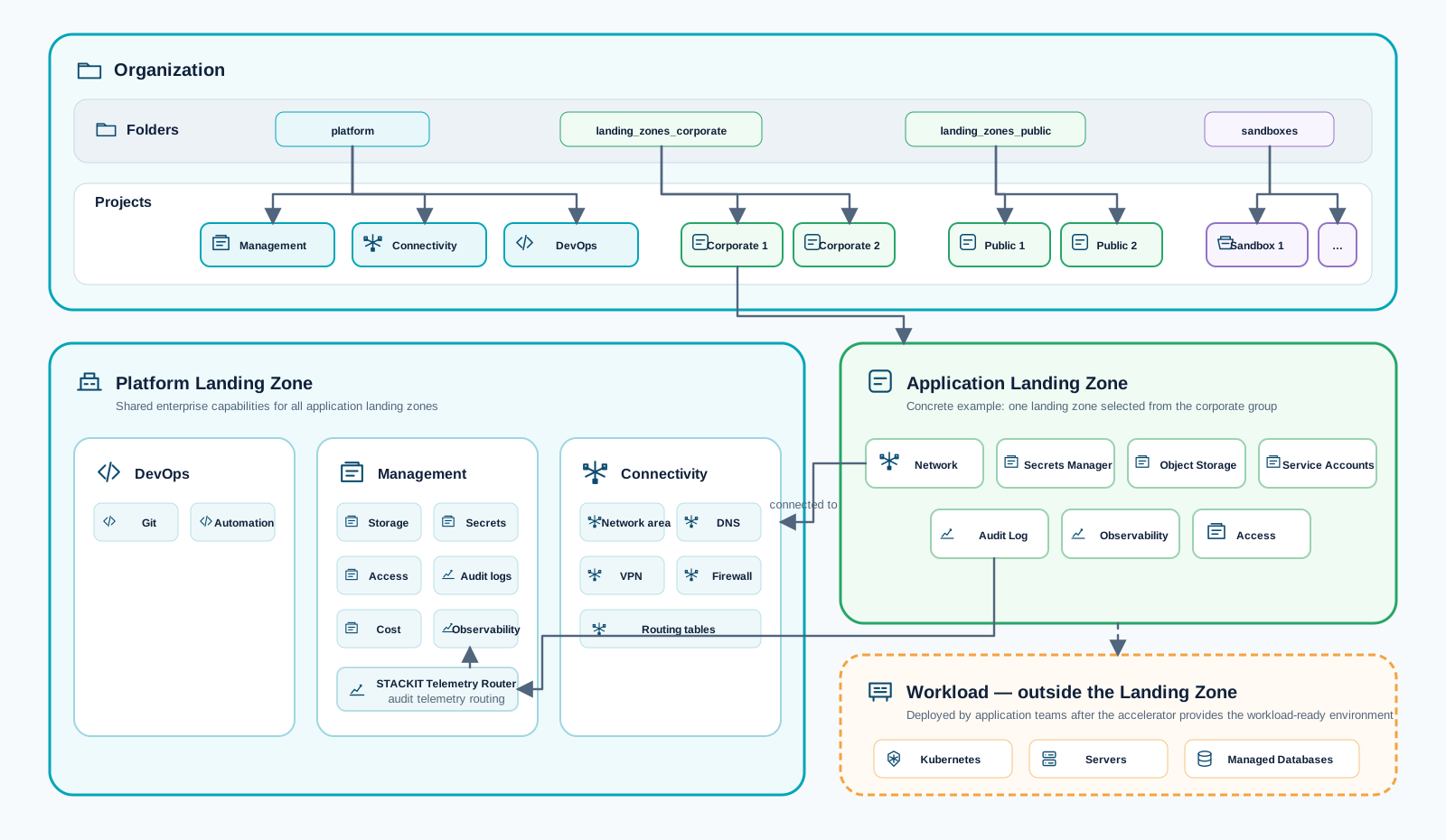
This asset provides a reusable foundation for implementing a STACKIT platform landing zone. It is designed for enterprise environments that need a structured baseline for governance, security, networking, cost controls, and automation.
Repository:
This repository is a single root-module accelerator with modular submodules.
src/main.tf orchestrates all platform and landing-zone building blocks.src/config/.The repository provides eight reference configurations in src/config/. Choose the simplest
topology that satisfies the required network, security, organizational, tenant, and regional
boundaries.
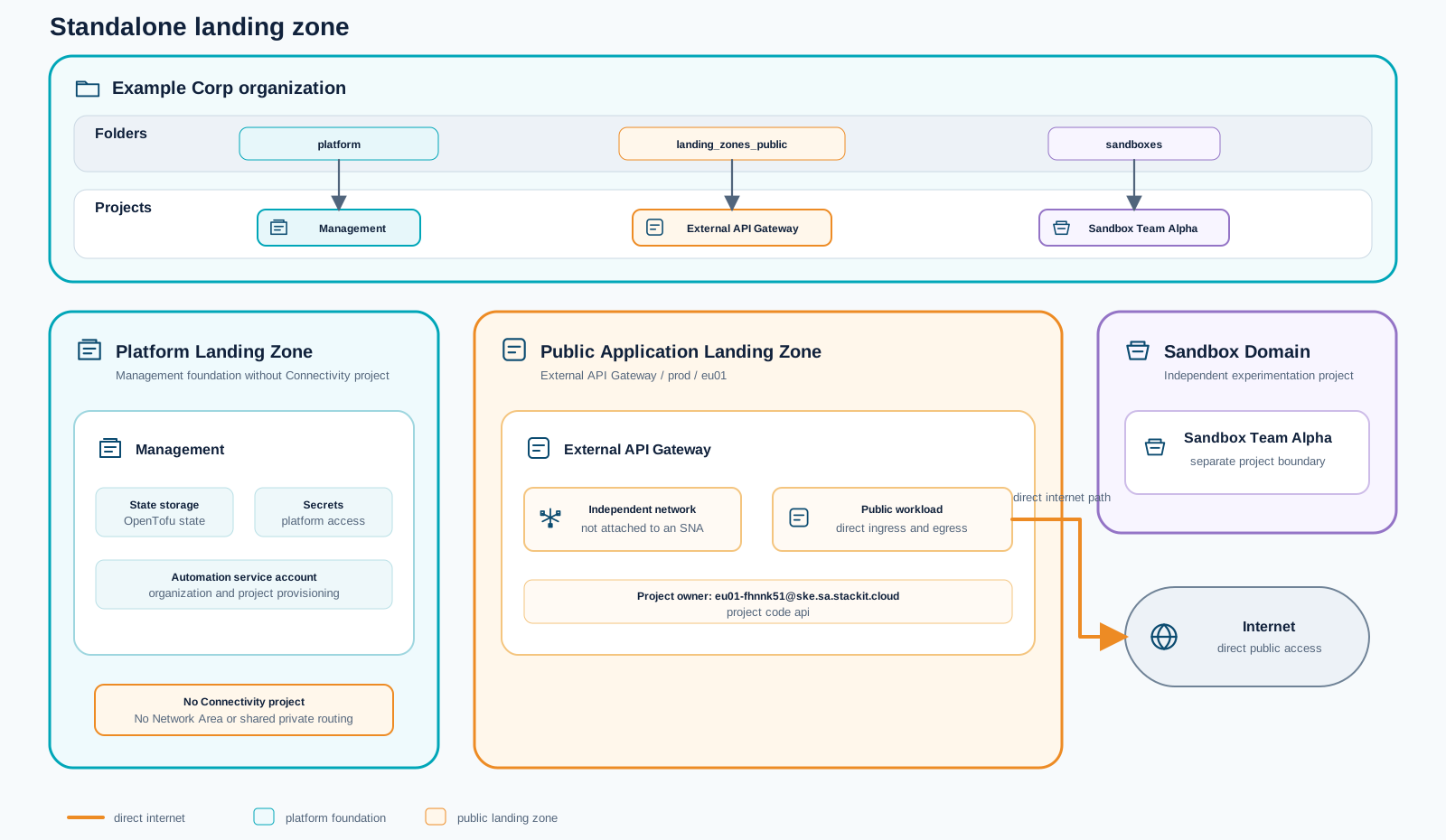
Use standalone.tfvars for the smallest foundation: governance, management, a sandbox, and a
public application landing zone with its own network and direct internet access. It creates no
shared Network Area or connectivity hub, making it suitable when workloads do not require private
east-west connectivity or central DNS.
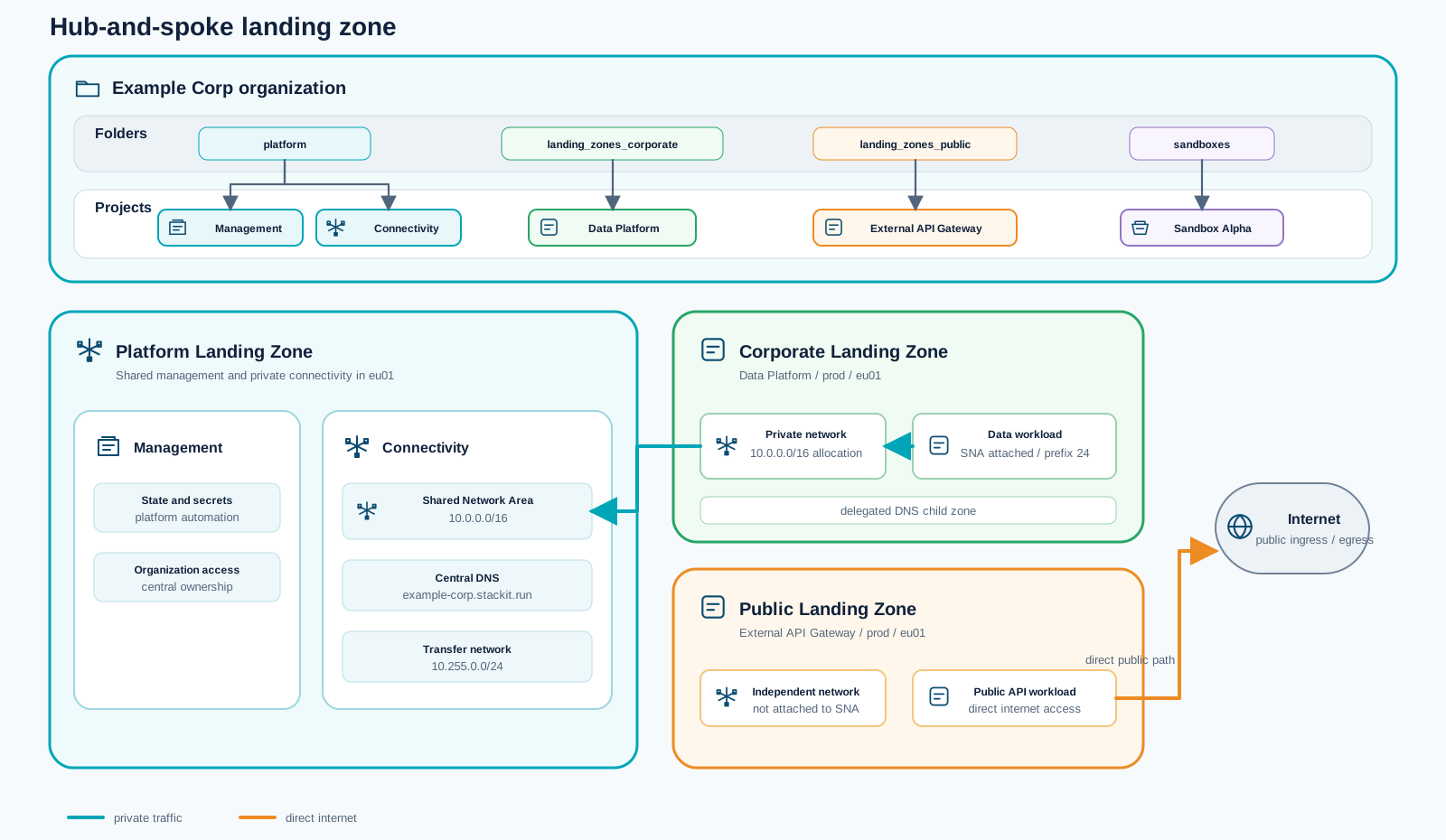
Use hub-and-spoke.tfvars when corporate workloads need shared private connectivity. A central
connectivity project provides the Network Area and DNS, the corporate data platform joins that
private domain, and public workloads retain independent networks with direct internet access.
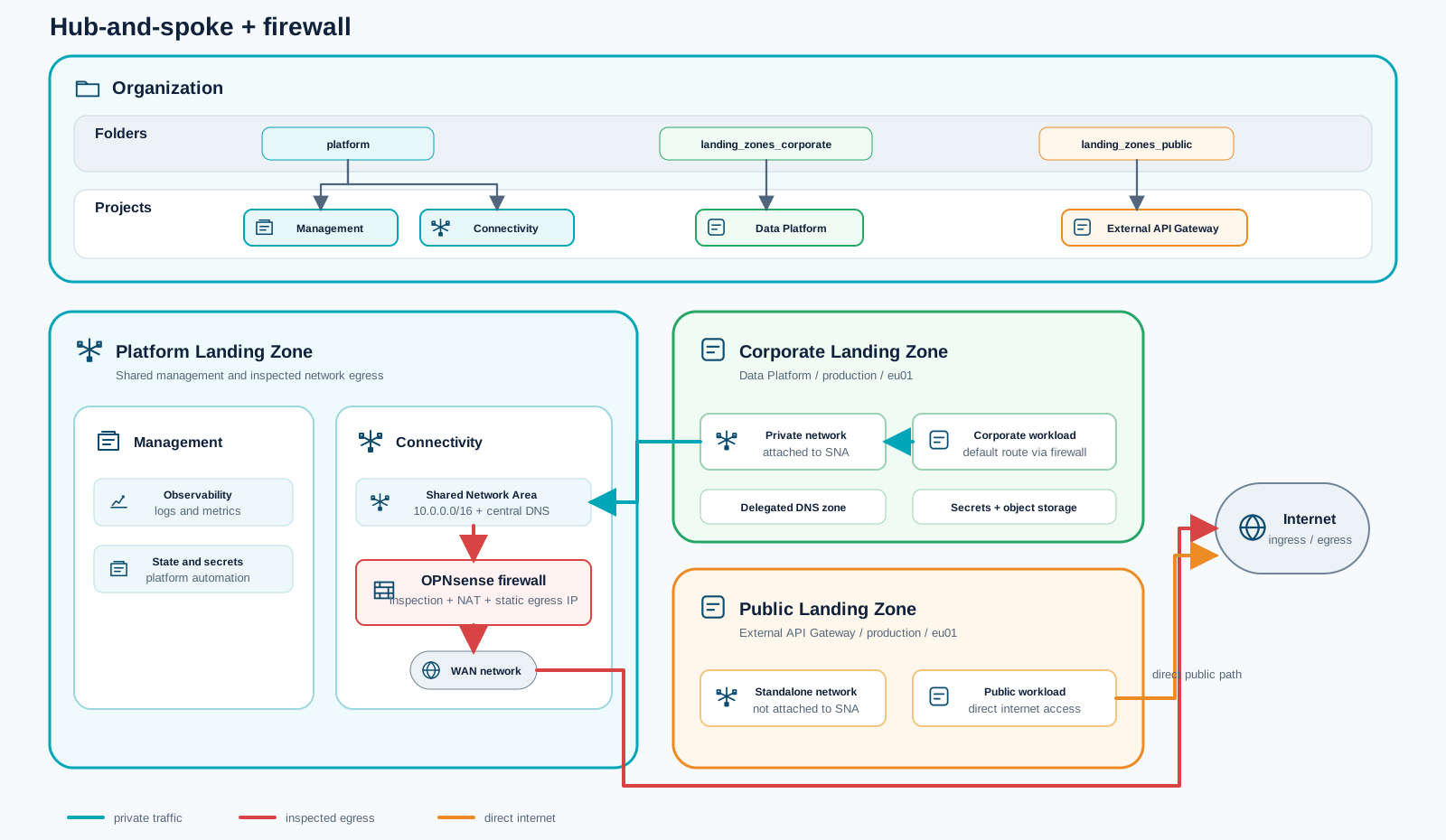
Use hub-and-spoke-firewall.tfvars when corporate egress needs a consistent inspection and control
point. It extends the shared Network Area with an OPNsense firewall and steers corporate default
routes through the appliance, while public landing zones remain directly connected.
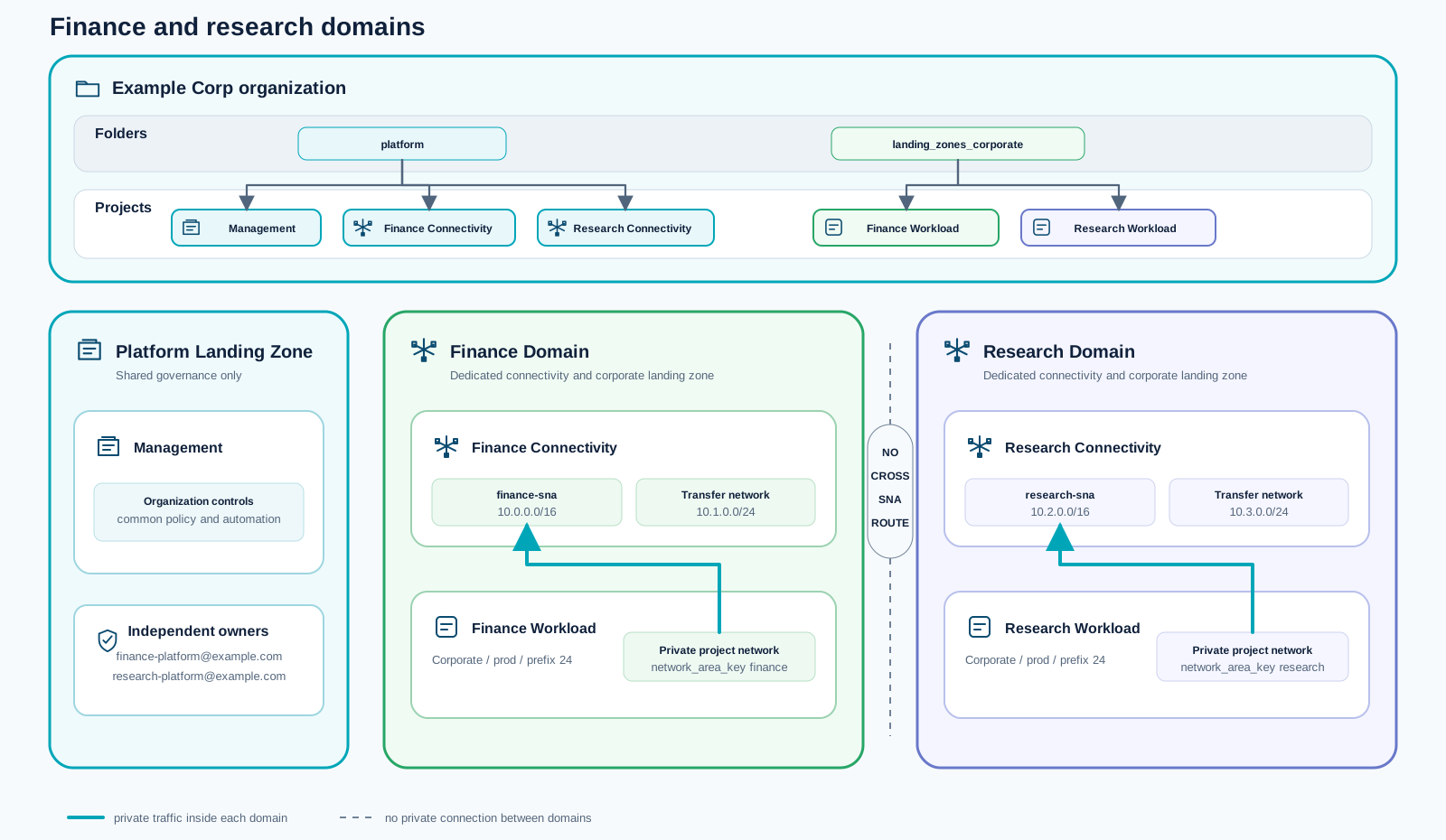
Use hub-and-spoke-finance-research.tfvars when business units require independent ownership and
private connectivity. Finance and research each receive their own address plan, connectivity
project, Network Area, and workload landing zone within the same STACKIT organization.
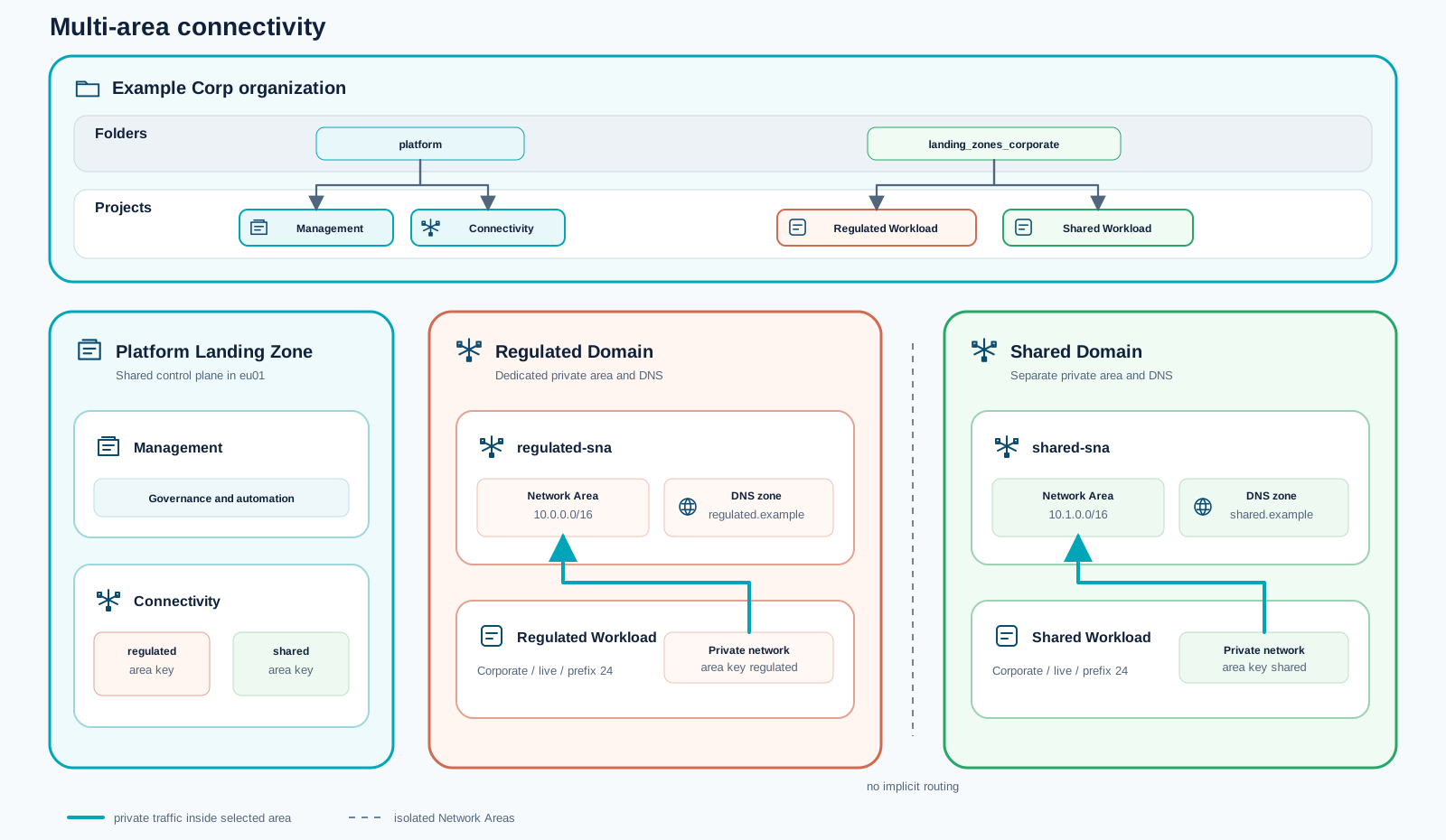
Use hub-and-spoke-multi-area.tfvars when regulated and shared workloads must occupy separate
private connectivity domains. Each domain has its own Network Area and DNS zone, with no implicit
routing between them.
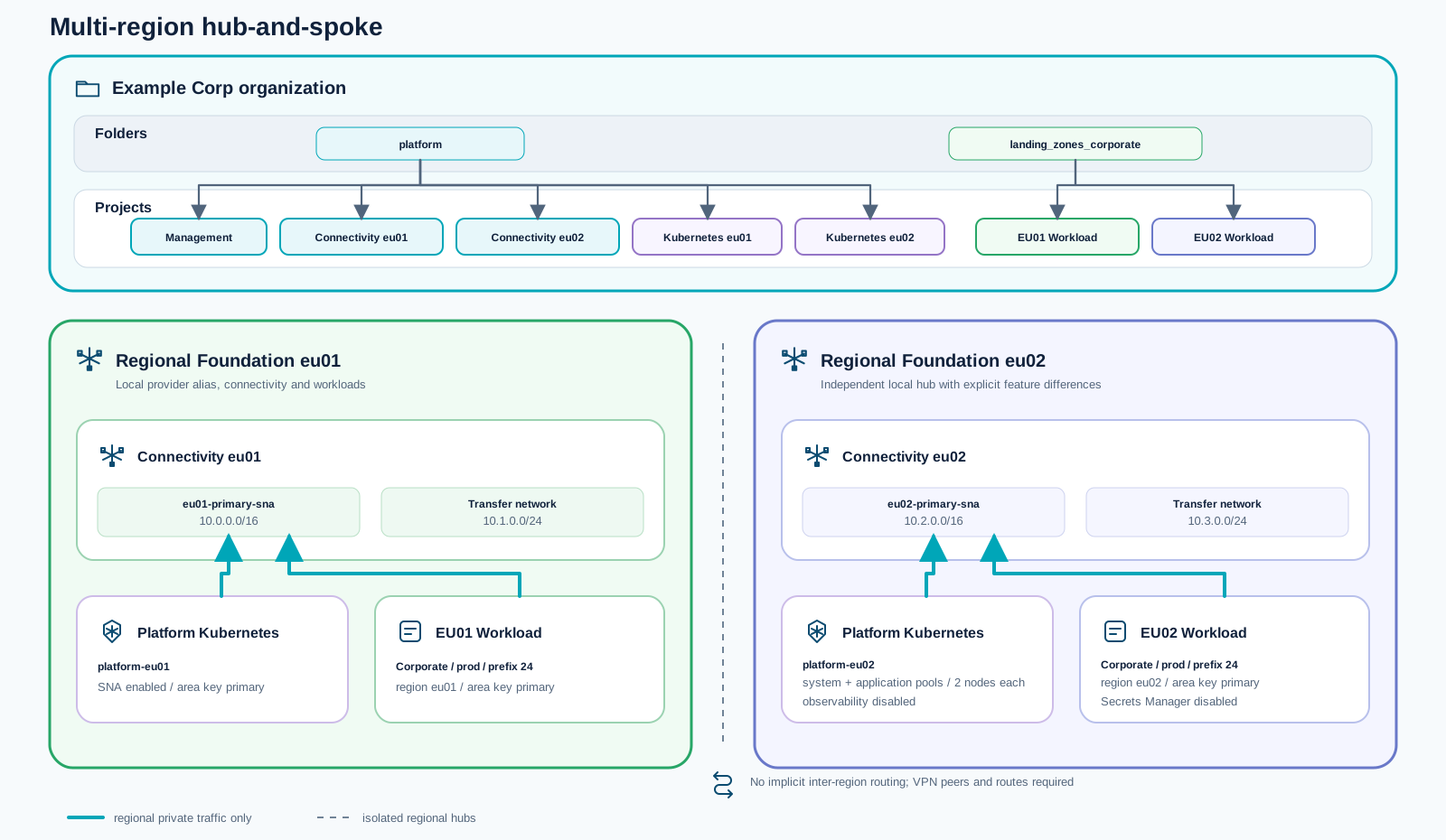
Use hub-and-spoke-multi-region.tfvars for regional foundations in eu01 and eu02. Each region
receives an independent hub, Network Area, workload landing zone, and optional platform Kubernetes
cluster. Inter-region connectivity is deliberately not created and must be designed explicitly.
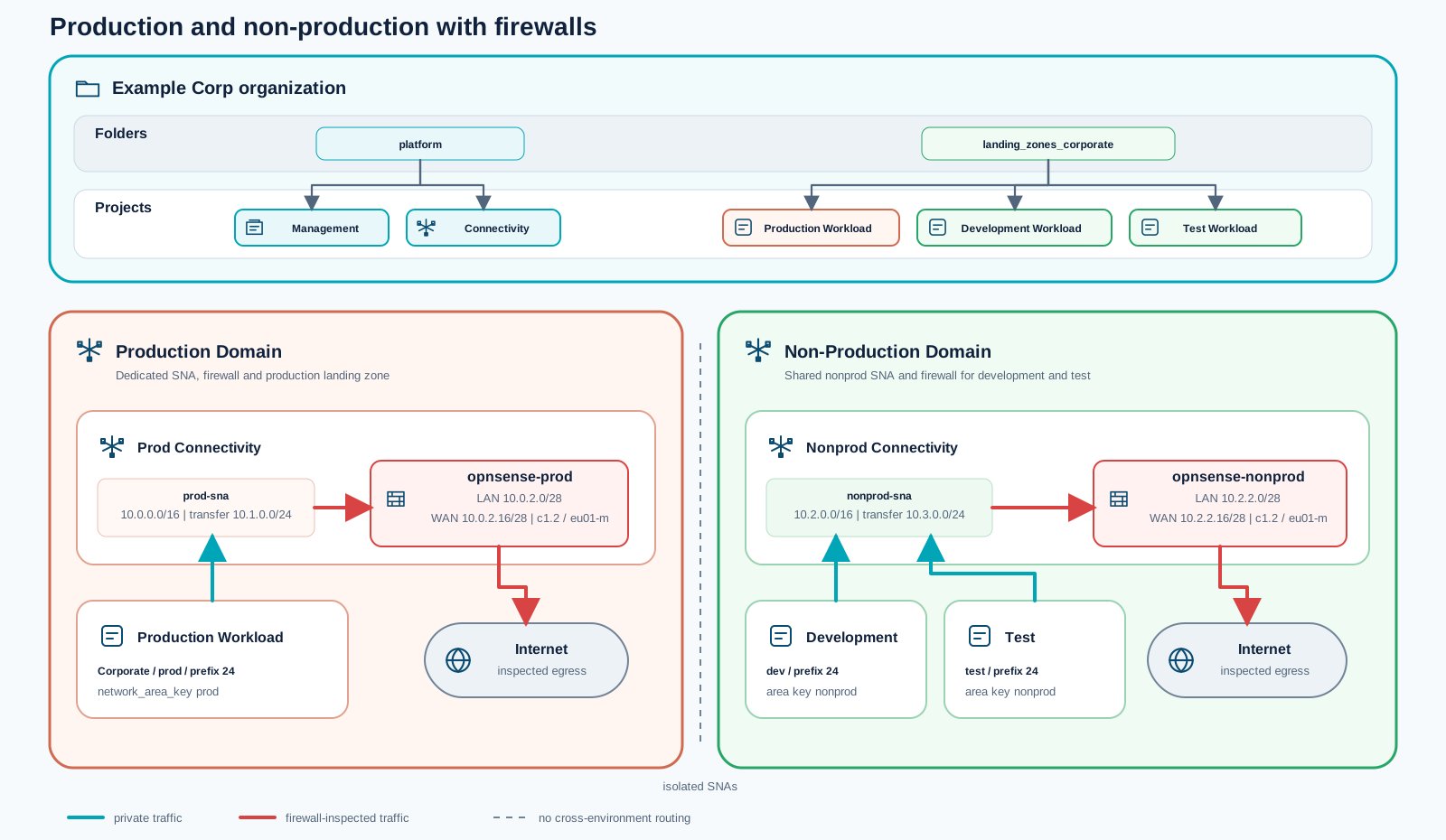
Use hub-and-spoke-prod-nonprod-firewall.tfvars when production must be isolated from
non-production. Each domain receives a dedicated Network Area and OPNsense firewall; development
and test share the non-production domain while remaining separate landing zones.
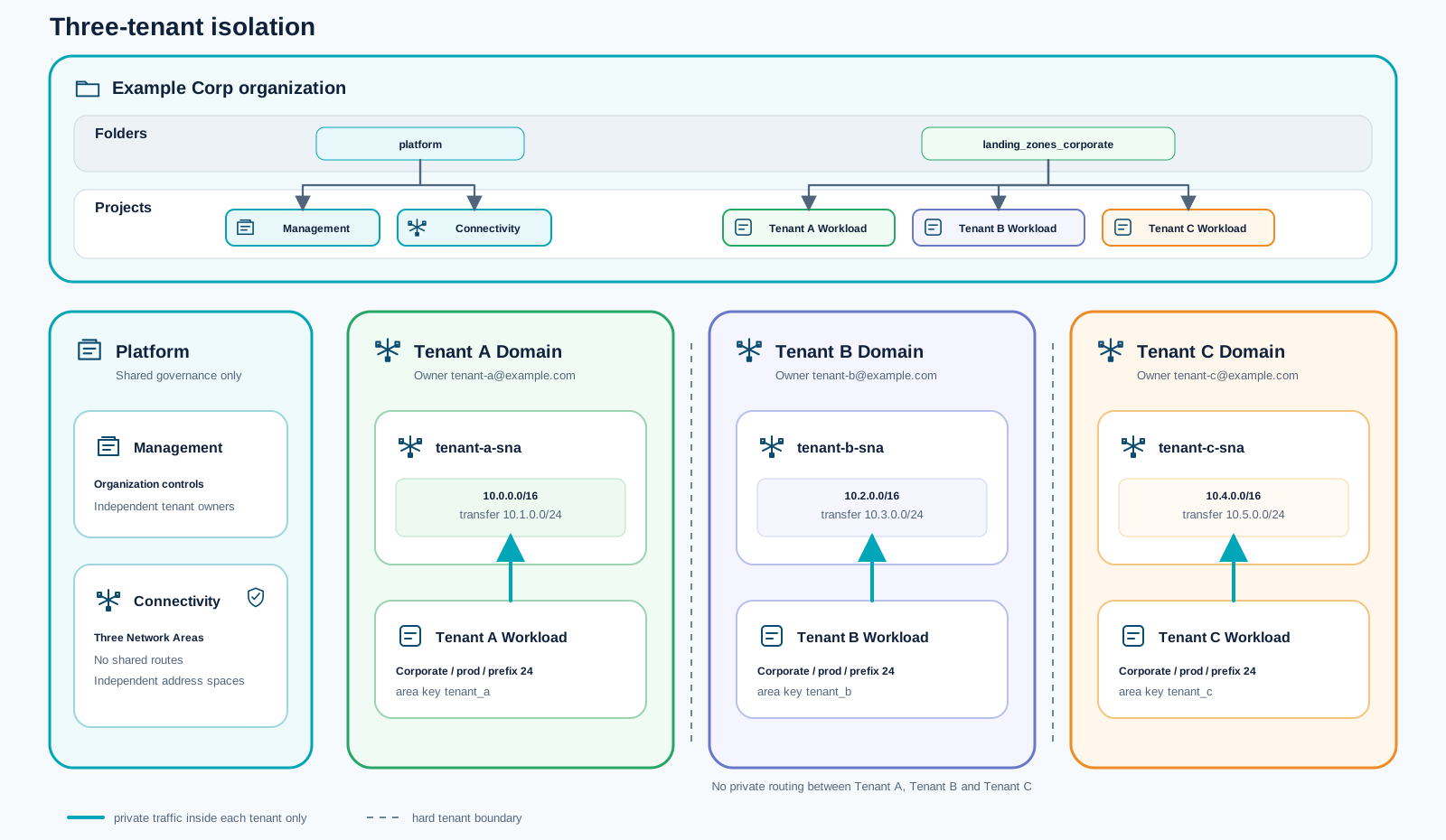
Use hub-and-spoke-tenant-isolation.tfvars for multiple tenants inside one organization. Every
tenant receives an independent owner, address plan, Network Area, connectivity project, and
workload landing zone, without private routing to the other tenant domains.
src/modules/governance)Purpose:
platform, landing_zones_corporate, landing_zones_public, sandboxes).Landing-zone classification:
src/modules/management)Purpose:
Landing-zone classification:
src/modules/connectivity)Purpose:
Landing-zone classification:
src/modules/devops)Purpose:
Landing-zone classification:
src/modules/landing-zone)Purpose:
for_each).Landing-zone classification:
src/modules/sandboxes)Purpose:
sandboxes folder.Landing-zone classification:
The current implementation now includes an end-to-end path for a central Kubernetes platform and namespace-based application onboarding.
The platform scope now includes a dedicated central Kubernetes foundation that can be operated as a shared platform service.
Application landing zones can now consume namespace service from the central Kubernetes platform cluster.
governancemanagementconnectivitydevopslanding-zone (core ALZ provisioning)sandboxes (supporting ALZ-adjacent environments)This means the repository delivers a strong platform baseline first, while ALZ capabilities are intentionally focused on project landing-zone provisioning and team sandbox enablement.
landing-zone map in your variable files.

Open Contributors
The shared entry for everyone contributing to the STACKIT Cloud Framework in a personal capacity, without a company profile standing behind their work.
Unlike traditional on-premise environments (“Boundary Security”), the cloud operates on the Shared Responsibility Model:
Code & Supply Chain Security * 4-Eye-Principle: Mandatory reviews for every Pull Request. * Vulnerability Scanning: Using Snyk to identify vulnerabilities in libraries.
ACLs & Encryption * SKE ACLs: Strictly restrict access to the
Control Plane (No 0.0.0.0/0!). * TLS & Ingress: Certificate management
via Cert-Manager for all entry points.
Runtime Security & Zero Trust * SentinelOne: EDR protection directly on the Kubernetes nodes. * ‘Istio’ (Service Mesh): mTLS for encrypted pod-to-pod communication and Zero Trust enforcement.
Security is defined as code and rolled out automatically:
| Layer | Measure | Policy / Tool |
|---|---|---|
| Code | Snyk, Reviews | Vulnerability Management |
| Control Plane | STACKIT SKE ACLs | SKE Access Control |
| Network | TLS, mTLS | Cert-Manager / Istio |
| Workload | SentinelOne | Endpoint Protection |
Connecting your workspace to the centralized CI/CD infrastructure. Secure repository mirroring, dynamic runner registration, and enterprise Helm delivery blueprints are configured out-of-the-box.
STACKIT
The sovereign European cloud provider behind the framework, delivering IaaS and PaaS from German and Austrian data centers with full digital independence.
This asset applies the Migration Framework to a Spring Boot and PostgreSQL Replatform: the application moves from a VM service to STACKIT Kubernetes Engine (SKE), and its database moves from self-managed PostgreSQL to STACKIT PostgreSQL Flex. The business function and application JAR stay unchanged; the runtime and database operating models change.
The reference repository is the source of truth for Terraform, Helm charts, pinned artifacts,
migration scripts, and validation. Use a reviewed revision containing the Gateway API and
scripts/migrate_postgres.py workflows described here; an older revision with a direct
database-import Job does not implement this procedure.
Cloud Foundry, Object Storage, microservice decomposition, and application modernization are not part of this implementation. The old sample application demonstrates platform substitution, not a recommendation to deploy an unsupported application stack in production.
Review the architecture asset before choosing capacity and network controls. It separates the implemented topology from production extensions such as public HTTPS, highly available workers, and protected metrics.
Spring Boot on SKE with PostgreSQL Flex and Gateway API Review the implemented topology, runtime and data boundaries, and separately qualified production extensions. Open pageUse an isolated Linux lab environment with Git, Terraform, kubectl, curl, jq, getent,
Python 3.11 or newer, and the PostgreSQL server and client tools. The Rehost sample scripts
also require runuser, sha256sum, a postgres OS account, and root privileges to create
and validate a temporary local database. Run the sample commands in that prepared lab
environment, not on a production database host. Keep the generated private artifacts
readable by the operator running the migration; do not make them world-readable.
Obtain reviewed commit IDs for both repositories from the reference maintainer and export
them as REHOST_REVISION and REPLATFORM_REVISION before continuing. The Replatform revision
must contain the Gateway API and gated migration workflow. Do not assume the remote default
branch already contains the locally tested implementation; if the approved revision is not
available, stop and obtain it before attempting the walkthrough.
Replace both placeholders with the reviewed full 40-character commit IDs, then set them in the same Bash terminal:
export REHOST_REVISION="REPLACE_WITH_REVIEWED_REHOST_COMMIT_ID"export REPLATFORM_REVISION="REPLACE_WITH_REVIEWED_REPLATFORM_COMMIT_ID"Run the following complete block from an empty working directory. The if check rejects
missing, empty, or malformed IDs, including unchanged placeholders. Each && runs the next
command only if the previous one succeeded. Git checks whether the commits are available;
the format check alone does not verify approval or repository contents.
if [[ ! ${REHOST_REVISION:-} =~ ^[0-9a-fA-F]{40}$ || ! ${REPLATFORM_REVISION:-} =~ ^[0-9a-fA-F]{40}$ ]]; then printf '%s\n' "Set both revision variables to reviewed full 40-character commit IDs." >&2 falseelse umask 077 && git clone https://github.com/stackitcloud/stackit-cmf-Rehost-springboot.git && git clone https://github.com/stackitcloud/stackit-cmf-replatform-springboot-k8s.git && git -C stackit-cmf-Rehost-springboot checkout --detach "$REHOST_REVISION" && git -C stackit-cmf-replatform-springboot-k8s checkout --detach "$REPLATFORM_REVISION" && test -f stackit-cmf-replatform-springboot-k8s/scripts/migrate_postgres.py && test -f stackit-cmf-replatform-springboot-k8s/scripts/validate_gateway.sh && cd stackit-cmf-replatform-springboot-k8s && printf '%s\n' "Workspace ready. Continue from this Replatform checkout." || { printf '%s\n' "Preparation failed. Resolve the error before continuing." >&2 false }fiContinue only after Workspace ready appears. On failure the terminal stays open; later
preparation commands are skipped. Existing or partially cloned directories are not removed
or overwritten: inspect them and preserve local changes before retrying in a new empty
working directory. On success, the terminal is in the Replatform checkout for the next steps.
Use an approved STACKIT project, service account, DNS delegation, SKE capacity, and protected Terraform backend. Obtain credentials through the approved secret channel, never from this Trail. The following commands assume this directory layout and a reviewed configuration; they do not establish a validated greenfield production deployment.
Qualify a consistent source dump and its manifest before data enters the migration workflow.
The Rehost reference supplies scripts/create_source_dump.sh and
scripts/validate_source_dump.sh for its reproducible sample. Run them from that repository.
Its artifacts directory supplies source-postgresql.dump and
source-postgresql.manifest to the Replatform workflow. The manifest records version 1,
table=public.album, row_count, album_fingerprint, and dump_sha256.
For the reproducible sample only, run the following from the Replatform checkout in the prepared lab environment. The scripts create a temporary PostgreSQL instance from the versioned sample SQL, export it, then perform an independent test restore. Use a fresh artifact directory; do not overwrite evidence from a migration already in progress.
umask 077pushd ../stackit-cmf-Rehost-springbootbash scripts/create_source_dump.shbash scripts/validate_source_dump.shpopdExpect successful validation of eight rows and a matching fingerprint. These commands do not read a source VM. Keep using these exact artifacts for rehearsal and cutover.
For a real source, replace the sample generator with an approved export procedure: freeze all writers and derive the custom-format dump and manifest from the same consistent source snapshot. Do not mistake the generated eight-album sample for an export of an arbitrary running VM. Verify PostgreSQL compatibility, extensions, ownership, and schema dependencies before export.
Only trusted dumps may be restored because they execute SQL. This implementation migrates the
public application schema and checks public.album; it deliberately excludes Flex-managed
schemas. Other workloads require their own invariants and an adapted schema scope.
Provision the target from a reviewed plan with explicit project, capacity, access, and DNS inputs.
Use Terraform, kubectl, curl, jq, getent, and Python 3.11 or newer on Linux. Copy
env.tfvars.example to env.tfvars and adapt the actual variables in that file. Keep
the tested provider lock file and immutable image and JAR references. Confirm SKE version
availability, node-pool capacity, project permissions, and DNS delegation before planning.
Starting with Kubernetes v1.33, we remove minor versions on the patch day that precedes the upstream maintenance end-of-life (EOL) date. The following table below lists the upstream EOL date for each Kubernetes minor version and the corresponding expiration date in SKE:
| Kubernetes minor version | End-of-life date | Expiration in SKE |
|---|---|---|
| v1.32 | 2026-02-28 | 2026-04-15 |
| v1.33 | 2026-06-28 | 2026-06-10 |
| v1.34 | 2026-10-27 | 2026-10-14 |
| v1.35 | 2027-02-28 | 2027-02-10 |
Please refer to the official Kubernetes Release History for up-to-date announcements of new versions.
This section is copied from the STACKIT docs automatically, several times a day. It cannot be changed here. Changes belong in the STACKIT docs.
Prefer an approved Application Landing Zone project. Set create_project = false and provide
its project ID and service account key path. Project creation is an alternative requiring an
approved parent container and permissions; it is not a replacement for landing-zone governance.
Never put credentials, state, saved plans, or migration evidence in version control.
For a new checkout, create the private variable file without overwriting an existing one:
umask 077test -e env.tfvars || cp env.tfvars.example env.tfvarschmod 600 env.tfvarsEdit this file before planning: supply the approved project and service-account path, region, supported SKE version, available node-pool flavor and zone, and delegated DNS settings from the repository example. Review backend access and locking, quotas, costs, and the HTTP/public-metrics limitations. The next section’s feature flags are not a complete environment configuration.
The optional common wrapper maps setup_project, setup_observability, setup_database,
setup_workload, setup_loadgen, and setup_dns to the repository’s Terraform switches.
These select provisioning scope only: enabling the database does not authorize data replacement
and never replaces the separate migration approval gate.
These values select the complete workload and database path. They supplement, rather than replace, the project, region, node-pool, and DNS values in the repository example.
deploy_workload = truedns_enabled = trueenable_postgres_flex = truepostgres_flex_target_database = "springmusic"postgres_flex_target_app_acl_cidrs = []observability_enabled = truecreate_observability_instance = truecreate_grafana_dashboard = trueenable_springboot_hpa = falseenable_load_generator = falsedeploy_postgres_migration_job = falseKeep HPA and load generation disabled during migration. Choose alert settings deliberately;
the end-to-end test did not validate alert delivery. springboot_image selects the Java runtime,
not an unrelated prebuilt application image. The init container downloads the commit-pinned
Rehost JAR and verifies its SHA-256 before startup. Mirror immutable artifacts into approved
artifact and image services for production.
Run from the Replatform repository and review the saved plan before applying:
umask 077terraform initterraform validateterraform plan -var-file=env.tfvars -out=tfplanterraform apply tfplanbash scripts/validate_gateway.shWith empty application ACL inputs, Terraform uses the SKE cluster’s actual egress CIDRs for
PostgreSQL Flex. Explicit application or legacy ACL values override that default and must be
reviewed. Do not permit 0.0.0.0/0.
The temporary PostgreSQL client runs inside SKE and receives the dump through kubectl. It does
not connect directly to the source VM, and no source or workstation CIDR needs temporary Flex
access. JDBC and database tools use sslmode=require; this requires encryption but does not
provide the hostname verification of verify-full. Protect credentials in Kubernetes Secrets
and the Terraform backend, and validate stronger certificate verification where required.
Restore the final dump into the isolated rehearsal database and require matching evidence less than 24 hours old.
After infrastructure apply completes, run an isolated restore into springmusic_rehearsal.
Adjust the source directory to the approved artifacts; keep the evidence path private.
python3 scripts/migrate_postgres.py rehearse \ --artifacts ../stackit-cmf-Rehost-springboot/artifacts \ --evidence .tmp/migration-runRehearsal validates the manifest, dump checksum, target identity, row count, and fingerprint without replacing the application database. After the source write freeze, rehearse the final dump again. Cutover requires matching evidence from less than 24 hours ago. A successful rehearsal of an older or different dump is not approval for the final input.
The old deploy_postgres_migration_job = true path is disabled by validation. Use the gated
workflow instead. Stop HPA, load generation, and all other target writers. Suspend Terraform
and GitOps reconciliation while the script controls the Deployment replica count. Its local
lock protects one checkout, not concurrent operators on different machines.
python3 scripts/migrate_postgres.py cutover \ --artifacts ../stackit-cmf-Rehost-springboot/artifacts \ --evidence .tmp/migration-run \ --source-write-frozen --confirm-target springmusicThe source-write flag is an operator attestation, not an automatic source shutdown. Cutover scales the application to zero, saves and checksums the pre-cutover target, proves that backup by restoring it into the rehearsal database, and only then restores the source transactionally. It verifies data before restarting the original replica count. Failure leaves the application stopped for investigation. Preserve the evidence journal and backup; do not overwrite them to retry.
Compare the database evidence with the source manifest, check application behavior through the Gateway, and confirm both metrics jobs are healthy. Traffic switching and business acceptance remain operator-controlled steps; the script does not change the source application’s endpoint.
To restore the protected pre-cutover target database:
python3 scripts/migrate_postgres.py rollback \ --evidence .tmp/migration-run --confirm-target springmusicRollback checks target identity and backup integrity, saves the current target separately, restores the original data, and verifies its fingerprint before restarting. Post-cutover writes are not merged; retain the pre-rollback dump for explicit reconciliation. This is target-database rollback, not automatic failback to the source VM.
Terraform manages the SCF Replatform Grafana folder and eight-panel dashboard against the
existing Thanos datasource. Use grafana_dashboard_url to open it. Cluster CPU, cluster memory,
running pods, application requests, and PostgreSQL health and pressure support acceptance and
later optimization. No manual dashboard import is required.
Application metrics come from the pod-local Boot 2 Actuator through the metrics adapter on port 9090; the PostgreSQL exporter serves port 9187. Check both actual scrape results, not only dashboard rendering. Missing telemetry is an investigation trigger, never proof of zero load.
Export a short-lived kubeconfig with private permissions and inspect the default namespace:
umask 077mkdir -p .tmpterraform output -raw kubeconfig > .tmp/replatform.kubeconfigexport KUBECONFIG="$PWD/.tmp/replatform.kubeconfig"kubectl get deploy,svc,pods -n springbootkubectl get gateway,httproute -n springbootkubectl rollout status deployment/springboot -n springbootbash scripts/validate_gateway.shThe Gateway validator checks acceptance, resolved route references, DNS, and the application response. Remove the local kubeconfig after use and obtain a fresh one when it expires. Do not treat successful rollout alone as data or business acceptance.
Keep migration rollback distinct from Flex service recovery and retain protected evidence outside ephemeral execution environments.
Flex retention is configured explicitly, with a 32-day default in this reference. Managed database backups and the migration pre-cutover dump serve different purposes. Rehearsing the latter does not prove managed-service restore, point-in-time recovery, or application disaster recovery. Assign recovery ownership and test the required service recovery path separately.
Retain protected evidence and backups outside an ephemeral dev container until the rollback
window closes. After a killed migration process, inspect leftover springmusic-migration-*
pods before resuming; do not use Terraform to restart an unverified target.
This asset demonstrates how to preserve application behavior while changing the runtime and database operating models:
This evidence does not establish a complete greenfield replay, migration from a live production source, zero downtime, high availability, public Gateway TLS, interactive IDP login, alert delivery, or managed Flex recovery. The tested single-worker HTTP setup exposes unauthenticated metrics; resolve those production requirements before using sensitive data. Upgrade the sample application and validate an appropriate supported Kubernetes release as separate controlled changes.
Reference configuration, scripts, and validation evidence Use the repository README and versioned implementation for exact prerequisites, variables, commands, and supported recovery boundaries. Open the repositoryTobias M.Head of STACKIT Cloud Framework · STACKITOwnerActive 12 of the last 12 weeks · 168 updateswww.linkedin.com/in/tobias-müller-011304172Tobias M.Head of STACKIT Cloud Framework · STACKITOwnerActive 12 of the last 12 weeks · 168 updatesSTACKITwww.linkedin.com/in/tobias-müller-011304172??Name not publicThe Cloud Framework team knows who this is. The name is not shown on the site.Contributed in TM Solutions Corp. Inc.Tobias M.Tobias M.Head of STACKIT Cloud Framework · STACKITOwnerActive 12 of the last 12 weeks · 168 updatesSTACKITwww.linkedin.com/in/tobias-müller-011304172
· Sep 14, 2026
Tobias M.Tobias M.Head of STACKIT Cloud Framework · STACKITOwnerActive 12 of the last 12 weeks · 168 updatesSTACKITwww.linkedin.com/in/tobias-müller-011304172
· Aug 31, 2026
Tobias M.Tobias M.Head of STACKIT Cloud Framework · STACKITOwnerActive 12 of the last 12 weeks · 168 updatesSTACKITwww.linkedin.com/in/tobias-müller-011304172
· Aug 26, 2026
Tobias M.Tobias M.Head of STACKIT Cloud Framework · STACKITOwnerActive 12 of the last 12 weeks · 168 updatesSTACKITwww.linkedin.com/in/tobias-müller-011304172
· Aug 10, 2026
Tobias M.Tobias M.Head of STACKIT Cloud Framework · STACKITOwnerActive 12 of the last 12 weeks · 168 updatesSTACKITwww.linkedin.com/in/tobias-müller-011304172
· Jul 29, 2026
Tobias M.Tobias M.Head of STACKIT Cloud Framework · STACKITOwnerActive 12 of the last 12 weeks · 168 updatesSTACKITwww.linkedin.com/in/tobias-müller-011304172
· Jul 16, 2026
Tobias M.Tobias M.Head of STACKIT Cloud Framework · STACKITOwnerActive 12 of the last 12 weeks · 168 updatesSTACKITwww.linkedin.com/in/tobias-müller-011304172
· Jul 15, 2026
Tobias M.Tobias M.Head of STACKIT Cloud Framework · STACKITOwnerActive 12 of the last 12 weeks · 168 updatesSTACKITwww.linkedin.com/in/tobias-müller-011304172
· Jul 13, 2026