Platform component selection
Identify which layers should change (for example runtime, database operations, integration controls).
Last updated on


Replatform Spring Boot and PostgreSQL to SKE and PostgreSQL Flex: prepare source and target, rehearse the data migration, cut over, validate, and stabilize.
Confirm the two deliberate substitutions: a VM service becomes a Kubernetes Deployment, and VM-local PostgreSQL becomes PostgreSQL Flex. Preserve the Spring Music JAR and business behavior; this is Replatform rather than VM Rehost or application Refactor.
Replatform keeps core application behavior but changes selected platform components to gain operational or economic benefits. It sits between Rehost and Refactor in change intensity.
These are Replatform changes as long as the core product behavior and major code paths remain mostly stable.
Platform component selection
Identify which layers should change (for example runtime, database operations, integration controls).
Compatibility boundaries
Validate technical constraints and fallback options before introducing platform changes.
Risk-managed sequencing
Stage changes to avoid coupling too many unknowns in one cutover window.
Evidence and acceptance
Define measurable improvements for performance, resilience, and operational load.
For stateful workloads, define source and target data platform responsibilities before runtime cutover.
For a runnable example of a platform swap from VM to Kubernetes with Spring Boot, use:


Use the asset for the runnable VM-to-Kubernetes and VM-to-managed-database implementation details.
Define landing zone controls and guardrails as the start condition for the Replatform path. Confirm platform prerequisites for runtime, data, and integration layers so substitutions can be introduced without breaking governance or operability.
Define the target platform mapping for the Replatform path across runtime, data, and integration services. Make dependencies explicit, including identity, networking, and data responsibilities, so each change can be validated before cutover.
Specify required platform prerequisite changes and sequencing for controlled transition. Define rollback guardrails, readiness checks, and run ownership so wave delivery stays predictable when multiple platform layers change together.
STACKIT
The sovereign European cloud provider behind the framework, delivering IaaS and PaaS from German and Austrian data centers with full digital independence.
This architecture maps the VM-based Spring Boot and PostgreSQL source to a Kubernetes runtime and managed database on STACKIT. The same application JAR is retained while provisioning, deployment, traffic management, data recovery, and operational responsibilities change.
The reference baseline uses one SKE worker and PostgreSQL Flex, with Envoy Gateway, STACKIT DNS, and Observability. It does not deploy the additional services or multi-zone topology shown in the optional extension pattern below.
An init container verifies the commit-pinned JAR checksum before Java starts. Application containers are replaceable: authoritative album data lives in PostgreSQL Flex, not in a pod filesystem or Kubernetes PersistentVolume. Kubernetes Secrets inject database credentials; an external Secret Manager integration is not implemented in this baseline.
The Flex ACL defaults to actual SKE egress CIDRs. Both application and migration client require encrypted database connections. The migration client uses an isolated rehearsal database and only replaces the application data after explicit approval and a verified pre-cutover backup. No source-VM database connection or temporary public Flex ACL is required for the dump-based path.
Terraform installs Envoy Gateway and then a local routing chart. The application Service is ClusterIP; Envoy supplies the public LoadBalancer. SKE-managed ExternalDNS publishes the HTTPRoute hostname from the Gateway address. This is Gateway API, not a legacy Ingress controller or a separately provisioned STACKIT Application Load Balancer service.
HTTP is the tested default. For HTTPS, supply a trusted TLS Secret and configure
gateway_tls_secret_name according to the repository procedure; certificate issuance and
renewal remain external responsibilities. The separate metrics listeners are public and
unauthenticated in the reference and require protection before sensitive use.
Boot 2 Actuator binds to pod-local loopback; the metrics adapter exposes selected measurements. The PostgreSQL exporter and the SKE monitoring integration feed Observability. Terraform creates the Grafana folder and dashboard, but dashboard availability alone does not establish application health, scrape continuity, or working alert delivery.
The tested worker count, HTTP endpoint, and sample application are a functional baseline, not an HA production architecture. Select a supported SKE release and suitable zone capacity. Assess multiple workers, zone distribution, workload disruption budgets, replica safety, database availability, and the traffic layer as separate design decisions with failure tests.
Database rollback restores the pre-cutover target, while Flex managed backups serve service recovery. Neither automatically redirects users to the source VM. Define write ownership, traffic-switch authority, rollback deadline, retention, and recovery objectives before migration.
The following broader design illustrates possible additions, not resources created by the reference Terraform. Additional node pools, topology rules, persistent volumes, RabbitMQ, Object Storage, and Secret Manager need their own implementation, ownership, and validation. Use them only for a demonstrated workload requirement; do not infer HA from this diagram.
cp env.tfvars.example env.tfvarsservice_account_key_path = "/path/to/stackit-sa-key.json"create_project = truetarget_project_owner_email = "owner@sa.stackit.cloud"parent_container_id = "cmf-parent-container-id"ske_cluster_name = "rpltfk8s01"observability_instance_name = "cmf-rpltf-observability"dns_zone_name = "cmf-example.runs.onstackit.cloud"dns_zone_display_name = "cmf-example"observability_enabled = truecreate_observability_instance = truedns_enabled = truecreate_dns_zone = truedeploy_workload = trueenable_postgres_flex = trueenable_springboot_hpa = falseenable_load_generator = falsespringboot_replicas = 1deploy_postgres_migration_job = falsecreate_grafana_dashboard = trueflags.env):setup_project=truesetup_observability=truesetup_database=truesetup_workload=truesetup_loadgen=falsesetup_dns=trueterraform initterraform validateterraform plan -var-file=env.tfvars -out=tfplanterraform apply tfplanExpected result: springboot_url reaches the application through the Gateway, the application
uses PostgreSQL Flex, and grafana_dashboard_url opens the managed dashboard. Provisioning
does not import source data. Follow the separate rehearsal and cutover workflow after target
validation; keep HPA disabled throughout migration.
STACKIT
The sovereign European cloud provider behind the framework, delivering IaaS and PaaS from German and Austrian data centers with full digital independence.
This asset applies the Migration Framework to a Spring Boot and PostgreSQL Replatform: the application moves from a VM service to STACKIT Kubernetes Engine (SKE), and its database moves from self-managed PostgreSQL to STACKIT PostgreSQL Flex. The business function and application JAR stay unchanged; the runtime and database operating models change.
The reference repository is the source of truth for Terraform, Helm charts, pinned artifacts,
migration scripts, and validation. Use a reviewed revision containing the Gateway API and
scripts/migrate_postgres.py workflows described here; an older revision with a direct
database-import Job does not implement this procedure.
Cloud Foundry, Object Storage, microservice decomposition, and application modernization are not part of this implementation. The old sample application demonstrates platform substitution, not a recommendation to deploy an unsupported application stack in production.
Review the architecture asset before choosing capacity and network controls. It separates the implemented topology from production extensions such as public HTTPS, highly available workers, and protected metrics.
Spring Boot on SKE with PostgreSQL Flex and Gateway API Review the implemented topology, runtime and data boundaries, and separately qualified production extensions. Open pageUse an isolated Linux lab environment with Git, Terraform, kubectl, curl, jq, getent,
Python 3.11 or newer, and the PostgreSQL server and client tools. The Rehost sample scripts
also require runuser, sha256sum, a postgres OS account, and root privileges to create
and validate a temporary local database. Run the sample commands in that prepared lab
environment, not on a production database host. Keep the generated private artifacts
readable by the operator running the migration; do not make them world-readable.
Obtain reviewed commit IDs for both repositories from the reference maintainer and export
them as REHOST_REVISION and REPLATFORM_REVISION before continuing. The Replatform revision
must contain the Gateway API and gated migration workflow. Do not assume the remote default
branch already contains the locally tested implementation; if the approved revision is not
available, stop and obtain it before attempting the walkthrough.
Replace both placeholders with the reviewed full 40-character commit IDs, then set them in the same Bash terminal:
export REHOST_REVISION="REPLACE_WITH_REVIEWED_REHOST_COMMIT_ID"export REPLATFORM_REVISION="REPLACE_WITH_REVIEWED_REPLATFORM_COMMIT_ID"Run the following complete block from an empty working directory. The if check rejects
missing, empty, or malformed IDs, including unchanged placeholders. Each && runs the next
command only if the previous one succeeded. Git checks whether the commits are available;
the format check alone does not verify approval or repository contents.
if [[ ! ${REHOST_REVISION:-} =~ ^[0-9a-fA-F]{40}$ || ! ${REPLATFORM_REVISION:-} =~ ^[0-9a-fA-F]{40}$ ]]; then printf '%s\n' "Set both revision variables to reviewed full 40-character commit IDs." >&2 falseelse umask 077 && git clone https://github.com/stackitcloud/stackit-cmf-Rehost-springboot.git && git clone https://github.com/stackitcloud/stackit-cmf-replatform-springboot-k8s.git && git -C stackit-cmf-Rehost-springboot checkout --detach "$REHOST_REVISION" && git -C stackit-cmf-replatform-springboot-k8s checkout --detach "$REPLATFORM_REVISION" && test -f stackit-cmf-replatform-springboot-k8s/scripts/migrate_postgres.py && test -f stackit-cmf-replatform-springboot-k8s/scripts/validate_gateway.sh && cd stackit-cmf-replatform-springboot-k8s && printf '%s\n' "Workspace ready. Continue from this Replatform checkout." || { printf '%s\n' "Preparation failed. Resolve the error before continuing." >&2 false }fiContinue only after Workspace ready appears. On failure the terminal stays open; later
preparation commands are skipped. Existing or partially cloned directories are not removed
or overwritten: inspect them and preserve local changes before retrying in a new empty
working directory. On success, the terminal is in the Replatform checkout for the next steps.
Use an approved STACKIT project, service account, DNS delegation, SKE capacity, and protected Terraform backend. Obtain credentials through the approved secret channel, never from this Trail. The following commands assume this directory layout and a reviewed configuration; they do not establish a validated greenfield production deployment.
Qualify a consistent source dump and its manifest before data enters the migration workflow.
The Rehost reference supplies scripts/create_source_dump.sh and
scripts/validate_source_dump.sh for its reproducible sample. Run them from that repository.
Its artifacts directory supplies source-postgresql.dump and
source-postgresql.manifest to the Replatform workflow. The manifest records version 1,
table=public.album, row_count, album_fingerprint, and dump_sha256.
For the reproducible sample only, run the following from the Replatform checkout in the prepared lab environment. The scripts create a temporary PostgreSQL instance from the versioned sample SQL, export it, then perform an independent test restore. Use a fresh artifact directory; do not overwrite evidence from a migration already in progress.
umask 077pushd ../stackit-cmf-Rehost-springbootbash scripts/create_source_dump.shbash scripts/validate_source_dump.shpopdExpect successful validation of eight rows and a matching fingerprint. These commands do not read a source VM. Keep using these exact artifacts for rehearsal and cutover.
For a real source, replace the sample generator with an approved export procedure: freeze all writers and derive the custom-format dump and manifest from the same consistent source snapshot. Do not mistake the generated eight-album sample for an export of an arbitrary running VM. Verify PostgreSQL compatibility, extensions, ownership, and schema dependencies before export.
Only trusted dumps may be restored because they execute SQL. This implementation migrates the
public application schema and checks public.album; it deliberately excludes Flex-managed
schemas. Other workloads require their own invariants and an adapted schema scope.
Provision the target from a reviewed plan with explicit project, capacity, access, and DNS inputs.
Use Terraform, kubectl, curl, jq, getent, and Python 3.11 or newer on Linux. Copy
env.tfvars.example to env.tfvars and adapt the actual variables in that file. Keep
the tested provider lock file and immutable image and JAR references. Confirm SKE version
availability, node-pool capacity, project permissions, and DNS delegation before planning.
Starting with Kubernetes v1.33, we remove minor versions on the patch day that precedes the upstream maintenance end-of-life (EOL) date. The following table below lists the upstream EOL date for each Kubernetes minor version and the corresponding expiration date in SKE:
| Kubernetes minor version | End-of-life date | Expiration in SKE |
|---|---|---|
| v1.32 | 2026-02-28 | 2026-04-15 |
| v1.33 | 2026-06-28 | 2026-06-10 |
| v1.34 | 2026-10-27 | 2026-10-14 |
| v1.35 | 2027-02-28 | 2027-02-10 |
Please refer to the official Kubernetes Release History for up-to-date announcements of new versions.
This section is copied from the STACKIT docs automatically, several times a day. It cannot be changed here. Changes belong in the STACKIT docs.
Prefer an approved Application Landing Zone project. Set create_project = false and provide
its project ID and service account key path. Project creation is an alternative requiring an
approved parent container and permissions; it is not a replacement for landing-zone governance.
Never put credentials, state, saved plans, or migration evidence in version control.
For a new checkout, create the private variable file without overwriting an existing one:
umask 077test -e env.tfvars || cp env.tfvars.example env.tfvarschmod 600 env.tfvarsEdit this file before planning: supply the approved project and service-account path, region, supported SKE version, available node-pool flavor and zone, and delegated DNS settings from the repository example. Review backend access and locking, quotas, costs, and the HTTP/public-metrics limitations. The next section’s feature flags are not a complete environment configuration.
The optional common wrapper maps setup_project, setup_observability, setup_database,
setup_workload, setup_loadgen, and setup_dns to the repository’s Terraform switches.
These select provisioning scope only: enabling the database does not authorize data replacement
and never replaces the separate migration approval gate.
These values select the complete workload and database path. They supplement, rather than replace, the project, region, node-pool, and DNS values in the repository example.
deploy_workload = truedns_enabled = trueenable_postgres_flex = truepostgres_flex_target_database = "springmusic"postgres_flex_target_app_acl_cidrs = []observability_enabled = truecreate_observability_instance = truecreate_grafana_dashboard = trueenable_springboot_hpa = falseenable_load_generator = falsedeploy_postgres_migration_job = falseKeep HPA and load generation disabled during migration. Choose alert settings deliberately;
the end-to-end test did not validate alert delivery. springboot_image selects the Java runtime,
not an unrelated prebuilt application image. The init container downloads the commit-pinned
Rehost JAR and verifies its SHA-256 before startup. Mirror immutable artifacts into approved
artifact and image services for production.
Run from the Replatform repository and review the saved plan before applying:
umask 077terraform initterraform validateterraform plan -var-file=env.tfvars -out=tfplanterraform apply tfplanbash scripts/validate_gateway.shWith empty application ACL inputs, Terraform uses the SKE cluster’s actual egress CIDRs for
PostgreSQL Flex. Explicit application or legacy ACL values override that default and must be
reviewed. Do not permit 0.0.0.0/0.
The temporary PostgreSQL client runs inside SKE and receives the dump through kubectl. It does
not connect directly to the source VM, and no source or workstation CIDR needs temporary Flex
access. JDBC and database tools use sslmode=require; this requires encryption but does not
provide the hostname verification of verify-full. Protect credentials in Kubernetes Secrets
and the Terraform backend, and validate stronger certificate verification where required.
Restore the final dump into the isolated rehearsal database and require matching evidence less than 24 hours old.
After infrastructure apply completes, run an isolated restore into springmusic_rehearsal.
Adjust the source directory to the approved artifacts; keep the evidence path private.
python3 scripts/migrate_postgres.py rehearse \ --artifacts ../stackit-cmf-Rehost-springboot/artifacts \ --evidence .tmp/migration-runRehearsal validates the manifest, dump checksum, target identity, row count, and fingerprint without replacing the application database. After the source write freeze, rehearse the final dump again. Cutover requires matching evidence from less than 24 hours ago. A successful rehearsal of an older or different dump is not approval for the final input.
The old deploy_postgres_migration_job = true path is disabled by validation. Use the gated
workflow instead. Stop HPA, load generation, and all other target writers. Suspend Terraform
and GitOps reconciliation while the script controls the Deployment replica count. Its local
lock protects one checkout, not concurrent operators on different machines.
python3 scripts/migrate_postgres.py cutover \ --artifacts ../stackit-cmf-Rehost-springboot/artifacts \ --evidence .tmp/migration-run \ --source-write-frozen --confirm-target springmusicThe source-write flag is an operator attestation, not an automatic source shutdown. Cutover scales the application to zero, saves and checksums the pre-cutover target, proves that backup by restoring it into the rehearsal database, and only then restores the source transactionally. It verifies data before restarting the original replica count. Failure leaves the application stopped for investigation. Preserve the evidence journal and backup; do not overwrite them to retry.
Compare the database evidence with the source manifest, check application behavior through the Gateway, and confirm both metrics jobs are healthy. Traffic switching and business acceptance remain operator-controlled steps; the script does not change the source application’s endpoint.
To restore the protected pre-cutover target database:
python3 scripts/migrate_postgres.py rollback \ --evidence .tmp/migration-run --confirm-target springmusicRollback checks target identity and backup integrity, saves the current target separately, restores the original data, and verifies its fingerprint before restarting. Post-cutover writes are not merged; retain the pre-rollback dump for explicit reconciliation. This is target-database rollback, not automatic failback to the source VM.
Terraform manages the SCF Replatform Grafana folder and eight-panel dashboard against the
existing Thanos datasource. Use grafana_dashboard_url to open it. Cluster CPU, cluster memory,
running pods, application requests, and PostgreSQL health and pressure support acceptance and
later optimization. No manual dashboard import is required.
Application metrics come from the pod-local Boot 2 Actuator through the metrics adapter on port 9090; the PostgreSQL exporter serves port 9187. Check both actual scrape results, not only dashboard rendering. Missing telemetry is an investigation trigger, never proof of zero load.
Export a short-lived kubeconfig with private permissions and inspect the default namespace:
umask 077mkdir -p .tmpterraform output -raw kubeconfig > .tmp/replatform.kubeconfigexport KUBECONFIG="$PWD/.tmp/replatform.kubeconfig"kubectl get deploy,svc,pods -n springbootkubectl get gateway,httproute -n springbootkubectl rollout status deployment/springboot -n springbootbash scripts/validate_gateway.shThe Gateway validator checks acceptance, resolved route references, DNS, and the application response. Remove the local kubeconfig after use and obtain a fresh one when it expires. Do not treat successful rollout alone as data or business acceptance.
Keep migration rollback distinct from Flex service recovery and retain protected evidence outside ephemeral execution environments.
Flex retention is configured explicitly, with a 32-day default in this reference. Managed database backups and the migration pre-cutover dump serve different purposes. Rehearsing the latter does not prove managed-service restore, point-in-time recovery, or application disaster recovery. Assign recovery ownership and test the required service recovery path separately.
Retain protected evidence and backups outside an ephemeral dev container until the rollback
window closes. After a killed migration process, inspect leftover springmusic-migration-*
pods before resuming; do not use Terraform to restart an unverified target.
This asset demonstrates how to preserve application behavior while changing the runtime and database operating models:
This evidence does not establish a complete greenfield replay, migration from a live production source, zero downtime, high availability, public Gateway TLS, interactive IDP login, alert delivery, or managed Flex recovery. The tested single-worker HTTP setup exposes unauthenticated metrics; resolve those production requirements before using sensitive data. Upgrade the sample application and validate an appropriate supported Kubernetes release as separate controlled changes.
Reference configuration, scripts, and validation evidence Use the repository README and versioned implementation for exact prerequisites, variables, commands, and supported recovery boundaries. Open the repositorySTACKIT
The sovereign European cloud provider behind the framework, delivering IaaS and PaaS from German and Austrian data centers with full digital independence.
This asset applies the Migration Framework to a Spring Boot and PostgreSQL Replatform: the application moves from a VM service to STACKIT Kubernetes Engine (SKE), and its database moves from self-managed PostgreSQL to STACKIT PostgreSQL Flex. The business function and application JAR stay unchanged; the runtime and database operating models change.
The reference repository is the source of truth for Terraform, Helm charts, pinned artifacts,
migration scripts, and validation. Use a reviewed revision containing the Gateway API and
scripts/migrate_postgres.py workflows described here; an older revision with a direct
database-import Job does not implement this procedure.
Cloud Foundry, Object Storage, microservice decomposition, and application modernization are not part of this implementation. The old sample application demonstrates platform substitution, not a recommendation to deploy an unsupported application stack in production.
Review the architecture asset before choosing capacity and network controls. It separates the implemented topology from production extensions such as public HTTPS, highly available workers, and protected metrics.
Spring Boot on SKE with PostgreSQL Flex and Gateway API Review the implemented topology, runtime and data boundaries, and separately qualified production extensions. Open pageUse an isolated Linux lab environment with Git, Terraform, kubectl, curl, jq, getent,
Python 3.11 or newer, and the PostgreSQL server and client tools. The Rehost sample scripts
also require runuser, sha256sum, a postgres OS account, and root privileges to create
and validate a temporary local database. Run the sample commands in that prepared lab
environment, not on a production database host. Keep the generated private artifacts
readable by the operator running the migration; do not make them world-readable.
Obtain reviewed commit IDs for both repositories from the reference maintainer and export
them as REHOST_REVISION and REPLATFORM_REVISION before continuing. The Replatform revision
must contain the Gateway API and gated migration workflow. Do not assume the remote default
branch already contains the locally tested implementation; if the approved revision is not
available, stop and obtain it before attempting the walkthrough.
Replace both placeholders with the reviewed full 40-character commit IDs, then set them in the same Bash terminal:
export REHOST_REVISION="REPLACE_WITH_REVIEWED_REHOST_COMMIT_ID"export REPLATFORM_REVISION="REPLACE_WITH_REVIEWED_REPLATFORM_COMMIT_ID"Run the following complete block from an empty working directory. The if check rejects
missing, empty, or malformed IDs, including unchanged placeholders. Each && runs the next
command only if the previous one succeeded. Git checks whether the commits are available;
the format check alone does not verify approval or repository contents.
if [[ ! ${REHOST_REVISION:-} =~ ^[0-9a-fA-F]{40}$ || ! ${REPLATFORM_REVISION:-} =~ ^[0-9a-fA-F]{40}$ ]]; then printf '%s\n' "Set both revision variables to reviewed full 40-character commit IDs." >&2 falseelse umask 077 && git clone https://github.com/stackitcloud/stackit-cmf-Rehost-springboot.git && git clone https://github.com/stackitcloud/stackit-cmf-replatform-springboot-k8s.git && git -C stackit-cmf-Rehost-springboot checkout --detach "$REHOST_REVISION" && git -C stackit-cmf-replatform-springboot-k8s checkout --detach "$REPLATFORM_REVISION" && test -f stackit-cmf-replatform-springboot-k8s/scripts/migrate_postgres.py && test -f stackit-cmf-replatform-springboot-k8s/scripts/validate_gateway.sh && cd stackit-cmf-replatform-springboot-k8s && printf '%s\n' "Workspace ready. Continue from this Replatform checkout." || { printf '%s\n' "Preparation failed. Resolve the error before continuing." >&2 false }fiContinue only after Workspace ready appears. On failure the terminal stays open; later
preparation commands are skipped. Existing or partially cloned directories are not removed
or overwritten: inspect them and preserve local changes before retrying in a new empty
working directory. On success, the terminal is in the Replatform checkout for the next steps.
Use an approved STACKIT project, service account, DNS delegation, SKE capacity, and protected Terraform backend. Obtain credentials through the approved secret channel, never from this Trail. The following commands assume this directory layout and a reviewed configuration; they do not establish a validated greenfield production deployment.
Qualify a consistent source dump and its manifest before data enters the migration workflow.
The Rehost reference supplies scripts/create_source_dump.sh and
scripts/validate_source_dump.sh for its reproducible sample. Run them from that repository.
Its artifacts directory supplies source-postgresql.dump and
source-postgresql.manifest to the Replatform workflow. The manifest records version 1,
table=public.album, row_count, album_fingerprint, and dump_sha256.
For the reproducible sample only, run the following from the Replatform checkout in the prepared lab environment. The scripts create a temporary PostgreSQL instance from the versioned sample SQL, export it, then perform an independent test restore. Use a fresh artifact directory; do not overwrite evidence from a migration already in progress.
umask 077pushd ../stackit-cmf-Rehost-springbootbash scripts/create_source_dump.shbash scripts/validate_source_dump.shpopdExpect successful validation of eight rows and a matching fingerprint. These commands do not read a source VM. Keep using these exact artifacts for rehearsal and cutover.
For a real source, replace the sample generator with an approved export procedure: freeze all writers and derive the custom-format dump and manifest from the same consistent source snapshot. Do not mistake the generated eight-album sample for an export of an arbitrary running VM. Verify PostgreSQL compatibility, extensions, ownership, and schema dependencies before export.
Only trusted dumps may be restored because they execute SQL. This implementation migrates the
public application schema and checks public.album; it deliberately excludes Flex-managed
schemas. Other workloads require their own invariants and an adapted schema scope.
Provision the target from a reviewed plan with explicit project, capacity, access, and DNS inputs.
Use Terraform, kubectl, curl, jq, getent, and Python 3.11 or newer on Linux. Copy
env.tfvars.example to env.tfvars and adapt the actual variables in that file. Keep
the tested provider lock file and immutable image and JAR references. Confirm SKE version
availability, node-pool capacity, project permissions, and DNS delegation before planning.
Starting with Kubernetes v1.33, we remove minor versions on the patch day that precedes the upstream maintenance end-of-life (EOL) date. The following table below lists the upstream EOL date for each Kubernetes minor version and the corresponding expiration date in SKE:
| Kubernetes minor version | End-of-life date | Expiration in SKE |
|---|---|---|
| v1.32 | 2026-02-28 | 2026-04-15 |
| v1.33 | 2026-06-28 | 2026-06-10 |
| v1.34 | 2026-10-27 | 2026-10-14 |
| v1.35 | 2027-02-28 | 2027-02-10 |
Please refer to the official Kubernetes Release History for up-to-date announcements of new versions.
This section is copied from the STACKIT docs automatically, several times a day. It cannot be changed here. Changes belong in the STACKIT docs.
Prefer an approved Application Landing Zone project. Set create_project = false and provide
its project ID and service account key path. Project creation is an alternative requiring an
approved parent container and permissions; it is not a replacement for landing-zone governance.
Never put credentials, state, saved plans, or migration evidence in version control.
For a new checkout, create the private variable file without overwriting an existing one:
umask 077test -e env.tfvars || cp env.tfvars.example env.tfvarschmod 600 env.tfvarsEdit this file before planning: supply the approved project and service-account path, region, supported SKE version, available node-pool flavor and zone, and delegated DNS settings from the repository example. Review backend access and locking, quotas, costs, and the HTTP/public-metrics limitations. The next section’s feature flags are not a complete environment configuration.
The optional common wrapper maps setup_project, setup_observability, setup_database,
setup_workload, setup_loadgen, and setup_dns to the repository’s Terraform switches.
These select provisioning scope only: enabling the database does not authorize data replacement
and never replaces the separate migration approval gate.
These values select the complete workload and database path. They supplement, rather than replace, the project, region, node-pool, and DNS values in the repository example.
deploy_workload = truedns_enabled = trueenable_postgres_flex = truepostgres_flex_target_database = "springmusic"postgres_flex_target_app_acl_cidrs = []observability_enabled = truecreate_observability_instance = truecreate_grafana_dashboard = trueenable_springboot_hpa = falseenable_load_generator = falsedeploy_postgres_migration_job = falseKeep HPA and load generation disabled during migration. Choose alert settings deliberately;
the end-to-end test did not validate alert delivery. springboot_image selects the Java runtime,
not an unrelated prebuilt application image. The init container downloads the commit-pinned
Rehost JAR and verifies its SHA-256 before startup. Mirror immutable artifacts into approved
artifact and image services for production.
Run from the Replatform repository and review the saved plan before applying:
umask 077terraform initterraform validateterraform plan -var-file=env.tfvars -out=tfplanterraform apply tfplanbash scripts/validate_gateway.shWith empty application ACL inputs, Terraform uses the SKE cluster’s actual egress CIDRs for
PostgreSQL Flex. Explicit application or legacy ACL values override that default and must be
reviewed. Do not permit 0.0.0.0/0.
The temporary PostgreSQL client runs inside SKE and receives the dump through kubectl. It does
not connect directly to the source VM, and no source or workstation CIDR needs temporary Flex
access. JDBC and database tools use sslmode=require; this requires encryption but does not
provide the hostname verification of verify-full. Protect credentials in Kubernetes Secrets
and the Terraform backend, and validate stronger certificate verification where required.
Restore the final dump into the isolated rehearsal database and require matching evidence less than 24 hours old.
After infrastructure apply completes, run an isolated restore into springmusic_rehearsal.
Adjust the source directory to the approved artifacts; keep the evidence path private.
python3 scripts/migrate_postgres.py rehearse \ --artifacts ../stackit-cmf-Rehost-springboot/artifacts \ --evidence .tmp/migration-runRehearsal validates the manifest, dump checksum, target identity, row count, and fingerprint without replacing the application database. After the source write freeze, rehearse the final dump again. Cutover requires matching evidence from less than 24 hours ago. A successful rehearsal of an older or different dump is not approval for the final input.
The old deploy_postgres_migration_job = true path is disabled by validation. Use the gated
workflow instead. Stop HPA, load generation, and all other target writers. Suspend Terraform
and GitOps reconciliation while the script controls the Deployment replica count. Its local
lock protects one checkout, not concurrent operators on different machines.
python3 scripts/migrate_postgres.py cutover \ --artifacts ../stackit-cmf-Rehost-springboot/artifacts \ --evidence .tmp/migration-run \ --source-write-frozen --confirm-target springmusicThe source-write flag is an operator attestation, not an automatic source shutdown. Cutover scales the application to zero, saves and checksums the pre-cutover target, proves that backup by restoring it into the rehearsal database, and only then restores the source transactionally. It verifies data before restarting the original replica count. Failure leaves the application stopped for investigation. Preserve the evidence journal and backup; do not overwrite them to retry.
Compare the database evidence with the source manifest, check application behavior through the Gateway, and confirm both metrics jobs are healthy. Traffic switching and business acceptance remain operator-controlled steps; the script does not change the source application’s endpoint.
To restore the protected pre-cutover target database:
python3 scripts/migrate_postgres.py rollback \ --evidence .tmp/migration-run --confirm-target springmusicRollback checks target identity and backup integrity, saves the current target separately, restores the original data, and verifies its fingerprint before restarting. Post-cutover writes are not merged; retain the pre-rollback dump for explicit reconciliation. This is target-database rollback, not automatic failback to the source VM.
Terraform manages the SCF Replatform Grafana folder and eight-panel dashboard against the
existing Thanos datasource. Use grafana_dashboard_url to open it. Cluster CPU, cluster memory,
running pods, application requests, and PostgreSQL health and pressure support acceptance and
later optimization. No manual dashboard import is required.
Application metrics come from the pod-local Boot 2 Actuator through the metrics adapter on port 9090; the PostgreSQL exporter serves port 9187. Check both actual scrape results, not only dashboard rendering. Missing telemetry is an investigation trigger, never proof of zero load.
Export a short-lived kubeconfig with private permissions and inspect the default namespace:
umask 077mkdir -p .tmpterraform output -raw kubeconfig > .tmp/replatform.kubeconfigexport KUBECONFIG="$PWD/.tmp/replatform.kubeconfig"kubectl get deploy,svc,pods -n springbootkubectl get gateway,httproute -n springbootkubectl rollout status deployment/springboot -n springbootbash scripts/validate_gateway.shThe Gateway validator checks acceptance, resolved route references, DNS, and the application response. Remove the local kubeconfig after use and obtain a fresh one when it expires. Do not treat successful rollout alone as data or business acceptance.
Keep migration rollback distinct from Flex service recovery and retain protected evidence outside ephemeral execution environments.
Flex retention is configured explicitly, with a 32-day default in this reference. Managed database backups and the migration pre-cutover dump serve different purposes. Rehearsing the latter does not prove managed-service restore, point-in-time recovery, or application disaster recovery. Assign recovery ownership and test the required service recovery path separately.
Retain protected evidence and backups outside an ephemeral dev container until the rollback
window closes. After a killed migration process, inspect leftover springmusic-migration-*
pods before resuming; do not use Terraform to restart an unverified target.
This asset demonstrates how to preserve application behavior while changing the runtime and database operating models:
This evidence does not establish a complete greenfield replay, migration from a live production source, zero downtime, high availability, public Gateway TLS, interactive IDP login, alert delivery, or managed Flex recovery. The tested single-worker HTTP setup exposes unauthenticated metrics; resolve those production requirements before using sensitive data. Upgrade the sample application and validate an appropriate supported Kubernetes release as separate controlled changes.
Reference configuration, scripts, and validation evidence Use the repository README and versioned implementation for exact prerequisites, variables, commands, and supported recovery boundaries. Open the repositorySTACKIT
The sovereign European cloud provider behind the framework, delivering IaaS and PaaS from German and Austrian data centers with full digital independence.
This asset applies the Migration Framework to a Spring Boot and PostgreSQL Replatform: the application moves from a VM service to STACKIT Kubernetes Engine (SKE), and its database moves from self-managed PostgreSQL to STACKIT PostgreSQL Flex. The business function and application JAR stay unchanged; the runtime and database operating models change.
The reference repository is the source of truth for Terraform, Helm charts, pinned artifacts,
migration scripts, and validation. Use a reviewed revision containing the Gateway API and
scripts/migrate_postgres.py workflows described here; an older revision with a direct
database-import Job does not implement this procedure.
Cloud Foundry, Object Storage, microservice decomposition, and application modernization are not part of this implementation. The old sample application demonstrates platform substitution, not a recommendation to deploy an unsupported application stack in production.
Review the architecture asset before choosing capacity and network controls. It separates the implemented topology from production extensions such as public HTTPS, highly available workers, and protected metrics.
Spring Boot on SKE with PostgreSQL Flex and Gateway API Review the implemented topology, runtime and data boundaries, and separately qualified production extensions. Open pageUse an isolated Linux lab environment with Git, Terraform, kubectl, curl, jq, getent,
Python 3.11 or newer, and the PostgreSQL server and client tools. The Rehost sample scripts
also require runuser, sha256sum, a postgres OS account, and root privileges to create
and validate a temporary local database. Run the sample commands in that prepared lab
environment, not on a production database host. Keep the generated private artifacts
readable by the operator running the migration; do not make them world-readable.
Obtain reviewed commit IDs for both repositories from the reference maintainer and export
them as REHOST_REVISION and REPLATFORM_REVISION before continuing. The Replatform revision
must contain the Gateway API and gated migration workflow. Do not assume the remote default
branch already contains the locally tested implementation; if the approved revision is not
available, stop and obtain it before attempting the walkthrough.
Replace both placeholders with the reviewed full 40-character commit IDs, then set them in the same Bash terminal:
export REHOST_REVISION="REPLACE_WITH_REVIEWED_REHOST_COMMIT_ID"export REPLATFORM_REVISION="REPLACE_WITH_REVIEWED_REPLATFORM_COMMIT_ID"Run the following complete block from an empty working directory. The if check rejects
missing, empty, or malformed IDs, including unchanged placeholders. Each && runs the next
command only if the previous one succeeded. Git checks whether the commits are available;
the format check alone does not verify approval or repository contents.
if [[ ! ${REHOST_REVISION:-} =~ ^[0-9a-fA-F]{40}$ || ! ${REPLATFORM_REVISION:-} =~ ^[0-9a-fA-F]{40}$ ]]; then printf '%s\n' "Set both revision variables to reviewed full 40-character commit IDs." >&2 falseelse umask 077 && git clone https://github.com/stackitcloud/stackit-cmf-Rehost-springboot.git && git clone https://github.com/stackitcloud/stackit-cmf-replatform-springboot-k8s.git && git -C stackit-cmf-Rehost-springboot checkout --detach "$REHOST_REVISION" && git -C stackit-cmf-replatform-springboot-k8s checkout --detach "$REPLATFORM_REVISION" && test -f stackit-cmf-replatform-springboot-k8s/scripts/migrate_postgres.py && test -f stackit-cmf-replatform-springboot-k8s/scripts/validate_gateway.sh && cd stackit-cmf-replatform-springboot-k8s && printf '%s\n' "Workspace ready. Continue from this Replatform checkout." || { printf '%s\n' "Preparation failed. Resolve the error before continuing." >&2 false }fiContinue only after Workspace ready appears. On failure the terminal stays open; later
preparation commands are skipped. Existing or partially cloned directories are not removed
or overwritten: inspect them and preserve local changes before retrying in a new empty
working directory. On success, the terminal is in the Replatform checkout for the next steps.
Use an approved STACKIT project, service account, DNS delegation, SKE capacity, and protected Terraform backend. Obtain credentials through the approved secret channel, never from this Trail. The following commands assume this directory layout and a reviewed configuration; they do not establish a validated greenfield production deployment.
Qualify a consistent source dump and its manifest before data enters the migration workflow.
The Rehost reference supplies scripts/create_source_dump.sh and
scripts/validate_source_dump.sh for its reproducible sample. Run them from that repository.
Its artifacts directory supplies source-postgresql.dump and
source-postgresql.manifest to the Replatform workflow. The manifest records version 1,
table=public.album, row_count, album_fingerprint, and dump_sha256.
For the reproducible sample only, run the following from the Replatform checkout in the prepared lab environment. The scripts create a temporary PostgreSQL instance from the versioned sample SQL, export it, then perform an independent test restore. Use a fresh artifact directory; do not overwrite evidence from a migration already in progress.
umask 077pushd ../stackit-cmf-Rehost-springbootbash scripts/create_source_dump.shbash scripts/validate_source_dump.shpopdExpect successful validation of eight rows and a matching fingerprint. These commands do not read a source VM. Keep using these exact artifacts for rehearsal and cutover.
For a real source, replace the sample generator with an approved export procedure: freeze all writers and derive the custom-format dump and manifest from the same consistent source snapshot. Do not mistake the generated eight-album sample for an export of an arbitrary running VM. Verify PostgreSQL compatibility, extensions, ownership, and schema dependencies before export.
Only trusted dumps may be restored because they execute SQL. This implementation migrates the
public application schema and checks public.album; it deliberately excludes Flex-managed
schemas. Other workloads require their own invariants and an adapted schema scope.
Provision the target from a reviewed plan with explicit project, capacity, access, and DNS inputs.
Use Terraform, kubectl, curl, jq, getent, and Python 3.11 or newer on Linux. Copy
env.tfvars.example to env.tfvars and adapt the actual variables in that file. Keep
the tested provider lock file and immutable image and JAR references. Confirm SKE version
availability, node-pool capacity, project permissions, and DNS delegation before planning.
Starting with Kubernetes v1.33, we remove minor versions on the patch day that precedes the upstream maintenance end-of-life (EOL) date. The following table below lists the upstream EOL date for each Kubernetes minor version and the corresponding expiration date in SKE:
| Kubernetes minor version | End-of-life date | Expiration in SKE |
|---|---|---|
| v1.32 | 2026-02-28 | 2026-04-15 |
| v1.33 | 2026-06-28 | 2026-06-10 |
| v1.34 | 2026-10-27 | 2026-10-14 |
| v1.35 | 2027-02-28 | 2027-02-10 |
Please refer to the official Kubernetes Release History for up-to-date announcements of new versions.
This section is copied from the STACKIT docs automatically, several times a day. It cannot be changed here. Changes belong in the STACKIT docs.
Prefer an approved Application Landing Zone project. Set create_project = false and provide
its project ID and service account key path. Project creation is an alternative requiring an
approved parent container and permissions; it is not a replacement for landing-zone governance.
Never put credentials, state, saved plans, or migration evidence in version control.
For a new checkout, create the private variable file without overwriting an existing one:
umask 077test -e env.tfvars || cp env.tfvars.example env.tfvarschmod 600 env.tfvarsEdit this file before planning: supply the approved project and service-account path, region, supported SKE version, available node-pool flavor and zone, and delegated DNS settings from the repository example. Review backend access and locking, quotas, costs, and the HTTP/public-metrics limitations. The next section’s feature flags are not a complete environment configuration.
The optional common wrapper maps setup_project, setup_observability, setup_database,
setup_workload, setup_loadgen, and setup_dns to the repository’s Terraform switches.
These select provisioning scope only: enabling the database does not authorize data replacement
and never replaces the separate migration approval gate.
These values select the complete workload and database path. They supplement, rather than replace, the project, region, node-pool, and DNS values in the repository example.
deploy_workload = truedns_enabled = trueenable_postgres_flex = truepostgres_flex_target_database = "springmusic"postgres_flex_target_app_acl_cidrs = []observability_enabled = truecreate_observability_instance = truecreate_grafana_dashboard = trueenable_springboot_hpa = falseenable_load_generator = falsedeploy_postgres_migration_job = falseKeep HPA and load generation disabled during migration. Choose alert settings deliberately;
the end-to-end test did not validate alert delivery. springboot_image selects the Java runtime,
not an unrelated prebuilt application image. The init container downloads the commit-pinned
Rehost JAR and verifies its SHA-256 before startup. Mirror immutable artifacts into approved
artifact and image services for production.
Run from the Replatform repository and review the saved plan before applying:
umask 077terraform initterraform validateterraform plan -var-file=env.tfvars -out=tfplanterraform apply tfplanbash scripts/validate_gateway.shWith empty application ACL inputs, Terraform uses the SKE cluster’s actual egress CIDRs for
PostgreSQL Flex. Explicit application or legacy ACL values override that default and must be
reviewed. Do not permit 0.0.0.0/0.
The temporary PostgreSQL client runs inside SKE and receives the dump through kubectl. It does
not connect directly to the source VM, and no source or workstation CIDR needs temporary Flex
access. JDBC and database tools use sslmode=require; this requires encryption but does not
provide the hostname verification of verify-full. Protect credentials in Kubernetes Secrets
and the Terraform backend, and validate stronger certificate verification where required.
Restore the final dump into the isolated rehearsal database and require matching evidence less than 24 hours old.
After infrastructure apply completes, run an isolated restore into springmusic_rehearsal.
Adjust the source directory to the approved artifacts; keep the evidence path private.
python3 scripts/migrate_postgres.py rehearse \ --artifacts ../stackit-cmf-Rehost-springboot/artifacts \ --evidence .tmp/migration-runRehearsal validates the manifest, dump checksum, target identity, row count, and fingerprint without replacing the application database. After the source write freeze, rehearse the final dump again. Cutover requires matching evidence from less than 24 hours ago. A successful rehearsal of an older or different dump is not approval for the final input.
The old deploy_postgres_migration_job = true path is disabled by validation. Use the gated
workflow instead. Stop HPA, load generation, and all other target writers. Suspend Terraform
and GitOps reconciliation while the script controls the Deployment replica count. Its local
lock protects one checkout, not concurrent operators on different machines.
python3 scripts/migrate_postgres.py cutover \ --artifacts ../stackit-cmf-Rehost-springboot/artifacts \ --evidence .tmp/migration-run \ --source-write-frozen --confirm-target springmusicThe source-write flag is an operator attestation, not an automatic source shutdown. Cutover scales the application to zero, saves and checksums the pre-cutover target, proves that backup by restoring it into the rehearsal database, and only then restores the source transactionally. It verifies data before restarting the original replica count. Failure leaves the application stopped for investigation. Preserve the evidence journal and backup; do not overwrite them to retry.
Compare the database evidence with the source manifest, check application behavior through the Gateway, and confirm both metrics jobs are healthy. Traffic switching and business acceptance remain operator-controlled steps; the script does not change the source application’s endpoint.
To restore the protected pre-cutover target database:
python3 scripts/migrate_postgres.py rollback \ --evidence .tmp/migration-run --confirm-target springmusicRollback checks target identity and backup integrity, saves the current target separately, restores the original data, and verifies its fingerprint before restarting. Post-cutover writes are not merged; retain the pre-rollback dump for explicit reconciliation. This is target-database rollback, not automatic failback to the source VM.
Terraform manages the SCF Replatform Grafana folder and eight-panel dashboard against the
existing Thanos datasource. Use grafana_dashboard_url to open it. Cluster CPU, cluster memory,
running pods, application requests, and PostgreSQL health and pressure support acceptance and
later optimization. No manual dashboard import is required.
Application metrics come from the pod-local Boot 2 Actuator through the metrics adapter on port 9090; the PostgreSQL exporter serves port 9187. Check both actual scrape results, not only dashboard rendering. Missing telemetry is an investigation trigger, never proof of zero load.
Export a short-lived kubeconfig with private permissions and inspect the default namespace:
umask 077mkdir -p .tmpterraform output -raw kubeconfig > .tmp/replatform.kubeconfigexport KUBECONFIG="$PWD/.tmp/replatform.kubeconfig"kubectl get deploy,svc,pods -n springbootkubectl get gateway,httproute -n springbootkubectl rollout status deployment/springboot -n springbootbash scripts/validate_gateway.shThe Gateway validator checks acceptance, resolved route references, DNS, and the application response. Remove the local kubeconfig after use and obtain a fresh one when it expires. Do not treat successful rollout alone as data or business acceptance.
Keep migration rollback distinct from Flex service recovery and retain protected evidence outside ephemeral execution environments.
Flex retention is configured explicitly, with a 32-day default in this reference. Managed database backups and the migration pre-cutover dump serve different purposes. Rehearsing the latter does not prove managed-service restore, point-in-time recovery, or application disaster recovery. Assign recovery ownership and test the required service recovery path separately.
Retain protected evidence and backups outside an ephemeral dev container until the rollback
window closes. After a killed migration process, inspect leftover springmusic-migration-*
pods before resuming; do not use Terraform to restart an unverified target.
This asset demonstrates how to preserve application behavior while changing the runtime and database operating models:
This evidence does not establish a complete greenfield replay, migration from a live production source, zero downtime, high availability, public Gateway TLS, interactive IDP login, alert delivery, or managed Flex recovery. The tested single-worker HTTP setup exposes unauthenticated metrics; resolve those production requirements before using sensitive data. Upgrade the sample application and validate an appropriate supported Kubernetes release as separate controlled changes.
Reference configuration, scripts, and validation evidence Use the repository README and versioned implementation for exact prerequisites, variables, commands, and supported recovery boundaries. Open the repositorySTACKIT
The sovereign European cloud provider behind the framework, delivering IaaS and PaaS from German and Austrian data centers with full digital independence.
This asset applies the Migration Framework to a Spring Boot and PostgreSQL Replatform: the application moves from a VM service to STACKIT Kubernetes Engine (SKE), and its database moves from self-managed PostgreSQL to STACKIT PostgreSQL Flex. The business function and application JAR stay unchanged; the runtime and database operating models change.
The reference repository is the source of truth for Terraform, Helm charts, pinned artifacts,
migration scripts, and validation. Use a reviewed revision containing the Gateway API and
scripts/migrate_postgres.py workflows described here; an older revision with a direct
database-import Job does not implement this procedure.
Cloud Foundry, Object Storage, microservice decomposition, and application modernization are not part of this implementation. The old sample application demonstrates platform substitution, not a recommendation to deploy an unsupported application stack in production.
Review the architecture asset before choosing capacity and network controls. It separates the implemented topology from production extensions such as public HTTPS, highly available workers, and protected metrics.
Spring Boot on SKE with PostgreSQL Flex and Gateway API Review the implemented topology, runtime and data boundaries, and separately qualified production extensions. Open pageUse an isolated Linux lab environment with Git, Terraform, kubectl, curl, jq, getent,
Python 3.11 or newer, and the PostgreSQL server and client tools. The Rehost sample scripts
also require runuser, sha256sum, a postgres OS account, and root privileges to create
and validate a temporary local database. Run the sample commands in that prepared lab
environment, not on a production database host. Keep the generated private artifacts
readable by the operator running the migration; do not make them world-readable.
Obtain reviewed commit IDs for both repositories from the reference maintainer and export
them as REHOST_REVISION and REPLATFORM_REVISION before continuing. The Replatform revision
must contain the Gateway API and gated migration workflow. Do not assume the remote default
branch already contains the locally tested implementation; if the approved revision is not
available, stop and obtain it before attempting the walkthrough.
Replace both placeholders with the reviewed full 40-character commit IDs, then set them in the same Bash terminal:
export REHOST_REVISION="REPLACE_WITH_REVIEWED_REHOST_COMMIT_ID"export REPLATFORM_REVISION="REPLACE_WITH_REVIEWED_REPLATFORM_COMMIT_ID"Run the following complete block from an empty working directory. The if check rejects
missing, empty, or malformed IDs, including unchanged placeholders. Each && runs the next
command only if the previous one succeeded. Git checks whether the commits are available;
the format check alone does not verify approval or repository contents.
if [[ ! ${REHOST_REVISION:-} =~ ^[0-9a-fA-F]{40}$ || ! ${REPLATFORM_REVISION:-} =~ ^[0-9a-fA-F]{40}$ ]]; then printf '%s\n' "Set both revision variables to reviewed full 40-character commit IDs." >&2 falseelse umask 077 && git clone https://github.com/stackitcloud/stackit-cmf-Rehost-springboot.git && git clone https://github.com/stackitcloud/stackit-cmf-replatform-springboot-k8s.git && git -C stackit-cmf-Rehost-springboot checkout --detach "$REHOST_REVISION" && git -C stackit-cmf-replatform-springboot-k8s checkout --detach "$REPLATFORM_REVISION" && test -f stackit-cmf-replatform-springboot-k8s/scripts/migrate_postgres.py && test -f stackit-cmf-replatform-springboot-k8s/scripts/validate_gateway.sh && cd stackit-cmf-replatform-springboot-k8s && printf '%s\n' "Workspace ready. Continue from this Replatform checkout." || { printf '%s\n' "Preparation failed. Resolve the error before continuing." >&2 false }fiContinue only after Workspace ready appears. On failure the terminal stays open; later
preparation commands are skipped. Existing or partially cloned directories are not removed
or overwritten: inspect them and preserve local changes before retrying in a new empty
working directory. On success, the terminal is in the Replatform checkout for the next steps.
Use an approved STACKIT project, service account, DNS delegation, SKE capacity, and protected Terraform backend. Obtain credentials through the approved secret channel, never from this Trail. The following commands assume this directory layout and a reviewed configuration; they do not establish a validated greenfield production deployment.
Qualify a consistent source dump and its manifest before data enters the migration workflow.
The Rehost reference supplies scripts/create_source_dump.sh and
scripts/validate_source_dump.sh for its reproducible sample. Run them from that repository.
Its artifacts directory supplies source-postgresql.dump and
source-postgresql.manifest to the Replatform workflow. The manifest records version 1,
table=public.album, row_count, album_fingerprint, and dump_sha256.
For the reproducible sample only, run the following from the Replatform checkout in the prepared lab environment. The scripts create a temporary PostgreSQL instance from the versioned sample SQL, export it, then perform an independent test restore. Use a fresh artifact directory; do not overwrite evidence from a migration already in progress.
umask 077pushd ../stackit-cmf-Rehost-springbootbash scripts/create_source_dump.shbash scripts/validate_source_dump.shpopdExpect successful validation of eight rows and a matching fingerprint. These commands do not read a source VM. Keep using these exact artifacts for rehearsal and cutover.
For a real source, replace the sample generator with an approved export procedure: freeze all writers and derive the custom-format dump and manifest from the same consistent source snapshot. Do not mistake the generated eight-album sample for an export of an arbitrary running VM. Verify PostgreSQL compatibility, extensions, ownership, and schema dependencies before export.
Only trusted dumps may be restored because they execute SQL. This implementation migrates the
public application schema and checks public.album; it deliberately excludes Flex-managed
schemas. Other workloads require their own invariants and an adapted schema scope.
Provision the target from a reviewed plan with explicit project, capacity, access, and DNS inputs.
Use Terraform, kubectl, curl, jq, getent, and Python 3.11 or newer on Linux. Copy
env.tfvars.example to env.tfvars and adapt the actual variables in that file. Keep
the tested provider lock file and immutable image and JAR references. Confirm SKE version
availability, node-pool capacity, project permissions, and DNS delegation before planning.
Starting with Kubernetes v1.33, we remove minor versions on the patch day that precedes the upstream maintenance end-of-life (EOL) date. The following table below lists the upstream EOL date for each Kubernetes minor version and the corresponding expiration date in SKE:
| Kubernetes minor version | End-of-life date | Expiration in SKE |
|---|---|---|
| v1.32 | 2026-02-28 | 2026-04-15 |
| v1.33 | 2026-06-28 | 2026-06-10 |
| v1.34 | 2026-10-27 | 2026-10-14 |
| v1.35 | 2027-02-28 | 2027-02-10 |
Please refer to the official Kubernetes Release History for up-to-date announcements of new versions.
This section is copied from the STACKIT docs automatically, several times a day. It cannot be changed here. Changes belong in the STACKIT docs.
Prefer an approved Application Landing Zone project. Set create_project = false and provide
its project ID and service account key path. Project creation is an alternative requiring an
approved parent container and permissions; it is not a replacement for landing-zone governance.
Never put credentials, state, saved plans, or migration evidence in version control.
For a new checkout, create the private variable file without overwriting an existing one:
umask 077test -e env.tfvars || cp env.tfvars.example env.tfvarschmod 600 env.tfvarsEdit this file before planning: supply the approved project and service-account path, region, supported SKE version, available node-pool flavor and zone, and delegated DNS settings from the repository example. Review backend access and locking, quotas, costs, and the HTTP/public-metrics limitations. The next section’s feature flags are not a complete environment configuration.
The optional common wrapper maps setup_project, setup_observability, setup_database,
setup_workload, setup_loadgen, and setup_dns to the repository’s Terraform switches.
These select provisioning scope only: enabling the database does not authorize data replacement
and never replaces the separate migration approval gate.
These values select the complete workload and database path. They supplement, rather than replace, the project, region, node-pool, and DNS values in the repository example.
deploy_workload = truedns_enabled = trueenable_postgres_flex = truepostgres_flex_target_database = "springmusic"postgres_flex_target_app_acl_cidrs = []observability_enabled = truecreate_observability_instance = truecreate_grafana_dashboard = trueenable_springboot_hpa = falseenable_load_generator = falsedeploy_postgres_migration_job = falseKeep HPA and load generation disabled during migration. Choose alert settings deliberately;
the end-to-end test did not validate alert delivery. springboot_image selects the Java runtime,
not an unrelated prebuilt application image. The init container downloads the commit-pinned
Rehost JAR and verifies its SHA-256 before startup. Mirror immutable artifacts into approved
artifact and image services for production.
Run from the Replatform repository and review the saved plan before applying:
umask 077terraform initterraform validateterraform plan -var-file=env.tfvars -out=tfplanterraform apply tfplanbash scripts/validate_gateway.shWith empty application ACL inputs, Terraform uses the SKE cluster’s actual egress CIDRs for
PostgreSQL Flex. Explicit application or legacy ACL values override that default and must be
reviewed. Do not permit 0.0.0.0/0.
The temporary PostgreSQL client runs inside SKE and receives the dump through kubectl. It does
not connect directly to the source VM, and no source or workstation CIDR needs temporary Flex
access. JDBC and database tools use sslmode=require; this requires encryption but does not
provide the hostname verification of verify-full. Protect credentials in Kubernetes Secrets
and the Terraform backend, and validate stronger certificate verification where required.
Restore the final dump into the isolated rehearsal database and require matching evidence less than 24 hours old.
After infrastructure apply completes, run an isolated restore into springmusic_rehearsal.
Adjust the source directory to the approved artifacts; keep the evidence path private.
python3 scripts/migrate_postgres.py rehearse \ --artifacts ../stackit-cmf-Rehost-springboot/artifacts \ --evidence .tmp/migration-runRehearsal validates the manifest, dump checksum, target identity, row count, and fingerprint without replacing the application database. After the source write freeze, rehearse the final dump again. Cutover requires matching evidence from less than 24 hours ago. A successful rehearsal of an older or different dump is not approval for the final input.
The old deploy_postgres_migration_job = true path is disabled by validation. Use the gated
workflow instead. Stop HPA, load generation, and all other target writers. Suspend Terraform
and GitOps reconciliation while the script controls the Deployment replica count. Its local
lock protects one checkout, not concurrent operators on different machines.
python3 scripts/migrate_postgres.py cutover \ --artifacts ../stackit-cmf-Rehost-springboot/artifacts \ --evidence .tmp/migration-run \ --source-write-frozen --confirm-target springmusicThe source-write flag is an operator attestation, not an automatic source shutdown. Cutover scales the application to zero, saves and checksums the pre-cutover target, proves that backup by restoring it into the rehearsal database, and only then restores the source transactionally. It verifies data before restarting the original replica count. Failure leaves the application stopped for investigation. Preserve the evidence journal and backup; do not overwrite them to retry.
Compare the database evidence with the source manifest, check application behavior through the Gateway, and confirm both metrics jobs are healthy. Traffic switching and business acceptance remain operator-controlled steps; the script does not change the source application’s endpoint.
To restore the protected pre-cutover target database:
python3 scripts/migrate_postgres.py rollback \ --evidence .tmp/migration-run --confirm-target springmusicRollback checks target identity and backup integrity, saves the current target separately, restores the original data, and verifies its fingerprint before restarting. Post-cutover writes are not merged; retain the pre-rollback dump for explicit reconciliation. This is target-database rollback, not automatic failback to the source VM.
Terraform manages the SCF Replatform Grafana folder and eight-panel dashboard against the
existing Thanos datasource. Use grafana_dashboard_url to open it. Cluster CPU, cluster memory,
running pods, application requests, and PostgreSQL health and pressure support acceptance and
later optimization. No manual dashboard import is required.
Application metrics come from the pod-local Boot 2 Actuator through the metrics adapter on port 9090; the PostgreSQL exporter serves port 9187. Check both actual scrape results, not only dashboard rendering. Missing telemetry is an investigation trigger, never proof of zero load.
Export a short-lived kubeconfig with private permissions and inspect the default namespace:
umask 077mkdir -p .tmpterraform output -raw kubeconfig > .tmp/replatform.kubeconfigexport KUBECONFIG="$PWD/.tmp/replatform.kubeconfig"kubectl get deploy,svc,pods -n springbootkubectl get gateway,httproute -n springbootkubectl rollout status deployment/springboot -n springbootbash scripts/validate_gateway.shThe Gateway validator checks acceptance, resolved route references, DNS, and the application response. Remove the local kubeconfig after use and obtain a fresh one when it expires. Do not treat successful rollout alone as data or business acceptance.
Keep migration rollback distinct from Flex service recovery and retain protected evidence outside ephemeral execution environments.
Flex retention is configured explicitly, with a 32-day default in this reference. Managed database backups and the migration pre-cutover dump serve different purposes. Rehearsing the latter does not prove managed-service restore, point-in-time recovery, or application disaster recovery. Assign recovery ownership and test the required service recovery path separately.
Retain protected evidence and backups outside an ephemeral dev container until the rollback
window closes. After a killed migration process, inspect leftover springmusic-migration-*
pods before resuming; do not use Terraform to restart an unverified target.
This asset demonstrates how to preserve application behavior while changing the runtime and database operating models:
This evidence does not establish a complete greenfield replay, migration from a live production source, zero downtime, high availability, public Gateway TLS, interactive IDP login, alert delivery, or managed Flex recovery. The tested single-worker HTTP setup exposes unauthenticated metrics; resolve those production requirements before using sensitive data. Upgrade the sample application and validate an appropriate supported Kubernetes release as separate controlled changes.
Reference configuration, scripts, and validation evidence Use the repository README and versioned implementation for exact prerequisites, variables, commands, and supported recovery boundaries. Open the repositorySTACKIT
The sovereign European cloud provider behind the framework, delivering IaaS and PaaS from German and Austrian data centers with full digital independence.
This asset applies the Migration Framework to a Spring Boot and PostgreSQL Replatform: the application moves from a VM service to STACKIT Kubernetes Engine (SKE), and its database moves from self-managed PostgreSQL to STACKIT PostgreSQL Flex. The business function and application JAR stay unchanged; the runtime and database operating models change.
The reference repository is the source of truth for Terraform, Helm charts, pinned artifacts,
migration scripts, and validation. Use a reviewed revision containing the Gateway API and
scripts/migrate_postgres.py workflows described here; an older revision with a direct
database-import Job does not implement this procedure.
Cloud Foundry, Object Storage, microservice decomposition, and application modernization are not part of this implementation. The old sample application demonstrates platform substitution, not a recommendation to deploy an unsupported application stack in production.
Review the architecture asset before choosing capacity and network controls. It separates the implemented topology from production extensions such as public HTTPS, highly available workers, and protected metrics.
Spring Boot on SKE with PostgreSQL Flex and Gateway API Review the implemented topology, runtime and data boundaries, and separately qualified production extensions. Open pageUse an isolated Linux lab environment with Git, Terraform, kubectl, curl, jq, getent,
Python 3.11 or newer, and the PostgreSQL server and client tools. The Rehost sample scripts
also require runuser, sha256sum, a postgres OS account, and root privileges to create
and validate a temporary local database. Run the sample commands in that prepared lab
environment, not on a production database host. Keep the generated private artifacts
readable by the operator running the migration; do not make them world-readable.
Obtain reviewed commit IDs for both repositories from the reference maintainer and export
them as REHOST_REVISION and REPLATFORM_REVISION before continuing. The Replatform revision
must contain the Gateway API and gated migration workflow. Do not assume the remote default
branch already contains the locally tested implementation; if the approved revision is not
available, stop and obtain it before attempting the walkthrough.
Replace both placeholders with the reviewed full 40-character commit IDs, then set them in the same Bash terminal:
export REHOST_REVISION="REPLACE_WITH_REVIEWED_REHOST_COMMIT_ID"export REPLATFORM_REVISION="REPLACE_WITH_REVIEWED_REPLATFORM_COMMIT_ID"Run the following complete block from an empty working directory. The if check rejects
missing, empty, or malformed IDs, including unchanged placeholders. Each && runs the next
command only if the previous one succeeded. Git checks whether the commits are available;
the format check alone does not verify approval or repository contents.
if [[ ! ${REHOST_REVISION:-} =~ ^[0-9a-fA-F]{40}$ || ! ${REPLATFORM_REVISION:-} =~ ^[0-9a-fA-F]{40}$ ]]; then printf '%s\n' "Set both revision variables to reviewed full 40-character commit IDs." >&2 falseelse umask 077 && git clone https://github.com/stackitcloud/stackit-cmf-Rehost-springboot.git && git clone https://github.com/stackitcloud/stackit-cmf-replatform-springboot-k8s.git && git -C stackit-cmf-Rehost-springboot checkout --detach "$REHOST_REVISION" && git -C stackit-cmf-replatform-springboot-k8s checkout --detach "$REPLATFORM_REVISION" && test -f stackit-cmf-replatform-springboot-k8s/scripts/migrate_postgres.py && test -f stackit-cmf-replatform-springboot-k8s/scripts/validate_gateway.sh && cd stackit-cmf-replatform-springboot-k8s && printf '%s\n' "Workspace ready. Continue from this Replatform checkout." || { printf '%s\n' "Preparation failed. Resolve the error before continuing." >&2 false }fiContinue only after Workspace ready appears. On failure the terminal stays open; later
preparation commands are skipped. Existing or partially cloned directories are not removed
or overwritten: inspect them and preserve local changes before retrying in a new empty
working directory. On success, the terminal is in the Replatform checkout for the next steps.
Use an approved STACKIT project, service account, DNS delegation, SKE capacity, and protected Terraform backend. Obtain credentials through the approved secret channel, never from this Trail. The following commands assume this directory layout and a reviewed configuration; they do not establish a validated greenfield production deployment.
Qualify a consistent source dump and its manifest before data enters the migration workflow.
The Rehost reference supplies scripts/create_source_dump.sh and
scripts/validate_source_dump.sh for its reproducible sample. Run them from that repository.
Its artifacts directory supplies source-postgresql.dump and
source-postgresql.manifest to the Replatform workflow. The manifest records version 1,
table=public.album, row_count, album_fingerprint, and dump_sha256.
For the reproducible sample only, run the following from the Replatform checkout in the prepared lab environment. The scripts create a temporary PostgreSQL instance from the versioned sample SQL, export it, then perform an independent test restore. Use a fresh artifact directory; do not overwrite evidence from a migration already in progress.
umask 077pushd ../stackit-cmf-Rehost-springbootbash scripts/create_source_dump.shbash scripts/validate_source_dump.shpopdExpect successful validation of eight rows and a matching fingerprint. These commands do not read a source VM. Keep using these exact artifacts for rehearsal and cutover.
For a real source, replace the sample generator with an approved export procedure: freeze all writers and derive the custom-format dump and manifest from the same consistent source snapshot. Do not mistake the generated eight-album sample for an export of an arbitrary running VM. Verify PostgreSQL compatibility, extensions, ownership, and schema dependencies before export.
Only trusted dumps may be restored because they execute SQL. This implementation migrates the
public application schema and checks public.album; it deliberately excludes Flex-managed
schemas. Other workloads require their own invariants and an adapted schema scope.
Provision the target from a reviewed plan with explicit project, capacity, access, and DNS inputs.
Use Terraform, kubectl, curl, jq, getent, and Python 3.11 or newer on Linux. Copy
env.tfvars.example to env.tfvars and adapt the actual variables in that file. Keep
the tested provider lock file and immutable image and JAR references. Confirm SKE version
availability, node-pool capacity, project permissions, and DNS delegation before planning.
Starting with Kubernetes v1.33, we remove minor versions on the patch day that precedes the upstream maintenance end-of-life (EOL) date. The following table below lists the upstream EOL date for each Kubernetes minor version and the corresponding expiration date in SKE:
| Kubernetes minor version | End-of-life date | Expiration in SKE |
|---|---|---|
| v1.32 | 2026-02-28 | 2026-04-15 |
| v1.33 | 2026-06-28 | 2026-06-10 |
| v1.34 | 2026-10-27 | 2026-10-14 |
| v1.35 | 2027-02-28 | 2027-02-10 |
Please refer to the official Kubernetes Release History for up-to-date announcements of new versions.
This section is copied from the STACKIT docs automatically, several times a day. It cannot be changed here. Changes belong in the STACKIT docs.
Prefer an approved Application Landing Zone project. Set create_project = false and provide
its project ID and service account key path. Project creation is an alternative requiring an
approved parent container and permissions; it is not a replacement for landing-zone governance.
Never put credentials, state, saved plans, or migration evidence in version control.
For a new checkout, create the private variable file without overwriting an existing one:
umask 077test -e env.tfvars || cp env.tfvars.example env.tfvarschmod 600 env.tfvarsEdit this file before planning: supply the approved project and service-account path, region, supported SKE version, available node-pool flavor and zone, and delegated DNS settings from the repository example. Review backend access and locking, quotas, costs, and the HTTP/public-metrics limitations. The next section’s feature flags are not a complete environment configuration.
The optional common wrapper maps setup_project, setup_observability, setup_database,
setup_workload, setup_loadgen, and setup_dns to the repository’s Terraform switches.
These select provisioning scope only: enabling the database does not authorize data replacement
and never replaces the separate migration approval gate.
These values select the complete workload and database path. They supplement, rather than replace, the project, region, node-pool, and DNS values in the repository example.
deploy_workload = truedns_enabled = trueenable_postgres_flex = truepostgres_flex_target_database = "springmusic"postgres_flex_target_app_acl_cidrs = []observability_enabled = truecreate_observability_instance = truecreate_grafana_dashboard = trueenable_springboot_hpa = falseenable_load_generator = falsedeploy_postgres_migration_job = falseKeep HPA and load generation disabled during migration. Choose alert settings deliberately;
the end-to-end test did not validate alert delivery. springboot_image selects the Java runtime,
not an unrelated prebuilt application image. The init container downloads the commit-pinned
Rehost JAR and verifies its SHA-256 before startup. Mirror immutable artifacts into approved
artifact and image services for production.
Run from the Replatform repository and review the saved plan before applying:
umask 077terraform initterraform validateterraform plan -var-file=env.tfvars -out=tfplanterraform apply tfplanbash scripts/validate_gateway.shWith empty application ACL inputs, Terraform uses the SKE cluster’s actual egress CIDRs for
PostgreSQL Flex. Explicit application or legacy ACL values override that default and must be
reviewed. Do not permit 0.0.0.0/0.
The temporary PostgreSQL client runs inside SKE and receives the dump through kubectl. It does
not connect directly to the source VM, and no source or workstation CIDR needs temporary Flex
access. JDBC and database tools use sslmode=require; this requires encryption but does not
provide the hostname verification of verify-full. Protect credentials in Kubernetes Secrets
and the Terraform backend, and validate stronger certificate verification where required.
Restore the final dump into the isolated rehearsal database and require matching evidence less than 24 hours old.
After infrastructure apply completes, run an isolated restore into springmusic_rehearsal.
Adjust the source directory to the approved artifacts; keep the evidence path private.
python3 scripts/migrate_postgres.py rehearse \ --artifacts ../stackit-cmf-Rehost-springboot/artifacts \ --evidence .tmp/migration-runRehearsal validates the manifest, dump checksum, target identity, row count, and fingerprint without replacing the application database. After the source write freeze, rehearse the final dump again. Cutover requires matching evidence from less than 24 hours ago. A successful rehearsal of an older or different dump is not approval for the final input.
The old deploy_postgres_migration_job = true path is disabled by validation. Use the gated
workflow instead. Stop HPA, load generation, and all other target writers. Suspend Terraform
and GitOps reconciliation while the script controls the Deployment replica count. Its local
lock protects one checkout, not concurrent operators on different machines.
python3 scripts/migrate_postgres.py cutover \ --artifacts ../stackit-cmf-Rehost-springboot/artifacts \ --evidence .tmp/migration-run \ --source-write-frozen --confirm-target springmusicThe source-write flag is an operator attestation, not an automatic source shutdown. Cutover scales the application to zero, saves and checksums the pre-cutover target, proves that backup by restoring it into the rehearsal database, and only then restores the source transactionally. It verifies data before restarting the original replica count. Failure leaves the application stopped for investigation. Preserve the evidence journal and backup; do not overwrite them to retry.
Compare the database evidence with the source manifest, check application behavior through the Gateway, and confirm both metrics jobs are healthy. Traffic switching and business acceptance remain operator-controlled steps; the script does not change the source application’s endpoint.
To restore the protected pre-cutover target database:
python3 scripts/migrate_postgres.py rollback \ --evidence .tmp/migration-run --confirm-target springmusicRollback checks target identity and backup integrity, saves the current target separately, restores the original data, and verifies its fingerprint before restarting. Post-cutover writes are not merged; retain the pre-rollback dump for explicit reconciliation. This is target-database rollback, not automatic failback to the source VM.
Terraform manages the SCF Replatform Grafana folder and eight-panel dashboard against the
existing Thanos datasource. Use grafana_dashboard_url to open it. Cluster CPU, cluster memory,
running pods, application requests, and PostgreSQL health and pressure support acceptance and
later optimization. No manual dashboard import is required.
Application metrics come from the pod-local Boot 2 Actuator through the metrics adapter on port 9090; the PostgreSQL exporter serves port 9187. Check both actual scrape results, not only dashboard rendering. Missing telemetry is an investigation trigger, never proof of zero load.
Export a short-lived kubeconfig with private permissions and inspect the default namespace:
umask 077mkdir -p .tmpterraform output -raw kubeconfig > .tmp/replatform.kubeconfigexport KUBECONFIG="$PWD/.tmp/replatform.kubeconfig"kubectl get deploy,svc,pods -n springbootkubectl get gateway,httproute -n springbootkubectl rollout status deployment/springboot -n springbootbash scripts/validate_gateway.shThe Gateway validator checks acceptance, resolved route references, DNS, and the application response. Remove the local kubeconfig after use and obtain a fresh one when it expires. Do not treat successful rollout alone as data or business acceptance.
Keep migration rollback distinct from Flex service recovery and retain protected evidence outside ephemeral execution environments.
Flex retention is configured explicitly, with a 32-day default in this reference. Managed database backups and the migration pre-cutover dump serve different purposes. Rehearsing the latter does not prove managed-service restore, point-in-time recovery, or application disaster recovery. Assign recovery ownership and test the required service recovery path separately.
Retain protected evidence and backups outside an ephemeral dev container until the rollback
window closes. After a killed migration process, inspect leftover springmusic-migration-*
pods before resuming; do not use Terraform to restart an unverified target.
This asset demonstrates how to preserve application behavior while changing the runtime and database operating models:
This evidence does not establish a complete greenfield replay, migration from a live production source, zero downtime, high availability, public Gateway TLS, interactive IDP login, alert delivery, or managed Flex recovery. The tested single-worker HTTP setup exposes unauthenticated metrics; resolve those production requirements before using sensitive data. Upgrade the sample application and validate an appropriate supported Kubernetes release as separate controlled changes.
Reference configuration, scripts, and validation evidence Use the repository README and versioned implementation for exact prerequisites, variables, commands, and supported recovery boundaries. Open the repositorySTACKIT
The sovereign European cloud provider behind the framework, delivering IaaS and PaaS from German and Austrian data centers with full digital independence.
This asset applies the Migration Framework to a Spring Boot and PostgreSQL Replatform: the application moves from a VM service to STACKIT Kubernetes Engine (SKE), and its database moves from self-managed PostgreSQL to STACKIT PostgreSQL Flex. The business function and application JAR stay unchanged; the runtime and database operating models change.
The reference repository is the source of truth for Terraform, Helm charts, pinned artifacts,
migration scripts, and validation. Use a reviewed revision containing the Gateway API and
scripts/migrate_postgres.py workflows described here; an older revision with a direct
database-import Job does not implement this procedure.
Cloud Foundry, Object Storage, microservice decomposition, and application modernization are not part of this implementation. The old sample application demonstrates platform substitution, not a recommendation to deploy an unsupported application stack in production.
Review the architecture asset before choosing capacity and network controls. It separates the implemented topology from production extensions such as public HTTPS, highly available workers, and protected metrics.
Spring Boot on SKE with PostgreSQL Flex and Gateway API Review the implemented topology, runtime and data boundaries, and separately qualified production extensions. Open pageUse an isolated Linux lab environment with Git, Terraform, kubectl, curl, jq, getent,
Python 3.11 or newer, and the PostgreSQL server and client tools. The Rehost sample scripts
also require runuser, sha256sum, a postgres OS account, and root privileges to create
and validate a temporary local database. Run the sample commands in that prepared lab
environment, not on a production database host. Keep the generated private artifacts
readable by the operator running the migration; do not make them world-readable.
Obtain reviewed commit IDs for both repositories from the reference maintainer and export
them as REHOST_REVISION and REPLATFORM_REVISION before continuing. The Replatform revision
must contain the Gateway API and gated migration workflow. Do not assume the remote default
branch already contains the locally tested implementation; if the approved revision is not
available, stop and obtain it before attempting the walkthrough.
Replace both placeholders with the reviewed full 40-character commit IDs, then set them in the same Bash terminal:
export REHOST_REVISION="REPLACE_WITH_REVIEWED_REHOST_COMMIT_ID"export REPLATFORM_REVISION="REPLACE_WITH_REVIEWED_REPLATFORM_COMMIT_ID"Run the following complete block from an empty working directory. The if check rejects
missing, empty, or malformed IDs, including unchanged placeholders. Each && runs the next
command only if the previous one succeeded. Git checks whether the commits are available;
the format check alone does not verify approval or repository contents.
if [[ ! ${REHOST_REVISION:-} =~ ^[0-9a-fA-F]{40}$ || ! ${REPLATFORM_REVISION:-} =~ ^[0-9a-fA-F]{40}$ ]]; then printf '%s\n' "Set both revision variables to reviewed full 40-character commit IDs." >&2 falseelse umask 077 && git clone https://github.com/stackitcloud/stackit-cmf-Rehost-springboot.git && git clone https://github.com/stackitcloud/stackit-cmf-replatform-springboot-k8s.git && git -C stackit-cmf-Rehost-springboot checkout --detach "$REHOST_REVISION" && git -C stackit-cmf-replatform-springboot-k8s checkout --detach "$REPLATFORM_REVISION" && test -f stackit-cmf-replatform-springboot-k8s/scripts/migrate_postgres.py && test -f stackit-cmf-replatform-springboot-k8s/scripts/validate_gateway.sh && cd stackit-cmf-replatform-springboot-k8s && printf '%s\n' "Workspace ready. Continue from this Replatform checkout." || { printf '%s\n' "Preparation failed. Resolve the error before continuing." >&2 false }fiContinue only after Workspace ready appears. On failure the terminal stays open; later
preparation commands are skipped. Existing or partially cloned directories are not removed
or overwritten: inspect them and preserve local changes before retrying in a new empty
working directory. On success, the terminal is in the Replatform checkout for the next steps.
Use an approved STACKIT project, service account, DNS delegation, SKE capacity, and protected Terraform backend. Obtain credentials through the approved secret channel, never from this Trail. The following commands assume this directory layout and a reviewed configuration; they do not establish a validated greenfield production deployment.
Qualify a consistent source dump and its manifest before data enters the migration workflow.
The Rehost reference supplies scripts/create_source_dump.sh and
scripts/validate_source_dump.sh for its reproducible sample. Run them from that repository.
Its artifacts directory supplies source-postgresql.dump and
source-postgresql.manifest to the Replatform workflow. The manifest records version 1,
table=public.album, row_count, album_fingerprint, and dump_sha256.
For the reproducible sample only, run the following from the Replatform checkout in the prepared lab environment. The scripts create a temporary PostgreSQL instance from the versioned sample SQL, export it, then perform an independent test restore. Use a fresh artifact directory; do not overwrite evidence from a migration already in progress.
umask 077pushd ../stackit-cmf-Rehost-springbootbash scripts/create_source_dump.shbash scripts/validate_source_dump.shpopdExpect successful validation of eight rows and a matching fingerprint. These commands do not read a source VM. Keep using these exact artifacts for rehearsal and cutover.
For a real source, replace the sample generator with an approved export procedure: freeze all writers and derive the custom-format dump and manifest from the same consistent source snapshot. Do not mistake the generated eight-album sample for an export of an arbitrary running VM. Verify PostgreSQL compatibility, extensions, ownership, and schema dependencies before export.
Only trusted dumps may be restored because they execute SQL. This implementation migrates the
public application schema and checks public.album; it deliberately excludes Flex-managed
schemas. Other workloads require their own invariants and an adapted schema scope.
Provision the target from a reviewed plan with explicit project, capacity, access, and DNS inputs.
Use Terraform, kubectl, curl, jq, getent, and Python 3.11 or newer on Linux. Copy
env.tfvars.example to env.tfvars and adapt the actual variables in that file. Keep
the tested provider lock file and immutable image and JAR references. Confirm SKE version
availability, node-pool capacity, project permissions, and DNS delegation before planning.
Starting with Kubernetes v1.33, we remove minor versions on the patch day that precedes the upstream maintenance end-of-life (EOL) date. The following table below lists the upstream EOL date for each Kubernetes minor version and the corresponding expiration date in SKE:
| Kubernetes minor version | End-of-life date | Expiration in SKE |
|---|---|---|
| v1.32 | 2026-02-28 | 2026-04-15 |
| v1.33 | 2026-06-28 | 2026-06-10 |
| v1.34 | 2026-10-27 | 2026-10-14 |
| v1.35 | 2027-02-28 | 2027-02-10 |
Please refer to the official Kubernetes Release History for up-to-date announcements of new versions.
This section is copied from the STACKIT docs automatically, several times a day. It cannot be changed here. Changes belong in the STACKIT docs.
Prefer an approved Application Landing Zone project. Set create_project = false and provide
its project ID and service account key path. Project creation is an alternative requiring an
approved parent container and permissions; it is not a replacement for landing-zone governance.
Never put credentials, state, saved plans, or migration evidence in version control.
For a new checkout, create the private variable file without overwriting an existing one:
umask 077test -e env.tfvars || cp env.tfvars.example env.tfvarschmod 600 env.tfvarsEdit this file before planning: supply the approved project and service-account path, region, supported SKE version, available node-pool flavor and zone, and delegated DNS settings from the repository example. Review backend access and locking, quotas, costs, and the HTTP/public-metrics limitations. The next section’s feature flags are not a complete environment configuration.
The optional common wrapper maps setup_project, setup_observability, setup_database,
setup_workload, setup_loadgen, and setup_dns to the repository’s Terraform switches.
These select provisioning scope only: enabling the database does not authorize data replacement
and never replaces the separate migration approval gate.
These values select the complete workload and database path. They supplement, rather than replace, the project, region, node-pool, and DNS values in the repository example.
deploy_workload = truedns_enabled = trueenable_postgres_flex = truepostgres_flex_target_database = "springmusic"postgres_flex_target_app_acl_cidrs = []observability_enabled = truecreate_observability_instance = truecreate_grafana_dashboard = trueenable_springboot_hpa = falseenable_load_generator = falsedeploy_postgres_migration_job = falseKeep HPA and load generation disabled during migration. Choose alert settings deliberately;
the end-to-end test did not validate alert delivery. springboot_image selects the Java runtime,
not an unrelated prebuilt application image. The init container downloads the commit-pinned
Rehost JAR and verifies its SHA-256 before startup. Mirror immutable artifacts into approved
artifact and image services for production.
Run from the Replatform repository and review the saved plan before applying:
umask 077terraform initterraform validateterraform plan -var-file=env.tfvars -out=tfplanterraform apply tfplanbash scripts/validate_gateway.shWith empty application ACL inputs, Terraform uses the SKE cluster’s actual egress CIDRs for
PostgreSQL Flex. Explicit application or legacy ACL values override that default and must be
reviewed. Do not permit 0.0.0.0/0.
The temporary PostgreSQL client runs inside SKE and receives the dump through kubectl. It does
not connect directly to the source VM, and no source or workstation CIDR needs temporary Flex
access. JDBC and database tools use sslmode=require; this requires encryption but does not
provide the hostname verification of verify-full. Protect credentials in Kubernetes Secrets
and the Terraform backend, and validate stronger certificate verification where required.
Restore the final dump into the isolated rehearsal database and require matching evidence less than 24 hours old.
After infrastructure apply completes, run an isolated restore into springmusic_rehearsal.
Adjust the source directory to the approved artifacts; keep the evidence path private.
python3 scripts/migrate_postgres.py rehearse \ --artifacts ../stackit-cmf-Rehost-springboot/artifacts \ --evidence .tmp/migration-runRehearsal validates the manifest, dump checksum, target identity, row count, and fingerprint without replacing the application database. After the source write freeze, rehearse the final dump again. Cutover requires matching evidence from less than 24 hours ago. A successful rehearsal of an older or different dump is not approval for the final input.
The old deploy_postgres_migration_job = true path is disabled by validation. Use the gated
workflow instead. Stop HPA, load generation, and all other target writers. Suspend Terraform
and GitOps reconciliation while the script controls the Deployment replica count. Its local
lock protects one checkout, not concurrent operators on different machines.
python3 scripts/migrate_postgres.py cutover \ --artifacts ../stackit-cmf-Rehost-springboot/artifacts \ --evidence .tmp/migration-run \ --source-write-frozen --confirm-target springmusicThe source-write flag is an operator attestation, not an automatic source shutdown. Cutover scales the application to zero, saves and checksums the pre-cutover target, proves that backup by restoring it into the rehearsal database, and only then restores the source transactionally. It verifies data before restarting the original replica count. Failure leaves the application stopped for investigation. Preserve the evidence journal and backup; do not overwrite them to retry.
Compare the database evidence with the source manifest, check application behavior through the Gateway, and confirm both metrics jobs are healthy. Traffic switching and business acceptance remain operator-controlled steps; the script does not change the source application’s endpoint.
To restore the protected pre-cutover target database:
python3 scripts/migrate_postgres.py rollback \ --evidence .tmp/migration-run --confirm-target springmusicRollback checks target identity and backup integrity, saves the current target separately, restores the original data, and verifies its fingerprint before restarting. Post-cutover writes are not merged; retain the pre-rollback dump for explicit reconciliation. This is target-database rollback, not automatic failback to the source VM.
Terraform manages the SCF Replatform Grafana folder and eight-panel dashboard against the
existing Thanos datasource. Use grafana_dashboard_url to open it. Cluster CPU, cluster memory,
running pods, application requests, and PostgreSQL health and pressure support acceptance and
later optimization. No manual dashboard import is required.
Application metrics come from the pod-local Boot 2 Actuator through the metrics adapter on port 9090; the PostgreSQL exporter serves port 9187. Check both actual scrape results, not only dashboard rendering. Missing telemetry is an investigation trigger, never proof of zero load.
Export a short-lived kubeconfig with private permissions and inspect the default namespace:
umask 077mkdir -p .tmpterraform output -raw kubeconfig > .tmp/replatform.kubeconfigexport KUBECONFIG="$PWD/.tmp/replatform.kubeconfig"kubectl get deploy,svc,pods -n springbootkubectl get gateway,httproute -n springbootkubectl rollout status deployment/springboot -n springbootbash scripts/validate_gateway.shThe Gateway validator checks acceptance, resolved route references, DNS, and the application response. Remove the local kubeconfig after use and obtain a fresh one when it expires. Do not treat successful rollout alone as data or business acceptance.
Keep migration rollback distinct from Flex service recovery and retain protected evidence outside ephemeral execution environments.
Flex retention is configured explicitly, with a 32-day default in this reference. Managed database backups and the migration pre-cutover dump serve different purposes. Rehearsing the latter does not prove managed-service restore, point-in-time recovery, or application disaster recovery. Assign recovery ownership and test the required service recovery path separately.
Retain protected evidence and backups outside an ephemeral dev container until the rollback
window closes. After a killed migration process, inspect leftover springmusic-migration-*
pods before resuming; do not use Terraform to restart an unverified target.
This asset demonstrates how to preserve application behavior while changing the runtime and database operating models:
This evidence does not establish a complete greenfield replay, migration from a live production source, zero downtime, high availability, public Gateway TLS, interactive IDP login, alert delivery, or managed Flex recovery. The tested single-worker HTTP setup exposes unauthenticated metrics; resolve those production requirements before using sensitive data. Upgrade the sample application and validate an appropriate supported Kubernetes release as separate controlled changes.
Reference configuration, scripts, and validation evidence Use the repository README and versioned implementation for exact prerequisites, variables, commands, and supported recovery boundaries. Open the repositorySTACKIT
The sovereign European cloud provider behind the framework, delivering IaaS and PaaS from German and Austrian data centers with full digital independence.
This asset applies the Migration Framework to a Spring Boot and PostgreSQL Replatform: the application moves from a VM service to STACKIT Kubernetes Engine (SKE), and its database moves from self-managed PostgreSQL to STACKIT PostgreSQL Flex. The business function and application JAR stay unchanged; the runtime and database operating models change.
The reference repository is the source of truth for Terraform, Helm charts, pinned artifacts,
migration scripts, and validation. Use a reviewed revision containing the Gateway API and
scripts/migrate_postgres.py workflows described here; an older revision with a direct
database-import Job does not implement this procedure.
Cloud Foundry, Object Storage, microservice decomposition, and application modernization are not part of this implementation. The old sample application demonstrates platform substitution, not a recommendation to deploy an unsupported application stack in production.
Review the architecture asset before choosing capacity and network controls. It separates the implemented topology from production extensions such as public HTTPS, highly available workers, and protected metrics.
Spring Boot on SKE with PostgreSQL Flex and Gateway API Review the implemented topology, runtime and data boundaries, and separately qualified production extensions. Open pageUse an isolated Linux lab environment with Git, Terraform, kubectl, curl, jq, getent,
Python 3.11 or newer, and the PostgreSQL server and client tools. The Rehost sample scripts
also require runuser, sha256sum, a postgres OS account, and root privileges to create
and validate a temporary local database. Run the sample commands in that prepared lab
environment, not on a production database host. Keep the generated private artifacts
readable by the operator running the migration; do not make them world-readable.
Obtain reviewed commit IDs for both repositories from the reference maintainer and export
them as REHOST_REVISION and REPLATFORM_REVISION before continuing. The Replatform revision
must contain the Gateway API and gated migration workflow. Do not assume the remote default
branch already contains the locally tested implementation; if the approved revision is not
available, stop and obtain it before attempting the walkthrough.
Replace both placeholders with the reviewed full 40-character commit IDs, then set them in the same Bash terminal:
export REHOST_REVISION="REPLACE_WITH_REVIEWED_REHOST_COMMIT_ID"export REPLATFORM_REVISION="REPLACE_WITH_REVIEWED_REPLATFORM_COMMIT_ID"Run the following complete block from an empty working directory. The if check rejects
missing, empty, or malformed IDs, including unchanged placeholders. Each && runs the next
command only if the previous one succeeded. Git checks whether the commits are available;
the format check alone does not verify approval or repository contents.
if [[ ! ${REHOST_REVISION:-} =~ ^[0-9a-fA-F]{40}$ || ! ${REPLATFORM_REVISION:-} =~ ^[0-9a-fA-F]{40}$ ]]; then printf '%s\n' "Set both revision variables to reviewed full 40-character commit IDs." >&2 falseelse umask 077 && git clone https://github.com/stackitcloud/stackit-cmf-Rehost-springboot.git && git clone https://github.com/stackitcloud/stackit-cmf-replatform-springboot-k8s.git && git -C stackit-cmf-Rehost-springboot checkout --detach "$REHOST_REVISION" && git -C stackit-cmf-replatform-springboot-k8s checkout --detach "$REPLATFORM_REVISION" && test -f stackit-cmf-replatform-springboot-k8s/scripts/migrate_postgres.py && test -f stackit-cmf-replatform-springboot-k8s/scripts/validate_gateway.sh && cd stackit-cmf-replatform-springboot-k8s && printf '%s\n' "Workspace ready. Continue from this Replatform checkout." || { printf '%s\n' "Preparation failed. Resolve the error before continuing." >&2 false }fiContinue only after Workspace ready appears. On failure the terminal stays open; later
preparation commands are skipped. Existing or partially cloned directories are not removed
or overwritten: inspect them and preserve local changes before retrying in a new empty
working directory. On success, the terminal is in the Replatform checkout for the next steps.
Use an approved STACKIT project, service account, DNS delegation, SKE capacity, and protected Terraform backend. Obtain credentials through the approved secret channel, never from this Trail. The following commands assume this directory layout and a reviewed configuration; they do not establish a validated greenfield production deployment.
Qualify a consistent source dump and its manifest before data enters the migration workflow.
The Rehost reference supplies scripts/create_source_dump.sh and
scripts/validate_source_dump.sh for its reproducible sample. Run them from that repository.
Its artifacts directory supplies source-postgresql.dump and
source-postgresql.manifest to the Replatform workflow. The manifest records version 1,
table=public.album, row_count, album_fingerprint, and dump_sha256.
For the reproducible sample only, run the following from the Replatform checkout in the prepared lab environment. The scripts create a temporary PostgreSQL instance from the versioned sample SQL, export it, then perform an independent test restore. Use a fresh artifact directory; do not overwrite evidence from a migration already in progress.
umask 077pushd ../stackit-cmf-Rehost-springbootbash scripts/create_source_dump.shbash scripts/validate_source_dump.shpopdExpect successful validation of eight rows and a matching fingerprint. These commands do not read a source VM. Keep using these exact artifacts for rehearsal and cutover.
For a real source, replace the sample generator with an approved export procedure: freeze all writers and derive the custom-format dump and manifest from the same consistent source snapshot. Do not mistake the generated eight-album sample for an export of an arbitrary running VM. Verify PostgreSQL compatibility, extensions, ownership, and schema dependencies before export.
Only trusted dumps may be restored because they execute SQL. This implementation migrates the
public application schema and checks public.album; it deliberately excludes Flex-managed
schemas. Other workloads require their own invariants and an adapted schema scope.
Provision the target from a reviewed plan with explicit project, capacity, access, and DNS inputs.
Use Terraform, kubectl, curl, jq, getent, and Python 3.11 or newer on Linux. Copy
env.tfvars.example to env.tfvars and adapt the actual variables in that file. Keep
the tested provider lock file and immutable image and JAR references. Confirm SKE version
availability, node-pool capacity, project permissions, and DNS delegation before planning.
Starting with Kubernetes v1.33, we remove minor versions on the patch day that precedes the upstream maintenance end-of-life (EOL) date. The following table below lists the upstream EOL date for each Kubernetes minor version and the corresponding expiration date in SKE:
| Kubernetes minor version | End-of-life date | Expiration in SKE |
|---|---|---|
| v1.32 | 2026-02-28 | 2026-04-15 |
| v1.33 | 2026-06-28 | 2026-06-10 |
| v1.34 | 2026-10-27 | 2026-10-14 |
| v1.35 | 2027-02-28 | 2027-02-10 |
Please refer to the official Kubernetes Release History for up-to-date announcements of new versions.
This section is copied from the STACKIT docs automatically, several times a day. It cannot be changed here. Changes belong in the STACKIT docs.
Prefer an approved Application Landing Zone project. Set create_project = false and provide
its project ID and service account key path. Project creation is an alternative requiring an
approved parent container and permissions; it is not a replacement for landing-zone governance.
Never put credentials, state, saved plans, or migration evidence in version control.
For a new checkout, create the private variable file without overwriting an existing one:
umask 077test -e env.tfvars || cp env.tfvars.example env.tfvarschmod 600 env.tfvarsEdit this file before planning: supply the approved project and service-account path, region, supported SKE version, available node-pool flavor and zone, and delegated DNS settings from the repository example. Review backend access and locking, quotas, costs, and the HTTP/public-metrics limitations. The next section’s feature flags are not a complete environment configuration.
The optional common wrapper maps setup_project, setup_observability, setup_database,
setup_workload, setup_loadgen, and setup_dns to the repository’s Terraform switches.
These select provisioning scope only: enabling the database does not authorize data replacement
and never replaces the separate migration approval gate.
These values select the complete workload and database path. They supplement, rather than replace, the project, region, node-pool, and DNS values in the repository example.
deploy_workload = truedns_enabled = trueenable_postgres_flex = truepostgres_flex_target_database = "springmusic"postgres_flex_target_app_acl_cidrs = []observability_enabled = truecreate_observability_instance = truecreate_grafana_dashboard = trueenable_springboot_hpa = falseenable_load_generator = falsedeploy_postgres_migration_job = falseKeep HPA and load generation disabled during migration. Choose alert settings deliberately;
the end-to-end test did not validate alert delivery. springboot_image selects the Java runtime,
not an unrelated prebuilt application image. The init container downloads the commit-pinned
Rehost JAR and verifies its SHA-256 before startup. Mirror immutable artifacts into approved
artifact and image services for production.
Run from the Replatform repository and review the saved plan before applying:
umask 077terraform initterraform validateterraform plan -var-file=env.tfvars -out=tfplanterraform apply tfplanbash scripts/validate_gateway.shWith empty application ACL inputs, Terraform uses the SKE cluster’s actual egress CIDRs for
PostgreSQL Flex. Explicit application or legacy ACL values override that default and must be
reviewed. Do not permit 0.0.0.0/0.
The temporary PostgreSQL client runs inside SKE and receives the dump through kubectl. It does
not connect directly to the source VM, and no source or workstation CIDR needs temporary Flex
access. JDBC and database tools use sslmode=require; this requires encryption but does not
provide the hostname verification of verify-full. Protect credentials in Kubernetes Secrets
and the Terraform backend, and validate stronger certificate verification where required.
Restore the final dump into the isolated rehearsal database and require matching evidence less than 24 hours old.
After infrastructure apply completes, run an isolated restore into springmusic_rehearsal.
Adjust the source directory to the approved artifacts; keep the evidence path private.
python3 scripts/migrate_postgres.py rehearse \ --artifacts ../stackit-cmf-Rehost-springboot/artifacts \ --evidence .tmp/migration-runRehearsal validates the manifest, dump checksum, target identity, row count, and fingerprint without replacing the application database. After the source write freeze, rehearse the final dump again. Cutover requires matching evidence from less than 24 hours ago. A successful rehearsal of an older or different dump is not approval for the final input.
The old deploy_postgres_migration_job = true path is disabled by validation. Use the gated
workflow instead. Stop HPA, load generation, and all other target writers. Suspend Terraform
and GitOps reconciliation while the script controls the Deployment replica count. Its local
lock protects one checkout, not concurrent operators on different machines.
python3 scripts/migrate_postgres.py cutover \ --artifacts ../stackit-cmf-Rehost-springboot/artifacts \ --evidence .tmp/migration-run \ --source-write-frozen --confirm-target springmusicThe source-write flag is an operator attestation, not an automatic source shutdown. Cutover scales the application to zero, saves and checksums the pre-cutover target, proves that backup by restoring it into the rehearsal database, and only then restores the source transactionally. It verifies data before restarting the original replica count. Failure leaves the application stopped for investigation. Preserve the evidence journal and backup; do not overwrite them to retry.
Compare the database evidence with the source manifest, check application behavior through the Gateway, and confirm both metrics jobs are healthy. Traffic switching and business acceptance remain operator-controlled steps; the script does not change the source application’s endpoint.
To restore the protected pre-cutover target database:
python3 scripts/migrate_postgres.py rollback \ --evidence .tmp/migration-run --confirm-target springmusicRollback checks target identity and backup integrity, saves the current target separately, restores the original data, and verifies its fingerprint before restarting. Post-cutover writes are not merged; retain the pre-rollback dump for explicit reconciliation. This is target-database rollback, not automatic failback to the source VM.
Terraform manages the SCF Replatform Grafana folder and eight-panel dashboard against the
existing Thanos datasource. Use grafana_dashboard_url to open it. Cluster CPU, cluster memory,
running pods, application requests, and PostgreSQL health and pressure support acceptance and
later optimization. No manual dashboard import is required.
Application metrics come from the pod-local Boot 2 Actuator through the metrics adapter on port 9090; the PostgreSQL exporter serves port 9187. Check both actual scrape results, not only dashboard rendering. Missing telemetry is an investigation trigger, never proof of zero load.
Export a short-lived kubeconfig with private permissions and inspect the default namespace:
umask 077mkdir -p .tmpterraform output -raw kubeconfig > .tmp/replatform.kubeconfigexport KUBECONFIG="$PWD/.tmp/replatform.kubeconfig"kubectl get deploy,svc,pods -n springbootkubectl get gateway,httproute -n springbootkubectl rollout status deployment/springboot -n springbootbash scripts/validate_gateway.shThe Gateway validator checks acceptance, resolved route references, DNS, and the application response. Remove the local kubeconfig after use and obtain a fresh one when it expires. Do not treat successful rollout alone as data or business acceptance.
Keep migration rollback distinct from Flex service recovery and retain protected evidence outside ephemeral execution environments.
Flex retention is configured explicitly, with a 32-day default in this reference. Managed database backups and the migration pre-cutover dump serve different purposes. Rehearsing the latter does not prove managed-service restore, point-in-time recovery, or application disaster recovery. Assign recovery ownership and test the required service recovery path separately.
Retain protected evidence and backups outside an ephemeral dev container until the rollback
window closes. After a killed migration process, inspect leftover springmusic-migration-*
pods before resuming; do not use Terraform to restart an unverified target.
This asset demonstrates how to preserve application behavior while changing the runtime and database operating models:
This evidence does not establish a complete greenfield replay, migration from a live production source, zero downtime, high availability, public Gateway TLS, interactive IDP login, alert delivery, or managed Flex recovery. The tested single-worker HTTP setup exposes unauthenticated metrics; resolve those production requirements before using sensitive data. Upgrade the sample application and validate an appropriate supported Kubernetes release as separate controlled changes.
Reference configuration, scripts, and validation evidence Use the repository README and versioned implementation for exact prerequisites, variables, commands, and supported recovery boundaries. Open the repositorySTACKIT
The sovereign European cloud provider behind the framework, delivering IaaS and PaaS from German and Austrian data centers with full digital independence.
This asset applies the Migration Framework to a Spring Boot and PostgreSQL Replatform: the application moves from a VM service to STACKIT Kubernetes Engine (SKE), and its database moves from self-managed PostgreSQL to STACKIT PostgreSQL Flex. The business function and application JAR stay unchanged; the runtime and database operating models change.
The reference repository is the source of truth for Terraform, Helm charts, pinned artifacts,
migration scripts, and validation. Use a reviewed revision containing the Gateway API and
scripts/migrate_postgres.py workflows described here; an older revision with a direct
database-import Job does not implement this procedure.
Cloud Foundry, Object Storage, microservice decomposition, and application modernization are not part of this implementation. The old sample application demonstrates platform substitution, not a recommendation to deploy an unsupported application stack in production.
Review the architecture asset before choosing capacity and network controls. It separates the implemented topology from production extensions such as public HTTPS, highly available workers, and protected metrics.
Spring Boot on SKE with PostgreSQL Flex and Gateway API Review the implemented topology, runtime and data boundaries, and separately qualified production extensions. Open pageUse an isolated Linux lab environment with Git, Terraform, kubectl, curl, jq, getent,
Python 3.11 or newer, and the PostgreSQL server and client tools. The Rehost sample scripts
also require runuser, sha256sum, a postgres OS account, and root privileges to create
and validate a temporary local database. Run the sample commands in that prepared lab
environment, not on a production database host. Keep the generated private artifacts
readable by the operator running the migration; do not make them world-readable.
Obtain reviewed commit IDs for both repositories from the reference maintainer and export
them as REHOST_REVISION and REPLATFORM_REVISION before continuing. The Replatform revision
must contain the Gateway API and gated migration workflow. Do not assume the remote default
branch already contains the locally tested implementation; if the approved revision is not
available, stop and obtain it before attempting the walkthrough.
Replace both placeholders with the reviewed full 40-character commit IDs, then set them in the same Bash terminal:
export REHOST_REVISION="REPLACE_WITH_REVIEWED_REHOST_COMMIT_ID"export REPLATFORM_REVISION="REPLACE_WITH_REVIEWED_REPLATFORM_COMMIT_ID"Run the following complete block from an empty working directory. The if check rejects
missing, empty, or malformed IDs, including unchanged placeholders. Each && runs the next
command only if the previous one succeeded. Git checks whether the commits are available;
the format check alone does not verify approval or repository contents.
if [[ ! ${REHOST_REVISION:-} =~ ^[0-9a-fA-F]{40}$ || ! ${REPLATFORM_REVISION:-} =~ ^[0-9a-fA-F]{40}$ ]]; then printf '%s\n' "Set both revision variables to reviewed full 40-character commit IDs." >&2 falseelse umask 077 && git clone https://github.com/stackitcloud/stackit-cmf-Rehost-springboot.git && git clone https://github.com/stackitcloud/stackit-cmf-replatform-springboot-k8s.git && git -C stackit-cmf-Rehost-springboot checkout --detach "$REHOST_REVISION" && git -C stackit-cmf-replatform-springboot-k8s checkout --detach "$REPLATFORM_REVISION" && test -f stackit-cmf-replatform-springboot-k8s/scripts/migrate_postgres.py && test -f stackit-cmf-replatform-springboot-k8s/scripts/validate_gateway.sh && cd stackit-cmf-replatform-springboot-k8s && printf '%s\n' "Workspace ready. Continue from this Replatform checkout." || { printf '%s\n' "Preparation failed. Resolve the error before continuing." >&2 false }fiContinue only after Workspace ready appears. On failure the terminal stays open; later
preparation commands are skipped. Existing or partially cloned directories are not removed
or overwritten: inspect them and preserve local changes before retrying in a new empty
working directory. On success, the terminal is in the Replatform checkout for the next steps.
Use an approved STACKIT project, service account, DNS delegation, SKE capacity, and protected Terraform backend. Obtain credentials through the approved secret channel, never from this Trail. The following commands assume this directory layout and a reviewed configuration; they do not establish a validated greenfield production deployment.
Qualify a consistent source dump and its manifest before data enters the migration workflow.
The Rehost reference supplies scripts/create_source_dump.sh and
scripts/validate_source_dump.sh for its reproducible sample. Run them from that repository.
Its artifacts directory supplies source-postgresql.dump and
source-postgresql.manifest to the Replatform workflow. The manifest records version 1,
table=public.album, row_count, album_fingerprint, and dump_sha256.
For the reproducible sample only, run the following from the Replatform checkout in the prepared lab environment. The scripts create a temporary PostgreSQL instance from the versioned sample SQL, export it, then perform an independent test restore. Use a fresh artifact directory; do not overwrite evidence from a migration already in progress.
umask 077pushd ../stackit-cmf-Rehost-springbootbash scripts/create_source_dump.shbash scripts/validate_source_dump.shpopdExpect successful validation of eight rows and a matching fingerprint. These commands do not read a source VM. Keep using these exact artifacts for rehearsal and cutover.
For a real source, replace the sample generator with an approved export procedure: freeze all writers and derive the custom-format dump and manifest from the same consistent source snapshot. Do not mistake the generated eight-album sample for an export of an arbitrary running VM. Verify PostgreSQL compatibility, extensions, ownership, and schema dependencies before export.
Only trusted dumps may be restored because they execute SQL. This implementation migrates the
public application schema and checks public.album; it deliberately excludes Flex-managed
schemas. Other workloads require their own invariants and an adapted schema scope.
Provision the target from a reviewed plan with explicit project, capacity, access, and DNS inputs.
Use Terraform, kubectl, curl, jq, getent, and Python 3.11 or newer on Linux. Copy
env.tfvars.example to env.tfvars and adapt the actual variables in that file. Keep
the tested provider lock file and immutable image and JAR references. Confirm SKE version
availability, node-pool capacity, project permissions, and DNS delegation before planning.
Starting with Kubernetes v1.33, we remove minor versions on the patch day that precedes the upstream maintenance end-of-life (EOL) date. The following table below lists the upstream EOL date for each Kubernetes minor version and the corresponding expiration date in SKE:
| Kubernetes minor version | End-of-life date | Expiration in SKE |
|---|---|---|
| v1.32 | 2026-02-28 | 2026-04-15 |
| v1.33 | 2026-06-28 | 2026-06-10 |
| v1.34 | 2026-10-27 | 2026-10-14 |
| v1.35 | 2027-02-28 | 2027-02-10 |
Please refer to the official Kubernetes Release History for up-to-date announcements of new versions.
This section is copied from the STACKIT docs automatically, several times a day. It cannot be changed here. Changes belong in the STACKIT docs.
Prefer an approved Application Landing Zone project. Set create_project = false and provide
its project ID and service account key path. Project creation is an alternative requiring an
approved parent container and permissions; it is not a replacement for landing-zone governance.
Never put credentials, state, saved plans, or migration evidence in version control.
For a new checkout, create the private variable file without overwriting an existing one:
umask 077test -e env.tfvars || cp env.tfvars.example env.tfvarschmod 600 env.tfvarsEdit this file before planning: supply the approved project and service-account path, region, supported SKE version, available node-pool flavor and zone, and delegated DNS settings from the repository example. Review backend access and locking, quotas, costs, and the HTTP/public-metrics limitations. The next section’s feature flags are not a complete environment configuration.
The optional common wrapper maps setup_project, setup_observability, setup_database,
setup_workload, setup_loadgen, and setup_dns to the repository’s Terraform switches.
These select provisioning scope only: enabling the database does not authorize data replacement
and never replaces the separate migration approval gate.
These values select the complete workload and database path. They supplement, rather than replace, the project, region, node-pool, and DNS values in the repository example.
deploy_workload = truedns_enabled = trueenable_postgres_flex = truepostgres_flex_target_database = "springmusic"postgres_flex_target_app_acl_cidrs = []observability_enabled = truecreate_observability_instance = truecreate_grafana_dashboard = trueenable_springboot_hpa = falseenable_load_generator = falsedeploy_postgres_migration_job = falseKeep HPA and load generation disabled during migration. Choose alert settings deliberately;
the end-to-end test did not validate alert delivery. springboot_image selects the Java runtime,
not an unrelated prebuilt application image. The init container downloads the commit-pinned
Rehost JAR and verifies its SHA-256 before startup. Mirror immutable artifacts into approved
artifact and image services for production.
Run from the Replatform repository and review the saved plan before applying:
umask 077terraform initterraform validateterraform plan -var-file=env.tfvars -out=tfplanterraform apply tfplanbash scripts/validate_gateway.shWith empty application ACL inputs, Terraform uses the SKE cluster’s actual egress CIDRs for
PostgreSQL Flex. Explicit application or legacy ACL values override that default and must be
reviewed. Do not permit 0.0.0.0/0.
The temporary PostgreSQL client runs inside SKE and receives the dump through kubectl. It does
not connect directly to the source VM, and no source or workstation CIDR needs temporary Flex
access. JDBC and database tools use sslmode=require; this requires encryption but does not
provide the hostname verification of verify-full. Protect credentials in Kubernetes Secrets
and the Terraform backend, and validate stronger certificate verification where required.
Restore the final dump into the isolated rehearsal database and require matching evidence less than 24 hours old.
After infrastructure apply completes, run an isolated restore into springmusic_rehearsal.
Adjust the source directory to the approved artifacts; keep the evidence path private.
python3 scripts/migrate_postgres.py rehearse \ --artifacts ../stackit-cmf-Rehost-springboot/artifacts \ --evidence .tmp/migration-runRehearsal validates the manifest, dump checksum, target identity, row count, and fingerprint without replacing the application database. After the source write freeze, rehearse the final dump again. Cutover requires matching evidence from less than 24 hours ago. A successful rehearsal of an older or different dump is not approval for the final input.
The old deploy_postgres_migration_job = true path is disabled by validation. Use the gated
workflow instead. Stop HPA, load generation, and all other target writers. Suspend Terraform
and GitOps reconciliation while the script controls the Deployment replica count. Its local
lock protects one checkout, not concurrent operators on different machines.
python3 scripts/migrate_postgres.py cutover \ --artifacts ../stackit-cmf-Rehost-springboot/artifacts \ --evidence .tmp/migration-run \ --source-write-frozen --confirm-target springmusicThe source-write flag is an operator attestation, not an automatic source shutdown. Cutover scales the application to zero, saves and checksums the pre-cutover target, proves that backup by restoring it into the rehearsal database, and only then restores the source transactionally. It verifies data before restarting the original replica count. Failure leaves the application stopped for investigation. Preserve the evidence journal and backup; do not overwrite them to retry.
Compare the database evidence with the source manifest, check application behavior through the Gateway, and confirm both metrics jobs are healthy. Traffic switching and business acceptance remain operator-controlled steps; the script does not change the source application’s endpoint.
To restore the protected pre-cutover target database:
python3 scripts/migrate_postgres.py rollback \ --evidence .tmp/migration-run --confirm-target springmusicRollback checks target identity and backup integrity, saves the current target separately, restores the original data, and verifies its fingerprint before restarting. Post-cutover writes are not merged; retain the pre-rollback dump for explicit reconciliation. This is target-database rollback, not automatic failback to the source VM.
Terraform manages the SCF Replatform Grafana folder and eight-panel dashboard against the
existing Thanos datasource. Use grafana_dashboard_url to open it. Cluster CPU, cluster memory,
running pods, application requests, and PostgreSQL health and pressure support acceptance and
later optimization. No manual dashboard import is required.
Application metrics come from the pod-local Boot 2 Actuator through the metrics adapter on port 9090; the PostgreSQL exporter serves port 9187. Check both actual scrape results, not only dashboard rendering. Missing telemetry is an investigation trigger, never proof of zero load.
Export a short-lived kubeconfig with private permissions and inspect the default namespace:
umask 077mkdir -p .tmpterraform output -raw kubeconfig > .tmp/replatform.kubeconfigexport KUBECONFIG="$PWD/.tmp/replatform.kubeconfig"kubectl get deploy,svc,pods -n springbootkubectl get gateway,httproute -n springbootkubectl rollout status deployment/springboot -n springbootbash scripts/validate_gateway.shThe Gateway validator checks acceptance, resolved route references, DNS, and the application response. Remove the local kubeconfig after use and obtain a fresh one when it expires. Do not treat successful rollout alone as data or business acceptance.
Keep migration rollback distinct from Flex service recovery and retain protected evidence outside ephemeral execution environments.
Flex retention is configured explicitly, with a 32-day default in this reference. Managed database backups and the migration pre-cutover dump serve different purposes. Rehearsing the latter does not prove managed-service restore, point-in-time recovery, or application disaster recovery. Assign recovery ownership and test the required service recovery path separately.
Retain protected evidence and backups outside an ephemeral dev container until the rollback
window closes. After a killed migration process, inspect leftover springmusic-migration-*
pods before resuming; do not use Terraform to restart an unverified target.
This asset demonstrates how to preserve application behavior while changing the runtime and database operating models:
This evidence does not establish a complete greenfield replay, migration from a live production source, zero downtime, high availability, public Gateway TLS, interactive IDP login, alert delivery, or managed Flex recovery. The tested single-worker HTTP setup exposes unauthenticated metrics; resolve those production requirements before using sensitive data. Upgrade the sample application and validate an appropriate supported Kubernetes release as separate controlled changes.
Reference configuration, scripts, and validation evidence Use the repository README and versioned implementation for exact prerequisites, variables, commands, and supported recovery boundaries. Open the repositoryThis asset applies the Migration Framework to a Spring Boot and PostgreSQL Replatform: the application moves from a VM service to STACKIT Kubernetes Engine (SKE), and its database moves from self-managed PostgreSQL to STACKIT PostgreSQL Flex. The business function and application JAR stay unchanged; the runtime and database operating models change.
The reference repository is the source of truth for Terraform, Helm charts, pinned artifacts,
migration scripts, and validation. Use a reviewed revision containing the Gateway API and
scripts/migrate_postgres.py workflows described here; an older revision with a direct
database-import Job does not implement this procedure.
Cloud Foundry, Object Storage, microservice decomposition, and application modernization are not part of this implementation. The old sample application demonstrates platform substitution, not a recommendation to deploy an unsupported application stack in production.
Review the architecture asset before choosing capacity and network controls. It separates the implemented topology from production extensions such as public HTTPS, highly available workers, and protected metrics.
Spring Boot on SKE with PostgreSQL Flex and Gateway API Review the implemented topology, runtime and data boundaries, and separately qualified production extensions. Open pageUse an isolated Linux lab environment with Git, Terraform, kubectl, curl, jq, getent,
Python 3.11 or newer, and the PostgreSQL server and client tools. The Rehost sample scripts
also require runuser, sha256sum, a postgres OS account, and root privileges to create
and validate a temporary local database. Run the sample commands in that prepared lab
environment, not on a production database host. Keep the generated private artifacts
readable by the operator running the migration; do not make them world-readable.
Obtain reviewed commit IDs for both repositories from the reference maintainer and export
them as REHOST_REVISION and REPLATFORM_REVISION before continuing. The Replatform revision
must contain the Gateway API and gated migration workflow. Do not assume the remote default
branch already contains the locally tested implementation; if the approved revision is not
available, stop and obtain it before attempting the walkthrough.
Replace both placeholders with the reviewed full 40-character commit IDs, then set them in the same Bash terminal:
export REHOST_REVISION="REPLACE_WITH_REVIEWED_REHOST_COMMIT_ID"export REPLATFORM_REVISION="REPLACE_WITH_REVIEWED_REPLATFORM_COMMIT_ID"Run the following complete block from an empty working directory. The if check rejects
missing, empty, or malformed IDs, including unchanged placeholders. Each && runs the next
command only if the previous one succeeded. Git checks whether the commits are available;
the format check alone does not verify approval or repository contents.
if [[ ! ${REHOST_REVISION:-} =~ ^[0-9a-fA-F]{40}$ || ! ${REPLATFORM_REVISION:-} =~ ^[0-9a-fA-F]{40}$ ]]; then printf '%s\n' "Set both revision variables to reviewed full 40-character commit IDs." >&2 falseelse umask 077 && git clone https://github.com/stackitcloud/stackit-cmf-Rehost-springboot.git && git clone https://github.com/stackitcloud/stackit-cmf-replatform-springboot-k8s.git && git -C stackit-cmf-Rehost-springboot checkout --detach "$REHOST_REVISION" && git -C stackit-cmf-replatform-springboot-k8s checkout --detach "$REPLATFORM_REVISION" && test -f stackit-cmf-replatform-springboot-k8s/scripts/migrate_postgres.py && test -f stackit-cmf-replatform-springboot-k8s/scripts/validate_gateway.sh && cd stackit-cmf-replatform-springboot-k8s && printf '%s\n' "Workspace ready. Continue from this Replatform checkout." || { printf '%s\n' "Preparation failed. Resolve the error before continuing." >&2 false }fiContinue only after Workspace ready appears. On failure the terminal stays open; later
preparation commands are skipped. Existing or partially cloned directories are not removed
or overwritten: inspect them and preserve local changes before retrying in a new empty
working directory. On success, the terminal is in the Replatform checkout for the next steps.
Use an approved STACKIT project, service account, DNS delegation, SKE capacity, and protected Terraform backend. Obtain credentials through the approved secret channel, never from this Trail. The following commands assume this directory layout and a reviewed configuration; they do not establish a validated greenfield production deployment.
Qualify a consistent source dump and its manifest before data enters the migration workflow.
The Rehost reference supplies scripts/create_source_dump.sh and
scripts/validate_source_dump.sh for its reproducible sample. Run them from that repository.
Its artifacts directory supplies source-postgresql.dump and
source-postgresql.manifest to the Replatform workflow. The manifest records version 1,
table=public.album, row_count, album_fingerprint, and dump_sha256.
For the reproducible sample only, run the following from the Replatform checkout in the prepared lab environment. The scripts create a temporary PostgreSQL instance from the versioned sample SQL, export it, then perform an independent test restore. Use a fresh artifact directory; do not overwrite evidence from a migration already in progress.
umask 077pushd ../stackit-cmf-Rehost-springbootbash scripts/create_source_dump.shbash scripts/validate_source_dump.shpopdExpect successful validation of eight rows and a matching fingerprint. These commands do not read a source VM. Keep using these exact artifacts for rehearsal and cutover.
For a real source, replace the sample generator with an approved export procedure: freeze all writers and derive the custom-format dump and manifest from the same consistent source snapshot. Do not mistake the generated eight-album sample for an export of an arbitrary running VM. Verify PostgreSQL compatibility, extensions, ownership, and schema dependencies before export.
Only trusted dumps may be restored because they execute SQL. This implementation migrates the
public application schema and checks public.album; it deliberately excludes Flex-managed
schemas. Other workloads require their own invariants and an adapted schema scope.
Provision the target from a reviewed plan with explicit project, capacity, access, and DNS inputs.
Use Terraform, kubectl, curl, jq, getent, and Python 3.11 or newer on Linux. Copy
env.tfvars.example to env.tfvars and adapt the actual variables in that file. Keep
the tested provider lock file and immutable image and JAR references. Confirm SKE version
availability, node-pool capacity, project permissions, and DNS delegation before planning.
Starting with Kubernetes v1.33, we remove minor versions on the patch day that precedes the upstream maintenance end-of-life (EOL) date. The following table below lists the upstream EOL date for each Kubernetes minor version and the corresponding expiration date in SKE:
| Kubernetes minor version | End-of-life date | Expiration in SKE |
|---|---|---|
| v1.32 | 2026-02-28 | 2026-04-15 |
| v1.33 | 2026-06-28 | 2026-06-10 |
| v1.34 | 2026-10-27 | 2026-10-14 |
| v1.35 | 2027-02-28 | 2027-02-10 |
Please refer to the official Kubernetes Release History for up-to-date announcements of new versions.
This section is copied from the STACKIT docs automatically, several times a day. It cannot be changed here. Changes belong in the STACKIT docs.
Prefer an approved Application Landing Zone project. Set create_project = false and provide
its project ID and service account key path. Project creation is an alternative requiring an
approved parent container and permissions; it is not a replacement for landing-zone governance.
Never put credentials, state, saved plans, or migration evidence in version control.
For a new checkout, create the private variable file without overwriting an existing one:
umask 077test -e env.tfvars || cp env.tfvars.example env.tfvarschmod 600 env.tfvarsEdit this file before planning: supply the approved project and service-account path, region, supported SKE version, available node-pool flavor and zone, and delegated DNS settings from the repository example. Review backend access and locking, quotas, costs, and the HTTP/public-metrics limitations. The next section’s feature flags are not a complete environment configuration.
The optional common wrapper maps setup_project, setup_observability, setup_database,
setup_workload, setup_loadgen, and setup_dns to the repository’s Terraform switches.
These select provisioning scope only: enabling the database does not authorize data replacement
and never replaces the separate migration approval gate.
These values select the complete workload and database path. They supplement, rather than replace, the project, region, node-pool, and DNS values in the repository example.
deploy_workload = truedns_enabled = trueenable_postgres_flex = truepostgres_flex_target_database = "springmusic"postgres_flex_target_app_acl_cidrs = []observability_enabled = truecreate_observability_instance = truecreate_grafana_dashboard = trueenable_springboot_hpa = falseenable_load_generator = falsedeploy_postgres_migration_job = falseKeep HPA and load generation disabled during migration. Choose alert settings deliberately;
the end-to-end test did not validate alert delivery. springboot_image selects the Java runtime,
not an unrelated prebuilt application image. The init container downloads the commit-pinned
Rehost JAR and verifies its SHA-256 before startup. Mirror immutable artifacts into approved
artifact and image services for production.
Run from the Replatform repository and review the saved plan before applying:
umask 077terraform initterraform validateterraform plan -var-file=env.tfvars -out=tfplanterraform apply tfplanbash scripts/validate_gateway.shWith empty application ACL inputs, Terraform uses the SKE cluster’s actual egress CIDRs for
PostgreSQL Flex. Explicit application or legacy ACL values override that default and must be
reviewed. Do not permit 0.0.0.0/0.
The temporary PostgreSQL client runs inside SKE and receives the dump through kubectl. It does
not connect directly to the source VM, and no source or workstation CIDR needs temporary Flex
access. JDBC and database tools use sslmode=require; this requires encryption but does not
provide the hostname verification of verify-full. Protect credentials in Kubernetes Secrets
and the Terraform backend, and validate stronger certificate verification where required.
Restore the final dump into the isolated rehearsal database and require matching evidence less than 24 hours old.
After infrastructure apply completes, run an isolated restore into springmusic_rehearsal.
Adjust the source directory to the approved artifacts; keep the evidence path private.
python3 scripts/migrate_postgres.py rehearse \ --artifacts ../stackit-cmf-Rehost-springboot/artifacts \ --evidence .tmp/migration-runRehearsal validates the manifest, dump checksum, target identity, row count, and fingerprint without replacing the application database. After the source write freeze, rehearse the final dump again. Cutover requires matching evidence from less than 24 hours ago. A successful rehearsal of an older or different dump is not approval for the final input.
The old deploy_postgres_migration_job = true path is disabled by validation. Use the gated
workflow instead. Stop HPA, load generation, and all other target writers. Suspend Terraform
and GitOps reconciliation while the script controls the Deployment replica count. Its local
lock protects one checkout, not concurrent operators on different machines.
python3 scripts/migrate_postgres.py cutover \ --artifacts ../stackit-cmf-Rehost-springboot/artifacts \ --evidence .tmp/migration-run \ --source-write-frozen --confirm-target springmusicThe source-write flag is an operator attestation, not an automatic source shutdown. Cutover scales the application to zero, saves and checksums the pre-cutover target, proves that backup by restoring it into the rehearsal database, and only then restores the source transactionally. It verifies data before restarting the original replica count. Failure leaves the application stopped for investigation. Preserve the evidence journal and backup; do not overwrite them to retry.
Compare the database evidence with the source manifest, check application behavior through the Gateway, and confirm both metrics jobs are healthy. Traffic switching and business acceptance remain operator-controlled steps; the script does not change the source application’s endpoint.
To restore the protected pre-cutover target database:
python3 scripts/migrate_postgres.py rollback \ --evidence .tmp/migration-run --confirm-target springmusicRollback checks target identity and backup integrity, saves the current target separately, restores the original data, and verifies its fingerprint before restarting. Post-cutover writes are not merged; retain the pre-rollback dump for explicit reconciliation. This is target-database rollback, not automatic failback to the source VM.
Terraform manages the SCF Replatform Grafana folder and eight-panel dashboard against the
existing Thanos datasource. Use grafana_dashboard_url to open it. Cluster CPU, cluster memory,
running pods, application requests, and PostgreSQL health and pressure support acceptance and
later optimization. No manual dashboard import is required.
Application metrics come from the pod-local Boot 2 Actuator through the metrics adapter on port 9090; the PostgreSQL exporter serves port 9187. Check both actual scrape results, not only dashboard rendering. Missing telemetry is an investigation trigger, never proof of zero load.
Export a short-lived kubeconfig with private permissions and inspect the default namespace:
umask 077mkdir -p .tmpterraform output -raw kubeconfig > .tmp/replatform.kubeconfigexport KUBECONFIG="$PWD/.tmp/replatform.kubeconfig"kubectl get deploy,svc,pods -n springbootkubectl get gateway,httproute -n springbootkubectl rollout status deployment/springboot -n springbootbash scripts/validate_gateway.shThe Gateway validator checks acceptance, resolved route references, DNS, and the application response. Remove the local kubeconfig after use and obtain a fresh one when it expires. Do not treat successful rollout alone as data or business acceptance.
Keep migration rollback distinct from Flex service recovery and retain protected evidence outside ephemeral execution environments.
Flex retention is configured explicitly, with a 32-day default in this reference. Managed database backups and the migration pre-cutover dump serve different purposes. Rehearsing the latter does not prove managed-service restore, point-in-time recovery, or application disaster recovery. Assign recovery ownership and test the required service recovery path separately.
Retain protected evidence and backups outside an ephemeral dev container until the rollback
window closes. After a killed migration process, inspect leftover springmusic-migration-*
pods before resuming; do not use Terraform to restart an unverified target.
This asset demonstrates how to preserve application behavior while changing the runtime and database operating models:
This evidence does not establish a complete greenfield replay, migration from a live production source, zero downtime, high availability, public Gateway TLS, interactive IDP login, alert delivery, or managed Flex recovery. The tested single-worker HTTP setup exposes unauthenticated metrics; resolve those production requirements before using sensitive data. Upgrade the sample application and validate an appropriate supported Kubernetes release as separate controlled changes.
Reference configuration, scripts, and validation evidence Use the repository README and versioned implementation for exact prerequisites, variables, commands, and supported recovery boundaries. Open the repositoryMove the Spring Music application from a VM to STACKIT Kubernetes Engine and its data from self-managed PostgreSQL to PostgreSQL Flex. Preserve the application JAR and business behavior while introducing Kubernetes deployment, Gateway API, DNS, and managed observability.
This runbook supplies the approval and operational sequence around the reference repository’s
scripts/migrate_postgres.py commands. Infrastructure provisioning and database replacement
are separate operations. A successful Terraform apply is not migration acceptance.
The reference migrates the public schema and validates public.album using row count and a
deterministic fingerprint. The tested input is the Rehost eight-album sample, not a live-source
export. A real workload needs its own compatible export, schema assessment, business tests,
and recovery objectives. Approve downtime: this is a write-freeze and dump/restore migration,
not replication or zero-downtime cutover.
The target uses a dedicated application database and rehearsal database, TLS-required database connections, and a temporary in-cluster migration client. The script does not stop source writers, switch client traffic, configure public TLS, or automate source failback. Those are operator tasks.
| Role | Accountable decision or evidence |
|---|---|
| Migration lead | Window, checkpoints, go/no-go authority, rollback deadline, and incident coordination |
| Application owner | All writers identified, source freeze, business acceptance, and post-cutover write reconciliation |
| Platform engineer | Approved Terraform plan, SKE access, Gateway and DNS readiness, suspended reconcilers |
| Database owner | Consistent source evidence, rehearsal, protected backup, restore integrity, and rollback execution |
| Operations owner | Telemetry, incident routing, recovery ownership, retention, and stabilization exit |
These gates explain the control model. The following sections provide the executable procedure and evidence requirements for the technical walkthrough.
Confirm writer control, paused reconcilers, ownership, acceptance criteria, and the rollback deadline.
Before entering the window, verify the PostgreSQL Flex ACL against the actual migration-client and application source addresses. Network admission is an additional control, not a replacement for database authentication or the TLS-required connections used by this runbook.
With the ACL entries, you control which source IPs are allowed to connect to your instance. Note, that this is an additional security layer and does not replace the need for proper authentication and security best practices. There are two predefined entries: 193.148.160.0/19 and 45.129.40.0/21. They ensure that you can access your instance from STACKIT cloud services. If you want to access your instance from the public net, you need to add the client’s IPv4 address or subnet. The entries follow the CIDR notation. If you want to allow a single IP address (e.g. single host), then set 32as the subnet parameter. E.g. to allow a host with the source IPv4 address of 93.229.84.137, add 93.229.84.137/32 as ACL entry. At the moment, you can’t add IPv6 addresses.
Do not set 0.0.0.0/0 as an ACL IP, because then your instance can be accessed from every IP.
This section is copied from the STACKIT docs automatically, several times a day. It cannot be changed here. Changes belong in the STACKIT docs.
bash scripts/validate_gateway.sh and inspect workload rollout and PostgreSQL connectivity.enable_springboot_hpa = false, enable_load_generator = false, and deploy_postgres_migration_job = false; apply those settings before suspending infrastructure automation.python3 scripts/migrate_postgres.py rehearse \ --artifacts ../stackit-cmf-Rehost-springboot/artifacts \ --evidence .tmp/migration-runpython3 scripts/migrate_postgres.py cutover \ --artifacts ../stackit-cmf-Rehost-springboot/artifacts \ --evidence .tmp/migration-run \ --source-write-frozen --confirm-target springmusicAccept only with matching data evidence, working client traffic, healthy runtime, and actual telemetry.
| Gate | Required evidence |
|---|---|
| Data integrity | Source manifest checksum, expected count and fingerprint match the restored target; migration journal identifies the correct project and database |
| Runtime | Original replica count restored, rollout healthy, no unexplained restart or connection failures |
| Traffic | Gateway accepted, HTTPRoute references resolved, DNS matches the Gateway, and actual client requests reach the intended target |
| Business behavior | Migrated albums visible and approved user journeys pass; any write test has an agreed cleanup and reconciliation plan |
| Database transport | Application and migration connections require TLS; ACL admits only approved SKE egress or explicitly approved overrides |
| Observability | Both scrape jobs have actual up=1 samples, exporter reports database health, and dashboard values correspond to the workload |
| Recovery | Pre-cutover backup, checksum, original fingerprint, and journal retained privately and copied to protected durable storage |
| Configuration | Reviewed post-migration plan has no unexplained resource drift; source and target operating states are recorded |
Public HTTP success alone does not satisfy a production HTTPS requirement. The sample dashboard does not replace independent business, latency-percentile, error-rate, or recovery validation.
Restore the protected target when an approved trigger is met; reconcile post-cutover writes and decide source failback separately.
Invoke the agreed decision before the deadline when data invariants fail, a critical business journey cannot be restored within the fix window, target instability breaches acceptance limits, or operators cannot establish trustworthy telemetry. Preserve the migration journal and logs.
python3 scripts/migrate_postgres.py rollback \ --evidence .tmp/migration-run --confirm-target springmusicReturning users to the VM is a separate decision: confirm source integrity, reconcile any accepted target writes, redirect traffic using the approved procedure, and allow exactly one side to accept writes. Restoring the pre-cutover target alone does not perform these steps.
If cutover failed before a valid backup was recorded, inspect the journal and database with the
database owner. Never overwrite the evidence directory or blindly rerun cutover. After a killed
process, inspect remaining springmusic-migration-* pods and the stopped Deployment before
resuming. The local migration lock does not coordinate different execution hosts.
Transfer configuration, acceptance evidence, dashboards, incident ownership, and source-retention decisions.
Transfer the reviewed configuration revision, workload and Gateway inventory, source manifest, migration journal, backup locations, acceptance results, dashboard URL, and rollback decision. Keep credentials out of the handover document; reference the approved secret store instead.
Agree an initial 24-72 hour stabilization window appropriate to the workload. Assign named incident and database recovery owners, confirm retention and restore procedures, and test alert delivery before relying on it. Flex backups complement migration dumps; a verified dump rollback is not proof of managed-service recovery.
Exit stabilization only with sustained business health, complete telemetry, no unresolved critical issues, and operations sign-off. Resume paused automation deliberately. Keep source data and protected evidence until the agreed retention and reconciliation gates permit decommissioning. Begin HPA and capacity experiments only after stabilization, in a separate change window.
| Checkpoint | Owner | Timestamp | Result | Evidence reference |
|---|---|---|---|---|
| Target and client path ready | Platform engineer | YYYY-MM-DD HH:MM | Pass/Fail | Protected record |
| Source freeze and final export | Application and DB owners | YYYY-MM-DD HH:MM | Pass/Fail | Manifest and approval |
| Final rehearsal accepted | DB owner | YYYY-MM-DD HH:MM | Pass/Fail | Rehearsal journal |
| Pre-cutover backup proven | DB owner | YYYY-MM-DD HH:MM | Pass/Fail | Backup checksum and restore result |
| Cutover and integrity accepted | DB owner | YYYY-MM-DD HH:MM | Pass/Fail | Migration journal |
| Business and traffic accepted | Application owner | YYYY-MM-DD HH:MM | Pass/Fail | Test and routing evidence |
| Drift and telemetry reviewed | Platform engineer | YYYY-MM-DD HH:MM | Pass/Fail | Plan and metric evidence |
| Handover or rollback completed | Migration lead | YYYY-MM-DD HH:MM | Pass/Fail | Signed decision |
STACKIT
The sovereign European cloud provider behind the framework, delivering IaaS and PaaS from German and Austrian data centers with full digital independence.
Move the Spring Music application from a VM to STACKIT Kubernetes Engine and its data from self-managed PostgreSQL to PostgreSQL Flex. Preserve the application JAR and business behavior while introducing Kubernetes deployment, Gateway API, DNS, and managed observability.
This runbook supplies the approval and operational sequence around the reference repository’s
scripts/migrate_postgres.py commands. Infrastructure provisioning and database replacement
are separate operations. A successful Terraform apply is not migration acceptance.
The reference migrates the public schema and validates public.album using row count and a
deterministic fingerprint. The tested input is the Rehost eight-album sample, not a live-source
export. A real workload needs its own compatible export, schema assessment, business tests,
and recovery objectives. Approve downtime: this is a write-freeze and dump/restore migration,
not replication or zero-downtime cutover.
The target uses a dedicated application database and rehearsal database, TLS-required database connections, and a temporary in-cluster migration client. The script does not stop source writers, switch client traffic, configure public TLS, or automate source failback. Those are operator tasks.
| Role | Accountable decision or evidence |
|---|---|
| Migration lead | Window, checkpoints, go/no-go authority, rollback deadline, and incident coordination |
| Application owner | All writers identified, source freeze, business acceptance, and post-cutover write reconciliation |
| Platform engineer | Approved Terraform plan, SKE access, Gateway and DNS readiness, suspended reconcilers |
| Database owner | Consistent source evidence, rehearsal, protected backup, restore integrity, and rollback execution |
| Operations owner | Telemetry, incident routing, recovery ownership, retention, and stabilization exit |
These gates explain the control model. The following sections provide the executable procedure and evidence requirements for the technical walkthrough.
Confirm writer control, paused reconcilers, ownership, acceptance criteria, and the rollback deadline.
Before entering the window, verify the PostgreSQL Flex ACL against the actual migration-client and application source addresses. Network admission is an additional control, not a replacement for database authentication or the TLS-required connections used by this runbook.
With the ACL entries, you control which source IPs are allowed to connect to your instance. Note, that this is an additional security layer and does not replace the need for proper authentication and security best practices. There are two predefined entries: 193.148.160.0/19 and 45.129.40.0/21. They ensure that you can access your instance from STACKIT cloud services. If you want to access your instance from the public net, you need to add the client’s IPv4 address or subnet. The entries follow the CIDR notation. If you want to allow a single IP address (e.g. single host), then set 32as the subnet parameter. E.g. to allow a host with the source IPv4 address of 93.229.84.137, add 93.229.84.137/32 as ACL entry. At the moment, you can’t add IPv6 addresses.
Do not set 0.0.0.0/0 as an ACL IP, because then your instance can be accessed from every IP.
This section is copied from the STACKIT docs automatically, several times a day. It cannot be changed here. Changes belong in the STACKIT docs.
bash scripts/validate_gateway.sh and inspect workload rollout and PostgreSQL connectivity.enable_springboot_hpa = false, enable_load_generator = false, and deploy_postgres_migration_job = false; apply those settings before suspending infrastructure automation.python3 scripts/migrate_postgres.py rehearse \ --artifacts ../stackit-cmf-Rehost-springboot/artifacts \ --evidence .tmp/migration-runpython3 scripts/migrate_postgres.py cutover \ --artifacts ../stackit-cmf-Rehost-springboot/artifacts \ --evidence .tmp/migration-run \ --source-write-frozen --confirm-target springmusicAccept only with matching data evidence, working client traffic, healthy runtime, and actual telemetry.
| Gate | Required evidence |
|---|---|
| Data integrity | Source manifest checksum, expected count and fingerprint match the restored target; migration journal identifies the correct project and database |
| Runtime | Original replica count restored, rollout healthy, no unexplained restart or connection failures |
| Traffic | Gateway accepted, HTTPRoute references resolved, DNS matches the Gateway, and actual client requests reach the intended target |
| Business behavior | Migrated albums visible and approved user journeys pass; any write test has an agreed cleanup and reconciliation plan |
| Database transport | Application and migration connections require TLS; ACL admits only approved SKE egress or explicitly approved overrides |
| Observability | Both scrape jobs have actual up=1 samples, exporter reports database health, and dashboard values correspond to the workload |
| Recovery | Pre-cutover backup, checksum, original fingerprint, and journal retained privately and copied to protected durable storage |
| Configuration | Reviewed post-migration plan has no unexplained resource drift; source and target operating states are recorded |
Public HTTP success alone does not satisfy a production HTTPS requirement. The sample dashboard does not replace independent business, latency-percentile, error-rate, or recovery validation.
Restore the protected target when an approved trigger is met; reconcile post-cutover writes and decide source failback separately.
Invoke the agreed decision before the deadline when data invariants fail, a critical business journey cannot be restored within the fix window, target instability breaches acceptance limits, or operators cannot establish trustworthy telemetry. Preserve the migration journal and logs.
python3 scripts/migrate_postgres.py rollback \ --evidence .tmp/migration-run --confirm-target springmusicReturning users to the VM is a separate decision: confirm source integrity, reconcile any accepted target writes, redirect traffic using the approved procedure, and allow exactly one side to accept writes. Restoring the pre-cutover target alone does not perform these steps.
If cutover failed before a valid backup was recorded, inspect the journal and database with the
database owner. Never overwrite the evidence directory or blindly rerun cutover. After a killed
process, inspect remaining springmusic-migration-* pods and the stopped Deployment before
resuming. The local migration lock does not coordinate different execution hosts.
Transfer configuration, acceptance evidence, dashboards, incident ownership, and source-retention decisions.
Transfer the reviewed configuration revision, workload and Gateway inventory, source manifest, migration journal, backup locations, acceptance results, dashboard URL, and rollback decision. Keep credentials out of the handover document; reference the approved secret store instead.
Agree an initial 24-72 hour stabilization window appropriate to the workload. Assign named incident and database recovery owners, confirm retention and restore procedures, and test alert delivery before relying on it. Flex backups complement migration dumps; a verified dump rollback is not proof of managed-service recovery.
Exit stabilization only with sustained business health, complete telemetry, no unresolved critical issues, and operations sign-off. Resume paused automation deliberately. Keep source data and protected evidence until the agreed retention and reconciliation gates permit decommissioning. Begin HPA and capacity experiments only after stabilization, in a separate change window.
| Checkpoint | Owner | Timestamp | Result | Evidence reference |
|---|---|---|---|---|
| Target and client path ready | Platform engineer | YYYY-MM-DD HH:MM | Pass/Fail | Protected record |
| Source freeze and final export | Application and DB owners | YYYY-MM-DD HH:MM | Pass/Fail | Manifest and approval |
| Final rehearsal accepted | DB owner | YYYY-MM-DD HH:MM | Pass/Fail | Rehearsal journal |
| Pre-cutover backup proven | DB owner | YYYY-MM-DD HH:MM | Pass/Fail | Backup checksum and restore result |
| Cutover and integrity accepted | DB owner | YYYY-MM-DD HH:MM | Pass/Fail | Migration journal |
| Business and traffic accepted | Application owner | YYYY-MM-DD HH:MM | Pass/Fail | Test and routing evidence |
| Drift and telemetry reviewed | Platform engineer | YYYY-MM-DD HH:MM | Pass/Fail | Plan and metric evidence |
| Handover or rollback completed | Migration lead | YYYY-MM-DD HH:MM | Pass/Fail | Signed decision |
Move the Spring Music application from a VM to STACKIT Kubernetes Engine and its data from self-managed PostgreSQL to PostgreSQL Flex. Preserve the application JAR and business behavior while introducing Kubernetes deployment, Gateway API, DNS, and managed observability.
This runbook supplies the approval and operational sequence around the reference repository’s
scripts/migrate_postgres.py commands. Infrastructure provisioning and database replacement
are separate operations. A successful Terraform apply is not migration acceptance.
The reference migrates the public schema and validates public.album using row count and a
deterministic fingerprint. The tested input is the Rehost eight-album sample, not a live-source
export. A real workload needs its own compatible export, schema assessment, business tests,
and recovery objectives. Approve downtime: this is a write-freeze and dump/restore migration,
not replication or zero-downtime cutover.
The target uses a dedicated application database and rehearsal database, TLS-required database connections, and a temporary in-cluster migration client. The script does not stop source writers, switch client traffic, configure public TLS, or automate source failback. Those are operator tasks.
| Role | Accountable decision or evidence |
|---|---|
| Migration lead | Window, checkpoints, go/no-go authority, rollback deadline, and incident coordination |
| Application owner | All writers identified, source freeze, business acceptance, and post-cutover write reconciliation |
| Platform engineer | Approved Terraform plan, SKE access, Gateway and DNS readiness, suspended reconcilers |
| Database owner | Consistent source evidence, rehearsal, protected backup, restore integrity, and rollback execution |
| Operations owner | Telemetry, incident routing, recovery ownership, retention, and stabilization exit |
These gates explain the control model. The following sections provide the executable procedure and evidence requirements for the technical walkthrough.
Confirm writer control, paused reconcilers, ownership, acceptance criteria, and the rollback deadline.
Before entering the window, verify the PostgreSQL Flex ACL against the actual migration-client and application source addresses. Network admission is an additional control, not a replacement for database authentication or the TLS-required connections used by this runbook.
With the ACL entries, you control which source IPs are allowed to connect to your instance. Note, that this is an additional security layer and does not replace the need for proper authentication and security best practices. There are two predefined entries: 193.148.160.0/19 and 45.129.40.0/21. They ensure that you can access your instance from STACKIT cloud services. If you want to access your instance from the public net, you need to add the client’s IPv4 address or subnet. The entries follow the CIDR notation. If you want to allow a single IP address (e.g. single host), then set 32as the subnet parameter. E.g. to allow a host with the source IPv4 address of 93.229.84.137, add 93.229.84.137/32 as ACL entry. At the moment, you can’t add IPv6 addresses.
Do not set 0.0.0.0/0 as an ACL IP, because then your instance can be accessed from every IP.
This section is copied from the STACKIT docs automatically, several times a day. It cannot be changed here. Changes belong in the STACKIT docs.
bash scripts/validate_gateway.sh and inspect workload rollout and PostgreSQL connectivity.enable_springboot_hpa = false, enable_load_generator = false, and deploy_postgres_migration_job = false; apply those settings before suspending infrastructure automation.python3 scripts/migrate_postgres.py rehearse \ --artifacts ../stackit-cmf-Rehost-springboot/artifacts \ --evidence .tmp/migration-runpython3 scripts/migrate_postgres.py cutover \ --artifacts ../stackit-cmf-Rehost-springboot/artifacts \ --evidence .tmp/migration-run \ --source-write-frozen --confirm-target springmusicAccept only with matching data evidence, working client traffic, healthy runtime, and actual telemetry.
| Gate | Required evidence |
|---|---|
| Data integrity | Source manifest checksum, expected count and fingerprint match the restored target; migration journal identifies the correct project and database |
| Runtime | Original replica count restored, rollout healthy, no unexplained restart or connection failures |
| Traffic | Gateway accepted, HTTPRoute references resolved, DNS matches the Gateway, and actual client requests reach the intended target |
| Business behavior | Migrated albums visible and approved user journeys pass; any write test has an agreed cleanup and reconciliation plan |
| Database transport | Application and migration connections require TLS; ACL admits only approved SKE egress or explicitly approved overrides |
| Observability | Both scrape jobs have actual up=1 samples, exporter reports database health, and dashboard values correspond to the workload |
| Recovery | Pre-cutover backup, checksum, original fingerprint, and journal retained privately and copied to protected durable storage |
| Configuration | Reviewed post-migration plan has no unexplained resource drift; source and target operating states are recorded |
Public HTTP success alone does not satisfy a production HTTPS requirement. The sample dashboard does not replace independent business, latency-percentile, error-rate, or recovery validation.
Restore the protected target when an approved trigger is met; reconcile post-cutover writes and decide source failback separately.
Invoke the agreed decision before the deadline when data invariants fail, a critical business journey cannot be restored within the fix window, target instability breaches acceptance limits, or operators cannot establish trustworthy telemetry. Preserve the migration journal and logs.
python3 scripts/migrate_postgres.py rollback \ --evidence .tmp/migration-run --confirm-target springmusicReturning users to the VM is a separate decision: confirm source integrity, reconcile any accepted target writes, redirect traffic using the approved procedure, and allow exactly one side to accept writes. Restoring the pre-cutover target alone does not perform these steps.
If cutover failed before a valid backup was recorded, inspect the journal and database with the
database owner. Never overwrite the evidence directory or blindly rerun cutover. After a killed
process, inspect remaining springmusic-migration-* pods and the stopped Deployment before
resuming. The local migration lock does not coordinate different execution hosts.
Transfer configuration, acceptance evidence, dashboards, incident ownership, and source-retention decisions.
Transfer the reviewed configuration revision, workload and Gateway inventory, source manifest, migration journal, backup locations, acceptance results, dashboard URL, and rollback decision. Keep credentials out of the handover document; reference the approved secret store instead.
Agree an initial 24-72 hour stabilization window appropriate to the workload. Assign named incident and database recovery owners, confirm retention and restore procedures, and test alert delivery before relying on it. Flex backups complement migration dumps; a verified dump rollback is not proof of managed-service recovery.
Exit stabilization only with sustained business health, complete telemetry, no unresolved critical issues, and operations sign-off. Resume paused automation deliberately. Keep source data and protected evidence until the agreed retention and reconciliation gates permit decommissioning. Begin HPA and capacity experiments only after stabilization, in a separate change window.
| Checkpoint | Owner | Timestamp | Result | Evidence reference |
|---|---|---|---|---|
| Target and client path ready | Platform engineer | YYYY-MM-DD HH:MM | Pass/Fail | Protected record |
| Source freeze and final export | Application and DB owners | YYYY-MM-DD HH:MM | Pass/Fail | Manifest and approval |
| Final rehearsal accepted | DB owner | YYYY-MM-DD HH:MM | Pass/Fail | Rehearsal journal |
| Pre-cutover backup proven | DB owner | YYYY-MM-DD HH:MM | Pass/Fail | Backup checksum and restore result |
| Cutover and integrity accepted | DB owner | YYYY-MM-DD HH:MM | Pass/Fail | Migration journal |
| Business and traffic accepted | Application owner | YYYY-MM-DD HH:MM | Pass/Fail | Test and routing evidence |
| Drift and telemetry reviewed | Platform engineer | YYYY-MM-DD HH:MM | Pass/Fail | Plan and metric evidence |
| Handover or rollback completed | Migration lead | YYYY-MM-DD HH:MM | Pass/Fail | Signed decision |
Move the Spring Music application from a VM to STACKIT Kubernetes Engine and its data from self-managed PostgreSQL to PostgreSQL Flex. Preserve the application JAR and business behavior while introducing Kubernetes deployment, Gateway API, DNS, and managed observability.
This runbook supplies the approval and operational sequence around the reference repository’s
scripts/migrate_postgres.py commands. Infrastructure provisioning and database replacement
are separate operations. A successful Terraform apply is not migration acceptance.
The reference migrates the public schema and validates public.album using row count and a
deterministic fingerprint. The tested input is the Rehost eight-album sample, not a live-source
export. A real workload needs its own compatible export, schema assessment, business tests,
and recovery objectives. Approve downtime: this is a write-freeze and dump/restore migration,
not replication or zero-downtime cutover.
The target uses a dedicated application database and rehearsal database, TLS-required database connections, and a temporary in-cluster migration client. The script does not stop source writers, switch client traffic, configure public TLS, or automate source failback. Those are operator tasks.
| Role | Accountable decision or evidence |
|---|---|
| Migration lead | Window, checkpoints, go/no-go authority, rollback deadline, and incident coordination |
| Application owner | All writers identified, source freeze, business acceptance, and post-cutover write reconciliation |
| Platform engineer | Approved Terraform plan, SKE access, Gateway and DNS readiness, suspended reconcilers |
| Database owner | Consistent source evidence, rehearsal, protected backup, restore integrity, and rollback execution |
| Operations owner | Telemetry, incident routing, recovery ownership, retention, and stabilization exit |
These gates explain the control model. The following sections provide the executable procedure and evidence requirements for the technical walkthrough.
Confirm writer control, paused reconcilers, ownership, acceptance criteria, and the rollback deadline.
Before entering the window, verify the PostgreSQL Flex ACL against the actual migration-client and application source addresses. Network admission is an additional control, not a replacement for database authentication or the TLS-required connections used by this runbook.
With the ACL entries, you control which source IPs are allowed to connect to your instance. Note, that this is an additional security layer and does not replace the need for proper authentication and security best practices. There are two predefined entries: 193.148.160.0/19 and 45.129.40.0/21. They ensure that you can access your instance from STACKIT cloud services. If you want to access your instance from the public net, you need to add the client’s IPv4 address or subnet. The entries follow the CIDR notation. If you want to allow a single IP address (e.g. single host), then set 32as the subnet parameter. E.g. to allow a host with the source IPv4 address of 93.229.84.137, add 93.229.84.137/32 as ACL entry. At the moment, you can’t add IPv6 addresses.
Do not set 0.0.0.0/0 as an ACL IP, because then your instance can be accessed from every IP.
This section is copied from the STACKIT docs automatically, several times a day. It cannot be changed here. Changes belong in the STACKIT docs.
bash scripts/validate_gateway.sh and inspect workload rollout and PostgreSQL connectivity.enable_springboot_hpa = false, enable_load_generator = false, and deploy_postgres_migration_job = false; apply those settings before suspending infrastructure automation.python3 scripts/migrate_postgres.py rehearse \ --artifacts ../stackit-cmf-Rehost-springboot/artifacts \ --evidence .tmp/migration-runpython3 scripts/migrate_postgres.py cutover \ --artifacts ../stackit-cmf-Rehost-springboot/artifacts \ --evidence .tmp/migration-run \ --source-write-frozen --confirm-target springmusicAccept only with matching data evidence, working client traffic, healthy runtime, and actual telemetry.
| Gate | Required evidence |
|---|---|
| Data integrity | Source manifest checksum, expected count and fingerprint match the restored target; migration journal identifies the correct project and database |
| Runtime | Original replica count restored, rollout healthy, no unexplained restart or connection failures |
| Traffic | Gateway accepted, HTTPRoute references resolved, DNS matches the Gateway, and actual client requests reach the intended target |
| Business behavior | Migrated albums visible and approved user journeys pass; any write test has an agreed cleanup and reconciliation plan |
| Database transport | Application and migration connections require TLS; ACL admits only approved SKE egress or explicitly approved overrides |
| Observability | Both scrape jobs have actual up=1 samples, exporter reports database health, and dashboard values correspond to the workload |
| Recovery | Pre-cutover backup, checksum, original fingerprint, and journal retained privately and copied to protected durable storage |
| Configuration | Reviewed post-migration plan has no unexplained resource drift; source and target operating states are recorded |
Public HTTP success alone does not satisfy a production HTTPS requirement. The sample dashboard does not replace independent business, latency-percentile, error-rate, or recovery validation.
Restore the protected target when an approved trigger is met; reconcile post-cutover writes and decide source failback separately.
Invoke the agreed decision before the deadline when data invariants fail, a critical business journey cannot be restored within the fix window, target instability breaches acceptance limits, or operators cannot establish trustworthy telemetry. Preserve the migration journal and logs.
python3 scripts/migrate_postgres.py rollback \ --evidence .tmp/migration-run --confirm-target springmusicReturning users to the VM is a separate decision: confirm source integrity, reconcile any accepted target writes, redirect traffic using the approved procedure, and allow exactly one side to accept writes. Restoring the pre-cutover target alone does not perform these steps.
If cutover failed before a valid backup was recorded, inspect the journal and database with the
database owner. Never overwrite the evidence directory or blindly rerun cutover. After a killed
process, inspect remaining springmusic-migration-* pods and the stopped Deployment before
resuming. The local migration lock does not coordinate different execution hosts.
Transfer configuration, acceptance evidence, dashboards, incident ownership, and source-retention decisions.
Transfer the reviewed configuration revision, workload and Gateway inventory, source manifest, migration journal, backup locations, acceptance results, dashboard URL, and rollback decision. Keep credentials out of the handover document; reference the approved secret store instead.
Agree an initial 24-72 hour stabilization window appropriate to the workload. Assign named incident and database recovery owners, confirm retention and restore procedures, and test alert delivery before relying on it. Flex backups complement migration dumps; a verified dump rollback is not proof of managed-service recovery.
Exit stabilization only with sustained business health, complete telemetry, no unresolved critical issues, and operations sign-off. Resume paused automation deliberately. Keep source data and protected evidence until the agreed retention and reconciliation gates permit decommissioning. Begin HPA and capacity experiments only after stabilization, in a separate change window.
| Checkpoint | Owner | Timestamp | Result | Evidence reference |
|---|---|---|---|---|
| Target and client path ready | Platform engineer | YYYY-MM-DD HH:MM | Pass/Fail | Protected record |
| Source freeze and final export | Application and DB owners | YYYY-MM-DD HH:MM | Pass/Fail | Manifest and approval |
| Final rehearsal accepted | DB owner | YYYY-MM-DD HH:MM | Pass/Fail | Rehearsal journal |
| Pre-cutover backup proven | DB owner | YYYY-MM-DD HH:MM | Pass/Fail | Backup checksum and restore result |
| Cutover and integrity accepted | DB owner | YYYY-MM-DD HH:MM | Pass/Fail | Migration journal |
| Business and traffic accepted | Application owner | YYYY-MM-DD HH:MM | Pass/Fail | Test and routing evidence |
| Drift and telemetry reviewed | Platform engineer | YYYY-MM-DD HH:MM | Pass/Fail | Plan and metric evidence |
| Handover or rollback completed | Migration lead | YYYY-MM-DD HH:MM | Pass/Fail | Signed decision |
Move the Spring Music application from a VM to STACKIT Kubernetes Engine and its data from self-managed PostgreSQL to PostgreSQL Flex. Preserve the application JAR and business behavior while introducing Kubernetes deployment, Gateway API, DNS, and managed observability.
This runbook supplies the approval and operational sequence around the reference repository’s
scripts/migrate_postgres.py commands. Infrastructure provisioning and database replacement
are separate operations. A successful Terraform apply is not migration acceptance.
The reference migrates the public schema and validates public.album using row count and a
deterministic fingerprint. The tested input is the Rehost eight-album sample, not a live-source
export. A real workload needs its own compatible export, schema assessment, business tests,
and recovery objectives. Approve downtime: this is a write-freeze and dump/restore migration,
not replication or zero-downtime cutover.
The target uses a dedicated application database and rehearsal database, TLS-required database connections, and a temporary in-cluster migration client. The script does not stop source writers, switch client traffic, configure public TLS, or automate source failback. Those are operator tasks.
| Role | Accountable decision or evidence |
|---|---|
| Migration lead | Window, checkpoints, go/no-go authority, rollback deadline, and incident coordination |
| Application owner | All writers identified, source freeze, business acceptance, and post-cutover write reconciliation |
| Platform engineer | Approved Terraform plan, SKE access, Gateway and DNS readiness, suspended reconcilers |
| Database owner | Consistent source evidence, rehearsal, protected backup, restore integrity, and rollback execution |
| Operations owner | Telemetry, incident routing, recovery ownership, retention, and stabilization exit |
These gates explain the control model. The following sections provide the executable procedure and evidence requirements for the technical walkthrough.
Confirm writer control, paused reconcilers, ownership, acceptance criteria, and the rollback deadline.
Before entering the window, verify the PostgreSQL Flex ACL against the actual migration-client and application source addresses. Network admission is an additional control, not a replacement for database authentication or the TLS-required connections used by this runbook.
With the ACL entries, you control which source IPs are allowed to connect to your instance. Note, that this is an additional security layer and does not replace the need for proper authentication and security best practices. There are two predefined entries: 193.148.160.0/19 and 45.129.40.0/21. They ensure that you can access your instance from STACKIT cloud services. If you want to access your instance from the public net, you need to add the client’s IPv4 address or subnet. The entries follow the CIDR notation. If you want to allow a single IP address (e.g. single host), then set 32as the subnet parameter. E.g. to allow a host with the source IPv4 address of 93.229.84.137, add 93.229.84.137/32 as ACL entry. At the moment, you can’t add IPv6 addresses.
Do not set 0.0.0.0/0 as an ACL IP, because then your instance can be accessed from every IP.
This section is copied from the STACKIT docs automatically, several times a day. It cannot be changed here. Changes belong in the STACKIT docs.
bash scripts/validate_gateway.sh and inspect workload rollout and PostgreSQL connectivity.enable_springboot_hpa = false, enable_load_generator = false, and deploy_postgres_migration_job = false; apply those settings before suspending infrastructure automation.python3 scripts/migrate_postgres.py rehearse \ --artifacts ../stackit-cmf-Rehost-springboot/artifacts \ --evidence .tmp/migration-runpython3 scripts/migrate_postgres.py cutover \ --artifacts ../stackit-cmf-Rehost-springboot/artifacts \ --evidence .tmp/migration-run \ --source-write-frozen --confirm-target springmusicAccept only with matching data evidence, working client traffic, healthy runtime, and actual telemetry.
| Gate | Required evidence |
|---|---|
| Data integrity | Source manifest checksum, expected count and fingerprint match the restored target; migration journal identifies the correct project and database |
| Runtime | Original replica count restored, rollout healthy, no unexplained restart or connection failures |
| Traffic | Gateway accepted, HTTPRoute references resolved, DNS matches the Gateway, and actual client requests reach the intended target |
| Business behavior | Migrated albums visible and approved user journeys pass; any write test has an agreed cleanup and reconciliation plan |
| Database transport | Application and migration connections require TLS; ACL admits only approved SKE egress or explicitly approved overrides |
| Observability | Both scrape jobs have actual up=1 samples, exporter reports database health, and dashboard values correspond to the workload |
| Recovery | Pre-cutover backup, checksum, original fingerprint, and journal retained privately and copied to protected durable storage |
| Configuration | Reviewed post-migration plan has no unexplained resource drift; source and target operating states are recorded |
Public HTTP success alone does not satisfy a production HTTPS requirement. The sample dashboard does not replace independent business, latency-percentile, error-rate, or recovery validation.
Restore the protected target when an approved trigger is met; reconcile post-cutover writes and decide source failback separately.
Invoke the agreed decision before the deadline when data invariants fail, a critical business journey cannot be restored within the fix window, target instability breaches acceptance limits, or operators cannot establish trustworthy telemetry. Preserve the migration journal and logs.
python3 scripts/migrate_postgres.py rollback \ --evidence .tmp/migration-run --confirm-target springmusicReturning users to the VM is a separate decision: confirm source integrity, reconcile any accepted target writes, redirect traffic using the approved procedure, and allow exactly one side to accept writes. Restoring the pre-cutover target alone does not perform these steps.
If cutover failed before a valid backup was recorded, inspect the journal and database with the
database owner. Never overwrite the evidence directory or blindly rerun cutover. After a killed
process, inspect remaining springmusic-migration-* pods and the stopped Deployment before
resuming. The local migration lock does not coordinate different execution hosts.
Transfer configuration, acceptance evidence, dashboards, incident ownership, and source-retention decisions.
Transfer the reviewed configuration revision, workload and Gateway inventory, source manifest, migration journal, backup locations, acceptance results, dashboard URL, and rollback decision. Keep credentials out of the handover document; reference the approved secret store instead.
Agree an initial 24-72 hour stabilization window appropriate to the workload. Assign named incident and database recovery owners, confirm retention and restore procedures, and test alert delivery before relying on it. Flex backups complement migration dumps; a verified dump rollback is not proof of managed-service recovery.
Exit stabilization only with sustained business health, complete telemetry, no unresolved critical issues, and operations sign-off. Resume paused automation deliberately. Keep source data and protected evidence until the agreed retention and reconciliation gates permit decommissioning. Begin HPA and capacity experiments only after stabilization, in a separate change window.
| Checkpoint | Owner | Timestamp | Result | Evidence reference |
|---|---|---|---|---|
| Target and client path ready | Platform engineer | YYYY-MM-DD HH:MM | Pass/Fail | Protected record |
| Source freeze and final export | Application and DB owners | YYYY-MM-DD HH:MM | Pass/Fail | Manifest and approval |
| Final rehearsal accepted | DB owner | YYYY-MM-DD HH:MM | Pass/Fail | Rehearsal journal |
| Pre-cutover backup proven | DB owner | YYYY-MM-DD HH:MM | Pass/Fail | Backup checksum and restore result |
| Cutover and integrity accepted | DB owner | YYYY-MM-DD HH:MM | Pass/Fail | Migration journal |
| Business and traffic accepted | Application owner | YYYY-MM-DD HH:MM | Pass/Fail | Test and routing evidence |
| Drift and telemetry reviewed | Platform engineer | YYYY-MM-DD HH:MM | Pass/Fail | Plan and metric evidence |
| Handover or rollback completed | Migration lead | YYYY-MM-DD HH:MM | Pass/Fail | Signed decision |
This asset applies the Migration Framework to a Spring Boot and PostgreSQL Replatform: the application moves from a VM service to STACKIT Kubernetes Engine (SKE), and its database moves from self-managed PostgreSQL to STACKIT PostgreSQL Flex. The business function and application JAR stay unchanged; the runtime and database operating models change.
The reference repository is the source of truth for Terraform, Helm charts, pinned artifacts,
migration scripts, and validation. Use a reviewed revision containing the Gateway API and
scripts/migrate_postgres.py workflows described here; an older revision with a direct
database-import Job does not implement this procedure.
Cloud Foundry, Object Storage, microservice decomposition, and application modernization are not part of this implementation. The old sample application demonstrates platform substitution, not a recommendation to deploy an unsupported application stack in production.
Review the architecture asset before choosing capacity and network controls. It separates the implemented topology from production extensions such as public HTTPS, highly available workers, and protected metrics.
Spring Boot on SKE with PostgreSQL Flex and Gateway API Review the implemented topology, runtime and data boundaries, and separately qualified production extensions. Open pageUse an isolated Linux lab environment with Git, Terraform, kubectl, curl, jq, getent,
Python 3.11 or newer, and the PostgreSQL server and client tools. The Rehost sample scripts
also require runuser, sha256sum, a postgres OS account, and root privileges to create
and validate a temporary local database. Run the sample commands in that prepared lab
environment, not on a production database host. Keep the generated private artifacts
readable by the operator running the migration; do not make them world-readable.
Obtain reviewed commit IDs for both repositories from the reference maintainer and export
them as REHOST_REVISION and REPLATFORM_REVISION before continuing. The Replatform revision
must contain the Gateway API and gated migration workflow. Do not assume the remote default
branch already contains the locally tested implementation; if the approved revision is not
available, stop and obtain it before attempting the walkthrough.
Replace both placeholders with the reviewed full 40-character commit IDs, then set them in the same Bash terminal:
export REHOST_REVISION="REPLACE_WITH_REVIEWED_REHOST_COMMIT_ID"export REPLATFORM_REVISION="REPLACE_WITH_REVIEWED_REPLATFORM_COMMIT_ID"Run the following complete block from an empty working directory. The if check rejects
missing, empty, or malformed IDs, including unchanged placeholders. Each && runs the next
command only if the previous one succeeded. Git checks whether the commits are available;
the format check alone does not verify approval or repository contents.
if [[ ! ${REHOST_REVISION:-} =~ ^[0-9a-fA-F]{40}$ || ! ${REPLATFORM_REVISION:-} =~ ^[0-9a-fA-F]{40}$ ]]; then printf '%s\n' "Set both revision variables to reviewed full 40-character commit IDs." >&2 falseelse umask 077 && git clone https://github.com/stackitcloud/stackit-cmf-Rehost-springboot.git && git clone https://github.com/stackitcloud/stackit-cmf-replatform-springboot-k8s.git && git -C stackit-cmf-Rehost-springboot checkout --detach "$REHOST_REVISION" && git -C stackit-cmf-replatform-springboot-k8s checkout --detach "$REPLATFORM_REVISION" && test -f stackit-cmf-replatform-springboot-k8s/scripts/migrate_postgres.py && test -f stackit-cmf-replatform-springboot-k8s/scripts/validate_gateway.sh && cd stackit-cmf-replatform-springboot-k8s && printf '%s\n' "Workspace ready. Continue from this Replatform checkout." || { printf '%s\n' "Preparation failed. Resolve the error before continuing." >&2 false }fiContinue only after Workspace ready appears. On failure the terminal stays open; later
preparation commands are skipped. Existing or partially cloned directories are not removed
or overwritten: inspect them and preserve local changes before retrying in a new empty
working directory. On success, the terminal is in the Replatform checkout for the next steps.
Use an approved STACKIT project, service account, DNS delegation, SKE capacity, and protected Terraform backend. Obtain credentials through the approved secret channel, never from this Trail. The following commands assume this directory layout and a reviewed configuration; they do not establish a validated greenfield production deployment.
Qualify a consistent source dump and its manifest before data enters the migration workflow.
The Rehost reference supplies scripts/create_source_dump.sh and
scripts/validate_source_dump.sh for its reproducible sample. Run them from that repository.
Its artifacts directory supplies source-postgresql.dump and
source-postgresql.manifest to the Replatform workflow. The manifest records version 1,
table=public.album, row_count, album_fingerprint, and dump_sha256.
For the reproducible sample only, run the following from the Replatform checkout in the prepared lab environment. The scripts create a temporary PostgreSQL instance from the versioned sample SQL, export it, then perform an independent test restore. Use a fresh artifact directory; do not overwrite evidence from a migration already in progress.
umask 077pushd ../stackit-cmf-Rehost-springbootbash scripts/create_source_dump.shbash scripts/validate_source_dump.shpopdExpect successful validation of eight rows and a matching fingerprint. These commands do not read a source VM. Keep using these exact artifacts for rehearsal and cutover.
For a real source, replace the sample generator with an approved export procedure: freeze all writers and derive the custom-format dump and manifest from the same consistent source snapshot. Do not mistake the generated eight-album sample for an export of an arbitrary running VM. Verify PostgreSQL compatibility, extensions, ownership, and schema dependencies before export.
Only trusted dumps may be restored because they execute SQL. This implementation migrates the
public application schema and checks public.album; it deliberately excludes Flex-managed
schemas. Other workloads require their own invariants and an adapted schema scope.
Provision the target from a reviewed plan with explicit project, capacity, access, and DNS inputs.
Use Terraform, kubectl, curl, jq, getent, and Python 3.11 or newer on Linux. Copy
env.tfvars.example to env.tfvars and adapt the actual variables in that file. Keep
the tested provider lock file and immutable image and JAR references. Confirm SKE version
availability, node-pool capacity, project permissions, and DNS delegation before planning.
Starting with Kubernetes v1.33, we remove minor versions on the patch day that precedes the upstream maintenance end-of-life (EOL) date. The following table below lists the upstream EOL date for each Kubernetes minor version and the corresponding expiration date in SKE:
| Kubernetes minor version | End-of-life date | Expiration in SKE |
|---|---|---|
| v1.32 | 2026-02-28 | 2026-04-15 |
| v1.33 | 2026-06-28 | 2026-06-10 |
| v1.34 | 2026-10-27 | 2026-10-14 |
| v1.35 | 2027-02-28 | 2027-02-10 |
Please refer to the official Kubernetes Release History for up-to-date announcements of new versions.
This section is copied from the STACKIT docs automatically, several times a day. It cannot be changed here. Changes belong in the STACKIT docs.
Prefer an approved Application Landing Zone project. Set create_project = false and provide
its project ID and service account key path. Project creation is an alternative requiring an
approved parent container and permissions; it is not a replacement for landing-zone governance.
Never put credentials, state, saved plans, or migration evidence in version control.
For a new checkout, create the private variable file without overwriting an existing one:
umask 077test -e env.tfvars || cp env.tfvars.example env.tfvarschmod 600 env.tfvarsEdit this file before planning: supply the approved project and service-account path, region, supported SKE version, available node-pool flavor and zone, and delegated DNS settings from the repository example. Review backend access and locking, quotas, costs, and the HTTP/public-metrics limitations. The next section’s feature flags are not a complete environment configuration.
The optional common wrapper maps setup_project, setup_observability, setup_database,
setup_workload, setup_loadgen, and setup_dns to the repository’s Terraform switches.
These select provisioning scope only: enabling the database does not authorize data replacement
and never replaces the separate migration approval gate.
These values select the complete workload and database path. They supplement, rather than replace, the project, region, node-pool, and DNS values in the repository example.
deploy_workload = truedns_enabled = trueenable_postgres_flex = truepostgres_flex_target_database = "springmusic"postgres_flex_target_app_acl_cidrs = []observability_enabled = truecreate_observability_instance = truecreate_grafana_dashboard = trueenable_springboot_hpa = falseenable_load_generator = falsedeploy_postgres_migration_job = falseKeep HPA and load generation disabled during migration. Choose alert settings deliberately;
the end-to-end test did not validate alert delivery. springboot_image selects the Java runtime,
not an unrelated prebuilt application image. The init container downloads the commit-pinned
Rehost JAR and verifies its SHA-256 before startup. Mirror immutable artifacts into approved
artifact and image services for production.
Run from the Replatform repository and review the saved plan before applying:
umask 077terraform initterraform validateterraform plan -var-file=env.tfvars -out=tfplanterraform apply tfplanbash scripts/validate_gateway.shWith empty application ACL inputs, Terraform uses the SKE cluster’s actual egress CIDRs for
PostgreSQL Flex. Explicit application or legacy ACL values override that default and must be
reviewed. Do not permit 0.0.0.0/0.
The temporary PostgreSQL client runs inside SKE and receives the dump through kubectl. It does
not connect directly to the source VM, and no source or workstation CIDR needs temporary Flex
access. JDBC and database tools use sslmode=require; this requires encryption but does not
provide the hostname verification of verify-full. Protect credentials in Kubernetes Secrets
and the Terraform backend, and validate stronger certificate verification where required.
Restore the final dump into the isolated rehearsal database and require matching evidence less than 24 hours old.
After infrastructure apply completes, run an isolated restore into springmusic_rehearsal.
Adjust the source directory to the approved artifacts; keep the evidence path private.
python3 scripts/migrate_postgres.py rehearse \ --artifacts ../stackit-cmf-Rehost-springboot/artifacts \ --evidence .tmp/migration-runRehearsal validates the manifest, dump checksum, target identity, row count, and fingerprint without replacing the application database. After the source write freeze, rehearse the final dump again. Cutover requires matching evidence from less than 24 hours ago. A successful rehearsal of an older or different dump is not approval for the final input.
The old deploy_postgres_migration_job = true path is disabled by validation. Use the gated
workflow instead. Stop HPA, load generation, and all other target writers. Suspend Terraform
and GitOps reconciliation while the script controls the Deployment replica count. Its local
lock protects one checkout, not concurrent operators on different machines.
python3 scripts/migrate_postgres.py cutover \ --artifacts ../stackit-cmf-Rehost-springboot/artifacts \ --evidence .tmp/migration-run \ --source-write-frozen --confirm-target springmusicThe source-write flag is an operator attestation, not an automatic source shutdown. Cutover scales the application to zero, saves and checksums the pre-cutover target, proves that backup by restoring it into the rehearsal database, and only then restores the source transactionally. It verifies data before restarting the original replica count. Failure leaves the application stopped for investigation. Preserve the evidence journal and backup; do not overwrite them to retry.
Compare the database evidence with the source manifest, check application behavior through the Gateway, and confirm both metrics jobs are healthy. Traffic switching and business acceptance remain operator-controlled steps; the script does not change the source application’s endpoint.
To restore the protected pre-cutover target database:
python3 scripts/migrate_postgres.py rollback \ --evidence .tmp/migration-run --confirm-target springmusicRollback checks target identity and backup integrity, saves the current target separately, restores the original data, and verifies its fingerprint before restarting. Post-cutover writes are not merged; retain the pre-rollback dump for explicit reconciliation. This is target-database rollback, not automatic failback to the source VM.
Terraform manages the SCF Replatform Grafana folder and eight-panel dashboard against the
existing Thanos datasource. Use grafana_dashboard_url to open it. Cluster CPU, cluster memory,
running pods, application requests, and PostgreSQL health and pressure support acceptance and
later optimization. No manual dashboard import is required.
Application metrics come from the pod-local Boot 2 Actuator through the metrics adapter on port 9090; the PostgreSQL exporter serves port 9187. Check both actual scrape results, not only dashboard rendering. Missing telemetry is an investigation trigger, never proof of zero load.
Export a short-lived kubeconfig with private permissions and inspect the default namespace:
umask 077mkdir -p .tmpterraform output -raw kubeconfig > .tmp/replatform.kubeconfigexport KUBECONFIG="$PWD/.tmp/replatform.kubeconfig"kubectl get deploy,svc,pods -n springbootkubectl get gateway,httproute -n springbootkubectl rollout status deployment/springboot -n springbootbash scripts/validate_gateway.shThe Gateway validator checks acceptance, resolved route references, DNS, and the application response. Remove the local kubeconfig after use and obtain a fresh one when it expires. Do not treat successful rollout alone as data or business acceptance.
Keep migration rollback distinct from Flex service recovery and retain protected evidence outside ephemeral execution environments.
Flex retention is configured explicitly, with a 32-day default in this reference. Managed database backups and the migration pre-cutover dump serve different purposes. Rehearsing the latter does not prove managed-service restore, point-in-time recovery, or application disaster recovery. Assign recovery ownership and test the required service recovery path separately.
Retain protected evidence and backups outside an ephemeral dev container until the rollback
window closes. After a killed migration process, inspect leftover springmusic-migration-*
pods before resuming; do not use Terraform to restart an unverified target.
This asset demonstrates how to preserve application behavior while changing the runtime and database operating models:
This evidence does not establish a complete greenfield replay, migration from a live production source, zero downtime, high availability, public Gateway TLS, interactive IDP login, alert delivery, or managed Flex recovery. The tested single-worker HTTP setup exposes unauthenticated metrics; resolve those production requirements before using sensitive data. Upgrade the sample application and validate an appropriate supported Kubernetes release as separate controlled changes.
Reference configuration, scripts, and validation evidence Use the repository README and versioned implementation for exact prerequisites, variables, commands, and supported recovery boundaries. Open the repositoryThis asset applies the Migration Framework to a Spring Boot and PostgreSQL Replatform: the application moves from a VM service to STACKIT Kubernetes Engine (SKE), and its database moves from self-managed PostgreSQL to STACKIT PostgreSQL Flex. The business function and application JAR stay unchanged; the runtime and database operating models change.
The reference repository is the source of truth for Terraform, Helm charts, pinned artifacts,
migration scripts, and validation. Use a reviewed revision containing the Gateway API and
scripts/migrate_postgres.py workflows described here; an older revision with a direct
database-import Job does not implement this procedure.
Cloud Foundry, Object Storage, microservice decomposition, and application modernization are not part of this implementation. The old sample application demonstrates platform substitution, not a recommendation to deploy an unsupported application stack in production.
Review the architecture asset before choosing capacity and network controls. It separates the implemented topology from production extensions such as public HTTPS, highly available workers, and protected metrics.
Spring Boot on SKE with PostgreSQL Flex and Gateway API Review the implemented topology, runtime and data boundaries, and separately qualified production extensions. Open pageUse an isolated Linux lab environment with Git, Terraform, kubectl, curl, jq, getent,
Python 3.11 or newer, and the PostgreSQL server and client tools. The Rehost sample scripts
also require runuser, sha256sum, a postgres OS account, and root privileges to create
and validate a temporary local database. Run the sample commands in that prepared lab
environment, not on a production database host. Keep the generated private artifacts
readable by the operator running the migration; do not make them world-readable.
Obtain reviewed commit IDs for both repositories from the reference maintainer and export
them as REHOST_REVISION and REPLATFORM_REVISION before continuing. The Replatform revision
must contain the Gateway API and gated migration workflow. Do not assume the remote default
branch already contains the locally tested implementation; if the approved revision is not
available, stop and obtain it before attempting the walkthrough.
Replace both placeholders with the reviewed full 40-character commit IDs, then set them in the same Bash terminal:
export REHOST_REVISION="REPLACE_WITH_REVIEWED_REHOST_COMMIT_ID"export REPLATFORM_REVISION="REPLACE_WITH_REVIEWED_REPLATFORM_COMMIT_ID"Run the following complete block from an empty working directory. The if check rejects
missing, empty, or malformed IDs, including unchanged placeholders. Each && runs the next
command only if the previous one succeeded. Git checks whether the commits are available;
the format check alone does not verify approval or repository contents.
if [[ ! ${REHOST_REVISION:-} =~ ^[0-9a-fA-F]{40}$ || ! ${REPLATFORM_REVISION:-} =~ ^[0-9a-fA-F]{40}$ ]]; then printf '%s\n' "Set both revision variables to reviewed full 40-character commit IDs." >&2 falseelse umask 077 && git clone https://github.com/stackitcloud/stackit-cmf-Rehost-springboot.git && git clone https://github.com/stackitcloud/stackit-cmf-replatform-springboot-k8s.git && git -C stackit-cmf-Rehost-springboot checkout --detach "$REHOST_REVISION" && git -C stackit-cmf-replatform-springboot-k8s checkout --detach "$REPLATFORM_REVISION" && test -f stackit-cmf-replatform-springboot-k8s/scripts/migrate_postgres.py && test -f stackit-cmf-replatform-springboot-k8s/scripts/validate_gateway.sh && cd stackit-cmf-replatform-springboot-k8s && printf '%s\n' "Workspace ready. Continue from this Replatform checkout." || { printf '%s\n' "Preparation failed. Resolve the error before continuing." >&2 false }fiContinue only after Workspace ready appears. On failure the terminal stays open; later
preparation commands are skipped. Existing or partially cloned directories are not removed
or overwritten: inspect them and preserve local changes before retrying in a new empty
working directory. On success, the terminal is in the Replatform checkout for the next steps.
Use an approved STACKIT project, service account, DNS delegation, SKE capacity, and protected Terraform backend. Obtain credentials through the approved secret channel, never from this Trail. The following commands assume this directory layout and a reviewed configuration; they do not establish a validated greenfield production deployment.
Qualify a consistent source dump and its manifest before data enters the migration workflow.
The Rehost reference supplies scripts/create_source_dump.sh and
scripts/validate_source_dump.sh for its reproducible sample. Run them from that repository.
Its artifacts directory supplies source-postgresql.dump and
source-postgresql.manifest to the Replatform workflow. The manifest records version 1,
table=public.album, row_count, album_fingerprint, and dump_sha256.
For the reproducible sample only, run the following from the Replatform checkout in the prepared lab environment. The scripts create a temporary PostgreSQL instance from the versioned sample SQL, export it, then perform an independent test restore. Use a fresh artifact directory; do not overwrite evidence from a migration already in progress.
umask 077pushd ../stackit-cmf-Rehost-springbootbash scripts/create_source_dump.shbash scripts/validate_source_dump.shpopdExpect successful validation of eight rows and a matching fingerprint. These commands do not read a source VM. Keep using these exact artifacts for rehearsal and cutover.
For a real source, replace the sample generator with an approved export procedure: freeze all writers and derive the custom-format dump and manifest from the same consistent source snapshot. Do not mistake the generated eight-album sample for an export of an arbitrary running VM. Verify PostgreSQL compatibility, extensions, ownership, and schema dependencies before export.
Only trusted dumps may be restored because they execute SQL. This implementation migrates the
public application schema and checks public.album; it deliberately excludes Flex-managed
schemas. Other workloads require their own invariants and an adapted schema scope.
Provision the target from a reviewed plan with explicit project, capacity, access, and DNS inputs.
Use Terraform, kubectl, curl, jq, getent, and Python 3.11 or newer on Linux. Copy
env.tfvars.example to env.tfvars and adapt the actual variables in that file. Keep
the tested provider lock file and immutable image and JAR references. Confirm SKE version
availability, node-pool capacity, project permissions, and DNS delegation before planning.
Starting with Kubernetes v1.33, we remove minor versions on the patch day that precedes the upstream maintenance end-of-life (EOL) date. The following table below lists the upstream EOL date for each Kubernetes minor version and the corresponding expiration date in SKE:
| Kubernetes minor version | End-of-life date | Expiration in SKE |
|---|---|---|
| v1.32 | 2026-02-28 | 2026-04-15 |
| v1.33 | 2026-06-28 | 2026-06-10 |
| v1.34 | 2026-10-27 | 2026-10-14 |
| v1.35 | 2027-02-28 | 2027-02-10 |
Please refer to the official Kubernetes Release History for up-to-date announcements of new versions.
This section is copied from the STACKIT docs automatically, several times a day. It cannot be changed here. Changes belong in the STACKIT docs.
Prefer an approved Application Landing Zone project. Set create_project = false and provide
its project ID and service account key path. Project creation is an alternative requiring an
approved parent container and permissions; it is not a replacement for landing-zone governance.
Never put credentials, state, saved plans, or migration evidence in version control.
For a new checkout, create the private variable file without overwriting an existing one:
umask 077test -e env.tfvars || cp env.tfvars.example env.tfvarschmod 600 env.tfvarsEdit this file before planning: supply the approved project and service-account path, region, supported SKE version, available node-pool flavor and zone, and delegated DNS settings from the repository example. Review backend access and locking, quotas, costs, and the HTTP/public-metrics limitations. The next section’s feature flags are not a complete environment configuration.
The optional common wrapper maps setup_project, setup_observability, setup_database,
setup_workload, setup_loadgen, and setup_dns to the repository’s Terraform switches.
These select provisioning scope only: enabling the database does not authorize data replacement
and never replaces the separate migration approval gate.
These values select the complete workload and database path. They supplement, rather than replace, the project, region, node-pool, and DNS values in the repository example.
deploy_workload = truedns_enabled = trueenable_postgres_flex = truepostgres_flex_target_database = "springmusic"postgres_flex_target_app_acl_cidrs = []observability_enabled = truecreate_observability_instance = truecreate_grafana_dashboard = trueenable_springboot_hpa = falseenable_load_generator = falsedeploy_postgres_migration_job = falseKeep HPA and load generation disabled during migration. Choose alert settings deliberately;
the end-to-end test did not validate alert delivery. springboot_image selects the Java runtime,
not an unrelated prebuilt application image. The init container downloads the commit-pinned
Rehost JAR and verifies its SHA-256 before startup. Mirror immutable artifacts into approved
artifact and image services for production.
Run from the Replatform repository and review the saved plan before applying:
umask 077terraform initterraform validateterraform plan -var-file=env.tfvars -out=tfplanterraform apply tfplanbash scripts/validate_gateway.shWith empty application ACL inputs, Terraform uses the SKE cluster’s actual egress CIDRs for
PostgreSQL Flex. Explicit application or legacy ACL values override that default and must be
reviewed. Do not permit 0.0.0.0/0.
The temporary PostgreSQL client runs inside SKE and receives the dump through kubectl. It does
not connect directly to the source VM, and no source or workstation CIDR needs temporary Flex
access. JDBC and database tools use sslmode=require; this requires encryption but does not
provide the hostname verification of verify-full. Protect credentials in Kubernetes Secrets
and the Terraform backend, and validate stronger certificate verification where required.
Restore the final dump into the isolated rehearsal database and require matching evidence less than 24 hours old.
After infrastructure apply completes, run an isolated restore into springmusic_rehearsal.
Adjust the source directory to the approved artifacts; keep the evidence path private.
python3 scripts/migrate_postgres.py rehearse \ --artifacts ../stackit-cmf-Rehost-springboot/artifacts \ --evidence .tmp/migration-runRehearsal validates the manifest, dump checksum, target identity, row count, and fingerprint without replacing the application database. After the source write freeze, rehearse the final dump again. Cutover requires matching evidence from less than 24 hours ago. A successful rehearsal of an older or different dump is not approval for the final input.
The old deploy_postgres_migration_job = true path is disabled by validation. Use the gated
workflow instead. Stop HPA, load generation, and all other target writers. Suspend Terraform
and GitOps reconciliation while the script controls the Deployment replica count. Its local
lock protects one checkout, not concurrent operators on different machines.
python3 scripts/migrate_postgres.py cutover \ --artifacts ../stackit-cmf-Rehost-springboot/artifacts \ --evidence .tmp/migration-run \ --source-write-frozen --confirm-target springmusicThe source-write flag is an operator attestation, not an automatic source shutdown. Cutover scales the application to zero, saves and checksums the pre-cutover target, proves that backup by restoring it into the rehearsal database, and only then restores the source transactionally. It verifies data before restarting the original replica count. Failure leaves the application stopped for investigation. Preserve the evidence journal and backup; do not overwrite them to retry.
Compare the database evidence with the source manifest, check application behavior through the Gateway, and confirm both metrics jobs are healthy. Traffic switching and business acceptance remain operator-controlled steps; the script does not change the source application’s endpoint.
To restore the protected pre-cutover target database:
python3 scripts/migrate_postgres.py rollback \ --evidence .tmp/migration-run --confirm-target springmusicRollback checks target identity and backup integrity, saves the current target separately, restores the original data, and verifies its fingerprint before restarting. Post-cutover writes are not merged; retain the pre-rollback dump for explicit reconciliation. This is target-database rollback, not automatic failback to the source VM.
Terraform manages the SCF Replatform Grafana folder and eight-panel dashboard against the
existing Thanos datasource. Use grafana_dashboard_url to open it. Cluster CPU, cluster memory,
running pods, application requests, and PostgreSQL health and pressure support acceptance and
later optimization. No manual dashboard import is required.
Application metrics come from the pod-local Boot 2 Actuator through the metrics adapter on port 9090; the PostgreSQL exporter serves port 9187. Check both actual scrape results, not only dashboard rendering. Missing telemetry is an investigation trigger, never proof of zero load.
Export a short-lived kubeconfig with private permissions and inspect the default namespace:
umask 077mkdir -p .tmpterraform output -raw kubeconfig > .tmp/replatform.kubeconfigexport KUBECONFIG="$PWD/.tmp/replatform.kubeconfig"kubectl get deploy,svc,pods -n springbootkubectl get gateway,httproute -n springbootkubectl rollout status deployment/springboot -n springbootbash scripts/validate_gateway.shThe Gateway validator checks acceptance, resolved route references, DNS, and the application response. Remove the local kubeconfig after use and obtain a fresh one when it expires. Do not treat successful rollout alone as data or business acceptance.
Keep migration rollback distinct from Flex service recovery and retain protected evidence outside ephemeral execution environments.
Flex retention is configured explicitly, with a 32-day default in this reference. Managed database backups and the migration pre-cutover dump serve different purposes. Rehearsing the latter does not prove managed-service restore, point-in-time recovery, or application disaster recovery. Assign recovery ownership and test the required service recovery path separately.
Retain protected evidence and backups outside an ephemeral dev container until the rollback
window closes. After a killed migration process, inspect leftover springmusic-migration-*
pods before resuming; do not use Terraform to restart an unverified target.
This asset demonstrates how to preserve application behavior while changing the runtime and database operating models:
This evidence does not establish a complete greenfield replay, migration from a live production source, zero downtime, high availability, public Gateway TLS, interactive IDP login, alert delivery, or managed Flex recovery. The tested single-worker HTTP setup exposes unauthenticated metrics; resolve those production requirements before using sensitive data. Upgrade the sample application and validate an appropriate supported Kubernetes release as separate controlled changes.
Reference configuration, scripts, and validation evidence Use the repository README and versioned implementation for exact prerequisites, variables, commands, and supported recovery boundaries. Open the repositoryThis asset applies the Migration Framework to a Spring Boot and PostgreSQL Replatform: the application moves from a VM service to STACKIT Kubernetes Engine (SKE), and its database moves from self-managed PostgreSQL to STACKIT PostgreSQL Flex. The business function and application JAR stay unchanged; the runtime and database operating models change.
The reference repository is the source of truth for Terraform, Helm charts, pinned artifacts,
migration scripts, and validation. Use a reviewed revision containing the Gateway API and
scripts/migrate_postgres.py workflows described here; an older revision with a direct
database-import Job does not implement this procedure.
Cloud Foundry, Object Storage, microservice decomposition, and application modernization are not part of this implementation. The old sample application demonstrates platform substitution, not a recommendation to deploy an unsupported application stack in production.
Review the architecture asset before choosing capacity and network controls. It separates the implemented topology from production extensions such as public HTTPS, highly available workers, and protected metrics.
Spring Boot on SKE with PostgreSQL Flex and Gateway API Review the implemented topology, runtime and data boundaries, and separately qualified production extensions. Open pageUse an isolated Linux lab environment with Git, Terraform, kubectl, curl, jq, getent,
Python 3.11 or newer, and the PostgreSQL server and client tools. The Rehost sample scripts
also require runuser, sha256sum, a postgres OS account, and root privileges to create
and validate a temporary local database. Run the sample commands in that prepared lab
environment, not on a production database host. Keep the generated private artifacts
readable by the operator running the migration; do not make them world-readable.
Obtain reviewed commit IDs for both repositories from the reference maintainer and export
them as REHOST_REVISION and REPLATFORM_REVISION before continuing. The Replatform revision
must contain the Gateway API and gated migration workflow. Do not assume the remote default
branch already contains the locally tested implementation; if the approved revision is not
available, stop and obtain it before attempting the walkthrough.
Replace both placeholders with the reviewed full 40-character commit IDs, then set them in the same Bash terminal:
export REHOST_REVISION="REPLACE_WITH_REVIEWED_REHOST_COMMIT_ID"export REPLATFORM_REVISION="REPLACE_WITH_REVIEWED_REPLATFORM_COMMIT_ID"Run the following complete block from an empty working directory. The if check rejects
missing, empty, or malformed IDs, including unchanged placeholders. Each && runs the next
command only if the previous one succeeded. Git checks whether the commits are available;
the format check alone does not verify approval or repository contents.
if [[ ! ${REHOST_REVISION:-} =~ ^[0-9a-fA-F]{40}$ || ! ${REPLATFORM_REVISION:-} =~ ^[0-9a-fA-F]{40}$ ]]; then printf '%s\n' "Set both revision variables to reviewed full 40-character commit IDs." >&2 falseelse umask 077 && git clone https://github.com/stackitcloud/stackit-cmf-Rehost-springboot.git && git clone https://github.com/stackitcloud/stackit-cmf-replatform-springboot-k8s.git && git -C stackit-cmf-Rehost-springboot checkout --detach "$REHOST_REVISION" && git -C stackit-cmf-replatform-springboot-k8s checkout --detach "$REPLATFORM_REVISION" && test -f stackit-cmf-replatform-springboot-k8s/scripts/migrate_postgres.py && test -f stackit-cmf-replatform-springboot-k8s/scripts/validate_gateway.sh && cd stackit-cmf-replatform-springboot-k8s && printf '%s\n' "Workspace ready. Continue from this Replatform checkout." || { printf '%s\n' "Preparation failed. Resolve the error before continuing." >&2 false }fiContinue only after Workspace ready appears. On failure the terminal stays open; later
preparation commands are skipped. Existing or partially cloned directories are not removed
or overwritten: inspect them and preserve local changes before retrying in a new empty
working directory. On success, the terminal is in the Replatform checkout for the next steps.
Use an approved STACKIT project, service account, DNS delegation, SKE capacity, and protected Terraform backend. Obtain credentials through the approved secret channel, never from this Trail. The following commands assume this directory layout and a reviewed configuration; they do not establish a validated greenfield production deployment.
Qualify a consistent source dump and its manifest before data enters the migration workflow.
The Rehost reference supplies scripts/create_source_dump.sh and
scripts/validate_source_dump.sh for its reproducible sample. Run them from that repository.
Its artifacts directory supplies source-postgresql.dump and
source-postgresql.manifest to the Replatform workflow. The manifest records version 1,
table=public.album, row_count, album_fingerprint, and dump_sha256.
For the reproducible sample only, run the following from the Replatform checkout in the prepared lab environment. The scripts create a temporary PostgreSQL instance from the versioned sample SQL, export it, then perform an independent test restore. Use a fresh artifact directory; do not overwrite evidence from a migration already in progress.
umask 077pushd ../stackit-cmf-Rehost-springbootbash scripts/create_source_dump.shbash scripts/validate_source_dump.shpopdExpect successful validation of eight rows and a matching fingerprint. These commands do not read a source VM. Keep using these exact artifacts for rehearsal and cutover.
For a real source, replace the sample generator with an approved export procedure: freeze all writers and derive the custom-format dump and manifest from the same consistent source snapshot. Do not mistake the generated eight-album sample for an export of an arbitrary running VM. Verify PostgreSQL compatibility, extensions, ownership, and schema dependencies before export.
Only trusted dumps may be restored because they execute SQL. This implementation migrates the
public application schema and checks public.album; it deliberately excludes Flex-managed
schemas. Other workloads require their own invariants and an adapted schema scope.
Provision the target from a reviewed plan with explicit project, capacity, access, and DNS inputs.
Use Terraform, kubectl, curl, jq, getent, and Python 3.11 or newer on Linux. Copy
env.tfvars.example to env.tfvars and adapt the actual variables in that file. Keep
the tested provider lock file and immutable image and JAR references. Confirm SKE version
availability, node-pool capacity, project permissions, and DNS delegation before planning.
Starting with Kubernetes v1.33, we remove minor versions on the patch day that precedes the upstream maintenance end-of-life (EOL) date. The following table below lists the upstream EOL date for each Kubernetes minor version and the corresponding expiration date in SKE:
| Kubernetes minor version | End-of-life date | Expiration in SKE |
|---|---|---|
| v1.32 | 2026-02-28 | 2026-04-15 |
| v1.33 | 2026-06-28 | 2026-06-10 |
| v1.34 | 2026-10-27 | 2026-10-14 |
| v1.35 | 2027-02-28 | 2027-02-10 |
Please refer to the official Kubernetes Release History for up-to-date announcements of new versions.
This section is copied from the STACKIT docs automatically, several times a day. It cannot be changed here. Changes belong in the STACKIT docs.
Prefer an approved Application Landing Zone project. Set create_project = false and provide
its project ID and service account key path. Project creation is an alternative requiring an
approved parent container and permissions; it is not a replacement for landing-zone governance.
Never put credentials, state, saved plans, or migration evidence in version control.
For a new checkout, create the private variable file without overwriting an existing one:
umask 077test -e env.tfvars || cp env.tfvars.example env.tfvarschmod 600 env.tfvarsEdit this file before planning: supply the approved project and service-account path, region, supported SKE version, available node-pool flavor and zone, and delegated DNS settings from the repository example. Review backend access and locking, quotas, costs, and the HTTP/public-metrics limitations. The next section’s feature flags are not a complete environment configuration.
The optional common wrapper maps setup_project, setup_observability, setup_database,
setup_workload, setup_loadgen, and setup_dns to the repository’s Terraform switches.
These select provisioning scope only: enabling the database does not authorize data replacement
and never replaces the separate migration approval gate.
These values select the complete workload and database path. They supplement, rather than replace, the project, region, node-pool, and DNS values in the repository example.
deploy_workload = truedns_enabled = trueenable_postgres_flex = truepostgres_flex_target_database = "springmusic"postgres_flex_target_app_acl_cidrs = []observability_enabled = truecreate_observability_instance = truecreate_grafana_dashboard = trueenable_springboot_hpa = falseenable_load_generator = falsedeploy_postgres_migration_job = falseKeep HPA and load generation disabled during migration. Choose alert settings deliberately;
the end-to-end test did not validate alert delivery. springboot_image selects the Java runtime,
not an unrelated prebuilt application image. The init container downloads the commit-pinned
Rehost JAR and verifies its SHA-256 before startup. Mirror immutable artifacts into approved
artifact and image services for production.
Run from the Replatform repository and review the saved plan before applying:
umask 077terraform initterraform validateterraform plan -var-file=env.tfvars -out=tfplanterraform apply tfplanbash scripts/validate_gateway.shWith empty application ACL inputs, Terraform uses the SKE cluster’s actual egress CIDRs for
PostgreSQL Flex. Explicit application or legacy ACL values override that default and must be
reviewed. Do not permit 0.0.0.0/0.
The temporary PostgreSQL client runs inside SKE and receives the dump through kubectl. It does
not connect directly to the source VM, and no source or workstation CIDR needs temporary Flex
access. JDBC and database tools use sslmode=require; this requires encryption but does not
provide the hostname verification of verify-full. Protect credentials in Kubernetes Secrets
and the Terraform backend, and validate stronger certificate verification where required.
Restore the final dump into the isolated rehearsal database and require matching evidence less than 24 hours old.
After infrastructure apply completes, run an isolated restore into springmusic_rehearsal.
Adjust the source directory to the approved artifacts; keep the evidence path private.
python3 scripts/migrate_postgres.py rehearse \ --artifacts ../stackit-cmf-Rehost-springboot/artifacts \ --evidence .tmp/migration-runRehearsal validates the manifest, dump checksum, target identity, row count, and fingerprint without replacing the application database. After the source write freeze, rehearse the final dump again. Cutover requires matching evidence from less than 24 hours ago. A successful rehearsal of an older or different dump is not approval for the final input.
The old deploy_postgres_migration_job = true path is disabled by validation. Use the gated
workflow instead. Stop HPA, load generation, and all other target writers. Suspend Terraform
and GitOps reconciliation while the script controls the Deployment replica count. Its local
lock protects one checkout, not concurrent operators on different machines.
python3 scripts/migrate_postgres.py cutover \ --artifacts ../stackit-cmf-Rehost-springboot/artifacts \ --evidence .tmp/migration-run \ --source-write-frozen --confirm-target springmusicThe source-write flag is an operator attestation, not an automatic source shutdown. Cutover scales the application to zero, saves and checksums the pre-cutover target, proves that backup by restoring it into the rehearsal database, and only then restores the source transactionally. It verifies data before restarting the original replica count. Failure leaves the application stopped for investigation. Preserve the evidence journal and backup; do not overwrite them to retry.
Compare the database evidence with the source manifest, check application behavior through the Gateway, and confirm both metrics jobs are healthy. Traffic switching and business acceptance remain operator-controlled steps; the script does not change the source application’s endpoint.
To restore the protected pre-cutover target database:
python3 scripts/migrate_postgres.py rollback \ --evidence .tmp/migration-run --confirm-target springmusicRollback checks target identity and backup integrity, saves the current target separately, restores the original data, and verifies its fingerprint before restarting. Post-cutover writes are not merged; retain the pre-rollback dump for explicit reconciliation. This is target-database rollback, not automatic failback to the source VM.
Terraform manages the SCF Replatform Grafana folder and eight-panel dashboard against the
existing Thanos datasource. Use grafana_dashboard_url to open it. Cluster CPU, cluster memory,
running pods, application requests, and PostgreSQL health and pressure support acceptance and
later optimization. No manual dashboard import is required.
Application metrics come from the pod-local Boot 2 Actuator through the metrics adapter on port 9090; the PostgreSQL exporter serves port 9187. Check both actual scrape results, not only dashboard rendering. Missing telemetry is an investigation trigger, never proof of zero load.
Export a short-lived kubeconfig with private permissions and inspect the default namespace:
umask 077mkdir -p .tmpterraform output -raw kubeconfig > .tmp/replatform.kubeconfigexport KUBECONFIG="$PWD/.tmp/replatform.kubeconfig"kubectl get deploy,svc,pods -n springbootkubectl get gateway,httproute -n springbootkubectl rollout status deployment/springboot -n springbootbash scripts/validate_gateway.shThe Gateway validator checks acceptance, resolved route references, DNS, and the application response. Remove the local kubeconfig after use and obtain a fresh one when it expires. Do not treat successful rollout alone as data or business acceptance.
Keep migration rollback distinct from Flex service recovery and retain protected evidence outside ephemeral execution environments.
Flex retention is configured explicitly, with a 32-day default in this reference. Managed database backups and the migration pre-cutover dump serve different purposes. Rehearsing the latter does not prove managed-service restore, point-in-time recovery, or application disaster recovery. Assign recovery ownership and test the required service recovery path separately.
Retain protected evidence and backups outside an ephemeral dev container until the rollback
window closes. After a killed migration process, inspect leftover springmusic-migration-*
pods before resuming; do not use Terraform to restart an unverified target.
This asset demonstrates how to preserve application behavior while changing the runtime and database operating models:
This evidence does not establish a complete greenfield replay, migration from a live production source, zero downtime, high availability, public Gateway TLS, interactive IDP login, alert delivery, or managed Flex recovery. The tested single-worker HTTP setup exposes unauthenticated metrics; resolve those production requirements before using sensitive data. Upgrade the sample application and validate an appropriate supported Kubernetes release as separate controlled changes.
Reference configuration, scripts, and validation evidence Use the repository README and versioned implementation for exact prerequisites, variables, commands, and supported recovery boundaries. Open the repositoryReturn to the Migration Framework's Optimize loop: collect representative operating evidence, identify the limiting layer, implement one controlled change, and validate reliability, performance, and cost before keeping it.
Optimize starts when workloads run on STACKIT and real operating data is available. The module converts post-cutover observations into measurable improvements for performance, stability, and cost efficiency.
Optimize is not a one-time task. It is an iterative cycle that can overlap with early stabilization and post-cutover care.
Many right-sizing and tuning decisions are only reliable under real load patterns. After cutover, teams can use production telemetry to separate assumptions from actual behavior.
Optimization decisions should be based on runtime evidence, not assumptions. For practical implementation, combine workload telemetry, alerting, and controlled infrastructure changes.
For Replatform workloads on Kubernetes, optimization spans multiple layers and should be coordinated as one control loop.
Primary inputs
Cutover reports, incident trends, SLO measurements, telemetry baselines, and cost reports.
Optimization outputs
Prioritized improvement backlog, validated tuning changes, and updated runbook standards.
Governance outcome
Clear trade-off decisions between performance, resilience, and cost with documented ownership.
STACKIT
The sovereign European cloud provider behind the framework, delivering IaaS and PaaS from German and Austrian data centers with full digital independence.
After migration acceptance and stabilization, use measured workload behavior to choose one optimization at a time. This asset covers pod resources, worker capacity, optional HPA, and PostgreSQL Flex. It does not claim those changes were exercised during the migration test.
Continue the same Terraform, Helm, Spring Music JAR, PostgreSQL Flex databases, and Observability deployment used for provisioning, rehearsal, cutover, and rollback. Do not introduce a second sample or perform capacity experiments during the migration window.
Spring Boot Kubernetes Replatform reference Use the same versioned variables, deployment resources, and dashboard as the migration and stabilization workflow. Open the repositoryOpen grafana_dashboard_url or the SCF Replatform folder. Terraform manages eight panels.
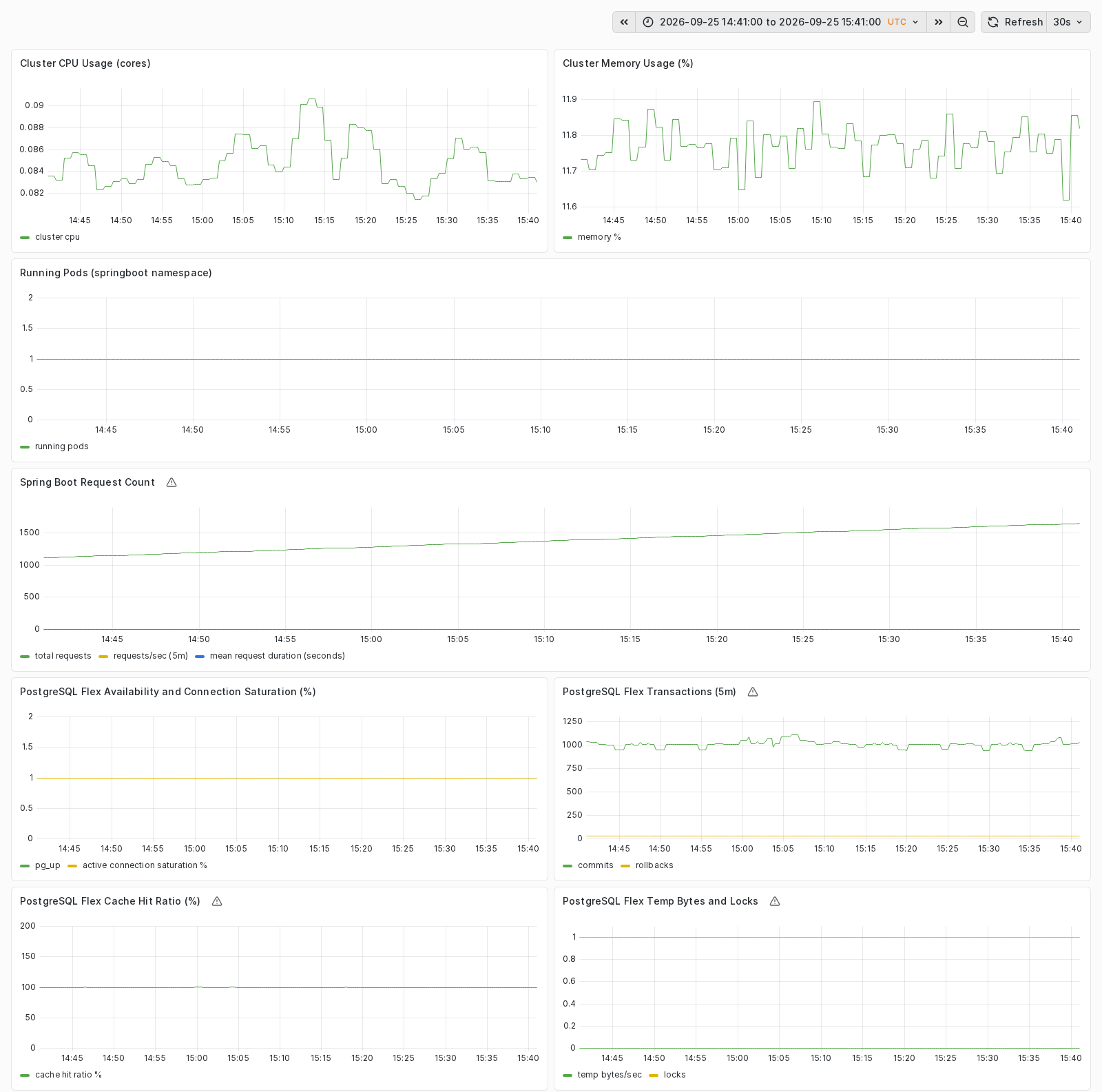
Snapshot from the reference deployment on September 25, 2026, 14:41-15:41 UTC. This is one hour of low-load test operation, not a representative production sizing baseline. Read application activity alongside database availability and pressure before selecting an optimization candidate; the panel interpretations below explain the limits of these signals.
| Panel group | Decision supported | Interpretation boundary |
|---|---|---|
| Cluster CPU and memory | Worker pressure and aggregate capacity | CPU query reports busy cores, not a utilization percentage; cluster totals do not identify an individual pod bottleneck |
| Running pods | Workload presence | A scrape fallback is not proof that all replicas are healthy; verify Kubernetes rollout and desired replicas |
| Application requests | Request rate and mean duration | The Boot 2 adapter does not supply latency percentiles or a complete error-rate SLO |
| PostgreSQL availability and connections | Database reachability and connection pressure | Inspect pg_up and actual scrape health independently |
| PostgreSQL transactions | Commit and rollback trends | Correlate changes with traffic and application behavior |
| PostgreSQL cache hits | Read-cache behavior | Low traffic and absent series cannot establish a capacity requirement |
| PostgreSQL temp bytes and locks | Query or contention investigation | More compute is not automatically the remedy for query or lock problems |
Verify both scrape jobs have actual up=1 samples before interpreting the dashboard. Some
cluster panels include fallback values, so a rendered zero is not evidence of zero consumption.
Scope queries to the intended cluster and database when a datasource contains multiple workloads.
Use additional telemetry and business tests for latency percentiles, errors, and recovery objectives.
Collect a representative baseline that includes busy periods, scheduled work, JVM warmup, and database maintenance. Agree the observation window, business SLOs, capacity headroom, and cost target before making a change. Fourteen days can be a starting observation window, not a rule.
Retain the baseline, previous configuration, rollback plan, and decision thresholds. Missing metrics, failed alert delivery, or synthetic traffic alone are insufficient evidence for production downsizing.
Keep database and application signals in the same review. Increasing pod count increases connection demand and can move the bottleneck to Flex. Separate connection-pool limits, expensive queries, lock contention, and storage pressure from genuine CPU or memory shortages.
Use the PostgreSQL Flex monitoring guidance to interpret service metrics alongside application behavior.
The reference exposes postgres_flex_cpu, postgres_flex_ram, postgres_flex_replicas,
postgres_flex_storage_class, and postgres_flex_storage_size. CPU, RAM, and the Single or
Replica selection resolve a flavor from the project’s current catalog. Select an offered
combination; do not assume arbitrary values or an in-place transition are supported.
Review the plan and service constraints before approval. Treat a database replacement as a new migration with verified recovery, not a routine resize. Storage growth and service-plan transitions may not be reversible by restoring previous variable values. Confirm the recovery path and required maintenance window before changing them.
The tested migration rollback recovers application data; it does not undo infrastructure resizing or prove Flex managed-service restore. Validate the required recovery method separately.
PostgreSQL Flex flavors and performance classes Open the documentation| Description | ID | CPU | RAM | max_connections | shared_buffers | work_mem | maintenance_work_mem | effective_cache_size |
|---|---|---|---|---|---|---|---|---|
| Small, Compute optimized | 2.4 | 2 | 4 GB | 95 | 950 MB | 14 MB | 380 MB | 2660 MB |
| Small, Memory optimized | 2.16 | 2 | 16 GB | 385 | 3950 MB | 14 MB | 1580 MB | 11060 MB |
| Medium, Compute optimized | 4.8 | 4 | 8 GB | 195 | 1950 MB | 14 MB | 780 MB | 5460 MB |
| Medium, Memory optimized | 4.32 | 4 | 32 GB | 785 | 7950 MB | 14 MB | 3180 MB | 22260 MB |
| Large, Processor optimized | 8.16 | 8 | 16 GB | 385 | 3950 MB | 14 MB | 1580 MB | 11060 MB |
| X-Large, Compute optimized | 16.32 | 16 | 32 GB | 785 | 7950 MB | 14 MB | 3180 MB | 22260 MB |
| X-Large, Memory optimized | 16.128 | 16 | 128 GB | 3170 | 31950 MB | 14 MB | 12780 MB | 89460 MB |
max_connections limit.This section is copied from the STACKIT docs automatically, several times a day. It cannot be changed here. Changes belong in the STACKIT docs.
| Description | ID | Max. IOPS | Max. throughput (MB/s) |
|---|---|---|---|
| Performance class 2 | premium-perf2-stackit | 1000 | 100 |
| Performance class 4 | premium-perf4-stackit | 2000 | 150 |
| Performance class 6 | premium-perf6-stackit | 5000 | 200 |
| Performance class 8 | premium-perf8-stackit | 10000 | 250 |
| Performance class 10 | premium-perf10-stackit | 15000 | 300 |
| Performance class 12 | premium-perf12-stackit | 20000 | 350 |
Currently, we offer three types of instances. For each type there is a different set of flavors available.
This section is copied from the STACKIT docs automatically, several times a day. It cannot be changed here. Changes belong in the STACKIT docs.
The reference declares resources in the Spring Boot Deployment in main.tf, not in dedicated
CPU or memory variables. Java requests 100m CPU and 512Mi memory, with limits of 500m
and 1Gi; JAVA_TOOL_OPTIONS sets a 128 MiB initial and 512 MiB maximum heap. Each of the
two exporter sidecars has its own resource budget.
Compare actual working set, heap, non-heap memory, throttling, startup behavior, and sidecar
usage before editing the Deployment. Leave room beyond the Java heap for threads and native
memory. A resource edit can roll pods and interrupts a single-replica workload; schedule and
validate it accordingly. Do not invent unsupported springboot_cpu or memory variable overrides.
Qualify metrics, replica ownership, application safety, and per-pod telemetry before a bounded HPA experiment.
HPA compares observed pod CPU utilization with the configured target and adjusts replicas within minimum and maximum bounds. Its resource metric depends on realistic requests and an available Kubernetes metrics API; Grafana scrape success does not prove that API works. Resource utilization also includes the sidecar budgets. HPA cannot create worker capacity by itself.
Before a multi-replica experiment, review session state, shared writes, initialization, and database connection limits. The current application/exporter scrape uses one load-balanced Service endpoint; replicas can be sampled interchangeably rather than as separate time series. Establish per-pod application scraping and avoid duplicate database aggregation before trusting scaled request rates or totals. These extensions are not part of the validated single-replica path.
Only after migration and rollback operations have finished, test bounded HPA in a separate approved experiment. These illustrative bounds are not production sizing recommendations:
enable_springboot_hpa = truespringboot_hpa_min_replicas = 1springboot_hpa_max_replicas = 3springboot_hpa_target_cpu_utilization_percentage = 70The Deployment also declares springboot_replicas in Terraform. Inspect later plans for competing
replica changes and establish an explicit ownership policy before unattended HPA operation.
The migration script refuses HPA-managed targets; disable HPA before any later migration or rollback.
Review the plan, then inspect HPA behavior with the configured kubeconfig:
terraform plan -var-file=env.tfvars -out=tfplan.optimizeterraform apply tfplan.optimizekubectl get hpa,pods -n springbootkubectl describe hpa springboot -n springbootkubectl top pods -n springboot --containersSupply enough worker headroom and account for pool capacity, zone constraints, and rollout disruption.
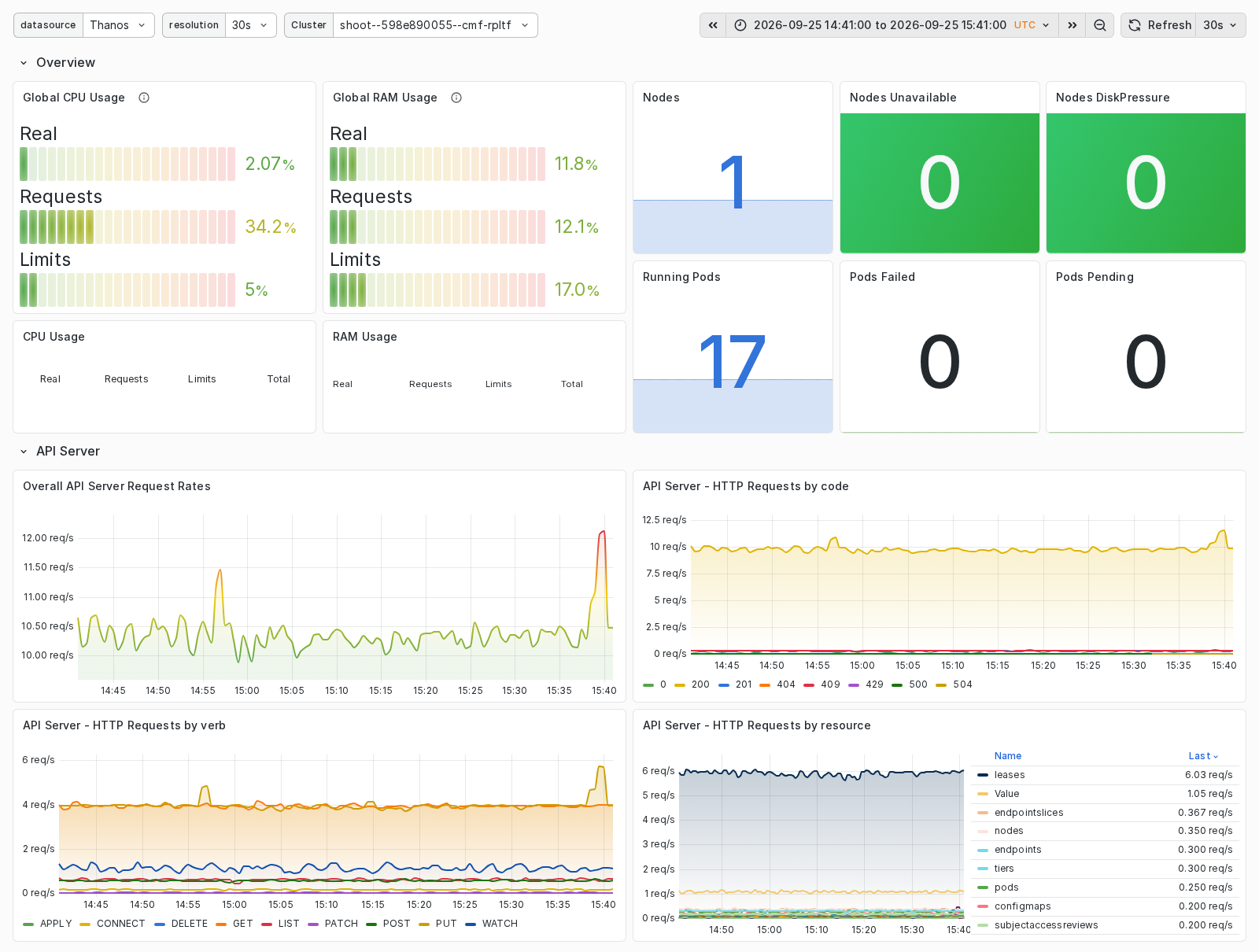
The SKE dashboard shows the same 14:41-15:41 UTC interval on September 25, 2026. Actual CPU usage is about 2%, while CPU requests reserve about 34% of cluster capacity. This difference illustrates why scheduling reservations and measured consumption must be reviewed together. The 17 running pods include platform components, not 17 Spring Boot replicas; the workload dashboard above shows the single application pod. No failed or pending pods at this point is a useful health signal, not proof of peak-load or failure tolerance.
Tune node_pool_minimum, node_pool_maximum, and node_pool_machine_type from aggregate
requests, observed demand, system overhead, and rollout headroom. Equal minimum and maximum
values fix the pool size; increasing an HPA maximum cannot overcome that capacity limit.
The reference configures one node pool. Additional pools and zone placement require an explicit architecture extension. A node pool’s availability zone cannot be changed in place; a different zone needs a new pool name and a reviewed migration plan. Check actual SKE capacity and planned worker replacement before applying a flavor or topology change.
SKE node-pool management Open the documentationThe implemented entry point is Envoy Gateway with HTTPRoutes, not legacy Ingress. Compare Gateway and service behavior with application and database latency before changing worker size. The optional in-cluster load generator bypasses the public Gateway, DNS, and TLS path; add an approved external test for end-to-end traffic. No measured public-throughput limit is claimed here.
Spring Music stores its authoritative data in Flex. There is no application PersistentVolume
to rightsize in this baseline. node_pool_volume_size concerns worker storage, not database
capacity. Use the Flex storage controls for album data and review growth, query I/O, retention,
and recovery together. Add Kubernetes storage only for a separately designed persistence need.
For reversible configuration changes, restore the previous reviewed values and inspect a new plan before applying. Do not assume a smaller database or restored storage class is supported. When HPA was the experiment, disable it and restore the intended replica count through the reviewed configuration; confirm that the Deployment is stable afterward.
Record before/after evidence, configuration revision, business results, and cost impact. Database migration rollback is not a substitute for reversing an optimization change.
The live reference test proved the single-replica workload, data migration and rollback, and dashboard/scrape path. It did not establish autoscaling behavior, optimal sizing, production load capacity, or high availability. Capture fresh evidence for each of those decisions.
Kubernetes Horizontal Pod Autoscaler Review the upstream control-loop behavior, metrics prerequisites, and scaling constraints before enabling autoscaling. Open external site Leads off the trailAfter migration acceptance and stabilization, use measured workload behavior to choose one optimization at a time. This asset covers pod resources, worker capacity, optional HPA, and PostgreSQL Flex. It does not claim those changes were exercised during the migration test.
Continue the same Terraform, Helm, Spring Music JAR, PostgreSQL Flex databases, and Observability deployment used for provisioning, rehearsal, cutover, and rollback. Do not introduce a second sample or perform capacity experiments during the migration window.
Spring Boot Kubernetes Replatform reference Use the same versioned variables, deployment resources, and dashboard as the migration and stabilization workflow. Open the repositoryOpen grafana_dashboard_url or the SCF Replatform folder. Terraform manages eight panels.
Snapshot from the reference deployment on September 25, 2026, 14:41-15:41 UTC. This is one hour of low-load test operation, not a representative production sizing baseline. Read application activity alongside database availability and pressure before selecting an optimization candidate; the panel interpretations below explain the limits of these signals.
| Panel group | Decision supported | Interpretation boundary |
|---|---|---|
| Cluster CPU and memory | Worker pressure and aggregate capacity | CPU query reports busy cores, not a utilization percentage; cluster totals do not identify an individual pod bottleneck |
| Running pods | Workload presence | A scrape fallback is not proof that all replicas are healthy; verify Kubernetes rollout and desired replicas |
| Application requests | Request rate and mean duration | The Boot 2 adapter does not supply latency percentiles or a complete error-rate SLO |
| PostgreSQL availability and connections | Database reachability and connection pressure | Inspect pg_up and actual scrape health independently |
| PostgreSQL transactions | Commit and rollback trends | Correlate changes with traffic and application behavior |
| PostgreSQL cache hits | Read-cache behavior | Low traffic and absent series cannot establish a capacity requirement |
| PostgreSQL temp bytes and locks | Query or contention investigation | More compute is not automatically the remedy for query or lock problems |
Verify both scrape jobs have actual up=1 samples before interpreting the dashboard. Some
cluster panels include fallback values, so a rendered zero is not evidence of zero consumption.
Scope queries to the intended cluster and database when a datasource contains multiple workloads.
Use additional telemetry and business tests for latency percentiles, errors, and recovery objectives.
Collect a representative baseline that includes busy periods, scheduled work, JVM warmup, and database maintenance. Agree the observation window, business SLOs, capacity headroom, and cost target before making a change. Fourteen days can be a starting observation window, not a rule.
Retain the baseline, previous configuration, rollback plan, and decision thresholds. Missing metrics, failed alert delivery, or synthetic traffic alone are insufficient evidence for production downsizing.
Keep database and application signals in the same review. Increasing pod count increases connection demand and can move the bottleneck to Flex. Separate connection-pool limits, expensive queries, lock contention, and storage pressure from genuine CPU or memory shortages.
Use the PostgreSQL Flex monitoring guidance to interpret service metrics alongside application behavior.
The reference exposes postgres_flex_cpu, postgres_flex_ram, postgres_flex_replicas,
postgres_flex_storage_class, and postgres_flex_storage_size. CPU, RAM, and the Single or
Replica selection resolve a flavor from the project’s current catalog. Select an offered
combination; do not assume arbitrary values or an in-place transition are supported.
Review the plan and service constraints before approval. Treat a database replacement as a new migration with verified recovery, not a routine resize. Storage growth and service-plan transitions may not be reversible by restoring previous variable values. Confirm the recovery path and required maintenance window before changing them.
The tested migration rollback recovers application data; it does not undo infrastructure resizing or prove Flex managed-service restore. Validate the required recovery method separately.
PostgreSQL Flex flavors and performance classes Open the documentation| Description | ID | CPU | RAM | max_connections | shared_buffers | work_mem | maintenance_work_mem | effective_cache_size |
|---|---|---|---|---|---|---|---|---|
| Small, Compute optimized | 2.4 | 2 | 4 GB | 95 | 950 MB | 14 MB | 380 MB | 2660 MB |
| Small, Memory optimized | 2.16 | 2 | 16 GB | 385 | 3950 MB | 14 MB | 1580 MB | 11060 MB |
| Medium, Compute optimized | 4.8 | 4 | 8 GB | 195 | 1950 MB | 14 MB | 780 MB | 5460 MB |
| Medium, Memory optimized | 4.32 | 4 | 32 GB | 785 | 7950 MB | 14 MB | 3180 MB | 22260 MB |
| Large, Processor optimized | 8.16 | 8 | 16 GB | 385 | 3950 MB | 14 MB | 1580 MB | 11060 MB |
| X-Large, Compute optimized | 16.32 | 16 | 32 GB | 785 | 7950 MB | 14 MB | 3180 MB | 22260 MB |
| X-Large, Memory optimized | 16.128 | 16 | 128 GB | 3170 | 31950 MB | 14 MB | 12780 MB | 89460 MB |
max_connections limit.This section is copied from the STACKIT docs automatically, several times a day. It cannot be changed here. Changes belong in the STACKIT docs.
| Description | ID | Max. IOPS | Max. throughput (MB/s) |
|---|---|---|---|
| Performance class 2 | premium-perf2-stackit | 1000 | 100 |
| Performance class 4 | premium-perf4-stackit | 2000 | 150 |
| Performance class 6 | premium-perf6-stackit | 5000 | 200 |
| Performance class 8 | premium-perf8-stackit | 10000 | 250 |
| Performance class 10 | premium-perf10-stackit | 15000 | 300 |
| Performance class 12 | premium-perf12-stackit | 20000 | 350 |
Currently, we offer three types of instances. For each type there is a different set of flavors available.
This section is copied from the STACKIT docs automatically, several times a day. It cannot be changed here. Changes belong in the STACKIT docs.
The reference declares resources in the Spring Boot Deployment in main.tf, not in dedicated
CPU or memory variables. Java requests 100m CPU and 512Mi memory, with limits of 500m
and 1Gi; JAVA_TOOL_OPTIONS sets a 128 MiB initial and 512 MiB maximum heap. Each of the
two exporter sidecars has its own resource budget.
Compare actual working set, heap, non-heap memory, throttling, startup behavior, and sidecar
usage before editing the Deployment. Leave room beyond the Java heap for threads and native
memory. A resource edit can roll pods and interrupts a single-replica workload; schedule and
validate it accordingly. Do not invent unsupported springboot_cpu or memory variable overrides.
Qualify metrics, replica ownership, application safety, and per-pod telemetry before a bounded HPA experiment.
HPA compares observed pod CPU utilization with the configured target and adjusts replicas within minimum and maximum bounds. Its resource metric depends on realistic requests and an available Kubernetes metrics API; Grafana scrape success does not prove that API works. Resource utilization also includes the sidecar budgets. HPA cannot create worker capacity by itself.
Before a multi-replica experiment, review session state, shared writes, initialization, and database connection limits. The current application/exporter scrape uses one load-balanced Service endpoint; replicas can be sampled interchangeably rather than as separate time series. Establish per-pod application scraping and avoid duplicate database aggregation before trusting scaled request rates or totals. These extensions are not part of the validated single-replica path.
Only after migration and rollback operations have finished, test bounded HPA in a separate approved experiment. These illustrative bounds are not production sizing recommendations:
enable_springboot_hpa = truespringboot_hpa_min_replicas = 1springboot_hpa_max_replicas = 3springboot_hpa_target_cpu_utilization_percentage = 70The Deployment also declares springboot_replicas in Terraform. Inspect later plans for competing
replica changes and establish an explicit ownership policy before unattended HPA operation.
The migration script refuses HPA-managed targets; disable HPA before any later migration or rollback.
Review the plan, then inspect HPA behavior with the configured kubeconfig:
terraform plan -var-file=env.tfvars -out=tfplan.optimizeterraform apply tfplan.optimizekubectl get hpa,pods -n springbootkubectl describe hpa springboot -n springbootkubectl top pods -n springboot --containersSupply enough worker headroom and account for pool capacity, zone constraints, and rollout disruption.
The SKE dashboard shows the same 14:41-15:41 UTC interval on September 25, 2026. Actual CPU usage is about 2%, while CPU requests reserve about 34% of cluster capacity. This difference illustrates why scheduling reservations and measured consumption must be reviewed together. The 17 running pods include platform components, not 17 Spring Boot replicas; the workload dashboard above shows the single application pod. No failed or pending pods at this point is a useful health signal, not proof of peak-load or failure tolerance.
Tune node_pool_minimum, node_pool_maximum, and node_pool_machine_type from aggregate
requests, observed demand, system overhead, and rollout headroom. Equal minimum and maximum
values fix the pool size; increasing an HPA maximum cannot overcome that capacity limit.
The reference configures one node pool. Additional pools and zone placement require an explicit architecture extension. A node pool’s availability zone cannot be changed in place; a different zone needs a new pool name and a reviewed migration plan. Check actual SKE capacity and planned worker replacement before applying a flavor or topology change.
SKE node-pool management Open the documentationThe implemented entry point is Envoy Gateway with HTTPRoutes, not legacy Ingress. Compare Gateway and service behavior with application and database latency before changing worker size. The optional in-cluster load generator bypasses the public Gateway, DNS, and TLS path; add an approved external test for end-to-end traffic. No measured public-throughput limit is claimed here.
Spring Music stores its authoritative data in Flex. There is no application PersistentVolume
to rightsize in this baseline. node_pool_volume_size concerns worker storage, not database
capacity. Use the Flex storage controls for album data and review growth, query I/O, retention,
and recovery together. Add Kubernetes storage only for a separately designed persistence need.
For reversible configuration changes, restore the previous reviewed values and inspect a new plan before applying. Do not assume a smaller database or restored storage class is supported. When HPA was the experiment, disable it and restore the intended replica count through the reviewed configuration; confirm that the Deployment is stable afterward.
Record before/after evidence, configuration revision, business results, and cost impact. Database migration rollback is not a substitute for reversing an optimization change.
The live reference test proved the single-replica workload, data migration and rollback, and dashboard/scrape path. It did not establish autoscaling behavior, optimal sizing, production load capacity, or high availability. Capture fresh evidence for each of those decisions.
Kubernetes Horizontal Pod Autoscaler Review the upstream control-loop behavior, metrics prerequisites, and scaling constraints before enabling autoscaling. Open external site Leads off the trailSTACKIT
The sovereign European cloud provider behind the framework, delivering IaaS and PaaS from German and Austrian data centers with full digital independence.
After migration acceptance and stabilization, use measured workload behavior to choose one optimization at a time. This asset covers pod resources, worker capacity, optional HPA, and PostgreSQL Flex. It does not claim those changes were exercised during the migration test.
Continue the same Terraform, Helm, Spring Music JAR, PostgreSQL Flex databases, and Observability deployment used for provisioning, rehearsal, cutover, and rollback. Do not introduce a second sample or perform capacity experiments during the migration window.
Spring Boot Kubernetes Replatform reference Use the same versioned variables, deployment resources, and dashboard as the migration and stabilization workflow. Open the repositoryOpen grafana_dashboard_url or the SCF Replatform folder. Terraform manages eight panels.
Snapshot from the reference deployment on September 25, 2026, 14:41-15:41 UTC. This is one hour of low-load test operation, not a representative production sizing baseline. Read application activity alongside database availability and pressure before selecting an optimization candidate; the panel interpretations below explain the limits of these signals.
| Panel group | Decision supported | Interpretation boundary |
|---|---|---|
| Cluster CPU and memory | Worker pressure and aggregate capacity | CPU query reports busy cores, not a utilization percentage; cluster totals do not identify an individual pod bottleneck |
| Running pods | Workload presence | A scrape fallback is not proof that all replicas are healthy; verify Kubernetes rollout and desired replicas |
| Application requests | Request rate and mean duration | The Boot 2 adapter does not supply latency percentiles or a complete error-rate SLO |
| PostgreSQL availability and connections | Database reachability and connection pressure | Inspect pg_up and actual scrape health independently |
| PostgreSQL transactions | Commit and rollback trends | Correlate changes with traffic and application behavior |
| PostgreSQL cache hits | Read-cache behavior | Low traffic and absent series cannot establish a capacity requirement |
| PostgreSQL temp bytes and locks | Query or contention investigation | More compute is not automatically the remedy for query or lock problems |
Verify both scrape jobs have actual up=1 samples before interpreting the dashboard. Some
cluster panels include fallback values, so a rendered zero is not evidence of zero consumption.
Scope queries to the intended cluster and database when a datasource contains multiple workloads.
Use additional telemetry and business tests for latency percentiles, errors, and recovery objectives.
Collect a representative baseline that includes busy periods, scheduled work, JVM warmup, and database maintenance. Agree the observation window, business SLOs, capacity headroom, and cost target before making a change. Fourteen days can be a starting observation window, not a rule.
Retain the baseline, previous configuration, rollback plan, and decision thresholds. Missing metrics, failed alert delivery, or synthetic traffic alone are insufficient evidence for production downsizing.
Keep database and application signals in the same review. Increasing pod count increases connection demand and can move the bottleneck to Flex. Separate connection-pool limits, expensive queries, lock contention, and storage pressure from genuine CPU or memory shortages.
Use the PostgreSQL Flex monitoring guidance to interpret service metrics alongside application behavior.
The reference exposes postgres_flex_cpu, postgres_flex_ram, postgres_flex_replicas,
postgres_flex_storage_class, and postgres_flex_storage_size. CPU, RAM, and the Single or
Replica selection resolve a flavor from the project’s current catalog. Select an offered
combination; do not assume arbitrary values or an in-place transition are supported.
Review the plan and service constraints before approval. Treat a database replacement as a new migration with verified recovery, not a routine resize. Storage growth and service-plan transitions may not be reversible by restoring previous variable values. Confirm the recovery path and required maintenance window before changing them.
The tested migration rollback recovers application data; it does not undo infrastructure resizing or prove Flex managed-service restore. Validate the required recovery method separately.
PostgreSQL Flex flavors and performance classes Open the documentation| Description | ID | CPU | RAM | max_connections | shared_buffers | work_mem | maintenance_work_mem | effective_cache_size |
|---|---|---|---|---|---|---|---|---|
| Small, Compute optimized | 2.4 | 2 | 4 GB | 95 | 950 MB | 14 MB | 380 MB | 2660 MB |
| Small, Memory optimized | 2.16 | 2 | 16 GB | 385 | 3950 MB | 14 MB | 1580 MB | 11060 MB |
| Medium, Compute optimized | 4.8 | 4 | 8 GB | 195 | 1950 MB | 14 MB | 780 MB | 5460 MB |
| Medium, Memory optimized | 4.32 | 4 | 32 GB | 785 | 7950 MB | 14 MB | 3180 MB | 22260 MB |
| Large, Processor optimized | 8.16 | 8 | 16 GB | 385 | 3950 MB | 14 MB | 1580 MB | 11060 MB |
| X-Large, Compute optimized | 16.32 | 16 | 32 GB | 785 | 7950 MB | 14 MB | 3180 MB | 22260 MB |
| X-Large, Memory optimized | 16.128 | 16 | 128 GB | 3170 | 31950 MB | 14 MB | 12780 MB | 89460 MB |
max_connections limit.This section is copied from the STACKIT docs automatically, several times a day. It cannot be changed here. Changes belong in the STACKIT docs.
| Description | ID | Max. IOPS | Max. throughput (MB/s) |
|---|---|---|---|
| Performance class 2 | premium-perf2-stackit | 1000 | 100 |
| Performance class 4 | premium-perf4-stackit | 2000 | 150 |
| Performance class 6 | premium-perf6-stackit | 5000 | 200 |
| Performance class 8 | premium-perf8-stackit | 10000 | 250 |
| Performance class 10 | premium-perf10-stackit | 15000 | 300 |
| Performance class 12 | premium-perf12-stackit | 20000 | 350 |
Currently, we offer three types of instances. For each type there is a different set of flavors available.
This section is copied from the STACKIT docs automatically, several times a day. It cannot be changed here. Changes belong in the STACKIT docs.
The reference declares resources in the Spring Boot Deployment in main.tf, not in dedicated
CPU or memory variables. Java requests 100m CPU and 512Mi memory, with limits of 500m
and 1Gi; JAVA_TOOL_OPTIONS sets a 128 MiB initial and 512 MiB maximum heap. Each of the
two exporter sidecars has its own resource budget.
Compare actual working set, heap, non-heap memory, throttling, startup behavior, and sidecar
usage before editing the Deployment. Leave room beyond the Java heap for threads and native
memory. A resource edit can roll pods and interrupts a single-replica workload; schedule and
validate it accordingly. Do not invent unsupported springboot_cpu or memory variable overrides.
Qualify metrics, replica ownership, application safety, and per-pod telemetry before a bounded HPA experiment.
HPA compares observed pod CPU utilization with the configured target and adjusts replicas within minimum and maximum bounds. Its resource metric depends on realistic requests and an available Kubernetes metrics API; Grafana scrape success does not prove that API works. Resource utilization also includes the sidecar budgets. HPA cannot create worker capacity by itself.
Before a multi-replica experiment, review session state, shared writes, initialization, and database connection limits. The current application/exporter scrape uses one load-balanced Service endpoint; replicas can be sampled interchangeably rather than as separate time series. Establish per-pod application scraping and avoid duplicate database aggregation before trusting scaled request rates or totals. These extensions are not part of the validated single-replica path.
Only after migration and rollback operations have finished, test bounded HPA in a separate approved experiment. These illustrative bounds are not production sizing recommendations:
enable_springboot_hpa = truespringboot_hpa_min_replicas = 1springboot_hpa_max_replicas = 3springboot_hpa_target_cpu_utilization_percentage = 70The Deployment also declares springboot_replicas in Terraform. Inspect later plans for competing
replica changes and establish an explicit ownership policy before unattended HPA operation.
The migration script refuses HPA-managed targets; disable HPA before any later migration or rollback.
Review the plan, then inspect HPA behavior with the configured kubeconfig:
terraform plan -var-file=env.tfvars -out=tfplan.optimizeterraform apply tfplan.optimizekubectl get hpa,pods -n springbootkubectl describe hpa springboot -n springbootkubectl top pods -n springboot --containersSupply enough worker headroom and account for pool capacity, zone constraints, and rollout disruption.
The SKE dashboard shows the same 14:41-15:41 UTC interval on September 25, 2026. Actual CPU usage is about 2%, while CPU requests reserve about 34% of cluster capacity. This difference illustrates why scheduling reservations and measured consumption must be reviewed together. The 17 running pods include platform components, not 17 Spring Boot replicas; the workload dashboard above shows the single application pod. No failed or pending pods at this point is a useful health signal, not proof of peak-load or failure tolerance.
Tune node_pool_minimum, node_pool_maximum, and node_pool_machine_type from aggregate
requests, observed demand, system overhead, and rollout headroom. Equal minimum and maximum
values fix the pool size; increasing an HPA maximum cannot overcome that capacity limit.
The reference configures one node pool. Additional pools and zone placement require an explicit architecture extension. A node pool’s availability zone cannot be changed in place; a different zone needs a new pool name and a reviewed migration plan. Check actual SKE capacity and planned worker replacement before applying a flavor or topology change.
SKE node-pool management Open the documentationThe implemented entry point is Envoy Gateway with HTTPRoutes, not legacy Ingress. Compare Gateway and service behavior with application and database latency before changing worker size. The optional in-cluster load generator bypasses the public Gateway, DNS, and TLS path; add an approved external test for end-to-end traffic. No measured public-throughput limit is claimed here.
Spring Music stores its authoritative data in Flex. There is no application PersistentVolume
to rightsize in this baseline. node_pool_volume_size concerns worker storage, not database
capacity. Use the Flex storage controls for album data and review growth, query I/O, retention,
and recovery together. Add Kubernetes storage only for a separately designed persistence need.
For reversible configuration changes, restore the previous reviewed values and inspect a new plan before applying. Do not assume a smaller database or restored storage class is supported. When HPA was the experiment, disable it and restore the intended replica count through the reviewed configuration; confirm that the Deployment is stable afterward.
Record before/after evidence, configuration revision, business results, and cost impact. Database migration rollback is not a substitute for reversing an optimization change.
The live reference test proved the single-replica workload, data migration and rollback, and dashboard/scrape path. It did not establish autoscaling behavior, optimal sizing, production load capacity, or high availability. Capture fresh evidence for each of those decisions.
Kubernetes Horizontal Pod Autoscaler Review the upstream control-loop behavior, metrics prerequisites, and scaling constraints before enabling autoscaling. Open external site Leads off the trailSTACKIT
The sovereign European cloud provider behind the framework, delivering IaaS and PaaS from German and Austrian data centers with full digital independence.
After migration acceptance and stabilization, use measured workload behavior to choose one optimization at a time. This asset covers pod resources, worker capacity, optional HPA, and PostgreSQL Flex. It does not claim those changes were exercised during the migration test.
Continue the same Terraform, Helm, Spring Music JAR, PostgreSQL Flex databases, and Observability deployment used for provisioning, rehearsal, cutover, and rollback. Do not introduce a second sample or perform capacity experiments during the migration window.
Spring Boot Kubernetes Replatform reference Use the same versioned variables, deployment resources, and dashboard as the migration and stabilization workflow. Open the repositoryOpen grafana_dashboard_url or the SCF Replatform folder. Terraform manages eight panels.
Snapshot from the reference deployment on September 25, 2026, 14:41-15:41 UTC. This is one hour of low-load test operation, not a representative production sizing baseline. Read application activity alongside database availability and pressure before selecting an optimization candidate; the panel interpretations below explain the limits of these signals.
| Panel group | Decision supported | Interpretation boundary |
|---|---|---|
| Cluster CPU and memory | Worker pressure and aggregate capacity | CPU query reports busy cores, not a utilization percentage; cluster totals do not identify an individual pod bottleneck |
| Running pods | Workload presence | A scrape fallback is not proof that all replicas are healthy; verify Kubernetes rollout and desired replicas |
| Application requests | Request rate and mean duration | The Boot 2 adapter does not supply latency percentiles or a complete error-rate SLO |
| PostgreSQL availability and connections | Database reachability and connection pressure | Inspect pg_up and actual scrape health independently |
| PostgreSQL transactions | Commit and rollback trends | Correlate changes with traffic and application behavior |
| PostgreSQL cache hits | Read-cache behavior | Low traffic and absent series cannot establish a capacity requirement |
| PostgreSQL temp bytes and locks | Query or contention investigation | More compute is not automatically the remedy for query or lock problems |
Verify both scrape jobs have actual up=1 samples before interpreting the dashboard. Some
cluster panels include fallback values, so a rendered zero is not evidence of zero consumption.
Scope queries to the intended cluster and database when a datasource contains multiple workloads.
Use additional telemetry and business tests for latency percentiles, errors, and recovery objectives.
Collect a representative baseline that includes busy periods, scheduled work, JVM warmup, and database maintenance. Agree the observation window, business SLOs, capacity headroom, and cost target before making a change. Fourteen days can be a starting observation window, not a rule.
Retain the baseline, previous configuration, rollback plan, and decision thresholds. Missing metrics, failed alert delivery, or synthetic traffic alone are insufficient evidence for production downsizing.
Keep database and application signals in the same review. Increasing pod count increases connection demand and can move the bottleneck to Flex. Separate connection-pool limits, expensive queries, lock contention, and storage pressure from genuine CPU or memory shortages.
Use the PostgreSQL Flex monitoring guidance to interpret service metrics alongside application behavior.
The reference exposes postgres_flex_cpu, postgres_flex_ram, postgres_flex_replicas,
postgres_flex_storage_class, and postgres_flex_storage_size. CPU, RAM, and the Single or
Replica selection resolve a flavor from the project’s current catalog. Select an offered
combination; do not assume arbitrary values or an in-place transition are supported.
Review the plan and service constraints before approval. Treat a database replacement as a new migration with verified recovery, not a routine resize. Storage growth and service-plan transitions may not be reversible by restoring previous variable values. Confirm the recovery path and required maintenance window before changing them.
The tested migration rollback recovers application data; it does not undo infrastructure resizing or prove Flex managed-service restore. Validate the required recovery method separately.
PostgreSQL Flex flavors and performance classes Open the documentation| Description | ID | CPU | RAM | max_connections | shared_buffers | work_mem | maintenance_work_mem | effective_cache_size |
|---|---|---|---|---|---|---|---|---|
| Small, Compute optimized | 2.4 | 2 | 4 GB | 95 | 950 MB | 14 MB | 380 MB | 2660 MB |
| Small, Memory optimized | 2.16 | 2 | 16 GB | 385 | 3950 MB | 14 MB | 1580 MB | 11060 MB |
| Medium, Compute optimized | 4.8 | 4 | 8 GB | 195 | 1950 MB | 14 MB | 780 MB | 5460 MB |
| Medium, Memory optimized | 4.32 | 4 | 32 GB | 785 | 7950 MB | 14 MB | 3180 MB | 22260 MB |
| Large, Processor optimized | 8.16 | 8 | 16 GB | 385 | 3950 MB | 14 MB | 1580 MB | 11060 MB |
| X-Large, Compute optimized | 16.32 | 16 | 32 GB | 785 | 7950 MB | 14 MB | 3180 MB | 22260 MB |
| X-Large, Memory optimized | 16.128 | 16 | 128 GB | 3170 | 31950 MB | 14 MB | 12780 MB | 89460 MB |
max_connections limit.This section is copied from the STACKIT docs automatically, several times a day. It cannot be changed here. Changes belong in the STACKIT docs.
| Description | ID | Max. IOPS | Max. throughput (MB/s) |
|---|---|---|---|
| Performance class 2 | premium-perf2-stackit | 1000 | 100 |
| Performance class 4 | premium-perf4-stackit | 2000 | 150 |
| Performance class 6 | premium-perf6-stackit | 5000 | 200 |
| Performance class 8 | premium-perf8-stackit | 10000 | 250 |
| Performance class 10 | premium-perf10-stackit | 15000 | 300 |
| Performance class 12 | premium-perf12-stackit | 20000 | 350 |
Currently, we offer three types of instances. For each type there is a different set of flavors available.
This section is copied from the STACKIT docs automatically, several times a day. It cannot be changed here. Changes belong in the STACKIT docs.
The reference declares resources in the Spring Boot Deployment in main.tf, not in dedicated
CPU or memory variables. Java requests 100m CPU and 512Mi memory, with limits of 500m
and 1Gi; JAVA_TOOL_OPTIONS sets a 128 MiB initial and 512 MiB maximum heap. Each of the
two exporter sidecars has its own resource budget.
Compare actual working set, heap, non-heap memory, throttling, startup behavior, and sidecar
usage before editing the Deployment. Leave room beyond the Java heap for threads and native
memory. A resource edit can roll pods and interrupts a single-replica workload; schedule and
validate it accordingly. Do not invent unsupported springboot_cpu or memory variable overrides.
Qualify metrics, replica ownership, application safety, and per-pod telemetry before a bounded HPA experiment.
HPA compares observed pod CPU utilization with the configured target and adjusts replicas within minimum and maximum bounds. Its resource metric depends on realistic requests and an available Kubernetes metrics API; Grafana scrape success does not prove that API works. Resource utilization also includes the sidecar budgets. HPA cannot create worker capacity by itself.
Before a multi-replica experiment, review session state, shared writes, initialization, and database connection limits. The current application/exporter scrape uses one load-balanced Service endpoint; replicas can be sampled interchangeably rather than as separate time series. Establish per-pod application scraping and avoid duplicate database aggregation before trusting scaled request rates or totals. These extensions are not part of the validated single-replica path.
Only after migration and rollback operations have finished, test bounded HPA in a separate approved experiment. These illustrative bounds are not production sizing recommendations:
enable_springboot_hpa = truespringboot_hpa_min_replicas = 1springboot_hpa_max_replicas = 3springboot_hpa_target_cpu_utilization_percentage = 70The Deployment also declares springboot_replicas in Terraform. Inspect later plans for competing
replica changes and establish an explicit ownership policy before unattended HPA operation.
The migration script refuses HPA-managed targets; disable HPA before any later migration or rollback.
Review the plan, then inspect HPA behavior with the configured kubeconfig:
terraform plan -var-file=env.tfvars -out=tfplan.optimizeterraform apply tfplan.optimizekubectl get hpa,pods -n springbootkubectl describe hpa springboot -n springbootkubectl top pods -n springboot --containersSupply enough worker headroom and account for pool capacity, zone constraints, and rollout disruption.
The SKE dashboard shows the same 14:41-15:41 UTC interval on September 25, 2026. Actual CPU usage is about 2%, while CPU requests reserve about 34% of cluster capacity. This difference illustrates why scheduling reservations and measured consumption must be reviewed together. The 17 running pods include platform components, not 17 Spring Boot replicas; the workload dashboard above shows the single application pod. No failed or pending pods at this point is a useful health signal, not proof of peak-load or failure tolerance.
Tune node_pool_minimum, node_pool_maximum, and node_pool_machine_type from aggregate
requests, observed demand, system overhead, and rollout headroom. Equal minimum and maximum
values fix the pool size; increasing an HPA maximum cannot overcome that capacity limit.
The reference configures one node pool. Additional pools and zone placement require an explicit architecture extension. A node pool’s availability zone cannot be changed in place; a different zone needs a new pool name and a reviewed migration plan. Check actual SKE capacity and planned worker replacement before applying a flavor or topology change.
SKE node-pool management Open the documentationThe implemented entry point is Envoy Gateway with HTTPRoutes, not legacy Ingress. Compare Gateway and service behavior with application and database latency before changing worker size. The optional in-cluster load generator bypasses the public Gateway, DNS, and TLS path; add an approved external test for end-to-end traffic. No measured public-throughput limit is claimed here.
Spring Music stores its authoritative data in Flex. There is no application PersistentVolume
to rightsize in this baseline. node_pool_volume_size concerns worker storage, not database
capacity. Use the Flex storage controls for album data and review growth, query I/O, retention,
and recovery together. Add Kubernetes storage only for a separately designed persistence need.
For reversible configuration changes, restore the previous reviewed values and inspect a new plan before applying. Do not assume a smaller database or restored storage class is supported. When HPA was the experiment, disable it and restore the intended replica count through the reviewed configuration; confirm that the Deployment is stable afterward.
Record before/after evidence, configuration revision, business results, and cost impact. Database migration rollback is not a substitute for reversing an optimization change.
The live reference test proved the single-replica workload, data migration and rollback, and dashboard/scrape path. It did not establish autoscaling behavior, optimal sizing, production load capacity, or high availability. Capture fresh evidence for each of those decisions.
Kubernetes Horizontal Pod Autoscaler Review the upstream control-loop behavior, metrics prerequisites, and scaling constraints before enabling autoscaling. Open external site Leads off the trailAfter migration acceptance and stabilization, use measured workload behavior to choose one optimization at a time. This asset covers pod resources, worker capacity, optional HPA, and PostgreSQL Flex. It does not claim those changes were exercised during the migration test.
Continue the same Terraform, Helm, Spring Music JAR, PostgreSQL Flex databases, and Observability deployment used for provisioning, rehearsal, cutover, and rollback. Do not introduce a second sample or perform capacity experiments during the migration window.
Spring Boot Kubernetes Replatform reference Use the same versioned variables, deployment resources, and dashboard as the migration and stabilization workflow. Open the repositoryOpen grafana_dashboard_url or the SCF Replatform folder. Terraform manages eight panels.
Snapshot from the reference deployment on September 25, 2026, 14:41-15:41 UTC. This is one hour of low-load test operation, not a representative production sizing baseline. Read application activity alongside database availability and pressure before selecting an optimization candidate; the panel interpretations below explain the limits of these signals.
| Panel group | Decision supported | Interpretation boundary |
|---|---|---|
| Cluster CPU and memory | Worker pressure and aggregate capacity | CPU query reports busy cores, not a utilization percentage; cluster totals do not identify an individual pod bottleneck |
| Running pods | Workload presence | A scrape fallback is not proof that all replicas are healthy; verify Kubernetes rollout and desired replicas |
| Application requests | Request rate and mean duration | The Boot 2 adapter does not supply latency percentiles or a complete error-rate SLO |
| PostgreSQL availability and connections | Database reachability and connection pressure | Inspect pg_up and actual scrape health independently |
| PostgreSQL transactions | Commit and rollback trends | Correlate changes with traffic and application behavior |
| PostgreSQL cache hits | Read-cache behavior | Low traffic and absent series cannot establish a capacity requirement |
| PostgreSQL temp bytes and locks | Query or contention investigation | More compute is not automatically the remedy for query or lock problems |
Verify both scrape jobs have actual up=1 samples before interpreting the dashboard. Some
cluster panels include fallback values, so a rendered zero is not evidence of zero consumption.
Scope queries to the intended cluster and database when a datasource contains multiple workloads.
Use additional telemetry and business tests for latency percentiles, errors, and recovery objectives.
Collect a representative baseline that includes busy periods, scheduled work, JVM warmup, and database maintenance. Agree the observation window, business SLOs, capacity headroom, and cost target before making a change. Fourteen days can be a starting observation window, not a rule.
Retain the baseline, previous configuration, rollback plan, and decision thresholds. Missing metrics, failed alert delivery, or synthetic traffic alone are insufficient evidence for production downsizing.
Keep database and application signals in the same review. Increasing pod count increases connection demand and can move the bottleneck to Flex. Separate connection-pool limits, expensive queries, lock contention, and storage pressure from genuine CPU or memory shortages.
Use the PostgreSQL Flex monitoring guidance to interpret service metrics alongside application behavior.
The reference exposes postgres_flex_cpu, postgres_flex_ram, postgres_flex_replicas,
postgres_flex_storage_class, and postgres_flex_storage_size. CPU, RAM, and the Single or
Replica selection resolve a flavor from the project’s current catalog. Select an offered
combination; do not assume arbitrary values or an in-place transition are supported.
Review the plan and service constraints before approval. Treat a database replacement as a new migration with verified recovery, not a routine resize. Storage growth and service-plan transitions may not be reversible by restoring previous variable values. Confirm the recovery path and required maintenance window before changing them.
The tested migration rollback recovers application data; it does not undo infrastructure resizing or prove Flex managed-service restore. Validate the required recovery method separately.
PostgreSQL Flex flavors and performance classes Open the documentation| Description | ID | CPU | RAM | max_connections | shared_buffers | work_mem | maintenance_work_mem | effective_cache_size |
|---|---|---|---|---|---|---|---|---|
| Small, Compute optimized | 2.4 | 2 | 4 GB | 95 | 950 MB | 14 MB | 380 MB | 2660 MB |
| Small, Memory optimized | 2.16 | 2 | 16 GB | 385 | 3950 MB | 14 MB | 1580 MB | 11060 MB |
| Medium, Compute optimized | 4.8 | 4 | 8 GB | 195 | 1950 MB | 14 MB | 780 MB | 5460 MB |
| Medium, Memory optimized | 4.32 | 4 | 32 GB | 785 | 7950 MB | 14 MB | 3180 MB | 22260 MB |
| Large, Processor optimized | 8.16 | 8 | 16 GB | 385 | 3950 MB | 14 MB | 1580 MB | 11060 MB |
| X-Large, Compute optimized | 16.32 | 16 | 32 GB | 785 | 7950 MB | 14 MB | 3180 MB | 22260 MB |
| X-Large, Memory optimized | 16.128 | 16 | 128 GB | 3170 | 31950 MB | 14 MB | 12780 MB | 89460 MB |
max_connections limit.This section is copied from the STACKIT docs automatically, several times a day. It cannot be changed here. Changes belong in the STACKIT docs.
| Description | ID | Max. IOPS | Max. throughput (MB/s) |
|---|---|---|---|
| Performance class 2 | premium-perf2-stackit | 1000 | 100 |
| Performance class 4 | premium-perf4-stackit | 2000 | 150 |
| Performance class 6 | premium-perf6-stackit | 5000 | 200 |
| Performance class 8 | premium-perf8-stackit | 10000 | 250 |
| Performance class 10 | premium-perf10-stackit | 15000 | 300 |
| Performance class 12 | premium-perf12-stackit | 20000 | 350 |
Currently, we offer three types of instances. For each type there is a different set of flavors available.
This section is copied from the STACKIT docs automatically, several times a day. It cannot be changed here. Changes belong in the STACKIT docs.
The reference declares resources in the Spring Boot Deployment in main.tf, not in dedicated
CPU or memory variables. Java requests 100m CPU and 512Mi memory, with limits of 500m
and 1Gi; JAVA_TOOL_OPTIONS sets a 128 MiB initial and 512 MiB maximum heap. Each of the
two exporter sidecars has its own resource budget.
Compare actual working set, heap, non-heap memory, throttling, startup behavior, and sidecar
usage before editing the Deployment. Leave room beyond the Java heap for threads and native
memory. A resource edit can roll pods and interrupts a single-replica workload; schedule and
validate it accordingly. Do not invent unsupported springboot_cpu or memory variable overrides.
Qualify metrics, replica ownership, application safety, and per-pod telemetry before a bounded HPA experiment.
HPA compares observed pod CPU utilization with the configured target and adjusts replicas within minimum and maximum bounds. Its resource metric depends on realistic requests and an available Kubernetes metrics API; Grafana scrape success does not prove that API works. Resource utilization also includes the sidecar budgets. HPA cannot create worker capacity by itself.
Before a multi-replica experiment, review session state, shared writes, initialization, and database connection limits. The current application/exporter scrape uses one load-balanced Service endpoint; replicas can be sampled interchangeably rather than as separate time series. Establish per-pod application scraping and avoid duplicate database aggregation before trusting scaled request rates or totals. These extensions are not part of the validated single-replica path.
Only after migration and rollback operations have finished, test bounded HPA in a separate approved experiment. These illustrative bounds are not production sizing recommendations:
enable_springboot_hpa = truespringboot_hpa_min_replicas = 1springboot_hpa_max_replicas = 3springboot_hpa_target_cpu_utilization_percentage = 70The Deployment also declares springboot_replicas in Terraform. Inspect later plans for competing
replica changes and establish an explicit ownership policy before unattended HPA operation.
The migration script refuses HPA-managed targets; disable HPA before any later migration or rollback.
Review the plan, then inspect HPA behavior with the configured kubeconfig:
terraform plan -var-file=env.tfvars -out=tfplan.optimizeterraform apply tfplan.optimizekubectl get hpa,pods -n springbootkubectl describe hpa springboot -n springbootkubectl top pods -n springboot --containersSupply enough worker headroom and account for pool capacity, zone constraints, and rollout disruption.
The SKE dashboard shows the same 14:41-15:41 UTC interval on September 25, 2026. Actual CPU usage is about 2%, while CPU requests reserve about 34% of cluster capacity. This difference illustrates why scheduling reservations and measured consumption must be reviewed together. The 17 running pods include platform components, not 17 Spring Boot replicas; the workload dashboard above shows the single application pod. No failed or pending pods at this point is a useful health signal, not proof of peak-load or failure tolerance.
Tune node_pool_minimum, node_pool_maximum, and node_pool_machine_type from aggregate
requests, observed demand, system overhead, and rollout headroom. Equal minimum and maximum
values fix the pool size; increasing an HPA maximum cannot overcome that capacity limit.
The reference configures one node pool. Additional pools and zone placement require an explicit architecture extension. A node pool’s availability zone cannot be changed in place; a different zone needs a new pool name and a reviewed migration plan. Check actual SKE capacity and planned worker replacement before applying a flavor or topology change.
SKE node-pool management Open the documentationThe implemented entry point is Envoy Gateway with HTTPRoutes, not legacy Ingress. Compare Gateway and service behavior with application and database latency before changing worker size. The optional in-cluster load generator bypasses the public Gateway, DNS, and TLS path; add an approved external test for end-to-end traffic. No measured public-throughput limit is claimed here.
Spring Music stores its authoritative data in Flex. There is no application PersistentVolume
to rightsize in this baseline. node_pool_volume_size concerns worker storage, not database
capacity. Use the Flex storage controls for album data and review growth, query I/O, retention,
and recovery together. Add Kubernetes storage only for a separately designed persistence need.
For reversible configuration changes, restore the previous reviewed values and inspect a new plan before applying. Do not assume a smaller database or restored storage class is supported. When HPA was the experiment, disable it and restore the intended replica count through the reviewed configuration; confirm that the Deployment is stable afterward.
Record before/after evidence, configuration revision, business results, and cost impact. Database migration rollback is not a substitute for reversing an optimization change.
The live reference test proved the single-replica workload, data migration and rollback, and dashboard/scrape path. It did not establish autoscaling behavior, optimal sizing, production load capacity, or high availability. Capture fresh evidence for each of those decisions.
Kubernetes Horizontal Pod Autoscaler Review the upstream control-loop behavior, metrics prerequisites, and scaling constraints before enabling autoscaling. Open external site Leads off the trailAfter migration acceptance and stabilization, use measured workload behavior to choose one optimization at a time. This asset covers pod resources, worker capacity, optional HPA, and PostgreSQL Flex. It does not claim those changes were exercised during the migration test.
Continue the same Terraform, Helm, Spring Music JAR, PostgreSQL Flex databases, and Observability deployment used for provisioning, rehearsal, cutover, and rollback. Do not introduce a second sample or perform capacity experiments during the migration window.
Spring Boot Kubernetes Replatform reference Use the same versioned variables, deployment resources, and dashboard as the migration and stabilization workflow. Open the repositoryOpen grafana_dashboard_url or the SCF Replatform folder. Terraform manages eight panels.
Snapshot from the reference deployment on September 25, 2026, 14:41-15:41 UTC. This is one hour of low-load test operation, not a representative production sizing baseline. Read application activity alongside database availability and pressure before selecting an optimization candidate; the panel interpretations below explain the limits of these signals.
| Panel group | Decision supported | Interpretation boundary |
|---|---|---|
| Cluster CPU and memory | Worker pressure and aggregate capacity | CPU query reports busy cores, not a utilization percentage; cluster totals do not identify an individual pod bottleneck |
| Running pods | Workload presence | A scrape fallback is not proof that all replicas are healthy; verify Kubernetes rollout and desired replicas |
| Application requests | Request rate and mean duration | The Boot 2 adapter does not supply latency percentiles or a complete error-rate SLO |
| PostgreSQL availability and connections | Database reachability and connection pressure | Inspect pg_up and actual scrape health independently |
| PostgreSQL transactions | Commit and rollback trends | Correlate changes with traffic and application behavior |
| PostgreSQL cache hits | Read-cache behavior | Low traffic and absent series cannot establish a capacity requirement |
| PostgreSQL temp bytes and locks | Query or contention investigation | More compute is not automatically the remedy for query or lock problems |
Verify both scrape jobs have actual up=1 samples before interpreting the dashboard. Some
cluster panels include fallback values, so a rendered zero is not evidence of zero consumption.
Scope queries to the intended cluster and database when a datasource contains multiple workloads.
Use additional telemetry and business tests for latency percentiles, errors, and recovery objectives.
Collect a representative baseline that includes busy periods, scheduled work, JVM warmup, and database maintenance. Agree the observation window, business SLOs, capacity headroom, and cost target before making a change. Fourteen days can be a starting observation window, not a rule.
Retain the baseline, previous configuration, rollback plan, and decision thresholds. Missing metrics, failed alert delivery, or synthetic traffic alone are insufficient evidence for production downsizing.
Keep database and application signals in the same review. Increasing pod count increases connection demand and can move the bottleneck to Flex. Separate connection-pool limits, expensive queries, lock contention, and storage pressure from genuine CPU or memory shortages.
Use the PostgreSQL Flex monitoring guidance to interpret service metrics alongside application behavior.
The reference exposes postgres_flex_cpu, postgres_flex_ram, postgres_flex_replicas,
postgres_flex_storage_class, and postgres_flex_storage_size. CPU, RAM, and the Single or
Replica selection resolve a flavor from the project’s current catalog. Select an offered
combination; do not assume arbitrary values or an in-place transition are supported.
Review the plan and service constraints before approval. Treat a database replacement as a new migration with verified recovery, not a routine resize. Storage growth and service-plan transitions may not be reversible by restoring previous variable values. Confirm the recovery path and required maintenance window before changing them.
The tested migration rollback recovers application data; it does not undo infrastructure resizing or prove Flex managed-service restore. Validate the required recovery method separately.
PostgreSQL Flex flavors and performance classes Open the documentation| Description | ID | CPU | RAM | max_connections | shared_buffers | work_mem | maintenance_work_mem | effective_cache_size |
|---|---|---|---|---|---|---|---|---|
| Small, Compute optimized | 2.4 | 2 | 4 GB | 95 | 950 MB | 14 MB | 380 MB | 2660 MB |
| Small, Memory optimized | 2.16 | 2 | 16 GB | 385 | 3950 MB | 14 MB | 1580 MB | 11060 MB |
| Medium, Compute optimized | 4.8 | 4 | 8 GB | 195 | 1950 MB | 14 MB | 780 MB | 5460 MB |
| Medium, Memory optimized | 4.32 | 4 | 32 GB | 785 | 7950 MB | 14 MB | 3180 MB | 22260 MB |
| Large, Processor optimized | 8.16 | 8 | 16 GB | 385 | 3950 MB | 14 MB | 1580 MB | 11060 MB |
| X-Large, Compute optimized | 16.32 | 16 | 32 GB | 785 | 7950 MB | 14 MB | 3180 MB | 22260 MB |
| X-Large, Memory optimized | 16.128 | 16 | 128 GB | 3170 | 31950 MB | 14 MB | 12780 MB | 89460 MB |
max_connections limit.This section is copied from the STACKIT docs automatically, several times a day. It cannot be changed here. Changes belong in the STACKIT docs.
| Description | ID | Max. IOPS | Max. throughput (MB/s) |
|---|---|---|---|
| Performance class 2 | premium-perf2-stackit | 1000 | 100 |
| Performance class 4 | premium-perf4-stackit | 2000 | 150 |
| Performance class 6 | premium-perf6-stackit | 5000 | 200 |
| Performance class 8 | premium-perf8-stackit | 10000 | 250 |
| Performance class 10 | premium-perf10-stackit | 15000 | 300 |
| Performance class 12 | premium-perf12-stackit | 20000 | 350 |
Currently, we offer three types of instances. For each type there is a different set of flavors available.
This section is copied from the STACKIT docs automatically, several times a day. It cannot be changed here. Changes belong in the STACKIT docs.
The reference declares resources in the Spring Boot Deployment in main.tf, not in dedicated
CPU or memory variables. Java requests 100m CPU and 512Mi memory, with limits of 500m
and 1Gi; JAVA_TOOL_OPTIONS sets a 128 MiB initial and 512 MiB maximum heap. Each of the
two exporter sidecars has its own resource budget.
Compare actual working set, heap, non-heap memory, throttling, startup behavior, and sidecar
usage before editing the Deployment. Leave room beyond the Java heap for threads and native
memory. A resource edit can roll pods and interrupts a single-replica workload; schedule and
validate it accordingly. Do not invent unsupported springboot_cpu or memory variable overrides.
Qualify metrics, replica ownership, application safety, and per-pod telemetry before a bounded HPA experiment.
HPA compares observed pod CPU utilization with the configured target and adjusts replicas within minimum and maximum bounds. Its resource metric depends on realistic requests and an available Kubernetes metrics API; Grafana scrape success does not prove that API works. Resource utilization also includes the sidecar budgets. HPA cannot create worker capacity by itself.
Before a multi-replica experiment, review session state, shared writes, initialization, and database connection limits. The current application/exporter scrape uses one load-balanced Service endpoint; replicas can be sampled interchangeably rather than as separate time series. Establish per-pod application scraping and avoid duplicate database aggregation before trusting scaled request rates or totals. These extensions are not part of the validated single-replica path.
Only after migration and rollback operations have finished, test bounded HPA in a separate approved experiment. These illustrative bounds are not production sizing recommendations:
enable_springboot_hpa = truespringboot_hpa_min_replicas = 1springboot_hpa_max_replicas = 3springboot_hpa_target_cpu_utilization_percentage = 70The Deployment also declares springboot_replicas in Terraform. Inspect later plans for competing
replica changes and establish an explicit ownership policy before unattended HPA operation.
The migration script refuses HPA-managed targets; disable HPA before any later migration or rollback.
Review the plan, then inspect HPA behavior with the configured kubeconfig:
terraform plan -var-file=env.tfvars -out=tfplan.optimizeterraform apply tfplan.optimizekubectl get hpa,pods -n springbootkubectl describe hpa springboot -n springbootkubectl top pods -n springboot --containersSupply enough worker headroom and account for pool capacity, zone constraints, and rollout disruption.
The SKE dashboard shows the same 14:41-15:41 UTC interval on September 25, 2026. Actual CPU usage is about 2%, while CPU requests reserve about 34% of cluster capacity. This difference illustrates why scheduling reservations and measured consumption must be reviewed together. The 17 running pods include platform components, not 17 Spring Boot replicas; the workload dashboard above shows the single application pod. No failed or pending pods at this point is a useful health signal, not proof of peak-load or failure tolerance.
Tune node_pool_minimum, node_pool_maximum, and node_pool_machine_type from aggregate
requests, observed demand, system overhead, and rollout headroom. Equal minimum and maximum
values fix the pool size; increasing an HPA maximum cannot overcome that capacity limit.
The reference configures one node pool. Additional pools and zone placement require an explicit architecture extension. A node pool’s availability zone cannot be changed in place; a different zone needs a new pool name and a reviewed migration plan. Check actual SKE capacity and planned worker replacement before applying a flavor or topology change.
SKE node-pool management Open the documentationThe implemented entry point is Envoy Gateway with HTTPRoutes, not legacy Ingress. Compare Gateway and service behavior with application and database latency before changing worker size. The optional in-cluster load generator bypasses the public Gateway, DNS, and TLS path; add an approved external test for end-to-end traffic. No measured public-throughput limit is claimed here.
Spring Music stores its authoritative data in Flex. There is no application PersistentVolume
to rightsize in this baseline. node_pool_volume_size concerns worker storage, not database
capacity. Use the Flex storage controls for album data and review growth, query I/O, retention,
and recovery together. Add Kubernetes storage only for a separately designed persistence need.
For reversible configuration changes, restore the previous reviewed values and inspect a new plan before applying. Do not assume a smaller database or restored storage class is supported. When HPA was the experiment, disable it and restore the intended replica count through the reviewed configuration; confirm that the Deployment is stable afterward.
Record before/after evidence, configuration revision, business results, and cost impact. Database migration rollback is not a substitute for reversing an optimization change.
The live reference test proved the single-replica workload, data migration and rollback, and dashboard/scrape path. It did not establish autoscaling behavior, optimal sizing, production load capacity, or high availability. Capture fresh evidence for each of those decisions.
Kubernetes Horizontal Pod Autoscaler Review the upstream control-loop behavior, metrics prerequisites, and scaling constraints before enabling autoscaling. Open external site Leads off the trailSTACKIT
The sovereign European cloud provider behind the framework, delivering IaaS and PaaS from German and Austrian data centers with full digital independence.
After migration acceptance and stabilization, use measured workload behavior to choose one optimization at a time. This asset covers pod resources, worker capacity, optional HPA, and PostgreSQL Flex. It does not claim those changes were exercised during the migration test.
Continue the same Terraform, Helm, Spring Music JAR, PostgreSQL Flex databases, and Observability deployment used for provisioning, rehearsal, cutover, and rollback. Do not introduce a second sample or perform capacity experiments during the migration window.
Spring Boot Kubernetes Replatform reference Use the same versioned variables, deployment resources, and dashboard as the migration and stabilization workflow. Open the repositoryOpen grafana_dashboard_url or the SCF Replatform folder. Terraform manages eight panels.
Snapshot from the reference deployment on September 25, 2026, 14:41-15:41 UTC. This is one hour of low-load test operation, not a representative production sizing baseline. Read application activity alongside database availability and pressure before selecting an optimization candidate; the panel interpretations below explain the limits of these signals.
| Panel group | Decision supported | Interpretation boundary |
|---|---|---|
| Cluster CPU and memory | Worker pressure and aggregate capacity | CPU query reports busy cores, not a utilization percentage; cluster totals do not identify an individual pod bottleneck |
| Running pods | Workload presence | A scrape fallback is not proof that all replicas are healthy; verify Kubernetes rollout and desired replicas |
| Application requests | Request rate and mean duration | The Boot 2 adapter does not supply latency percentiles or a complete error-rate SLO |
| PostgreSQL availability and connections | Database reachability and connection pressure | Inspect pg_up and actual scrape health independently |
| PostgreSQL transactions | Commit and rollback trends | Correlate changes with traffic and application behavior |
| PostgreSQL cache hits | Read-cache behavior | Low traffic and absent series cannot establish a capacity requirement |
| PostgreSQL temp bytes and locks | Query or contention investigation | More compute is not automatically the remedy for query or lock problems |
Verify both scrape jobs have actual up=1 samples before interpreting the dashboard. Some
cluster panels include fallback values, so a rendered zero is not evidence of zero consumption.
Scope queries to the intended cluster and database when a datasource contains multiple workloads.
Use additional telemetry and business tests for latency percentiles, errors, and recovery objectives.
Collect a representative baseline that includes busy periods, scheduled work, JVM warmup, and database maintenance. Agree the observation window, business SLOs, capacity headroom, and cost target before making a change. Fourteen days can be a starting observation window, not a rule.
Retain the baseline, previous configuration, rollback plan, and decision thresholds. Missing metrics, failed alert delivery, or synthetic traffic alone are insufficient evidence for production downsizing.
Keep database and application signals in the same review. Increasing pod count increases connection demand and can move the bottleneck to Flex. Separate connection-pool limits, expensive queries, lock contention, and storage pressure from genuine CPU or memory shortages.
Use the PostgreSQL Flex monitoring guidance to interpret service metrics alongside application behavior.
The reference exposes postgres_flex_cpu, postgres_flex_ram, postgres_flex_replicas,
postgres_flex_storage_class, and postgres_flex_storage_size. CPU, RAM, and the Single or
Replica selection resolve a flavor from the project’s current catalog. Select an offered
combination; do not assume arbitrary values or an in-place transition are supported.
Review the plan and service constraints before approval. Treat a database replacement as a new migration with verified recovery, not a routine resize. Storage growth and service-plan transitions may not be reversible by restoring previous variable values. Confirm the recovery path and required maintenance window before changing them.
The tested migration rollback recovers application data; it does not undo infrastructure resizing or prove Flex managed-service restore. Validate the required recovery method separately.
PostgreSQL Flex flavors and performance classes Open the documentation| Description | ID | CPU | RAM | max_connections | shared_buffers | work_mem | maintenance_work_mem | effective_cache_size |
|---|---|---|---|---|---|---|---|---|
| Small, Compute optimized | 2.4 | 2 | 4 GB | 95 | 950 MB | 14 MB | 380 MB | 2660 MB |
| Small, Memory optimized | 2.16 | 2 | 16 GB | 385 | 3950 MB | 14 MB | 1580 MB | 11060 MB |
| Medium, Compute optimized | 4.8 | 4 | 8 GB | 195 | 1950 MB | 14 MB | 780 MB | 5460 MB |
| Medium, Memory optimized | 4.32 | 4 | 32 GB | 785 | 7950 MB | 14 MB | 3180 MB | 22260 MB |
| Large, Processor optimized | 8.16 | 8 | 16 GB | 385 | 3950 MB | 14 MB | 1580 MB | 11060 MB |
| X-Large, Compute optimized | 16.32 | 16 | 32 GB | 785 | 7950 MB | 14 MB | 3180 MB | 22260 MB |
| X-Large, Memory optimized | 16.128 | 16 | 128 GB | 3170 | 31950 MB | 14 MB | 12780 MB | 89460 MB |
max_connections limit.This section is copied from the STACKIT docs automatically, several times a day. It cannot be changed here. Changes belong in the STACKIT docs.
| Description | ID | Max. IOPS | Max. throughput (MB/s) |
|---|---|---|---|
| Performance class 2 | premium-perf2-stackit | 1000 | 100 |
| Performance class 4 | premium-perf4-stackit | 2000 | 150 |
| Performance class 6 | premium-perf6-stackit | 5000 | 200 |
| Performance class 8 | premium-perf8-stackit | 10000 | 250 |
| Performance class 10 | premium-perf10-stackit | 15000 | 300 |
| Performance class 12 | premium-perf12-stackit | 20000 | 350 |
Currently, we offer three types of instances. For each type there is a different set of flavors available.
This section is copied from the STACKIT docs automatically, several times a day. It cannot be changed here. Changes belong in the STACKIT docs.
The reference declares resources in the Spring Boot Deployment in main.tf, not in dedicated
CPU or memory variables. Java requests 100m CPU and 512Mi memory, with limits of 500m
and 1Gi; JAVA_TOOL_OPTIONS sets a 128 MiB initial and 512 MiB maximum heap. Each of the
two exporter sidecars has its own resource budget.
Compare actual working set, heap, non-heap memory, throttling, startup behavior, and sidecar
usage before editing the Deployment. Leave room beyond the Java heap for threads and native
memory. A resource edit can roll pods and interrupts a single-replica workload; schedule and
validate it accordingly. Do not invent unsupported springboot_cpu or memory variable overrides.
Qualify metrics, replica ownership, application safety, and per-pod telemetry before a bounded HPA experiment.
HPA compares observed pod CPU utilization with the configured target and adjusts replicas within minimum and maximum bounds. Its resource metric depends on realistic requests and an available Kubernetes metrics API; Grafana scrape success does not prove that API works. Resource utilization also includes the sidecar budgets. HPA cannot create worker capacity by itself.
Before a multi-replica experiment, review session state, shared writes, initialization, and database connection limits. The current application/exporter scrape uses one load-balanced Service endpoint; replicas can be sampled interchangeably rather than as separate time series. Establish per-pod application scraping and avoid duplicate database aggregation before trusting scaled request rates or totals. These extensions are not part of the validated single-replica path.
Only after migration and rollback operations have finished, test bounded HPA in a separate approved experiment. These illustrative bounds are not production sizing recommendations:
enable_springboot_hpa = truespringboot_hpa_min_replicas = 1springboot_hpa_max_replicas = 3springboot_hpa_target_cpu_utilization_percentage = 70The Deployment also declares springboot_replicas in Terraform. Inspect later plans for competing
replica changes and establish an explicit ownership policy before unattended HPA operation.
The migration script refuses HPA-managed targets; disable HPA before any later migration or rollback.
Review the plan, then inspect HPA behavior with the configured kubeconfig:
terraform plan -var-file=env.tfvars -out=tfplan.optimizeterraform apply tfplan.optimizekubectl get hpa,pods -n springbootkubectl describe hpa springboot -n springbootkubectl top pods -n springboot --containersSupply enough worker headroom and account for pool capacity, zone constraints, and rollout disruption.
The SKE dashboard shows the same 14:41-15:41 UTC interval on September 25, 2026. Actual CPU usage is about 2%, while CPU requests reserve about 34% of cluster capacity. This difference illustrates why scheduling reservations and measured consumption must be reviewed together. The 17 running pods include platform components, not 17 Spring Boot replicas; the workload dashboard above shows the single application pod. No failed or pending pods at this point is a useful health signal, not proof of peak-load or failure tolerance.
Tune node_pool_minimum, node_pool_maximum, and node_pool_machine_type from aggregate
requests, observed demand, system overhead, and rollout headroom. Equal minimum and maximum
values fix the pool size; increasing an HPA maximum cannot overcome that capacity limit.
The reference configures one node pool. Additional pools and zone placement require an explicit architecture extension. A node pool’s availability zone cannot be changed in place; a different zone needs a new pool name and a reviewed migration plan. Check actual SKE capacity and planned worker replacement before applying a flavor or topology change.
SKE node-pool management Open the documentationThe implemented entry point is Envoy Gateway with HTTPRoutes, not legacy Ingress. Compare Gateway and service behavior with application and database latency before changing worker size. The optional in-cluster load generator bypasses the public Gateway, DNS, and TLS path; add an approved external test for end-to-end traffic. No measured public-throughput limit is claimed here.
Spring Music stores its authoritative data in Flex. There is no application PersistentVolume
to rightsize in this baseline. node_pool_volume_size concerns worker storage, not database
capacity. Use the Flex storage controls for album data and review growth, query I/O, retention,
and recovery together. Add Kubernetes storage only for a separately designed persistence need.
For reversible configuration changes, restore the previous reviewed values and inspect a new plan before applying. Do not assume a smaller database or restored storage class is supported. When HPA was the experiment, disable it and restore the intended replica count through the reviewed configuration; confirm that the Deployment is stable afterward.
Record before/after evidence, configuration revision, business results, and cost impact. Database migration rollback is not a substitute for reversing an optimization change.
The live reference test proved the single-replica workload, data migration and rollback, and dashboard/scrape path. It did not establish autoscaling behavior, optimal sizing, production load capacity, or high availability. Capture fresh evidence for each of those decisions.
Kubernetes Horizontal Pod Autoscaler Review the upstream control-loop behavior, metrics prerequisites, and scaling constraints before enabling autoscaling. Open external site Leads off the trailSTACKIT
The sovereign European cloud provider behind the framework, delivering IaaS and PaaS from German and Austrian data centers with full digital independence.
After migration acceptance and stabilization, use measured workload behavior to choose one optimization at a time. This asset covers pod resources, worker capacity, optional HPA, and PostgreSQL Flex. It does not claim those changes were exercised during the migration test.
Continue the same Terraform, Helm, Spring Music JAR, PostgreSQL Flex databases, and Observability deployment used for provisioning, rehearsal, cutover, and rollback. Do not introduce a second sample or perform capacity experiments during the migration window.
Spring Boot Kubernetes Replatform reference Use the same versioned variables, deployment resources, and dashboard as the migration and stabilization workflow. Open the repositoryOpen grafana_dashboard_url or the SCF Replatform folder. Terraform manages eight panels.
Snapshot from the reference deployment on September 25, 2026, 14:41-15:41 UTC. This is one hour of low-load test operation, not a representative production sizing baseline. Read application activity alongside database availability and pressure before selecting an optimization candidate; the panel interpretations below explain the limits of these signals.
| Panel group | Decision supported | Interpretation boundary |
|---|---|---|
| Cluster CPU and memory | Worker pressure and aggregate capacity | CPU query reports busy cores, not a utilization percentage; cluster totals do not identify an individual pod bottleneck |
| Running pods | Workload presence | A scrape fallback is not proof that all replicas are healthy; verify Kubernetes rollout and desired replicas |
| Application requests | Request rate and mean duration | The Boot 2 adapter does not supply latency percentiles or a complete error-rate SLO |
| PostgreSQL availability and connections | Database reachability and connection pressure | Inspect pg_up and actual scrape health independently |
| PostgreSQL transactions | Commit and rollback trends | Correlate changes with traffic and application behavior |
| PostgreSQL cache hits | Read-cache behavior | Low traffic and absent series cannot establish a capacity requirement |
| PostgreSQL temp bytes and locks | Query or contention investigation | More compute is not automatically the remedy for query or lock problems |
Verify both scrape jobs have actual up=1 samples before interpreting the dashboard. Some
cluster panels include fallback values, so a rendered zero is not evidence of zero consumption.
Scope queries to the intended cluster and database when a datasource contains multiple workloads.
Use additional telemetry and business tests for latency percentiles, errors, and recovery objectives.
Collect a representative baseline that includes busy periods, scheduled work, JVM warmup, and database maintenance. Agree the observation window, business SLOs, capacity headroom, and cost target before making a change. Fourteen days can be a starting observation window, not a rule.
Retain the baseline, previous configuration, rollback plan, and decision thresholds. Missing metrics, failed alert delivery, or synthetic traffic alone are insufficient evidence for production downsizing.
Keep database and application signals in the same review. Increasing pod count increases connection demand and can move the bottleneck to Flex. Separate connection-pool limits, expensive queries, lock contention, and storage pressure from genuine CPU or memory shortages.
Use the PostgreSQL Flex monitoring guidance to interpret service metrics alongside application behavior.
The reference exposes postgres_flex_cpu, postgres_flex_ram, postgres_flex_replicas,
postgres_flex_storage_class, and postgres_flex_storage_size. CPU, RAM, and the Single or
Replica selection resolve a flavor from the project’s current catalog. Select an offered
combination; do not assume arbitrary values or an in-place transition are supported.
Review the plan and service constraints before approval. Treat a database replacement as a new migration with verified recovery, not a routine resize. Storage growth and service-plan transitions may not be reversible by restoring previous variable values. Confirm the recovery path and required maintenance window before changing them.
The tested migration rollback recovers application data; it does not undo infrastructure resizing or prove Flex managed-service restore. Validate the required recovery method separately.
PostgreSQL Flex flavors and performance classes Open the documentation| Description | ID | CPU | RAM | max_connections | shared_buffers | work_mem | maintenance_work_mem | effective_cache_size |
|---|---|---|---|---|---|---|---|---|
| Small, Compute optimized | 2.4 | 2 | 4 GB | 95 | 950 MB | 14 MB | 380 MB | 2660 MB |
| Small, Memory optimized | 2.16 | 2 | 16 GB | 385 | 3950 MB | 14 MB | 1580 MB | 11060 MB |
| Medium, Compute optimized | 4.8 | 4 | 8 GB | 195 | 1950 MB | 14 MB | 780 MB | 5460 MB |
| Medium, Memory optimized | 4.32 | 4 | 32 GB | 785 | 7950 MB | 14 MB | 3180 MB | 22260 MB |
| Large, Processor optimized | 8.16 | 8 | 16 GB | 385 | 3950 MB | 14 MB | 1580 MB | 11060 MB |
| X-Large, Compute optimized | 16.32 | 16 | 32 GB | 785 | 7950 MB | 14 MB | 3180 MB | 22260 MB |
| X-Large, Memory optimized | 16.128 | 16 | 128 GB | 3170 | 31950 MB | 14 MB | 12780 MB | 89460 MB |
max_connections limit.This section is copied from the STACKIT docs automatically, several times a day. It cannot be changed here. Changes belong in the STACKIT docs.
| Description | ID | Max. IOPS | Max. throughput (MB/s) |
|---|---|---|---|
| Performance class 2 | premium-perf2-stackit | 1000 | 100 |
| Performance class 4 | premium-perf4-stackit | 2000 | 150 |
| Performance class 6 | premium-perf6-stackit | 5000 | 200 |
| Performance class 8 | premium-perf8-stackit | 10000 | 250 |
| Performance class 10 | premium-perf10-stackit | 15000 | 300 |
| Performance class 12 | premium-perf12-stackit | 20000 | 350 |
Currently, we offer three types of instances. For each type there is a different set of flavors available.
This section is copied from the STACKIT docs automatically, several times a day. It cannot be changed here. Changes belong in the STACKIT docs.
The reference declares resources in the Spring Boot Deployment in main.tf, not in dedicated
CPU or memory variables. Java requests 100m CPU and 512Mi memory, with limits of 500m
and 1Gi; JAVA_TOOL_OPTIONS sets a 128 MiB initial and 512 MiB maximum heap. Each of the
two exporter sidecars has its own resource budget.
Compare actual working set, heap, non-heap memory, throttling, startup behavior, and sidecar
usage before editing the Deployment. Leave room beyond the Java heap for threads and native
memory. A resource edit can roll pods and interrupts a single-replica workload; schedule and
validate it accordingly. Do not invent unsupported springboot_cpu or memory variable overrides.
Qualify metrics, replica ownership, application safety, and per-pod telemetry before a bounded HPA experiment.
HPA compares observed pod CPU utilization with the configured target and adjusts replicas within minimum and maximum bounds. Its resource metric depends on realistic requests and an available Kubernetes metrics API; Grafana scrape success does not prove that API works. Resource utilization also includes the sidecar budgets. HPA cannot create worker capacity by itself.
Before a multi-replica experiment, review session state, shared writes, initialization, and database connection limits. The current application/exporter scrape uses one load-balanced Service endpoint; replicas can be sampled interchangeably rather than as separate time series. Establish per-pod application scraping and avoid duplicate database aggregation before trusting scaled request rates or totals. These extensions are not part of the validated single-replica path.
Only after migration and rollback operations have finished, test bounded HPA in a separate approved experiment. These illustrative bounds are not production sizing recommendations:
enable_springboot_hpa = truespringboot_hpa_min_replicas = 1springboot_hpa_max_replicas = 3springboot_hpa_target_cpu_utilization_percentage = 70The Deployment also declares springboot_replicas in Terraform. Inspect later plans for competing
replica changes and establish an explicit ownership policy before unattended HPA operation.
The migration script refuses HPA-managed targets; disable HPA before any later migration or rollback.
Review the plan, then inspect HPA behavior with the configured kubeconfig:
terraform plan -var-file=env.tfvars -out=tfplan.optimizeterraform apply tfplan.optimizekubectl get hpa,pods -n springbootkubectl describe hpa springboot -n springbootkubectl top pods -n springboot --containersSupply enough worker headroom and account for pool capacity, zone constraints, and rollout disruption.
The SKE dashboard shows the same 14:41-15:41 UTC interval on September 25, 2026. Actual CPU usage is about 2%, while CPU requests reserve about 34% of cluster capacity. This difference illustrates why scheduling reservations and measured consumption must be reviewed together. The 17 running pods include platform components, not 17 Spring Boot replicas; the workload dashboard above shows the single application pod. No failed or pending pods at this point is a useful health signal, not proof of peak-load or failure tolerance.
Tune node_pool_minimum, node_pool_maximum, and node_pool_machine_type from aggregate
requests, observed demand, system overhead, and rollout headroom. Equal minimum and maximum
values fix the pool size; increasing an HPA maximum cannot overcome that capacity limit.
The reference configures one node pool. Additional pools and zone placement require an explicit architecture extension. A node pool’s availability zone cannot be changed in place; a different zone needs a new pool name and a reviewed migration plan. Check actual SKE capacity and planned worker replacement before applying a flavor or topology change.
SKE node-pool management Open the documentationThe implemented entry point is Envoy Gateway with HTTPRoutes, not legacy Ingress. Compare Gateway and service behavior with application and database latency before changing worker size. The optional in-cluster load generator bypasses the public Gateway, DNS, and TLS path; add an approved external test for end-to-end traffic. No measured public-throughput limit is claimed here.
Spring Music stores its authoritative data in Flex. There is no application PersistentVolume
to rightsize in this baseline. node_pool_volume_size concerns worker storage, not database
capacity. Use the Flex storage controls for album data and review growth, query I/O, retention,
and recovery together. Add Kubernetes storage only for a separately designed persistence need.
For reversible configuration changes, restore the previous reviewed values and inspect a new plan before applying. Do not assume a smaller database or restored storage class is supported. When HPA was the experiment, disable it and restore the intended replica count through the reviewed configuration; confirm that the Deployment is stable afterward.
Record before/after evidence, configuration revision, business results, and cost impact. Database migration rollback is not a substitute for reversing an optimization change.
The live reference test proved the single-replica workload, data migration and rollback, and dashboard/scrape path. It did not establish autoscaling behavior, optimal sizing, production load capacity, or high availability. Capture fresh evidence for each of those decisions.
Kubernetes Horizontal Pod Autoscaler Review the upstream control-loop behavior, metrics prerequisites, and scaling constraints before enabling autoscaling. Open external site Leads off the trailLukas WeberrußHead of STACKIT Cloud Migration Framework · STACKITOwnerActive 10 of the last 12 weeks · 47 updateswww.linkedin.com/in/lukas-weberruß-a360b081Lukas WeberrußHead of STACKIT Cloud Migration Framework · STACKITOwnerActive 10 of the last 12 weeks · 47 updatesSTACKITwww.linkedin.com/in/lukas-weberruß-a360b081Contributed in STACKITLukas WeberrußLukas WeberrußHead of STACKIT Cloud Migration Framework · STACKITOwnerActive 10 of the last 12 weeks · 47 updatesSTACKITwww.linkedin.com/in/lukas-weberruß-a360b081
· Oct 4, 2026