Continue the reference implementation
Section titled “Continue the reference implementation”This asset continues the same Spring Boot and PostgreSQL reference implementation used for provisioning, migration, cutover, and stabilization. It does not introduce another example or repository. The existing Terraform variables, Ansible configuration, Observability instance, and validation workflows remain the technical baseline for Optimize.
The Optimize extension answers one practical question: how to detect overprovisioning or underprovisioning and then change VM or storage capacity through a controlled IaC workflow.
STACKIT CMF Rehost Spring Boot repository Continue with the same Terraform and Ansible reference implementation used by the preceding Rehost migration steps. Open the repository Rehost implementation assetObservability setup used for optimization
Section titled “Observability setup used for optimization”Use the managed STACKIT Observability stack as evidence source.
- Prometheus: metric collection
- Thanos: long-term metric retention
- Grafana Loki: log analysis
- Grafana Tempo: distributed traces
- Grafana: dashboards and visualization
Architecture reference:
Observability decision dashboard
Section titled “Observability decision dashboard”Use the dashboard to review infrastructure saturation, application health, request behavior, and alert history together before changing VM capacity.
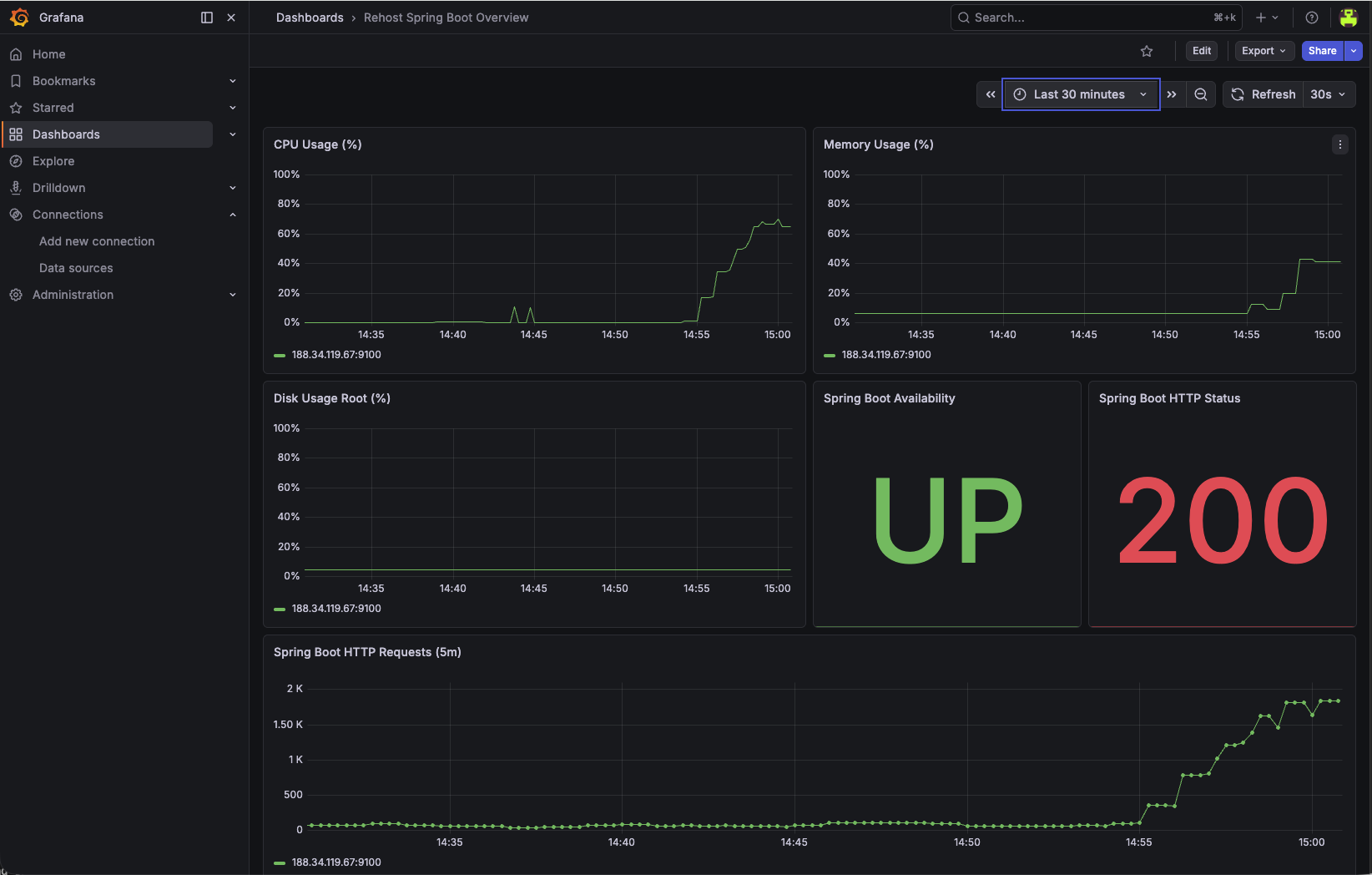
Signals and thresholds for rightsizing
Section titled “Signals and thresholds for rightsizing”Define technical thresholds before changing capacity.
- Candidate for downsizing: CPU p95 under 30% and memory p95 under 50% for at least 14 days.
- Scale-up candidate: CPU p95 over 75% or memory p95 over 80% during business load windows for at least 3 consecutive days.
- Stability guardrail: No unresolved critical alerts and no regression in error-rate SLOs.
Keep thresholds workload-specific and validate with business traffic patterns.
Database visibility for optimize decisions
Section titled “Database visibility for optimize decisions”For stateful Rehost workloads, include database signals in the same dashboard review cycle.
- Connection pressure: active connection trend and burst behavior.
- Database growth: database size progression over time.
- Transaction behavior: commit/rollback trend for stability checks.
Use these metrics together with VM signals to avoid CPU-only or memory-only optimization decisions.
PostgreSQL Flex optimization path for migrated data tiers
Section titled “PostgreSQL Flex optimization path for migrated data tiers”If the Rehost workload later moves its database tier to PostgreSQL Flex, include database-tier rightsizing and tuning in the same optimize cycle.
- Plan the target DB profile: use Plan your PostgreSQL Flex instance to align expected data growth and concurrency.
- Tune flavor and storage class: use Flavors and performance classes of PostgreSQL Flex to adjust CPU, RAM, and storage performance.
- Use the integrated dashboard first: review Dashboard metrics in PostgreSQL Flex for fast checks.
- Use scraped observability metrics for deep analysis: follow Observability metrics in PostgreSQL Flex for alert and threshold design.
Use the offered Flex combinations and storage performance limits to assess a database-tier change. Keep the VM thresholds above workload-specific; the product catalog does not supply acceptance criteria or prove that an infrastructure change is reversible.
| Description | ID | CPU | RAM | max_connections | shared_buffers | work_mem | maintenance_work_mem | effective_cache_size |
|---|---|---|---|---|---|---|---|---|
| Small, Compute optimized | 2.4 | 2 | 4 GB | 95 | 950 MB | 14 MB | 380 MB | 2660 MB |
| Small, Memory optimized | 2.16 | 2 | 16 GB | 385 | 3950 MB | 14 MB | 1580 MB | 11060 MB |
| Medium, Compute optimized | 4.8 | 4 | 8 GB | 195 | 1950 MB | 14 MB | 780 MB | 5460 MB |
| Medium, Memory optimized | 4.32 | 4 | 32 GB | 785 | 7950 MB | 14 MB | 3180 MB | 22260 MB |
| Large, Processor optimized | 8.16 | 8 | 16 GB | 385 | 3950 MB | 14 MB | 1580 MB | 11060 MB |
| X-Large, Compute optimized | 16.32 | 16 | 32 GB | 785 | 7950 MB | 14 MB | 3180 MB | 22260 MB |
| X-Large, Memory optimized | 16.128 | 16 | 128 GB | 3170 | 31950 MB | 14 MB | 12780 MB | 89460 MB |
Notes
- CPU and RAM is always per node.
- The system uses up to 15 connections for internal essential processes such as backup, monitoring, etc. These connections will be counted towards the
max_connectionslimit.
What is this?
This section is copied from the STACKIT docs automatically, several times a day. It cannot be changed here. Changes belong in the STACKIT docs.
| Description | ID | Max. IOPS | Max. throughput (MB/s) |
|---|---|---|---|
| Performance class 2 | premium-perf2-stackit | 1000 | 100 |
| Performance class 4 | premium-perf4-stackit | 2000 | 150 |
| Performance class 6 | premium-perf6-stackit | 5000 | 200 |
| Performance class 8 | premium-perf8-stackit | 10000 | 250 |
| Performance class 10 | premium-perf10-stackit | 15000 | 300 |
| Performance class 12 | premium-perf12-stackit | 20000 | 350 |
Currently, we offer three types of instances. For each type there is a different set of flavors available.
What is this?
This section is copied from the STACKIT docs automatically, several times a day. It cannot be changed here. Changes belong in the STACKIT docs.
Rightsizing workflow
Section titled “Rightsizing workflow”- Collect baseline metrics and traces for a representative period.
- Confirm optimization candidate with dashboards and alert history.
- Plan capacity change and rollback checkpoint.
- Apply VM size change with Terraform/OpenTofu.
- Re-validate latency, error rates, throughput, and cost.
- Keep or revert based on objective acceptance criteria.
Technical implementation example
Section titled “Technical implementation example”Example A: Downsize after sustained low utilization
Section titled “Example A: Downsize after sustained low utilization”Update VM sizing in env.tfvars:
machine_type = "g3i.2"Apply and inspect plan output:
terraform plan -var-file=env.tfvarsterraform apply -var-file=env.tfvarsThen validate:
- Service health (
systemctl status, synthetic checks) - p95 latency and error-rate trend
- Cost delta in reporting window
Example B: Scale up under sustained overload
Section titled “Example B: Scale up under sustained overload”Update VM sizing in env.tfvars:
machine_type = "g3i.4"Apply and validate with the same post-change checks.
Rollback pattern
Section titled “Rollback pattern”If SLOs regress after rightsizing, roll back by restoring the previous machine_type and re-applying IaC.
Treat rollback as a standard runbook step, not as an emergency-only path.
- Depending on platform constraints and machine type, resize can require restart or replacement. Confirm behavior in
terraform planbefore apply.
Storage as optimization dimension
Section titled “Storage as optimization dimension”In Rehost scenarios, CPU and memory are only one side of rightsizing. Storage performance can also become the limiting factor.
- When to investigate storage: elevated I/O wait, unstable latency under write-heavy load, or throughput saturation despite available CPU.
- What to select: a storage service plan and performance class that matches the observed IOPS and throughput profile.
- Guidance: Block Storage service plans
Select the performance class before provisioning
Section titled “Select the performance class before provisioning”A Block Storage performance class defines the maximum IOPS and throughput available to the complete volume. Application, database, operating-system, and backup access share this performance envelope. Select the class from measured peak demand, latency requirements, backup activity, and explicit growth headroom before creating the volume.
The following table lists currently available performance classes for the EU01 region:
| Performance class | Name | Max. IOPS | Max. Throughput (MB/s) |
|---|---|---|---|
| Performance class 0 | storage_premium_perf0 | 120 | 25 |
| Performance class 1 | storage_premium_perf1 | 500 | 50 |
| Performance class 2 | storage_premium_perf2 | 1000 | 100 |
| Performance class 4 | storage_premium_perf4 | 2000 | 150 |
| Performance class 6 | storage_premium_perf6 | 5000 | 200 |
| Performance class 8 | storage_premium_perf8 | 10000 | 250 |
| Performance class 10 | storage_premium_perf10 | 15000 | 300 |
| Performance class 12 | storage_premium_perf12 | 20000 | 350 |
| Performance class 13 | storage_premium_perf13 | 20000 | 700 |
| Performance class 14 | storage_premium_perf14 | 25000 | 400 |
| Performance class 15 | storage_premium_perf15 | 25000 | 800 |
| Performance class 16 | storage_premium_perf16 | 30000 | 450 |
| Performance class 17 | storage_premium_perf17 | 30000 | 900 |
| Performance class 18 | storage_premium_perf18 | 35000 | 500 |
| Performance class 19 | storage_premium_perf19 | 35000 | 1000 |
| Performance class 20 | storage_premium_perf20 | 40000 | 550 |
| Performance class 21 | storage_premium_perf21 | 40000 | 1100 |
| Performance class 29 | storage_premium_perf29 | 60000 | 1500 |
IOPS - Input/Output Operations per second
Throughput - Throughput in Megabytes per second
Thus, the classes used can be distinguished in detail based on the naming. Example: “Block Storage Premium - Performance Class 2” corresponds to SSD hard disks with max. 1000 IOPS and max. 100 Mbyte/s throughput.
What is this?
This section is copied from the STACKIT docs automatically, several times a day. It cannot be changed here. Changes belong in the STACKIT docs.
For the Rehost baseline, the operating system, Spring Boot application, and PostgreSQL data share the boot volume. Changing its performance class therefore requires a controlled replacement target:
- Select the new class from observed IOPS, throughput, latency, and I/O-wait data.
- Verify backup and database-level rollback readiness.
- Provision the replacement VM and boot volume through IaC with the selected class.
- Reapply the Ansible configuration and restore or migrate the workload data.
- Validate application behavior, data integrity, storage latency, backup coverage, and cost before switching.
Use a separate data volume when storage capacity or performance must evolve independently from the VM lifecycle. To change its performance class, create a new volume in the required availability model with sufficient capacity, stop writes, migrate and verify the data, switch the attachment or mount, and retain the source volume until acceptance and rollback gates have passed.
Migrate data from Block StorageTreat storage checks as part of the same Optimize loop and validate latency, error behavior, recovery, and cost impact after any change.
Asset historyActive 7 of the last 12 weeksTMUpdatedNo updates · 1 bar = 1 week i
- LWLukas WeberrußHead of STACKIT Cloud Migration Framework · STACKITOwner

 Lukas WeberrußHead of STACKIT Cloud Migration Framework · STACKITOwnerActive 10 of the last 12 weeks · 47 updateswww.linkedin.com/in/lukas-weberruß-a360b081
Tobias M.Head of STACKIT Cloud Framework · STACKITOwnerActive 12 of the last 12 weeks · 168 updatesSTACKITwww.linkedin.com/in/tobias-müller-011304172LWLukas WeberrußHead of STACKIT Cloud Migration Framework · STACKITOwnerActive 10 of the last 12 weeks · 47 updatesSTACKITwww.linkedin.com/in/lukas-weberruß-a360b081Contributed in STACKITTobias M.
Tobias M.Head of STACKIT Cloud Framework · STACKITOwnerActive 12 of the last 12 weeks · 168 updatesSTACKITwww.linkedin.com/in/tobias-müller-011304172
· Oct 5, 2026Lukas Weberruß
Lukas WeberrußHead of STACKIT Cloud Migration Framework · STACKITOwnerActive 10 of the last 12 weeks · 47 updatesSTACKITwww.linkedin.com/in/lukas-weberruß-a360b081
· Sep 25, 2026Tobias M.
Tobias M.Head of STACKIT Cloud Framework · STACKITOwnerActive 12 of the last 12 weeks · 168 updatesSTACKITwww.linkedin.com/in/tobias-müller-011304172
· Aug 26, 2026
Show full history (7 more)
Tobias M.
Tobias M.Head of STACKIT Cloud Framework · STACKITOwnerActive 12 of the last 12 weeks · 168 updatesSTACKITwww.linkedin.com/in/tobias-müller-011304172
· Aug 7, 2026Tobias M.
Tobias M.Head of STACKIT Cloud Framework · STACKITOwnerActive 12 of the last 12 weeks · 168 updatesSTACKITwww.linkedin.com/in/tobias-müller-011304172
· Jul 31, 2026Tobias M.
Tobias M.Head of STACKIT Cloud Framework · STACKITOwnerActive 12 of the last 12 weeks · 168 updatesSTACKITwww.linkedin.com/in/tobias-müller-011304172
· Jul 31, 2026Lukas Weberruß
Lukas WeberrußHead of STACKIT Cloud Migration Framework · STACKITOwnerActive 10 of the last 12 weeks · 47 updatesSTACKITwww.linkedin.com/in/lukas-weberruß-a360b081
· Jul 28, 2026Lukas Weberruß
Lukas WeberrußHead of STACKIT Cloud Migration Framework · STACKITOwnerActive 10 of the last 12 weeks · 47 updatesSTACKITwww.linkedin.com/in/lukas-weberruß-a360b081
· Jul 24, 2026Tobias M.
Tobias M.Head of STACKIT Cloud Framework · STACKITOwnerActive 12 of the last 12 weeks · 168 updatesSTACKITwww.linkedin.com/in/tobias-müller-011304172
· Jul 15, 2026