Optimize Replatform Spring Boot on Cloud Foundry with autoscaling and rightsizing
Last updated on
Scenario
Section titled “Scenario”This asset extends the Cloud Foundry architecture baseline into an optimize runbook for runtime behavior under load.
- Architecture baseline: Architecture Asset: Spring Boot on Cloud Foundry with Backing Services
- Optimize objective: improve reliability and cost efficiency while keeping scaling behavior predictable and reproducible.
Terraform-first operating model
Section titled “Terraform-first operating model”Use Terraform as the default control plane for reproducibility.
- Marketplace services with Terraform: PostgreSQL and Autoscaler service instances are provisioned with
cloudfoundry_service_instance. - No script dependency: deployment flow is defined by Terraform resources and variables, not custom shell scripts.
- Environment strategy:
- dev/demo: default to single plans.
- prod: use replica-capable plans and validate failover behavior.
What the app autoscaler does
Section titled “What the app autoscaler does”The App AutoScaler keeps application instance count aligned with real demand.
- Purpose: keep service quality stable under load while avoiding permanent over-provisioning.
- How it works: a control loop evaluates policy rules (for example throughput, CPU, memory, schedules) and adjusts instance count within configured bounds.
- Service model: in Cloud Foundry, App AutoScaler is consumed as a marketplace service and bound to the app.
For platform behavior and policy mechanics, refer to the product documentation:
Limits and operational boundaries
Section titled “Limits and operational boundaries”App AutoScaler improves elasticity, but scaling is still bound by platform and org constraints.
- Quota boundaries: org or space instance quotas can block scale-out (
app_instance_limit_exceeded). - Plan boundaries: the selected autoscaler plan defines available capabilities and practical limits.
- Metric timing: breach duration and cool-down settings intentionally delay decisions to avoid oscillation.
- Terraform boundary: this example provisions the autoscaler service and applies policy parameters natively with
cloudfoundry_service_credential_binding.
Dashboard interpretation notes
Section titled “Dashboard interpretation notes”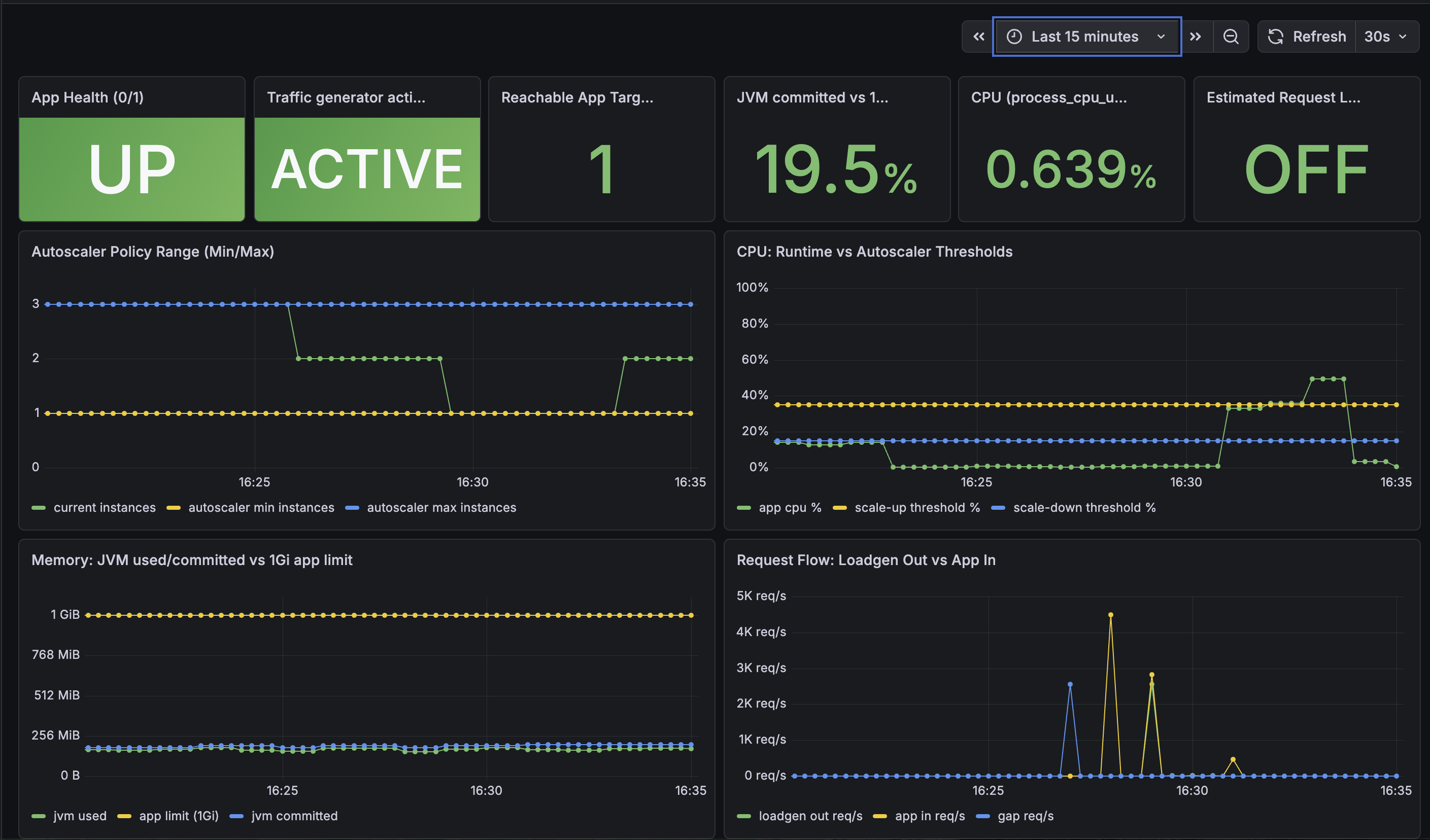
- App Health: this panel is a strict binary signal from
up{job="spring-music-metrics"}and must showUPorDOWNonly. - Load generator activity: this panel should be interpreted as traffic generation state (
ACTIVE/IDLE), and can beNO TRAFFIC GENERATOR METRICSwhen no traffic-generator scrape job is present. - Reachable App Targets: this is a scrape-target runtime proxy, not the authoritative Cloud Foundry process count.
- Autoscaler thresholds: min/max instance and CPU threshold lines are fixed policy constants and should appear as flat lines.
- Current instances panel: use current-instance telemetry from the dedicated exporter metric (
cf_app_current_instances), not a static policy proxy. - Scrape cadence: for this setup, the dedicated instance exporter scrape runs with a 60 s interval, so short display lag is expected.
- Cloud Foundry runtime view: use
cf app <app-name>for authoritative process count and runtime memory values.
Observability signals for optimization
Section titled “Observability signals for optimization”Use STACKIT Observability for evidence-based decisions.
- Scale-out candidate: sustained throughput increase, elevated CPU, or rising latency.
- Scale-in candidate: stable low load over the configured quiet window.
- Safety guardrail: no unresolved critical alerts and no error-rate regression.
Recommended autoscaling policy
Section titled “Recommended autoscaling policy”Use explicit thresholds and bounded scaling:
{ "instance_min_count": 1, "instance_max_count": 3, "scaling_rules": [ { "metric_type": "throughput", "breach_duration_secs": 60, "threshold": 80, "operator": ">=", "cool_down_secs": 60, "adjustment": "+1" }, { "metric_type": "cpu", "breach_duration_secs": 60, "threshold": 35, "operator": ">=", "cool_down_secs": 60, "adjustment": "+1" }, { "metric_type": "memoryused", "breach_duration_secs": 120, "threshold": 700, "operator": ">=", "cool_down_secs": 120, "adjustment": "+1" }, { "metric_type": "cpu", "breach_duration_secs": 120, "threshold": 15, "operator": "<", "cool_down_secs": 120, "adjustment": "-1" }, { "metric_type": "throughput", "breach_duration_secs": 120, "threshold": 20, "operator": "<", "cool_down_secs": 120, "adjustment": "-1" } ]}cpu- short name of “CPU utilization”, is the CPU usage of your application in percentage.memoryused- represents the absolute value of the used memory of your application. The unit ofmemoryusedmetric is “MB”.memoryutil- short name of “memory utilization”, is the used memory of the total memory allocated to the application in percentage. For example, if the memory usage of the application is 100 MB and memory quota is 200 MB, the value ofmemoryutilis 50%.responsetime- represents the average amount of time the application takes to respond to a request in a given time period. The unit ofresponsetimeis “ms” (milliseconds).throughput- is the total number of processed requests in a given time period. The unit ofthroughputis “rps” (requests per second).- Custom metric - You can define your own metric name and emit your own metric to App AutoScaler to trigger further dynamic scaling. Only alphabet letters, numbers and ”_” are allowed for a valid metric name, and the maximum length of the metric name is limited up to 100 characters.
What is this?
This section is copied from the STACKIT docs automatically, several times a day. It cannot be changed here. Changes belong in the STACKIT docs.
Load validation workflow
Section titled “Load validation workflow”- Deploy the stack with Terraform and verify the public route returns
200. - Generate representative burst traffic with a dedicated load generator app or tool.
- Keep load long enough to trigger the scale-out breach duration.
- Stop traffic and verify scale-in after quiet period and cool-down windows.
- Check application logs and autoscaling history for clean behavior.
Terraform flags for a dedicated load generator app
Section titled “Terraform flags for a dedicated load generator app”For reproducible load tests, use a second Terraform-managed load generator app.
- Enable:
setup_loadgen_app = true,loadgen_enabled = true,loadgen_mode = "cf-app" - Disable:
setup_loadgen_app = false - Tune load profile:
loadgen_parallel_requests,loadgen_burst_seconds,loadgen_idle_seconds
Example:
setup_loadgen_app   = trueloadgen_enabled     = trueloadgen_mode        = "cf-app"loadgen_app_name    = "spring-music-loadgen"
loadgen_instances         = 3loadgen_parallel_requests = 60loadgen_burst_seconds     = 180loadgen_idle_seconds      = 480loadgen_inner_sleep_seconds = 0
Current provider boundary and approval rule
Section titled “Current provider boundary and approval rule”The Autoscaler marketplace service instance is fully Terraform-managed.
Policy parameters are also applied natively with cloudfoundry_service_credential_binding in this implementation.
- Use Terraform as the primary control path for policy threshold changes.
- Keep manual CLI/API policy updates for emergency operation only and reconcile back into Terraform immediately.
Asset historyActive 7 of the last 12 weeksTMUpdatedNo updates · 1 bar = 1 week i
- LWLukas WeberrußHead of STACKIT Cloud Migration Framework · STACKITOwner

 Lukas WeberrußHead of STACKIT Cloud Migration Framework · STACKITOwnerActive 10 of the last 12 weeks · 47 updateswww.linkedin.com/in/lukas-weberruß-a360b081
Tobias M.Head of STACKIT Cloud Framework · STACKITOwnerActive 12 of the last 12 weeks · 168 updatesSTACKITwww.linkedin.com/in/tobias-müller-011304172LWLukas WeberrußHead of STACKIT Cloud Migration Framework · STACKITOwnerActive 10 of the last 12 weeks · 47 updatesSTACKITwww.linkedin.com/in/lukas-weberruß-a360b081Contributed in STACKITTobias M.
Tobias M.Head of STACKIT Cloud Framework · STACKITOwnerActive 12 of the last 12 weeks · 168 updatesSTACKITwww.linkedin.com/in/tobias-müller-011304172
· Oct 5, 2026Tobias M.
Tobias M.Head of STACKIT Cloud Framework · STACKITOwnerActive 12 of the last 12 weeks · 168 updatesSTACKITwww.linkedin.com/in/tobias-müller-011304172
· Sep 24, 2026Tobias M.
Tobias M.Head of STACKIT Cloud Framework · STACKITOwnerActive 12 of the last 12 weeks · 168 updatesSTACKITwww.linkedin.com/in/tobias-müller-011304172
· Aug 26, 2026
Show full history (6 more)
Tobias M.
Tobias M.Head of STACKIT Cloud Framework · STACKITOwnerActive 12 of the last 12 weeks · 168 updatesSTACKITwww.linkedin.com/in/tobias-müller-011304172
· Aug 7, 2026Tobias M.
Tobias M.Head of STACKIT Cloud Framework · STACKITOwnerActive 12 of the last 12 weeks · 168 updatesSTACKITwww.linkedin.com/in/tobias-müller-011304172
· Jul 31, 2026Tobias M.
Tobias M.Head of STACKIT Cloud Framework · STACKITOwnerActive 12 of the last 12 weeks · 168 updatesSTACKITwww.linkedin.com/in/tobias-müller-011304172
· Jul 31, 2026Lukas Weberruß
Lukas WeberrußHead of STACKIT Cloud Migration Framework · STACKITOwnerActive 10 of the last 12 weeks · 47 updatesSTACKITwww.linkedin.com/in/lukas-weberruß-a360b081
· Jul 28, 2026Tobias M.
Tobias M.Head of STACKIT Cloud Framework · STACKITOwnerActive 12 of the last 12 weeks · 168 updatesSTACKITwww.linkedin.com/in/tobias-müller-011304172
· Jul 15, 2026