Infrastructure mapping
Define target compute, storage, and network profiles with explicit compatibility checks.
Last updated on


Rehost Spring Boot and PostgreSQL to a STACKIT VM with Terraform and Ansible: prepare inputs, provision, rehearse, cut over, validate, and hand over operations.
Use Discovery evidence to confirm that preserving the Spring Boot JAR, systemd service model, and PostgreSQL engine on a VM meets the migration goals; Kubernetes, Cloud Foundry, or PostgreSQL Flex would instead be Replatform. Derive the delivery sequence from that decision: Landing Zone, Terraform infrastructure, Ansible configuration, separate PostgreSQL migration, and the rehearsed runbook.
Rehost (lift-and-shift) migrates workloads with minimal application change. It is primarily a run strategy to reduce transition risk and accelerate migration throughput.
In practical terms, Rehost is application-wave oriented: each workload gets a defined target runtime mapping, cutover path, and runbook package for repeatable factory delivery.
Relocate and Rehost are often used interchangeably, but in this framework they are separated on purpose.
Infrastructure mapping
Define target compute, storage, and network profiles with explicit compatibility checks.
Data and cutover path
Design transfer windows, consistency checks, and rollback triggers.
Stateful workload handling
Separate application artifact rollout from database migration sequencing to reduce cutover risk.
Security and compliance
Map identity controls, encryption requirements, and evidence checkpoints.
Operational handover
Ensure runbooks cover Day-1 operations and incident workflows after migration.
In Rehost scenarios, the data migration path depends on whether the workload is stateless or stateful:
For stateful migration waves, split the path into two streams:
Define landing zone requirements and controls as the start point for Rehost run. Clarify network, identity, backup, and monitoring prerequisites before migration sequencing is approved so Rehost waves can run with predictable operations quality.
Define the automated Rehost path used for repeatable wave throughput. In the automated Rehost path, infrastructure and application setup are provisioned as code so wave delivery stays repeatable and auditable.
Provision VM target with IaC: Create networks, security groups, compute instances, and base storage through Terraform or OpenTofu.
Install and configure application with automation: Use Ansible playbooks for package install, service setup, and baseline configuration.
Apply environment-specific parameters: Inject target variables, secrets references, and endpoint mappings in a controlled automation run.
Run automated validation and cutover gates: Execute health checks, migration pre-checks, rollback checkpoints, and release approvals before live switch.
The runbook asset documents the PostgreSQL flags and the optional dump-based data restore path.
Describe manual installation steps for exception workloads.
Create and prepare target VM manually: Provision the VM through Portal or CLI, attach required storage, and apply OS hardening and patch baseline.
Install runtime and dependencies manually: Install required runtime packages, system libraries, and service users/groups according to product installation guidance.
Install application in the classic way: Perform guided installation steps (for example installer or setup wizard flow) to reproduce the source deployment model on the target VM.
Validate base install readiness: Confirm service startup, file permissions, required ports, DNS reachability, and outbound connectivity.
Define manual runtime configuration and controls.
Mirror source configuration for target context: Recreate application settings from the source environment and adapt them to target endpoints, DNS, certificates, and service integrations.
Apply security and access settings: Configure service credentials, secret handling, and least-privilege access for target operation.
Align operational defaults: Configure logging targets, metrics exporters, backup schedules, and retention baselines.
Validate configuration parity: Run smoke checks to confirm the target instance behaves as a functional equivalent of the source baseline.
Define manual deployment sequencing and release checks.
Plan final migration window: Align freeze windows, communication checkpoints, and rollback authority for production switch.
Run final data migration: Execute last data sync or restore steps and confirm consistency checks before go-live.
Activate production traffic: Perform controlled live switch to the target environment and verify critical user and integration paths.
Confirm handover readiness: Record evidence, close open risks, and transfer ownership for Day-1 operations.
STACKIT
The sovereign European cloud provider behind the framework, delivering IaaS and PaaS from German and Austrian data centers with full digital independence.
This pattern represents the validated low-change target for the Spring Boot Rehost example. The JAR
continues to run as a systemd service, while PostgreSQL remains self-managed on the same VM. The
runtime and database operating models therefore stay VM-centric.
The baseline is intentionally one VM. It demonstrates repeatable migration controls and operations readiness, not application or database high availability.
Confirm which volumes the backup policy covers and rehearse recovery independently of cutover rollback. The available server-backup features do not by themselves prove PostgreSQL consistency or the application’s recovery objectives.
This section is copied from the STACKIT docs automatically, several times a day. It cannot be changed here. Changes belong in the STACKIT docs.
cp env.tfvars.example env.tfvarscreate_project = truetarget_project_name = "cmf-rehost-springboot"target_project_owner_email = "owner@sa.stackit.cloud"parent_container_id = "cmf-parent-container-id"service_account_key_path = "/path/to/stackit-sa-key.json"
run_ansible = truejar_local_path = "ansible/files/springboot-app.jar"availability_zone = "eu01-1"machine_type = "g2i.2"ssh_allowed_cidr = "203.0.113.10/32"app_allowed_cidr = "203.0.113.10/32"enable_observability = trueenable_node_exporter = trueenable_local_postgresql = trueenable_server_backup = trueflags.env):setup_project=truesetup_observability=truesetup_database=falsesetup_workload=truesetup_loadgen=falsesetup_dns=falseterraform initterraform apply -var-file=env.tfvarsExpected result: application_url serves the Spring Boot app directly from the VM on the configured
application port. PostgreSQL listens for the application on localhost, Observability scrapes node
exporter, and the boot volume has an enabled daily backup schedule.
This baseline has no automatic failover. A load-balancer or multi-VM variant is useful only after application session handling, PostgreSQL placement, write consistency, health checks, TLS, and traffic switching have been designed and tested together. Treat that as a separate architecture decision, not as an implicit property of this Rehost path.
STACKIT
The sovereign European cloud provider behind the framework, delivering IaaS and PaaS from German and Austrian data centers with full digital independence.
The Migration Framework defines the strategy, design, landing-zone, migration, and operations principles for Rehost workloads. This asset applies those principles to one concrete, runnable Spring Boot and PostgreSQL implementation on STACKIT.
The maintained repository is the source of truth for Terraform, Ansible, application artifacts, migration scripts, validation, and runtime configuration. This asset explains how to use that implementation without duplicating its complete source code.
STACKIT CMF Rehost Spring Boot repository Open the runnable Terraform and Ansible reference implementation for the Spring Boot and PostgreSQL Rehost path. Open the repositoryThis example represents an application Rehost path for a Spring Boot workload (Spring Music sample). The migration focus is the runtime relocation of the application to STACKIT:
systemd without changing the application runtime model.The validated baseline deliberately does not include an application load balancer, DNS switch, multiple VMs, Kubernetes, Cloud Foundry, or PostgreSQL Flex. Add those only as separately designed and tested extensions; they are not implied by this Rehost example.
To keep automation behavior consistent across CMF examples, use this common flag model in your Terraform variable set:
setup_project: create/use project context.setup_observability: enable/disable observability resources.setup_database: enable/disable optional VM-local PostgreSQL path.setup_workload: enable/disable workload installation on VM.setup_loadgen: enable/disable optional synthetic load generation.setup_dns: accepted by the shared wrapper but unsupported in this baseline.In the current Rehost repository, these map to existing switches (create_project, enable_observability, enable_local_postgresql, and load-generation related flags).
The following diagram shows the implemented and tested target, not a future high-availability variant.
Use an isolated Linux lab with Git, Terraform, Ansible, ShellCheck, SSH/SCP, curl, jq,
and PostgreSQL server/client tools including pg_config. The sample dump scripts use
runuser and the local postgres OS account and require root privileges in that lab.
When Server Backup is enabled, the cutover workflow also needs an authenticated STACKIT CLI.
Use the Terraform version that created an existing saved plan; plan files are version-specific.
Start in a parent directory without an existing checkout of the same name. This revision contains the migration workflows and declarative Observability management. Its JAR is unchanged from the artifact pinned by the Replatform reference:
umask 077 && git clone https://github.com/stackitcloud/stackit-cmf-Rehost-springboot.git && git -C stackit-cmf-Rehost-springboot checkout --detach b9225eb35c64b9ef4761c208fadb9a2356431793 && test -f stackit-cmf-Rehost-springboot/scripts/run_cutover.sh && cd stackit-cmf-Rehost-springboot && printf '%s\n' "Workspace ready. Continue from this Rehost checkout." || { printf '%s\n' "Preparation failed. Resolve the error before continuing." >&2 false }Run the following steps from that checkout only after preparation succeeds. Preserve an existing checkout, state and evidence rather than replacing them. Keep credentials, plans, state, dumps, inventory and evidence private and outside version control; do not enable shell tracing.
Create the private variable file only when it does not already exist:
umask 077test -e env.tfvars || cp env.tfvars.example env.tfvarschmod 600 env.tfvarsEdit the file before planning. Configure the approved existing project or project-creation scope,
service-account key path, SSH key pair, available image, availability zone, VM flavor and storage.
Restrict SSH and application ingress to the source CIDRs actually observed on the target path.
Verify the SSH host key through a trusted channel before migration scripts use strict host checking.
Set SSH_KEY and SSH_USER for those scripts when they differ from ~/.ssh/id_rsa and ubuntu;
keep them consistent with Terraform’s private_ssh_key_path and ssh_user.
Enable VM-local PostgreSQL, Observability and Server Backup for this walkthrough. For the initial
runtime deployment, leave postgresql_restore_after_copy = false and the source dump path empty:
provisioning must not import the source before rehearsal and cutover approval. Supply the database
password through the approved secret mechanism as TF_VAR_postgresql_app_password and retain it
securely for subsequent plans; do not put it in the variable file, shell history or documentation.
Confirm permissions, quota, cost approval and the private Terraform backend before initialization. This workflow assumes a prepared execution host, not a complete lab installation procedure.
Create a custom-format source dump and record its SHA-256 checksum, expected row count, and a workload-specific deterministic fingerprint. The repository includes a reproducible eight-row sample:
./scripts/create_source_dump.sh./scripts/validate_source_dump.shThe validation script restores into a separate local PostgreSQL cluster before the dump can enter a migration rehearsal. These scripts generate the bundled sample in temporary local clusters; they do not export a running application or the STACKIT VM. Use a fresh artifact directory and do not overwrite a dump already approved for migration. For a real source, export it under the agreed write-freeze procedure and record equivalent checksum, count and fingerprint evidence.
Configure an existing STACKIT project or project creation, restrict SSH and application ingress to
approved source CIDRs, and pass the database password through TF_VAR_postgresql_app_password rather
than a variable file. Review a saved plan before apply.
terraform init && ./scripts/check.sh && terraform plan -input=false -var-file=env.tfvars -out=tfplanStop if initialization, checks or planning fail. Review resource changes, target project, ingress, cost and the disabled initial restore before explicitly applying that saved plan:
terraform apply tfplanTerraform runs Ansible after provisioning. A successful apply proves completion of that orchestration, not acceptance of migrated data. Check the runtime before beginning rehearsal:
./scripts/validate_deployment.shRun the rehearsal against a temporary database on the target VM:
./scripts/run_migration_rehearsal.shThe rehearsal checks the source evidence, restores the dump, compares row count and fingerprint, and
removes its temporary database without changing the production springmusic database.
Set the expected source evidence in env.tfvars:
enable_local_postgresql = truepostgresql_source_dump_local_path = "artifacts/source-postgresql.dump"postgresql_restore_after_copy = truepostgresql_expected_album_count = 8postgresql_expected_album_fingerprint = "<source-fingerprint>"Then execute the explicit approval gate:
./scripts/run_cutover.sh --confirmThe script requires a fully available Server Backup no older than 24 hours, creates a saved Terraform plan that replaces only the Ansible orchestration resource, rejects unrelated infrastructure changes, applies the restore, validates data and runtime behavior, and requires a final no-op Terraform plan. Retries of the same source-dump hash preserve the original database rollback point.
Validation checks the source row count and fingerprint, table ownership, a transactionally rolled-back write as the application role, application reachability, services, and the protected rollback dump.
./scripts/validate_migration.sh./scripts/validate_deployment.sh./scripts/verify_rollback.shIf an approved rollback trigger is met during the rollback window, preserve the current target database and restore the original pre-cutover dump:
./scripts/rollback_postgresql.sh --confirmWith enable_server_backup = true, Terraform enables STACKIT Server Backup and a daily schedule for
the VM boot volume. The default retention is 14 days. Cutover requires a fully available backup no older
than 24 hours. Backup creation and status were validated against the real target; an in-place Server
Backup restore remains a disruptive disaster-recovery operation and must be rehearsed in a separate
recovery environment.
The Server Backup complements the PostgreSQL pre-restore dump. It does not replace database-level consistency checks or the application rollback procedure.
Follow workspace preparation, private target configuration, source evidence and reviewed provisioning
in that order. Rehearse before the approved cutover and retain the acceptance evidence afterwards.
The repository scripts invoke terraform explicitly; an OpenTofu-only execution host needs a
separately reviewed adaptation, not just replacement of commands in this page.
The implementation provisions STACKIT Observability and scrapes node exporter. The Grafana provider
manages the included dashboard in the SCF Rehost folder with the existing Thanos datasource,
waiting for instance readiness instead of silently skipping dashboard creation.
Verify live VM, Spring Boot and PostgreSQL metrics through grafana_dashboard_url, then require a
no-op plan. Seven panels cover the active baseline; the synthetic request panel is included only
when the local load generator is enabled. Synthetic requests do not represent all application traffic.
The deployment validation also checks exporter metrics and service health after apply and database restore.
Initial Grafana admin credentials remain a temporary authentication dependency. Protect state and saved plans. Notification receivers, alert-routing ownership, application logs and distributed tracing require separate configuration and acceptance before production use.
This example can be run in two valid setup modes.
create_project = false and project_id = "...") and the service account JSON configured for that landing zone scope.create_project = true and provide parent_container_id with an existing folder/container where the service account has sufficient permissions.For landing-zone design guidance, see Application Landing Zone.
Use this as a minimal starting point in env.tfvars.
create_project = truetarget_project_name = "cmf-rehost-springboot"target_project_owner_email = "owner@example.com"parent_container_id = "cmf-xxxxxxxx"service_account_key_path = "~/.ssh/cmf-sa.json"public_ssh_key_path = "~/.ssh/id_rsa.pub"private_ssh_key_path = "~/.ssh/id_rsa"availability_zone = "eu01-1"machine_type = "g2i.2"ssh_allowed_cidr = "203.0.113.10/32"app_allowed_cidr = "203.0.113.10/32"enable_local_postgresql = trueenable_observability = trueenable_server_backup = trueansible/files/springboot-app.jarjar_local_path points to the same file.jar_local_path.When the artifact changes, Terraform detects the checksum difference and re-runs the Ansible deployment step.
Every rehearsal, cutover, and rollback writes an evidence.env file below
artifacts/evidence/<timestamp>-<mode>/. Accept a cutover only when the evidence records the expected
checksum, row count, fingerprint, target VM, successful runtime validation, and final Terraform no-op.
./scripts/validate_migration.sh./scripts/validate_deployment.shterraform plan -var-file=env.tfvars -detailed-exitcodeUse the same approved source path, restore flag, expected count and fingerprint as the completed
cutover. Exit code 0 means no changes, 2 means changes are proposed, and 1 means an error.
A plan alone is not proof of apply. The cutover workflow records status=passed and
terraform_noop=true only after applying its saved plan and completing data and runtime validation.
The Replatform reference reuses this repository’s pinned Spring Music JAR and sample-data generator. Its sample walkthrough therefore needs this checkout and validated dump artifacts, but not a newly provisioned Rehost VM. Do not create another VM solely to generate the local sample.
For an actual migration from the Rehost VM to SKE and PostgreSQL Flex, verify that the VM is currently healthy, freeze its application writes, export its real PostgreSQL database and qualify that export. A historical successful Rehost apply does not establish current reachability or make the local sample equivalent to live VM data. Source export, acceptance and source failback need their own approved procedure.
STACKIT
The sovereign European cloud provider behind the framework, delivering IaaS and PaaS from German and Austrian data centers with full digital independence.
The Migration Framework defines the strategy, design, landing-zone, migration, and operations principles for Rehost workloads. This asset applies those principles to one concrete, runnable Spring Boot and PostgreSQL implementation on STACKIT.
The maintained repository is the source of truth for Terraform, Ansible, application artifacts, migration scripts, validation, and runtime configuration. This asset explains how to use that implementation without duplicating its complete source code.
STACKIT CMF Rehost Spring Boot repository Open the runnable Terraform and Ansible reference implementation for the Spring Boot and PostgreSQL Rehost path. Open the repositoryThis example represents an application Rehost path for a Spring Boot workload (Spring Music sample). The migration focus is the runtime relocation of the application to STACKIT:
systemd without changing the application runtime model.The validated baseline deliberately does not include an application load balancer, DNS switch, multiple VMs, Kubernetes, Cloud Foundry, or PostgreSQL Flex. Add those only as separately designed and tested extensions; they are not implied by this Rehost example.
To keep automation behavior consistent across CMF examples, use this common flag model in your Terraform variable set:
setup_project: create/use project context.setup_observability: enable/disable observability resources.setup_database: enable/disable optional VM-local PostgreSQL path.setup_workload: enable/disable workload installation on VM.setup_loadgen: enable/disable optional synthetic load generation.setup_dns: accepted by the shared wrapper but unsupported in this baseline.In the current Rehost repository, these map to existing switches (create_project, enable_observability, enable_local_postgresql, and load-generation related flags).
The following diagram shows the implemented and tested target, not a future high-availability variant.
Use an isolated Linux lab with Git, Terraform, Ansible, ShellCheck, SSH/SCP, curl, jq,
and PostgreSQL server/client tools including pg_config. The sample dump scripts use
runuser and the local postgres OS account and require root privileges in that lab.
When Server Backup is enabled, the cutover workflow also needs an authenticated STACKIT CLI.
Use the Terraform version that created an existing saved plan; plan files are version-specific.
Start in a parent directory without an existing checkout of the same name. This revision contains the migration workflows and declarative Observability management. Its JAR is unchanged from the artifact pinned by the Replatform reference:
umask 077 && git clone https://github.com/stackitcloud/stackit-cmf-Rehost-springboot.git && git -C stackit-cmf-Rehost-springboot checkout --detach b9225eb35c64b9ef4761c208fadb9a2356431793 && test -f stackit-cmf-Rehost-springboot/scripts/run_cutover.sh && cd stackit-cmf-Rehost-springboot && printf '%s\n' "Workspace ready. Continue from this Rehost checkout." || { printf '%s\n' "Preparation failed. Resolve the error before continuing." >&2 false }Run the following steps from that checkout only after preparation succeeds. Preserve an existing checkout, state and evidence rather than replacing them. Keep credentials, plans, state, dumps, inventory and evidence private and outside version control; do not enable shell tracing.
Create the private variable file only when it does not already exist:
umask 077test -e env.tfvars || cp env.tfvars.example env.tfvarschmod 600 env.tfvarsEdit the file before planning. Configure the approved existing project or project-creation scope,
service-account key path, SSH key pair, available image, availability zone, VM flavor and storage.
Restrict SSH and application ingress to the source CIDRs actually observed on the target path.
Verify the SSH host key through a trusted channel before migration scripts use strict host checking.
Set SSH_KEY and SSH_USER for those scripts when they differ from ~/.ssh/id_rsa and ubuntu;
keep them consistent with Terraform’s private_ssh_key_path and ssh_user.
Enable VM-local PostgreSQL, Observability and Server Backup for this walkthrough. For the initial
runtime deployment, leave postgresql_restore_after_copy = false and the source dump path empty:
provisioning must not import the source before rehearsal and cutover approval. Supply the database
password through the approved secret mechanism as TF_VAR_postgresql_app_password and retain it
securely for subsequent plans; do not put it in the variable file, shell history or documentation.
Confirm permissions, quota, cost approval and the private Terraform backend before initialization. This workflow assumes a prepared execution host, not a complete lab installation procedure.
Create a custom-format source dump and record its SHA-256 checksum, expected row count, and a workload-specific deterministic fingerprint. The repository includes a reproducible eight-row sample:
./scripts/create_source_dump.sh./scripts/validate_source_dump.shThe validation script restores into a separate local PostgreSQL cluster before the dump can enter a migration rehearsal. These scripts generate the bundled sample in temporary local clusters; they do not export a running application or the STACKIT VM. Use a fresh artifact directory and do not overwrite a dump already approved for migration. For a real source, export it under the agreed write-freeze procedure and record equivalent checksum, count and fingerprint evidence.
Configure an existing STACKIT project or project creation, restrict SSH and application ingress to
approved source CIDRs, and pass the database password through TF_VAR_postgresql_app_password rather
than a variable file. Review a saved plan before apply.
terraform init && ./scripts/check.sh && terraform plan -input=false -var-file=env.tfvars -out=tfplanStop if initialization, checks or planning fail. Review resource changes, target project, ingress, cost and the disabled initial restore before explicitly applying that saved plan:
terraform apply tfplanTerraform runs Ansible after provisioning. A successful apply proves completion of that orchestration, not acceptance of migrated data. Check the runtime before beginning rehearsal:
./scripts/validate_deployment.shRun the rehearsal against a temporary database on the target VM:
./scripts/run_migration_rehearsal.shThe rehearsal checks the source evidence, restores the dump, compares row count and fingerprint, and
removes its temporary database without changing the production springmusic database.
Set the expected source evidence in env.tfvars:
enable_local_postgresql = truepostgresql_source_dump_local_path = "artifacts/source-postgresql.dump"postgresql_restore_after_copy = truepostgresql_expected_album_count = 8postgresql_expected_album_fingerprint = "<source-fingerprint>"Then execute the explicit approval gate:
./scripts/run_cutover.sh --confirmThe script requires a fully available Server Backup no older than 24 hours, creates a saved Terraform plan that replaces only the Ansible orchestration resource, rejects unrelated infrastructure changes, applies the restore, validates data and runtime behavior, and requires a final no-op Terraform plan. Retries of the same source-dump hash preserve the original database rollback point.
Validation checks the source row count and fingerprint, table ownership, a transactionally rolled-back write as the application role, application reachability, services, and the protected rollback dump.
./scripts/validate_migration.sh./scripts/validate_deployment.sh./scripts/verify_rollback.shIf an approved rollback trigger is met during the rollback window, preserve the current target database and restore the original pre-cutover dump:
./scripts/rollback_postgresql.sh --confirmWith enable_server_backup = true, Terraform enables STACKIT Server Backup and a daily schedule for
the VM boot volume. The default retention is 14 days. Cutover requires a fully available backup no older
than 24 hours. Backup creation and status were validated against the real target; an in-place Server
Backup restore remains a disruptive disaster-recovery operation and must be rehearsed in a separate
recovery environment.
The Server Backup complements the PostgreSQL pre-restore dump. It does not replace database-level consistency checks or the application rollback procedure.
Follow workspace preparation, private target configuration, source evidence and reviewed provisioning
in that order. Rehearse before the approved cutover and retain the acceptance evidence afterwards.
The repository scripts invoke terraform explicitly; an OpenTofu-only execution host needs a
separately reviewed adaptation, not just replacement of commands in this page.
The implementation provisions STACKIT Observability and scrapes node exporter. The Grafana provider
manages the included dashboard in the SCF Rehost folder with the existing Thanos datasource,
waiting for instance readiness instead of silently skipping dashboard creation.
Verify live VM, Spring Boot and PostgreSQL metrics through grafana_dashboard_url, then require a
no-op plan. Seven panels cover the active baseline; the synthetic request panel is included only
when the local load generator is enabled. Synthetic requests do not represent all application traffic.
The deployment validation also checks exporter metrics and service health after apply and database restore.
Initial Grafana admin credentials remain a temporary authentication dependency. Protect state and saved plans. Notification receivers, alert-routing ownership, application logs and distributed tracing require separate configuration and acceptance before production use.
This example can be run in two valid setup modes.
create_project = false and project_id = "...") and the service account JSON configured for that landing zone scope.create_project = true and provide parent_container_id with an existing folder/container where the service account has sufficient permissions.For landing-zone design guidance, see Application Landing Zone.
Use this as a minimal starting point in env.tfvars.
create_project = truetarget_project_name = "cmf-rehost-springboot"target_project_owner_email = "owner@example.com"parent_container_id = "cmf-xxxxxxxx"service_account_key_path = "~/.ssh/cmf-sa.json"public_ssh_key_path = "~/.ssh/id_rsa.pub"private_ssh_key_path = "~/.ssh/id_rsa"availability_zone = "eu01-1"machine_type = "g2i.2"ssh_allowed_cidr = "203.0.113.10/32"app_allowed_cidr = "203.0.113.10/32"enable_local_postgresql = trueenable_observability = trueenable_server_backup = trueansible/files/springboot-app.jarjar_local_path points to the same file.jar_local_path.When the artifact changes, Terraform detects the checksum difference and re-runs the Ansible deployment step.
Every rehearsal, cutover, and rollback writes an evidence.env file below
artifacts/evidence/<timestamp>-<mode>/. Accept a cutover only when the evidence records the expected
checksum, row count, fingerprint, target VM, successful runtime validation, and final Terraform no-op.
./scripts/validate_migration.sh./scripts/validate_deployment.shterraform plan -var-file=env.tfvars -detailed-exitcodeUse the same approved source path, restore flag, expected count and fingerprint as the completed
cutover. Exit code 0 means no changes, 2 means changes are proposed, and 1 means an error.
A plan alone is not proof of apply. The cutover workflow records status=passed and
terraform_noop=true only after applying its saved plan and completing data and runtime validation.
The Replatform reference reuses this repository’s pinned Spring Music JAR and sample-data generator. Its sample walkthrough therefore needs this checkout and validated dump artifacts, but not a newly provisioned Rehost VM. Do not create another VM solely to generate the local sample.
For an actual migration from the Rehost VM to SKE and PostgreSQL Flex, verify that the VM is currently healthy, freeze its application writes, export its real PostgreSQL database and qualify that export. A historical successful Rehost apply does not establish current reachability or make the local sample equivalent to live VM data. Source export, acceptance and source failback need their own approved procedure.
STACKIT
The sovereign European cloud provider behind the framework, delivering IaaS and PaaS from German and Austrian data centers with full digital independence.
The Migration Framework defines the strategy, design, landing-zone, migration, and operations principles for Rehost workloads. This asset applies those principles to one concrete, runnable Spring Boot and PostgreSQL implementation on STACKIT.
The maintained repository is the source of truth for Terraform, Ansible, application artifacts, migration scripts, validation, and runtime configuration. This asset explains how to use that implementation without duplicating its complete source code.
STACKIT CMF Rehost Spring Boot repository Open the runnable Terraform and Ansible reference implementation for the Spring Boot and PostgreSQL Rehost path. Open the repositoryThis example represents an application Rehost path for a Spring Boot workload (Spring Music sample). The migration focus is the runtime relocation of the application to STACKIT:
systemd without changing the application runtime model.The validated baseline deliberately does not include an application load balancer, DNS switch, multiple VMs, Kubernetes, Cloud Foundry, or PostgreSQL Flex. Add those only as separately designed and tested extensions; they are not implied by this Rehost example.
To keep automation behavior consistent across CMF examples, use this common flag model in your Terraform variable set:
setup_project: create/use project context.setup_observability: enable/disable observability resources.setup_database: enable/disable optional VM-local PostgreSQL path.setup_workload: enable/disable workload installation on VM.setup_loadgen: enable/disable optional synthetic load generation.setup_dns: accepted by the shared wrapper but unsupported in this baseline.In the current Rehost repository, these map to existing switches (create_project, enable_observability, enable_local_postgresql, and load-generation related flags).
The following diagram shows the implemented and tested target, not a future high-availability variant.
Use an isolated Linux lab with Git, Terraform, Ansible, ShellCheck, SSH/SCP, curl, jq,
and PostgreSQL server/client tools including pg_config. The sample dump scripts use
runuser and the local postgres OS account and require root privileges in that lab.
When Server Backup is enabled, the cutover workflow also needs an authenticated STACKIT CLI.
Use the Terraform version that created an existing saved plan; plan files are version-specific.
Start in a parent directory without an existing checkout of the same name. This revision contains the migration workflows and declarative Observability management. Its JAR is unchanged from the artifact pinned by the Replatform reference:
umask 077 && git clone https://github.com/stackitcloud/stackit-cmf-Rehost-springboot.git && git -C stackit-cmf-Rehost-springboot checkout --detach b9225eb35c64b9ef4761c208fadb9a2356431793 && test -f stackit-cmf-Rehost-springboot/scripts/run_cutover.sh && cd stackit-cmf-Rehost-springboot && printf '%s\n' "Workspace ready. Continue from this Rehost checkout." || { printf '%s\n' "Preparation failed. Resolve the error before continuing." >&2 false }Run the following steps from that checkout only after preparation succeeds. Preserve an existing checkout, state and evidence rather than replacing them. Keep credentials, plans, state, dumps, inventory and evidence private and outside version control; do not enable shell tracing.
Create the private variable file only when it does not already exist:
umask 077test -e env.tfvars || cp env.tfvars.example env.tfvarschmod 600 env.tfvarsEdit the file before planning. Configure the approved existing project or project-creation scope,
service-account key path, SSH key pair, available image, availability zone, VM flavor and storage.
Restrict SSH and application ingress to the source CIDRs actually observed on the target path.
Verify the SSH host key through a trusted channel before migration scripts use strict host checking.
Set SSH_KEY and SSH_USER for those scripts when they differ from ~/.ssh/id_rsa and ubuntu;
keep them consistent with Terraform’s private_ssh_key_path and ssh_user.
Enable VM-local PostgreSQL, Observability and Server Backup for this walkthrough. For the initial
runtime deployment, leave postgresql_restore_after_copy = false and the source dump path empty:
provisioning must not import the source before rehearsal and cutover approval. Supply the database
password through the approved secret mechanism as TF_VAR_postgresql_app_password and retain it
securely for subsequent plans; do not put it in the variable file, shell history or documentation.
Confirm permissions, quota, cost approval and the private Terraform backend before initialization. This workflow assumes a prepared execution host, not a complete lab installation procedure.
Create a custom-format source dump and record its SHA-256 checksum, expected row count, and a workload-specific deterministic fingerprint. The repository includes a reproducible eight-row sample:
./scripts/create_source_dump.sh./scripts/validate_source_dump.shThe validation script restores into a separate local PostgreSQL cluster before the dump can enter a migration rehearsal. These scripts generate the bundled sample in temporary local clusters; they do not export a running application or the STACKIT VM. Use a fresh artifact directory and do not overwrite a dump already approved for migration. For a real source, export it under the agreed write-freeze procedure and record equivalent checksum, count and fingerprint evidence.
Configure an existing STACKIT project or project creation, restrict SSH and application ingress to
approved source CIDRs, and pass the database password through TF_VAR_postgresql_app_password rather
than a variable file. Review a saved plan before apply.
terraform init && ./scripts/check.sh && terraform plan -input=false -var-file=env.tfvars -out=tfplanStop if initialization, checks or planning fail. Review resource changes, target project, ingress, cost and the disabled initial restore before explicitly applying that saved plan:
terraform apply tfplanTerraform runs Ansible after provisioning. A successful apply proves completion of that orchestration, not acceptance of migrated data. Check the runtime before beginning rehearsal:
./scripts/validate_deployment.shRun the rehearsal against a temporary database on the target VM:
./scripts/run_migration_rehearsal.shThe rehearsal checks the source evidence, restores the dump, compares row count and fingerprint, and
removes its temporary database without changing the production springmusic database.
Set the expected source evidence in env.tfvars:
enable_local_postgresql = truepostgresql_source_dump_local_path = "artifacts/source-postgresql.dump"postgresql_restore_after_copy = truepostgresql_expected_album_count = 8postgresql_expected_album_fingerprint = "<source-fingerprint>"Then execute the explicit approval gate:
./scripts/run_cutover.sh --confirmThe script requires a fully available Server Backup no older than 24 hours, creates a saved Terraform plan that replaces only the Ansible orchestration resource, rejects unrelated infrastructure changes, applies the restore, validates data and runtime behavior, and requires a final no-op Terraform plan. Retries of the same source-dump hash preserve the original database rollback point.
Validation checks the source row count and fingerprint, table ownership, a transactionally rolled-back write as the application role, application reachability, services, and the protected rollback dump.
./scripts/validate_migration.sh./scripts/validate_deployment.sh./scripts/verify_rollback.shIf an approved rollback trigger is met during the rollback window, preserve the current target database and restore the original pre-cutover dump:
./scripts/rollback_postgresql.sh --confirmWith enable_server_backup = true, Terraform enables STACKIT Server Backup and a daily schedule for
the VM boot volume. The default retention is 14 days. Cutover requires a fully available backup no older
than 24 hours. Backup creation and status were validated against the real target; an in-place Server
Backup restore remains a disruptive disaster-recovery operation and must be rehearsed in a separate
recovery environment.
The Server Backup complements the PostgreSQL pre-restore dump. It does not replace database-level consistency checks or the application rollback procedure.
Follow workspace preparation, private target configuration, source evidence and reviewed provisioning
in that order. Rehearse before the approved cutover and retain the acceptance evidence afterwards.
The repository scripts invoke terraform explicitly; an OpenTofu-only execution host needs a
separately reviewed adaptation, not just replacement of commands in this page.
The implementation provisions STACKIT Observability and scrapes node exporter. The Grafana provider
manages the included dashboard in the SCF Rehost folder with the existing Thanos datasource,
waiting for instance readiness instead of silently skipping dashboard creation.
Verify live VM, Spring Boot and PostgreSQL metrics through grafana_dashboard_url, then require a
no-op plan. Seven panels cover the active baseline; the synthetic request panel is included only
when the local load generator is enabled. Synthetic requests do not represent all application traffic.
The deployment validation also checks exporter metrics and service health after apply and database restore.
Initial Grafana admin credentials remain a temporary authentication dependency. Protect state and saved plans. Notification receivers, alert-routing ownership, application logs and distributed tracing require separate configuration and acceptance before production use.
This example can be run in two valid setup modes.
create_project = false and project_id = "...") and the service account JSON configured for that landing zone scope.create_project = true and provide parent_container_id with an existing folder/container where the service account has sufficient permissions.For landing-zone design guidance, see Application Landing Zone.
Use this as a minimal starting point in env.tfvars.
create_project = truetarget_project_name = "cmf-rehost-springboot"target_project_owner_email = "owner@example.com"parent_container_id = "cmf-xxxxxxxx"service_account_key_path = "~/.ssh/cmf-sa.json"public_ssh_key_path = "~/.ssh/id_rsa.pub"private_ssh_key_path = "~/.ssh/id_rsa"availability_zone = "eu01-1"machine_type = "g2i.2"ssh_allowed_cidr = "203.0.113.10/32"app_allowed_cidr = "203.0.113.10/32"enable_local_postgresql = trueenable_observability = trueenable_server_backup = trueansible/files/springboot-app.jarjar_local_path points to the same file.jar_local_path.When the artifact changes, Terraform detects the checksum difference and re-runs the Ansible deployment step.
Every rehearsal, cutover, and rollback writes an evidence.env file below
artifacts/evidence/<timestamp>-<mode>/. Accept a cutover only when the evidence records the expected
checksum, row count, fingerprint, target VM, successful runtime validation, and final Terraform no-op.
./scripts/validate_migration.sh./scripts/validate_deployment.shterraform plan -var-file=env.tfvars -detailed-exitcodeUse the same approved source path, restore flag, expected count and fingerprint as the completed
cutover. Exit code 0 means no changes, 2 means changes are proposed, and 1 means an error.
A plan alone is not proof of apply. The cutover workflow records status=passed and
terraform_noop=true only after applying its saved plan and completing data and runtime validation.
The Replatform reference reuses this repository’s pinned Spring Music JAR and sample-data generator. Its sample walkthrough therefore needs this checkout and validated dump artifacts, but not a newly provisioned Rehost VM. Do not create another VM solely to generate the local sample.
For an actual migration from the Rehost VM to SKE and PostgreSQL Flex, verify that the VM is currently healthy, freeze its application writes, export its real PostgreSQL database and qualify that export. A historical successful Rehost apply does not establish current reachability or make the local sample equivalent to live VM data. Source export, acceptance and source failback need their own approved procedure.
STACKIT
The sovereign European cloud provider behind the framework, delivering IaaS and PaaS from German and Austrian data centers with full digital independence.
The Migration Framework defines the strategy, design, landing-zone, migration, and operations principles for Rehost workloads. This asset applies those principles to one concrete, runnable Spring Boot and PostgreSQL implementation on STACKIT.
The maintained repository is the source of truth for Terraform, Ansible, application artifacts, migration scripts, validation, and runtime configuration. This asset explains how to use that implementation without duplicating its complete source code.
STACKIT CMF Rehost Spring Boot repository Open the runnable Terraform and Ansible reference implementation for the Spring Boot and PostgreSQL Rehost path. Open the repositoryThis example represents an application Rehost path for a Spring Boot workload (Spring Music sample). The migration focus is the runtime relocation of the application to STACKIT:
systemd without changing the application runtime model.The validated baseline deliberately does not include an application load balancer, DNS switch, multiple VMs, Kubernetes, Cloud Foundry, or PostgreSQL Flex. Add those only as separately designed and tested extensions; they are not implied by this Rehost example.
To keep automation behavior consistent across CMF examples, use this common flag model in your Terraform variable set:
setup_project: create/use project context.setup_observability: enable/disable observability resources.setup_database: enable/disable optional VM-local PostgreSQL path.setup_workload: enable/disable workload installation on VM.setup_loadgen: enable/disable optional synthetic load generation.setup_dns: accepted by the shared wrapper but unsupported in this baseline.In the current Rehost repository, these map to existing switches (create_project, enable_observability, enable_local_postgresql, and load-generation related flags).
The following diagram shows the implemented and tested target, not a future high-availability variant.
Use an isolated Linux lab with Git, Terraform, Ansible, ShellCheck, SSH/SCP, curl, jq,
and PostgreSQL server/client tools including pg_config. The sample dump scripts use
runuser and the local postgres OS account and require root privileges in that lab.
When Server Backup is enabled, the cutover workflow also needs an authenticated STACKIT CLI.
Use the Terraform version that created an existing saved plan; plan files are version-specific.
Start in a parent directory without an existing checkout of the same name. This revision contains the migration workflows and declarative Observability management. Its JAR is unchanged from the artifact pinned by the Replatform reference:
umask 077 && git clone https://github.com/stackitcloud/stackit-cmf-Rehost-springboot.git && git -C stackit-cmf-Rehost-springboot checkout --detach b9225eb35c64b9ef4761c208fadb9a2356431793 && test -f stackit-cmf-Rehost-springboot/scripts/run_cutover.sh && cd stackit-cmf-Rehost-springboot && printf '%s\n' "Workspace ready. Continue from this Rehost checkout." || { printf '%s\n' "Preparation failed. Resolve the error before continuing." >&2 false }Run the following steps from that checkout only after preparation succeeds. Preserve an existing checkout, state and evidence rather than replacing them. Keep credentials, plans, state, dumps, inventory and evidence private and outside version control; do not enable shell tracing.
Create the private variable file only when it does not already exist:
umask 077test -e env.tfvars || cp env.tfvars.example env.tfvarschmod 600 env.tfvarsEdit the file before planning. Configure the approved existing project or project-creation scope,
service-account key path, SSH key pair, available image, availability zone, VM flavor and storage.
Restrict SSH and application ingress to the source CIDRs actually observed on the target path.
Verify the SSH host key through a trusted channel before migration scripts use strict host checking.
Set SSH_KEY and SSH_USER for those scripts when they differ from ~/.ssh/id_rsa and ubuntu;
keep them consistent with Terraform’s private_ssh_key_path and ssh_user.
Enable VM-local PostgreSQL, Observability and Server Backup for this walkthrough. For the initial
runtime deployment, leave postgresql_restore_after_copy = false and the source dump path empty:
provisioning must not import the source before rehearsal and cutover approval. Supply the database
password through the approved secret mechanism as TF_VAR_postgresql_app_password and retain it
securely for subsequent plans; do not put it in the variable file, shell history or documentation.
Confirm permissions, quota, cost approval and the private Terraform backend before initialization. This workflow assumes a prepared execution host, not a complete lab installation procedure.
Create a custom-format source dump and record its SHA-256 checksum, expected row count, and a workload-specific deterministic fingerprint. The repository includes a reproducible eight-row sample:
./scripts/create_source_dump.sh./scripts/validate_source_dump.shThe validation script restores into a separate local PostgreSQL cluster before the dump can enter a migration rehearsal. These scripts generate the bundled sample in temporary local clusters; they do not export a running application or the STACKIT VM. Use a fresh artifact directory and do not overwrite a dump already approved for migration. For a real source, export it under the agreed write-freeze procedure and record equivalent checksum, count and fingerprint evidence.
Configure an existing STACKIT project or project creation, restrict SSH and application ingress to
approved source CIDRs, and pass the database password through TF_VAR_postgresql_app_password rather
than a variable file. Review a saved plan before apply.
terraform init && ./scripts/check.sh && terraform plan -input=false -var-file=env.tfvars -out=tfplanStop if initialization, checks or planning fail. Review resource changes, target project, ingress, cost and the disabled initial restore before explicitly applying that saved plan:
terraform apply tfplanTerraform runs Ansible after provisioning. A successful apply proves completion of that orchestration, not acceptance of migrated data. Check the runtime before beginning rehearsal:
./scripts/validate_deployment.shRun the rehearsal against a temporary database on the target VM:
./scripts/run_migration_rehearsal.shThe rehearsal checks the source evidence, restores the dump, compares row count and fingerprint, and
removes its temporary database without changing the production springmusic database.
Set the expected source evidence in env.tfvars:
enable_local_postgresql = truepostgresql_source_dump_local_path = "artifacts/source-postgresql.dump"postgresql_restore_after_copy = truepostgresql_expected_album_count = 8postgresql_expected_album_fingerprint = "<source-fingerprint>"Then execute the explicit approval gate:
./scripts/run_cutover.sh --confirmThe script requires a fully available Server Backup no older than 24 hours, creates a saved Terraform plan that replaces only the Ansible orchestration resource, rejects unrelated infrastructure changes, applies the restore, validates data and runtime behavior, and requires a final no-op Terraform plan. Retries of the same source-dump hash preserve the original database rollback point.
Validation checks the source row count and fingerprint, table ownership, a transactionally rolled-back write as the application role, application reachability, services, and the protected rollback dump.
./scripts/validate_migration.sh./scripts/validate_deployment.sh./scripts/verify_rollback.shIf an approved rollback trigger is met during the rollback window, preserve the current target database and restore the original pre-cutover dump:
./scripts/rollback_postgresql.sh --confirmWith enable_server_backup = true, Terraform enables STACKIT Server Backup and a daily schedule for
the VM boot volume. The default retention is 14 days. Cutover requires a fully available backup no older
than 24 hours. Backup creation and status were validated against the real target; an in-place Server
Backup restore remains a disruptive disaster-recovery operation and must be rehearsed in a separate
recovery environment.
The Server Backup complements the PostgreSQL pre-restore dump. It does not replace database-level consistency checks or the application rollback procedure.
Follow workspace preparation, private target configuration, source evidence and reviewed provisioning
in that order. Rehearse before the approved cutover and retain the acceptance evidence afterwards.
The repository scripts invoke terraform explicitly; an OpenTofu-only execution host needs a
separately reviewed adaptation, not just replacement of commands in this page.
The implementation provisions STACKIT Observability and scrapes node exporter. The Grafana provider
manages the included dashboard in the SCF Rehost folder with the existing Thanos datasource,
waiting for instance readiness instead of silently skipping dashboard creation.
Verify live VM, Spring Boot and PostgreSQL metrics through grafana_dashboard_url, then require a
no-op plan. Seven panels cover the active baseline; the synthetic request panel is included only
when the local load generator is enabled. Synthetic requests do not represent all application traffic.
The deployment validation also checks exporter metrics and service health after apply and database restore.
Initial Grafana admin credentials remain a temporary authentication dependency. Protect state and saved plans. Notification receivers, alert-routing ownership, application logs and distributed tracing require separate configuration and acceptance before production use.
This example can be run in two valid setup modes.
create_project = false and project_id = "...") and the service account JSON configured for that landing zone scope.create_project = true and provide parent_container_id with an existing folder/container where the service account has sufficient permissions.For landing-zone design guidance, see Application Landing Zone.
Use this as a minimal starting point in env.tfvars.
create_project = truetarget_project_name = "cmf-rehost-springboot"target_project_owner_email = "owner@example.com"parent_container_id = "cmf-xxxxxxxx"service_account_key_path = "~/.ssh/cmf-sa.json"public_ssh_key_path = "~/.ssh/id_rsa.pub"private_ssh_key_path = "~/.ssh/id_rsa"availability_zone = "eu01-1"machine_type = "g2i.2"ssh_allowed_cidr = "203.0.113.10/32"app_allowed_cidr = "203.0.113.10/32"enable_local_postgresql = trueenable_observability = trueenable_server_backup = trueansible/files/springboot-app.jarjar_local_path points to the same file.jar_local_path.When the artifact changes, Terraform detects the checksum difference and re-runs the Ansible deployment step.
Every rehearsal, cutover, and rollback writes an evidence.env file below
artifacts/evidence/<timestamp>-<mode>/. Accept a cutover only when the evidence records the expected
checksum, row count, fingerprint, target VM, successful runtime validation, and final Terraform no-op.
./scripts/validate_migration.sh./scripts/validate_deployment.shterraform plan -var-file=env.tfvars -detailed-exitcodeUse the same approved source path, restore flag, expected count and fingerprint as the completed
cutover. Exit code 0 means no changes, 2 means changes are proposed, and 1 means an error.
A plan alone is not proof of apply. The cutover workflow records status=passed and
terraform_noop=true only after applying its saved plan and completing data and runtime validation.
The Replatform reference reuses this repository’s pinned Spring Music JAR and sample-data generator. Its sample walkthrough therefore needs this checkout and validated dump artifacts, but not a newly provisioned Rehost VM. Do not create another VM solely to generate the local sample.
For an actual migration from the Rehost VM to SKE and PostgreSQL Flex, verify that the VM is currently healthy, freeze its application writes, export its real PostgreSQL database and qualify that export. A historical successful Rehost apply does not establish current reachability or make the local sample equivalent to live VM data. Source export, acceptance and source failback need their own approved procedure.
STACKIT
The sovereign European cloud provider behind the framework, delivering IaaS and PaaS from German and Austrian data centers with full digital independence.
The Migration Framework defines the strategy, design, landing-zone, migration, and operations principles for Rehost workloads. This asset applies those principles to one concrete, runnable Spring Boot and PostgreSQL implementation on STACKIT.
The maintained repository is the source of truth for Terraform, Ansible, application artifacts, migration scripts, validation, and runtime configuration. This asset explains how to use that implementation without duplicating its complete source code.
STACKIT CMF Rehost Spring Boot repository Open the runnable Terraform and Ansible reference implementation for the Spring Boot and PostgreSQL Rehost path. Open the repositoryThis example represents an application Rehost path for a Spring Boot workload (Spring Music sample). The migration focus is the runtime relocation of the application to STACKIT:
systemd without changing the application runtime model.The validated baseline deliberately does not include an application load balancer, DNS switch, multiple VMs, Kubernetes, Cloud Foundry, or PostgreSQL Flex. Add those only as separately designed and tested extensions; they are not implied by this Rehost example.
To keep automation behavior consistent across CMF examples, use this common flag model in your Terraform variable set:
setup_project: create/use project context.setup_observability: enable/disable observability resources.setup_database: enable/disable optional VM-local PostgreSQL path.setup_workload: enable/disable workload installation on VM.setup_loadgen: enable/disable optional synthetic load generation.setup_dns: accepted by the shared wrapper but unsupported in this baseline.In the current Rehost repository, these map to existing switches (create_project, enable_observability, enable_local_postgresql, and load-generation related flags).
The following diagram shows the implemented and tested target, not a future high-availability variant.
Use an isolated Linux lab with Git, Terraform, Ansible, ShellCheck, SSH/SCP, curl, jq,
and PostgreSQL server/client tools including pg_config. The sample dump scripts use
runuser and the local postgres OS account and require root privileges in that lab.
When Server Backup is enabled, the cutover workflow also needs an authenticated STACKIT CLI.
Use the Terraform version that created an existing saved plan; plan files are version-specific.
Start in a parent directory without an existing checkout of the same name. This revision contains the migration workflows and declarative Observability management. Its JAR is unchanged from the artifact pinned by the Replatform reference:
umask 077 && git clone https://github.com/stackitcloud/stackit-cmf-Rehost-springboot.git && git -C stackit-cmf-Rehost-springboot checkout --detach b9225eb35c64b9ef4761c208fadb9a2356431793 && test -f stackit-cmf-Rehost-springboot/scripts/run_cutover.sh && cd stackit-cmf-Rehost-springboot && printf '%s\n' "Workspace ready. Continue from this Rehost checkout." || { printf '%s\n' "Preparation failed. Resolve the error before continuing." >&2 false }Run the following steps from that checkout only after preparation succeeds. Preserve an existing checkout, state and evidence rather than replacing them. Keep credentials, plans, state, dumps, inventory and evidence private and outside version control; do not enable shell tracing.
Create the private variable file only when it does not already exist:
umask 077test -e env.tfvars || cp env.tfvars.example env.tfvarschmod 600 env.tfvarsEdit the file before planning. Configure the approved existing project or project-creation scope,
service-account key path, SSH key pair, available image, availability zone, VM flavor and storage.
Restrict SSH and application ingress to the source CIDRs actually observed on the target path.
Verify the SSH host key through a trusted channel before migration scripts use strict host checking.
Set SSH_KEY and SSH_USER for those scripts when they differ from ~/.ssh/id_rsa and ubuntu;
keep them consistent with Terraform’s private_ssh_key_path and ssh_user.
Enable VM-local PostgreSQL, Observability and Server Backup for this walkthrough. For the initial
runtime deployment, leave postgresql_restore_after_copy = false and the source dump path empty:
provisioning must not import the source before rehearsal and cutover approval. Supply the database
password through the approved secret mechanism as TF_VAR_postgresql_app_password and retain it
securely for subsequent plans; do not put it in the variable file, shell history or documentation.
Confirm permissions, quota, cost approval and the private Terraform backend before initialization. This workflow assumes a prepared execution host, not a complete lab installation procedure.
Create a custom-format source dump and record its SHA-256 checksum, expected row count, and a workload-specific deterministic fingerprint. The repository includes a reproducible eight-row sample:
./scripts/create_source_dump.sh./scripts/validate_source_dump.shThe validation script restores into a separate local PostgreSQL cluster before the dump can enter a migration rehearsal. These scripts generate the bundled sample in temporary local clusters; they do not export a running application or the STACKIT VM. Use a fresh artifact directory and do not overwrite a dump already approved for migration. For a real source, export it under the agreed write-freeze procedure and record equivalent checksum, count and fingerprint evidence.
Configure an existing STACKIT project or project creation, restrict SSH and application ingress to
approved source CIDRs, and pass the database password through TF_VAR_postgresql_app_password rather
than a variable file. Review a saved plan before apply.
terraform init && ./scripts/check.sh && terraform plan -input=false -var-file=env.tfvars -out=tfplanStop if initialization, checks or planning fail. Review resource changes, target project, ingress, cost and the disabled initial restore before explicitly applying that saved plan:
terraform apply tfplanTerraform runs Ansible after provisioning. A successful apply proves completion of that orchestration, not acceptance of migrated data. Check the runtime before beginning rehearsal:
./scripts/validate_deployment.shRun the rehearsal against a temporary database on the target VM:
./scripts/run_migration_rehearsal.shThe rehearsal checks the source evidence, restores the dump, compares row count and fingerprint, and
removes its temporary database without changing the production springmusic database.
Set the expected source evidence in env.tfvars:
enable_local_postgresql = truepostgresql_source_dump_local_path = "artifacts/source-postgresql.dump"postgresql_restore_after_copy = truepostgresql_expected_album_count = 8postgresql_expected_album_fingerprint = "<source-fingerprint>"Then execute the explicit approval gate:
./scripts/run_cutover.sh --confirmThe script requires a fully available Server Backup no older than 24 hours, creates a saved Terraform plan that replaces only the Ansible orchestration resource, rejects unrelated infrastructure changes, applies the restore, validates data and runtime behavior, and requires a final no-op Terraform plan. Retries of the same source-dump hash preserve the original database rollback point.
Validation checks the source row count and fingerprint, table ownership, a transactionally rolled-back write as the application role, application reachability, services, and the protected rollback dump.
./scripts/validate_migration.sh./scripts/validate_deployment.sh./scripts/verify_rollback.shIf an approved rollback trigger is met during the rollback window, preserve the current target database and restore the original pre-cutover dump:
./scripts/rollback_postgresql.sh --confirmWith enable_server_backup = true, Terraform enables STACKIT Server Backup and a daily schedule for
the VM boot volume. The default retention is 14 days. Cutover requires a fully available backup no older
than 24 hours. Backup creation and status were validated against the real target; an in-place Server
Backup restore remains a disruptive disaster-recovery operation and must be rehearsed in a separate
recovery environment.
The Server Backup complements the PostgreSQL pre-restore dump. It does not replace database-level consistency checks or the application rollback procedure.
Follow workspace preparation, private target configuration, source evidence and reviewed provisioning
in that order. Rehearse before the approved cutover and retain the acceptance evidence afterwards.
The repository scripts invoke terraform explicitly; an OpenTofu-only execution host needs a
separately reviewed adaptation, not just replacement of commands in this page.
The implementation provisions STACKIT Observability and scrapes node exporter. The Grafana provider
manages the included dashboard in the SCF Rehost folder with the existing Thanos datasource,
waiting for instance readiness instead of silently skipping dashboard creation.
Verify live VM, Spring Boot and PostgreSQL metrics through grafana_dashboard_url, then require a
no-op plan. Seven panels cover the active baseline; the synthetic request panel is included only
when the local load generator is enabled. Synthetic requests do not represent all application traffic.
The deployment validation also checks exporter metrics and service health after apply and database restore.
Initial Grafana admin credentials remain a temporary authentication dependency. Protect state and saved plans. Notification receivers, alert-routing ownership, application logs and distributed tracing require separate configuration and acceptance before production use.
This example can be run in two valid setup modes.
create_project = false and project_id = "...") and the service account JSON configured for that landing zone scope.create_project = true and provide parent_container_id with an existing folder/container where the service account has sufficient permissions.For landing-zone design guidance, see Application Landing Zone.
Use this as a minimal starting point in env.tfvars.
create_project = truetarget_project_name = "cmf-rehost-springboot"target_project_owner_email = "owner@example.com"parent_container_id = "cmf-xxxxxxxx"service_account_key_path = "~/.ssh/cmf-sa.json"public_ssh_key_path = "~/.ssh/id_rsa.pub"private_ssh_key_path = "~/.ssh/id_rsa"availability_zone = "eu01-1"machine_type = "g2i.2"ssh_allowed_cidr = "203.0.113.10/32"app_allowed_cidr = "203.0.113.10/32"enable_local_postgresql = trueenable_observability = trueenable_server_backup = trueansible/files/springboot-app.jarjar_local_path points to the same file.jar_local_path.When the artifact changes, Terraform detects the checksum difference and re-runs the Ansible deployment step.
Every rehearsal, cutover, and rollback writes an evidence.env file below
artifacts/evidence/<timestamp>-<mode>/. Accept a cutover only when the evidence records the expected
checksum, row count, fingerprint, target VM, successful runtime validation, and final Terraform no-op.
./scripts/validate_migration.sh./scripts/validate_deployment.shterraform plan -var-file=env.tfvars -detailed-exitcodeUse the same approved source path, restore flag, expected count and fingerprint as the completed
cutover. Exit code 0 means no changes, 2 means changes are proposed, and 1 means an error.
A plan alone is not proof of apply. The cutover workflow records status=passed and
terraform_noop=true only after applying its saved plan and completing data and runtime validation.
The Replatform reference reuses this repository’s pinned Spring Music JAR and sample-data generator. Its sample walkthrough therefore needs this checkout and validated dump artifacts, but not a newly provisioned Rehost VM. Do not create another VM solely to generate the local sample.
For an actual migration from the Rehost VM to SKE and PostgreSQL Flex, verify that the VM is currently healthy, freeze its application writes, export its real PostgreSQL database and qualify that export. A historical successful Rehost apply does not establish current reachability or make the local sample equivalent to live VM data. Source export, acceptance and source failback need their own approved procedure.
The Migration Framework defines the strategy, design, landing-zone, migration, and operations principles for Rehost workloads. This asset applies those principles to one concrete, runnable Spring Boot and PostgreSQL implementation on STACKIT.
The maintained repository is the source of truth for Terraform, Ansible, application artifacts, migration scripts, validation, and runtime configuration. This asset explains how to use that implementation without duplicating its complete source code.
STACKIT CMF Rehost Spring Boot repository Open the runnable Terraform and Ansible reference implementation for the Spring Boot and PostgreSQL Rehost path. Open the repositoryThis example represents an application Rehost path for a Spring Boot workload (Spring Music sample). The migration focus is the runtime relocation of the application to STACKIT:
systemd without changing the application runtime model.The validated baseline deliberately does not include an application load balancer, DNS switch, multiple VMs, Kubernetes, Cloud Foundry, or PostgreSQL Flex. Add those only as separately designed and tested extensions; they are not implied by this Rehost example.
To keep automation behavior consistent across CMF examples, use this common flag model in your Terraform variable set:
setup_project: create/use project context.setup_observability: enable/disable observability resources.setup_database: enable/disable optional VM-local PostgreSQL path.setup_workload: enable/disable workload installation on VM.setup_loadgen: enable/disable optional synthetic load generation.setup_dns: accepted by the shared wrapper but unsupported in this baseline.In the current Rehost repository, these map to existing switches (create_project, enable_observability, enable_local_postgresql, and load-generation related flags).
The following diagram shows the implemented and tested target, not a future high-availability variant.
Use an isolated Linux lab with Git, Terraform, Ansible, ShellCheck, SSH/SCP, curl, jq,
and PostgreSQL server/client tools including pg_config. The sample dump scripts use
runuser and the local postgres OS account and require root privileges in that lab.
When Server Backup is enabled, the cutover workflow also needs an authenticated STACKIT CLI.
Use the Terraform version that created an existing saved plan; plan files are version-specific.
Start in a parent directory without an existing checkout of the same name. This revision contains the migration workflows and declarative Observability management. Its JAR is unchanged from the artifact pinned by the Replatform reference:
umask 077 && git clone https://github.com/stackitcloud/stackit-cmf-Rehost-springboot.git && git -C stackit-cmf-Rehost-springboot checkout --detach b9225eb35c64b9ef4761c208fadb9a2356431793 && test -f stackit-cmf-Rehost-springboot/scripts/run_cutover.sh && cd stackit-cmf-Rehost-springboot && printf '%s\n' "Workspace ready. Continue from this Rehost checkout." || { printf '%s\n' "Preparation failed. Resolve the error before continuing." >&2 false }Run the following steps from that checkout only after preparation succeeds. Preserve an existing checkout, state and evidence rather than replacing them. Keep credentials, plans, state, dumps, inventory and evidence private and outside version control; do not enable shell tracing.
Create the private variable file only when it does not already exist:
umask 077test -e env.tfvars || cp env.tfvars.example env.tfvarschmod 600 env.tfvarsEdit the file before planning. Configure the approved existing project or project-creation scope,
service-account key path, SSH key pair, available image, availability zone, VM flavor and storage.
Restrict SSH and application ingress to the source CIDRs actually observed on the target path.
Verify the SSH host key through a trusted channel before migration scripts use strict host checking.
Set SSH_KEY and SSH_USER for those scripts when they differ from ~/.ssh/id_rsa and ubuntu;
keep them consistent with Terraform’s private_ssh_key_path and ssh_user.
Enable VM-local PostgreSQL, Observability and Server Backup for this walkthrough. For the initial
runtime deployment, leave postgresql_restore_after_copy = false and the source dump path empty:
provisioning must not import the source before rehearsal and cutover approval. Supply the database
password through the approved secret mechanism as TF_VAR_postgresql_app_password and retain it
securely for subsequent plans; do not put it in the variable file, shell history or documentation.
Confirm permissions, quota, cost approval and the private Terraform backend before initialization. This workflow assumes a prepared execution host, not a complete lab installation procedure.
Create a custom-format source dump and record its SHA-256 checksum, expected row count, and a workload-specific deterministic fingerprint. The repository includes a reproducible eight-row sample:
./scripts/create_source_dump.sh./scripts/validate_source_dump.shThe validation script restores into a separate local PostgreSQL cluster before the dump can enter a migration rehearsal. These scripts generate the bundled sample in temporary local clusters; they do not export a running application or the STACKIT VM. Use a fresh artifact directory and do not overwrite a dump already approved for migration. For a real source, export it under the agreed write-freeze procedure and record equivalent checksum, count and fingerprint evidence.
Configure an existing STACKIT project or project creation, restrict SSH and application ingress to
approved source CIDRs, and pass the database password through TF_VAR_postgresql_app_password rather
than a variable file. Review a saved plan before apply.
terraform init && ./scripts/check.sh && terraform plan -input=false -var-file=env.tfvars -out=tfplanStop if initialization, checks or planning fail. Review resource changes, target project, ingress, cost and the disabled initial restore before explicitly applying that saved plan:
terraform apply tfplanTerraform runs Ansible after provisioning. A successful apply proves completion of that orchestration, not acceptance of migrated data. Check the runtime before beginning rehearsal:
./scripts/validate_deployment.shRun the rehearsal against a temporary database on the target VM:
./scripts/run_migration_rehearsal.shThe rehearsal checks the source evidence, restores the dump, compares row count and fingerprint, and
removes its temporary database without changing the production springmusic database.
Set the expected source evidence in env.tfvars:
enable_local_postgresql = truepostgresql_source_dump_local_path = "artifacts/source-postgresql.dump"postgresql_restore_after_copy = truepostgresql_expected_album_count = 8postgresql_expected_album_fingerprint = "<source-fingerprint>"Then execute the explicit approval gate:
./scripts/run_cutover.sh --confirmThe script requires a fully available Server Backup no older than 24 hours, creates a saved Terraform plan that replaces only the Ansible orchestration resource, rejects unrelated infrastructure changes, applies the restore, validates data and runtime behavior, and requires a final no-op Terraform plan. Retries of the same source-dump hash preserve the original database rollback point.
Validation checks the source row count and fingerprint, table ownership, a transactionally rolled-back write as the application role, application reachability, services, and the protected rollback dump.
./scripts/validate_migration.sh./scripts/validate_deployment.sh./scripts/verify_rollback.shIf an approved rollback trigger is met during the rollback window, preserve the current target database and restore the original pre-cutover dump:
./scripts/rollback_postgresql.sh --confirmWith enable_server_backup = true, Terraform enables STACKIT Server Backup and a daily schedule for
the VM boot volume. The default retention is 14 days. Cutover requires a fully available backup no older
than 24 hours. Backup creation and status were validated against the real target; an in-place Server
Backup restore remains a disruptive disaster-recovery operation and must be rehearsed in a separate
recovery environment.
The Server Backup complements the PostgreSQL pre-restore dump. It does not replace database-level consistency checks or the application rollback procedure.
Follow workspace preparation, private target configuration, source evidence and reviewed provisioning
in that order. Rehearse before the approved cutover and retain the acceptance evidence afterwards.
The repository scripts invoke terraform explicitly; an OpenTofu-only execution host needs a
separately reviewed adaptation, not just replacement of commands in this page.
The implementation provisions STACKIT Observability and scrapes node exporter. The Grafana provider
manages the included dashboard in the SCF Rehost folder with the existing Thanos datasource,
waiting for instance readiness instead of silently skipping dashboard creation.
Verify live VM, Spring Boot and PostgreSQL metrics through grafana_dashboard_url, then require a
no-op plan. Seven panels cover the active baseline; the synthetic request panel is included only
when the local load generator is enabled. Synthetic requests do not represent all application traffic.
The deployment validation also checks exporter metrics and service health after apply and database restore.
Initial Grafana admin credentials remain a temporary authentication dependency. Protect state and saved plans. Notification receivers, alert-routing ownership, application logs and distributed tracing require separate configuration and acceptance before production use.
This example can be run in two valid setup modes.
create_project = false and project_id = "...") and the service account JSON configured for that landing zone scope.create_project = true and provide parent_container_id with an existing folder/container where the service account has sufficient permissions.For landing-zone design guidance, see Application Landing Zone.
Use this as a minimal starting point in env.tfvars.
create_project = truetarget_project_name = "cmf-rehost-springboot"target_project_owner_email = "owner@example.com"parent_container_id = "cmf-xxxxxxxx"service_account_key_path = "~/.ssh/cmf-sa.json"public_ssh_key_path = "~/.ssh/id_rsa.pub"private_ssh_key_path = "~/.ssh/id_rsa"availability_zone = "eu01-1"machine_type = "g2i.2"ssh_allowed_cidr = "203.0.113.10/32"app_allowed_cidr = "203.0.113.10/32"enable_local_postgresql = trueenable_observability = trueenable_server_backup = trueansible/files/springboot-app.jarjar_local_path points to the same file.jar_local_path.When the artifact changes, Terraform detects the checksum difference and re-runs the Ansible deployment step.
Every rehearsal, cutover, and rollback writes an evidence.env file below
artifacts/evidence/<timestamp>-<mode>/. Accept a cutover only when the evidence records the expected
checksum, row count, fingerprint, target VM, successful runtime validation, and final Terraform no-op.
./scripts/validate_migration.sh./scripts/validate_deployment.shterraform plan -var-file=env.tfvars -detailed-exitcodeUse the same approved source path, restore flag, expected count and fingerprint as the completed
cutover. Exit code 0 means no changes, 2 means changes are proposed, and 1 means an error.
A plan alone is not proof of apply. The cutover workflow records status=passed and
terraform_noop=true only after applying its saved plan and completing data and runtime validation.
The Replatform reference reuses this repository’s pinned Spring Music JAR and sample-data generator. Its sample walkthrough therefore needs this checkout and validated dump artifacts, but not a newly provisioned Rehost VM. Do not create another VM solely to generate the local sample.
For an actual migration from the Rehost VM to SKE and PostgreSQL Flex, verify that the VM is currently healthy, freeze its application writes, export its real PostgreSQL database and qualify that export. A historical successful Rehost apply does not establish current reachability or make the local sample equivalent to live VM data. Source export, acceptance and source failback need their own approved procedure.
./scripts/run_migration_rehearsal.sh against a temporary target database../scripts/run_cutover.sh --confirm with the approved source evidence../scripts/rollback_postgresql.sh --confirm to stop Spring Boot and preserve the current target database.| Checkpoint | Owner | Timestamp | Result | Evidence Link |
|---|---|---|---|---|
| Target VM runtime prepared | Platform engineer | YYYY-MM-DD HH:MM | Pass/Fail | link |
| Rehearsal completed | DB owner | YYYY-MM-DD HH:MM | Pass/Fail | link |
| DB restore and integrity check | DB owner | YYYY-MM-DD HH:MM | Pass/Fail | link |
| Terraform no-op confirmed | Platform engineer | YYYY-MM-DD HH:MM | Pass/Fail | link |
| Post-cutover business checks | Application owner | YYYY-MM-DD HH:MM | Pass/Fail | link |
| Handover accepted | Operations owner | YYYY-MM-DD HH:MM | Pass/Fail | link |
STACKIT
The sovereign European cloud provider behind the framework, delivering IaaS and PaaS from German and Austrian data centers with full digital independence.
./scripts/run_migration_rehearsal.sh against a temporary target database../scripts/run_cutover.sh --confirm with the approved source evidence../scripts/rollback_postgresql.sh --confirm to stop Spring Boot and preserve the current target database.| Checkpoint | Owner | Timestamp | Result | Evidence Link |
|---|---|---|---|---|
| Target VM runtime prepared | Platform engineer | YYYY-MM-DD HH:MM | Pass/Fail | link |
| Rehearsal completed | DB owner | YYYY-MM-DD HH:MM | Pass/Fail | link |
| DB restore and integrity check | DB owner | YYYY-MM-DD HH:MM | Pass/Fail | link |
| Terraform no-op confirmed | Platform engineer | YYYY-MM-DD HH:MM | Pass/Fail | link |
| Post-cutover business checks | Application owner | YYYY-MM-DD HH:MM | Pass/Fail | link |
| Handover accepted | Operations owner | YYYY-MM-DD HH:MM | Pass/Fail | link |
STACKIT
The sovereign European cloud provider behind the framework, delivering IaaS and PaaS from German and Austrian data centers with full digital independence.
The Migration Framework defines the strategy, design, landing-zone, migration, and operations principles for Rehost workloads. This asset applies those principles to one concrete, runnable Spring Boot and PostgreSQL implementation on STACKIT.
The maintained repository is the source of truth for Terraform, Ansible, application artifacts, migration scripts, validation, and runtime configuration. This asset explains how to use that implementation without duplicating its complete source code.
STACKIT CMF Rehost Spring Boot repository Open the runnable Terraform and Ansible reference implementation for the Spring Boot and PostgreSQL Rehost path. Open the repositoryThis example represents an application Rehost path for a Spring Boot workload (Spring Music sample). The migration focus is the runtime relocation of the application to STACKIT:
systemd without changing the application runtime model.The validated baseline deliberately does not include an application load balancer, DNS switch, multiple VMs, Kubernetes, Cloud Foundry, or PostgreSQL Flex. Add those only as separately designed and tested extensions; they are not implied by this Rehost example.
To keep automation behavior consistent across CMF examples, use this common flag model in your Terraform variable set:
setup_project: create/use project context.setup_observability: enable/disable observability resources.setup_database: enable/disable optional VM-local PostgreSQL path.setup_workload: enable/disable workload installation on VM.setup_loadgen: enable/disable optional synthetic load generation.setup_dns: accepted by the shared wrapper but unsupported in this baseline.In the current Rehost repository, these map to existing switches (create_project, enable_observability, enable_local_postgresql, and load-generation related flags).
The following diagram shows the implemented and tested target, not a future high-availability variant.
Use an isolated Linux lab with Git, Terraform, Ansible, ShellCheck, SSH/SCP, curl, jq,
and PostgreSQL server/client tools including pg_config. The sample dump scripts use
runuser and the local postgres OS account and require root privileges in that lab.
When Server Backup is enabled, the cutover workflow also needs an authenticated STACKIT CLI.
Use the Terraform version that created an existing saved plan; plan files are version-specific.
Start in a parent directory without an existing checkout of the same name. This revision contains the migration workflows and declarative Observability management. Its JAR is unchanged from the artifact pinned by the Replatform reference:
umask 077 && git clone https://github.com/stackitcloud/stackit-cmf-Rehost-springboot.git && git -C stackit-cmf-Rehost-springboot checkout --detach b9225eb35c64b9ef4761c208fadb9a2356431793 && test -f stackit-cmf-Rehost-springboot/scripts/run_cutover.sh && cd stackit-cmf-Rehost-springboot && printf '%s\n' "Workspace ready. Continue from this Rehost checkout." || { printf '%s\n' "Preparation failed. Resolve the error before continuing." >&2 false }Run the following steps from that checkout only after preparation succeeds. Preserve an existing checkout, state and evidence rather than replacing them. Keep credentials, plans, state, dumps, inventory and evidence private and outside version control; do not enable shell tracing.
Create the private variable file only when it does not already exist:
umask 077test -e env.tfvars || cp env.tfvars.example env.tfvarschmod 600 env.tfvarsEdit the file before planning. Configure the approved existing project or project-creation scope,
service-account key path, SSH key pair, available image, availability zone, VM flavor and storage.
Restrict SSH and application ingress to the source CIDRs actually observed on the target path.
Verify the SSH host key through a trusted channel before migration scripts use strict host checking.
Set SSH_KEY and SSH_USER for those scripts when they differ from ~/.ssh/id_rsa and ubuntu;
keep them consistent with Terraform’s private_ssh_key_path and ssh_user.
Enable VM-local PostgreSQL, Observability and Server Backup for this walkthrough. For the initial
runtime deployment, leave postgresql_restore_after_copy = false and the source dump path empty:
provisioning must not import the source before rehearsal and cutover approval. Supply the database
password through the approved secret mechanism as TF_VAR_postgresql_app_password and retain it
securely for subsequent plans; do not put it in the variable file, shell history or documentation.
Confirm permissions, quota, cost approval and the private Terraform backend before initialization. This workflow assumes a prepared execution host, not a complete lab installation procedure.
Create a custom-format source dump and record its SHA-256 checksum, expected row count, and a workload-specific deterministic fingerprint. The repository includes a reproducible eight-row sample:
./scripts/create_source_dump.sh./scripts/validate_source_dump.shThe validation script restores into a separate local PostgreSQL cluster before the dump can enter a migration rehearsal. These scripts generate the bundled sample in temporary local clusters; they do not export a running application or the STACKIT VM. Use a fresh artifact directory and do not overwrite a dump already approved for migration. For a real source, export it under the agreed write-freeze procedure and record equivalent checksum, count and fingerprint evidence.
Configure an existing STACKIT project or project creation, restrict SSH and application ingress to
approved source CIDRs, and pass the database password through TF_VAR_postgresql_app_password rather
than a variable file. Review a saved plan before apply.
terraform init && ./scripts/check.sh && terraform plan -input=false -var-file=env.tfvars -out=tfplanStop if initialization, checks or planning fail. Review resource changes, target project, ingress, cost and the disabled initial restore before explicitly applying that saved plan:
terraform apply tfplanTerraform runs Ansible after provisioning. A successful apply proves completion of that orchestration, not acceptance of migrated data. Check the runtime before beginning rehearsal:
./scripts/validate_deployment.shRun the rehearsal against a temporary database on the target VM:
./scripts/run_migration_rehearsal.shThe rehearsal checks the source evidence, restores the dump, compares row count and fingerprint, and
removes its temporary database without changing the production springmusic database.
Set the expected source evidence in env.tfvars:
enable_local_postgresql = truepostgresql_source_dump_local_path = "artifacts/source-postgresql.dump"postgresql_restore_after_copy = truepostgresql_expected_album_count = 8postgresql_expected_album_fingerprint = "<source-fingerprint>"Then execute the explicit approval gate:
./scripts/run_cutover.sh --confirmThe script requires a fully available Server Backup no older than 24 hours, creates a saved Terraform plan that replaces only the Ansible orchestration resource, rejects unrelated infrastructure changes, applies the restore, validates data and runtime behavior, and requires a final no-op Terraform plan. Retries of the same source-dump hash preserve the original database rollback point.
Validation checks the source row count and fingerprint, table ownership, a transactionally rolled-back write as the application role, application reachability, services, and the protected rollback dump.
./scripts/validate_migration.sh./scripts/validate_deployment.sh./scripts/verify_rollback.shIf an approved rollback trigger is met during the rollback window, preserve the current target database and restore the original pre-cutover dump:
./scripts/rollback_postgresql.sh --confirmWith enable_server_backup = true, Terraform enables STACKIT Server Backup and a daily schedule for
the VM boot volume. The default retention is 14 days. Cutover requires a fully available backup no older
than 24 hours. Backup creation and status were validated against the real target; an in-place Server
Backup restore remains a disruptive disaster-recovery operation and must be rehearsed in a separate
recovery environment.
The Server Backup complements the PostgreSQL pre-restore dump. It does not replace database-level consistency checks or the application rollback procedure.
Follow workspace preparation, private target configuration, source evidence and reviewed provisioning
in that order. Rehearse before the approved cutover and retain the acceptance evidence afterwards.
The repository scripts invoke terraform explicitly; an OpenTofu-only execution host needs a
separately reviewed adaptation, not just replacement of commands in this page.
The implementation provisions STACKIT Observability and scrapes node exporter. The Grafana provider
manages the included dashboard in the SCF Rehost folder with the existing Thanos datasource,
waiting for instance readiness instead of silently skipping dashboard creation.
Verify live VM, Spring Boot and PostgreSQL metrics through grafana_dashboard_url, then require a
no-op plan. Seven panels cover the active baseline; the synthetic request panel is included only
when the local load generator is enabled. Synthetic requests do not represent all application traffic.
The deployment validation also checks exporter metrics and service health after apply and database restore.
Initial Grafana admin credentials remain a temporary authentication dependency. Protect state and saved plans. Notification receivers, alert-routing ownership, application logs and distributed tracing require separate configuration and acceptance before production use.
This example can be run in two valid setup modes.
create_project = false and project_id = "...") and the service account JSON configured for that landing zone scope.create_project = true and provide parent_container_id with an existing folder/container where the service account has sufficient permissions.For landing-zone design guidance, see Application Landing Zone.
Use this as a minimal starting point in env.tfvars.
create_project = truetarget_project_name = "cmf-rehost-springboot"target_project_owner_email = "owner@example.com"parent_container_id = "cmf-xxxxxxxx"service_account_key_path = "~/.ssh/cmf-sa.json"public_ssh_key_path = "~/.ssh/id_rsa.pub"private_ssh_key_path = "~/.ssh/id_rsa"availability_zone = "eu01-1"machine_type = "g2i.2"ssh_allowed_cidr = "203.0.113.10/32"app_allowed_cidr = "203.0.113.10/32"enable_local_postgresql = trueenable_observability = trueenable_server_backup = trueansible/files/springboot-app.jarjar_local_path points to the same file.jar_local_path.When the artifact changes, Terraform detects the checksum difference and re-runs the Ansible deployment step.
Every rehearsal, cutover, and rollback writes an evidence.env file below
artifacts/evidence/<timestamp>-<mode>/. Accept a cutover only when the evidence records the expected
checksum, row count, fingerprint, target VM, successful runtime validation, and final Terraform no-op.
./scripts/validate_migration.sh./scripts/validate_deployment.shterraform plan -var-file=env.tfvars -detailed-exitcodeUse the same approved source path, restore flag, expected count and fingerprint as the completed
cutover. Exit code 0 means no changes, 2 means changes are proposed, and 1 means an error.
A plan alone is not proof of apply. The cutover workflow records status=passed and
terraform_noop=true only after applying its saved plan and completing data and runtime validation.
The Replatform reference reuses this repository’s pinned Spring Music JAR and sample-data generator. Its sample walkthrough therefore needs this checkout and validated dump artifacts, but not a newly provisioned Rehost VM. Do not create another VM solely to generate the local sample.
For an actual migration from the Rehost VM to SKE and PostgreSQL Flex, verify that the VM is currently healthy, freeze its application writes, export its real PostgreSQL database and qualify that export. A historical successful Rehost apply does not establish current reachability or make the local sample equivalent to live VM data. Source export, acceptance and source failback need their own approved procedure.
./scripts/run_migration_rehearsal.sh against a temporary target database../scripts/run_cutover.sh --confirm with the approved source evidence../scripts/rollback_postgresql.sh --confirm to stop Spring Boot and preserve the current target database.| Checkpoint | Owner | Timestamp | Result | Evidence Link |
|---|---|---|---|---|
| Target VM runtime prepared | Platform engineer | YYYY-MM-DD HH:MM | Pass/Fail | link |
| Rehearsal completed | DB owner | YYYY-MM-DD HH:MM | Pass/Fail | link |
| DB restore and integrity check | DB owner | YYYY-MM-DD HH:MM | Pass/Fail | link |
| Terraform no-op confirmed | Platform engineer | YYYY-MM-DD HH:MM | Pass/Fail | link |
| Post-cutover business checks | Application owner | YYYY-MM-DD HH:MM | Pass/Fail | link |
| Handover accepted | Operations owner | YYYY-MM-DD HH:MM | Pass/Fail | link |
./scripts/run_migration_rehearsal.sh against a temporary target database../scripts/run_cutover.sh --confirm with the approved source evidence../scripts/rollback_postgresql.sh --confirm to stop Spring Boot and preserve the current target database.| Checkpoint | Owner | Timestamp | Result | Evidence Link |
|---|---|---|---|---|
| Target VM runtime prepared | Platform engineer | YYYY-MM-DD HH:MM | Pass/Fail | link |
| Rehearsal completed | DB owner | YYYY-MM-DD HH:MM | Pass/Fail | link |
| DB restore and integrity check | DB owner | YYYY-MM-DD HH:MM | Pass/Fail | link |
| Terraform no-op confirmed | Platform engineer | YYYY-MM-DD HH:MM | Pass/Fail | link |
| Post-cutover business checks | Application owner | YYYY-MM-DD HH:MM | Pass/Fail | link |
| Handover accepted | Operations owner | YYYY-MM-DD HH:MM | Pass/Fail | link |
STACKIT
The sovereign European cloud provider behind the framework, delivering IaaS and PaaS from German and Austrian data centers with full digital independence.
The Migration Framework defines the strategy, design, landing-zone, migration, and operations principles for Rehost workloads. This asset applies those principles to one concrete, runnable Spring Boot and PostgreSQL implementation on STACKIT.
The maintained repository is the source of truth for Terraform, Ansible, application artifacts, migration scripts, validation, and runtime configuration. This asset explains how to use that implementation without duplicating its complete source code.
STACKIT CMF Rehost Spring Boot repository Open the runnable Terraform and Ansible reference implementation for the Spring Boot and PostgreSQL Rehost path. Open the repositoryThis example represents an application Rehost path for a Spring Boot workload (Spring Music sample). The migration focus is the runtime relocation of the application to STACKIT:
systemd without changing the application runtime model.The validated baseline deliberately does not include an application load balancer, DNS switch, multiple VMs, Kubernetes, Cloud Foundry, or PostgreSQL Flex. Add those only as separately designed and tested extensions; they are not implied by this Rehost example.
To keep automation behavior consistent across CMF examples, use this common flag model in your Terraform variable set:
setup_project: create/use project context.setup_observability: enable/disable observability resources.setup_database: enable/disable optional VM-local PostgreSQL path.setup_workload: enable/disable workload installation on VM.setup_loadgen: enable/disable optional synthetic load generation.setup_dns: accepted by the shared wrapper but unsupported in this baseline.In the current Rehost repository, these map to existing switches (create_project, enable_observability, enable_local_postgresql, and load-generation related flags).
The following diagram shows the implemented and tested target, not a future high-availability variant.
Use an isolated Linux lab with Git, Terraform, Ansible, ShellCheck, SSH/SCP, curl, jq,
and PostgreSQL server/client tools including pg_config. The sample dump scripts use
runuser and the local postgres OS account and require root privileges in that lab.
When Server Backup is enabled, the cutover workflow also needs an authenticated STACKIT CLI.
Use the Terraform version that created an existing saved plan; plan files are version-specific.
Start in a parent directory without an existing checkout of the same name. This revision contains the migration workflows and declarative Observability management. Its JAR is unchanged from the artifact pinned by the Replatform reference:
umask 077 && git clone https://github.com/stackitcloud/stackit-cmf-Rehost-springboot.git && git -C stackit-cmf-Rehost-springboot checkout --detach b9225eb35c64b9ef4761c208fadb9a2356431793 && test -f stackit-cmf-Rehost-springboot/scripts/run_cutover.sh && cd stackit-cmf-Rehost-springboot && printf '%s\n' "Workspace ready. Continue from this Rehost checkout." || { printf '%s\n' "Preparation failed. Resolve the error before continuing." >&2 false }Run the following steps from that checkout only after preparation succeeds. Preserve an existing checkout, state and evidence rather than replacing them. Keep credentials, plans, state, dumps, inventory and evidence private and outside version control; do not enable shell tracing.
Create the private variable file only when it does not already exist:
umask 077test -e env.tfvars || cp env.tfvars.example env.tfvarschmod 600 env.tfvarsEdit the file before planning. Configure the approved existing project or project-creation scope,
service-account key path, SSH key pair, available image, availability zone, VM flavor and storage.
Restrict SSH and application ingress to the source CIDRs actually observed on the target path.
Verify the SSH host key through a trusted channel before migration scripts use strict host checking.
Set SSH_KEY and SSH_USER for those scripts when they differ from ~/.ssh/id_rsa and ubuntu;
keep them consistent with Terraform’s private_ssh_key_path and ssh_user.
Enable VM-local PostgreSQL, Observability and Server Backup for this walkthrough. For the initial
runtime deployment, leave postgresql_restore_after_copy = false and the source dump path empty:
provisioning must not import the source before rehearsal and cutover approval. Supply the database
password through the approved secret mechanism as TF_VAR_postgresql_app_password and retain it
securely for subsequent plans; do not put it in the variable file, shell history or documentation.
Confirm permissions, quota, cost approval and the private Terraform backend before initialization. This workflow assumes a prepared execution host, not a complete lab installation procedure.
Create a custom-format source dump and record its SHA-256 checksum, expected row count, and a workload-specific deterministic fingerprint. The repository includes a reproducible eight-row sample:
./scripts/create_source_dump.sh./scripts/validate_source_dump.shThe validation script restores into a separate local PostgreSQL cluster before the dump can enter a migration rehearsal. These scripts generate the bundled sample in temporary local clusters; they do not export a running application or the STACKIT VM. Use a fresh artifact directory and do not overwrite a dump already approved for migration. For a real source, export it under the agreed write-freeze procedure and record equivalent checksum, count and fingerprint evidence.
Configure an existing STACKIT project or project creation, restrict SSH and application ingress to
approved source CIDRs, and pass the database password through TF_VAR_postgresql_app_password rather
than a variable file. Review a saved plan before apply.
terraform init && ./scripts/check.sh && terraform plan -input=false -var-file=env.tfvars -out=tfplanStop if initialization, checks or planning fail. Review resource changes, target project, ingress, cost and the disabled initial restore before explicitly applying that saved plan:
terraform apply tfplanTerraform runs Ansible after provisioning. A successful apply proves completion of that orchestration, not acceptance of migrated data. Check the runtime before beginning rehearsal:
./scripts/validate_deployment.shRun the rehearsal against a temporary database on the target VM:
./scripts/run_migration_rehearsal.shThe rehearsal checks the source evidence, restores the dump, compares row count and fingerprint, and
removes its temporary database without changing the production springmusic database.
Set the expected source evidence in env.tfvars:
enable_local_postgresql = truepostgresql_source_dump_local_path = "artifacts/source-postgresql.dump"postgresql_restore_after_copy = truepostgresql_expected_album_count = 8postgresql_expected_album_fingerprint = "<source-fingerprint>"Then execute the explicit approval gate:
./scripts/run_cutover.sh --confirmThe script requires a fully available Server Backup no older than 24 hours, creates a saved Terraform plan that replaces only the Ansible orchestration resource, rejects unrelated infrastructure changes, applies the restore, validates data and runtime behavior, and requires a final no-op Terraform plan. Retries of the same source-dump hash preserve the original database rollback point.
Validation checks the source row count and fingerprint, table ownership, a transactionally rolled-back write as the application role, application reachability, services, and the protected rollback dump.
./scripts/validate_migration.sh./scripts/validate_deployment.sh./scripts/verify_rollback.shIf an approved rollback trigger is met during the rollback window, preserve the current target database and restore the original pre-cutover dump:
./scripts/rollback_postgresql.sh --confirmWith enable_server_backup = true, Terraform enables STACKIT Server Backup and a daily schedule for
the VM boot volume. The default retention is 14 days. Cutover requires a fully available backup no older
than 24 hours. Backup creation and status were validated against the real target; an in-place Server
Backup restore remains a disruptive disaster-recovery operation and must be rehearsed in a separate
recovery environment.
The Server Backup complements the PostgreSQL pre-restore dump. It does not replace database-level consistency checks or the application rollback procedure.
Follow workspace preparation, private target configuration, source evidence and reviewed provisioning
in that order. Rehearse before the approved cutover and retain the acceptance evidence afterwards.
The repository scripts invoke terraform explicitly; an OpenTofu-only execution host needs a
separately reviewed adaptation, not just replacement of commands in this page.
The implementation provisions STACKIT Observability and scrapes node exporter. The Grafana provider
manages the included dashboard in the SCF Rehost folder with the existing Thanos datasource,
waiting for instance readiness instead of silently skipping dashboard creation.
Verify live VM, Spring Boot and PostgreSQL metrics through grafana_dashboard_url, then require a
no-op plan. Seven panels cover the active baseline; the synthetic request panel is included only
when the local load generator is enabled. Synthetic requests do not represent all application traffic.
The deployment validation also checks exporter metrics and service health after apply and database restore.
Initial Grafana admin credentials remain a temporary authentication dependency. Protect state and saved plans. Notification receivers, alert-routing ownership, application logs and distributed tracing require separate configuration and acceptance before production use.
This example can be run in two valid setup modes.
create_project = false and project_id = "...") and the service account JSON configured for that landing zone scope.create_project = true and provide parent_container_id with an existing folder/container where the service account has sufficient permissions.For landing-zone design guidance, see Application Landing Zone.
Use this as a minimal starting point in env.tfvars.
create_project = truetarget_project_name = "cmf-rehost-springboot"target_project_owner_email = "owner@example.com"parent_container_id = "cmf-xxxxxxxx"service_account_key_path = "~/.ssh/cmf-sa.json"public_ssh_key_path = "~/.ssh/id_rsa.pub"private_ssh_key_path = "~/.ssh/id_rsa"availability_zone = "eu01-1"machine_type = "g2i.2"ssh_allowed_cidr = "203.0.113.10/32"app_allowed_cidr = "203.0.113.10/32"enable_local_postgresql = trueenable_observability = trueenable_server_backup = trueansible/files/springboot-app.jarjar_local_path points to the same file.jar_local_path.When the artifact changes, Terraform detects the checksum difference and re-runs the Ansible deployment step.
Every rehearsal, cutover, and rollback writes an evidence.env file below
artifacts/evidence/<timestamp>-<mode>/. Accept a cutover only when the evidence records the expected
checksum, row count, fingerprint, target VM, successful runtime validation, and final Terraform no-op.
./scripts/validate_migration.sh./scripts/validate_deployment.shterraform plan -var-file=env.tfvars -detailed-exitcodeUse the same approved source path, restore flag, expected count and fingerprint as the completed
cutover. Exit code 0 means no changes, 2 means changes are proposed, and 1 means an error.
A plan alone is not proof of apply. The cutover workflow records status=passed and
terraform_noop=true only after applying its saved plan and completing data and runtime validation.
The Replatform reference reuses this repository’s pinned Spring Music JAR and sample-data generator. Its sample walkthrough therefore needs this checkout and validated dump artifacts, but not a newly provisioned Rehost VM. Do not create another VM solely to generate the local sample.
For an actual migration from the Rehost VM to SKE and PostgreSQL Flex, verify that the VM is currently healthy, freeze its application writes, export its real PostgreSQL database and qualify that export. A historical successful Rehost apply does not establish current reachability or make the local sample equivalent to live VM data. Source export, acceptance and source failback need their own approved procedure.
STACKIT
The sovereign European cloud provider behind the framework, delivering IaaS and PaaS from German and Austrian data centers with full digital independence.
The Migration Framework defines the strategy, design, landing-zone, migration, and operations principles for Rehost workloads. This asset applies those principles to one concrete, runnable Spring Boot and PostgreSQL implementation on STACKIT.
The maintained repository is the source of truth for Terraform, Ansible, application artifacts, migration scripts, validation, and runtime configuration. This asset explains how to use that implementation without duplicating its complete source code.
STACKIT CMF Rehost Spring Boot repository Open the runnable Terraform and Ansible reference implementation for the Spring Boot and PostgreSQL Rehost path. Open the repositoryThis example represents an application Rehost path for a Spring Boot workload (Spring Music sample). The migration focus is the runtime relocation of the application to STACKIT:
systemd without changing the application runtime model.The validated baseline deliberately does not include an application load balancer, DNS switch, multiple VMs, Kubernetes, Cloud Foundry, or PostgreSQL Flex. Add those only as separately designed and tested extensions; they are not implied by this Rehost example.
To keep automation behavior consistent across CMF examples, use this common flag model in your Terraform variable set:
setup_project: create/use project context.setup_observability: enable/disable observability resources.setup_database: enable/disable optional VM-local PostgreSQL path.setup_workload: enable/disable workload installation on VM.setup_loadgen: enable/disable optional synthetic load generation.setup_dns: accepted by the shared wrapper but unsupported in this baseline.In the current Rehost repository, these map to existing switches (create_project, enable_observability, enable_local_postgresql, and load-generation related flags).
The following diagram shows the implemented and tested target, not a future high-availability variant.
Use an isolated Linux lab with Git, Terraform, Ansible, ShellCheck, SSH/SCP, curl, jq,
and PostgreSQL server/client tools including pg_config. The sample dump scripts use
runuser and the local postgres OS account and require root privileges in that lab.
When Server Backup is enabled, the cutover workflow also needs an authenticated STACKIT CLI.
Use the Terraform version that created an existing saved plan; plan files are version-specific.
Start in a parent directory without an existing checkout of the same name. This revision contains the migration workflows and declarative Observability management. Its JAR is unchanged from the artifact pinned by the Replatform reference:
umask 077 && git clone https://github.com/stackitcloud/stackit-cmf-Rehost-springboot.git && git -C stackit-cmf-Rehost-springboot checkout --detach b9225eb35c64b9ef4761c208fadb9a2356431793 && test -f stackit-cmf-Rehost-springboot/scripts/run_cutover.sh && cd stackit-cmf-Rehost-springboot && printf '%s\n' "Workspace ready. Continue from this Rehost checkout." || { printf '%s\n' "Preparation failed. Resolve the error before continuing." >&2 false }Run the following steps from that checkout only after preparation succeeds. Preserve an existing checkout, state and evidence rather than replacing them. Keep credentials, plans, state, dumps, inventory and evidence private and outside version control; do not enable shell tracing.
Create the private variable file only when it does not already exist:
umask 077test -e env.tfvars || cp env.tfvars.example env.tfvarschmod 600 env.tfvarsEdit the file before planning. Configure the approved existing project or project-creation scope,
service-account key path, SSH key pair, available image, availability zone, VM flavor and storage.
Restrict SSH and application ingress to the source CIDRs actually observed on the target path.
Verify the SSH host key through a trusted channel before migration scripts use strict host checking.
Set SSH_KEY and SSH_USER for those scripts when they differ from ~/.ssh/id_rsa and ubuntu;
keep them consistent with Terraform’s private_ssh_key_path and ssh_user.
Enable VM-local PostgreSQL, Observability and Server Backup for this walkthrough. For the initial
runtime deployment, leave postgresql_restore_after_copy = false and the source dump path empty:
provisioning must not import the source before rehearsal and cutover approval. Supply the database
password through the approved secret mechanism as TF_VAR_postgresql_app_password and retain it
securely for subsequent plans; do not put it in the variable file, shell history or documentation.
Confirm permissions, quota, cost approval and the private Terraform backend before initialization. This workflow assumes a prepared execution host, not a complete lab installation procedure.
Create a custom-format source dump and record its SHA-256 checksum, expected row count, and a workload-specific deterministic fingerprint. The repository includes a reproducible eight-row sample:
./scripts/create_source_dump.sh./scripts/validate_source_dump.shThe validation script restores into a separate local PostgreSQL cluster before the dump can enter a migration rehearsal. These scripts generate the bundled sample in temporary local clusters; they do not export a running application or the STACKIT VM. Use a fresh artifact directory and do not overwrite a dump already approved for migration. For a real source, export it under the agreed write-freeze procedure and record equivalent checksum, count and fingerprint evidence.
Configure an existing STACKIT project or project creation, restrict SSH and application ingress to
approved source CIDRs, and pass the database password through TF_VAR_postgresql_app_password rather
than a variable file. Review a saved plan before apply.
terraform init && ./scripts/check.sh && terraform plan -input=false -var-file=env.tfvars -out=tfplanStop if initialization, checks or planning fail. Review resource changes, target project, ingress, cost and the disabled initial restore before explicitly applying that saved plan:
terraform apply tfplanTerraform runs Ansible after provisioning. A successful apply proves completion of that orchestration, not acceptance of migrated data. Check the runtime before beginning rehearsal:
./scripts/validate_deployment.shRun the rehearsal against a temporary database on the target VM:
./scripts/run_migration_rehearsal.shThe rehearsal checks the source evidence, restores the dump, compares row count and fingerprint, and
removes its temporary database without changing the production springmusic database.
Set the expected source evidence in env.tfvars:
enable_local_postgresql = truepostgresql_source_dump_local_path = "artifacts/source-postgresql.dump"postgresql_restore_after_copy = truepostgresql_expected_album_count = 8postgresql_expected_album_fingerprint = "<source-fingerprint>"Then execute the explicit approval gate:
./scripts/run_cutover.sh --confirmThe script requires a fully available Server Backup no older than 24 hours, creates a saved Terraform plan that replaces only the Ansible orchestration resource, rejects unrelated infrastructure changes, applies the restore, validates data and runtime behavior, and requires a final no-op Terraform plan. Retries of the same source-dump hash preserve the original database rollback point.
Validation checks the source row count and fingerprint, table ownership, a transactionally rolled-back write as the application role, application reachability, services, and the protected rollback dump.
./scripts/validate_migration.sh./scripts/validate_deployment.sh./scripts/verify_rollback.shIf an approved rollback trigger is met during the rollback window, preserve the current target database and restore the original pre-cutover dump:
./scripts/rollback_postgresql.sh --confirmWith enable_server_backup = true, Terraform enables STACKIT Server Backup and a daily schedule for
the VM boot volume. The default retention is 14 days. Cutover requires a fully available backup no older
than 24 hours. Backup creation and status were validated against the real target; an in-place Server
Backup restore remains a disruptive disaster-recovery operation and must be rehearsed in a separate
recovery environment.
The Server Backup complements the PostgreSQL pre-restore dump. It does not replace database-level consistency checks or the application rollback procedure.
Follow workspace preparation, private target configuration, source evidence and reviewed provisioning
in that order. Rehearse before the approved cutover and retain the acceptance evidence afterwards.
The repository scripts invoke terraform explicitly; an OpenTofu-only execution host needs a
separately reviewed adaptation, not just replacement of commands in this page.
The implementation provisions STACKIT Observability and scrapes node exporter. The Grafana provider
manages the included dashboard in the SCF Rehost folder with the existing Thanos datasource,
waiting for instance readiness instead of silently skipping dashboard creation.
Verify live VM, Spring Boot and PostgreSQL metrics through grafana_dashboard_url, then require a
no-op plan. Seven panels cover the active baseline; the synthetic request panel is included only
when the local load generator is enabled. Synthetic requests do not represent all application traffic.
The deployment validation also checks exporter metrics and service health after apply and database restore.
Initial Grafana admin credentials remain a temporary authentication dependency. Protect state and saved plans. Notification receivers, alert-routing ownership, application logs and distributed tracing require separate configuration and acceptance before production use.
This example can be run in two valid setup modes.
create_project = false and project_id = "...") and the service account JSON configured for that landing zone scope.create_project = true and provide parent_container_id with an existing folder/container where the service account has sufficient permissions.For landing-zone design guidance, see Application Landing Zone.
Use this as a minimal starting point in env.tfvars.
create_project = truetarget_project_name = "cmf-rehost-springboot"target_project_owner_email = "owner@example.com"parent_container_id = "cmf-xxxxxxxx"service_account_key_path = "~/.ssh/cmf-sa.json"public_ssh_key_path = "~/.ssh/id_rsa.pub"private_ssh_key_path = "~/.ssh/id_rsa"availability_zone = "eu01-1"machine_type = "g2i.2"ssh_allowed_cidr = "203.0.113.10/32"app_allowed_cidr = "203.0.113.10/32"enable_local_postgresql = trueenable_observability = trueenable_server_backup = trueansible/files/springboot-app.jarjar_local_path points to the same file.jar_local_path.When the artifact changes, Terraform detects the checksum difference and re-runs the Ansible deployment step.
Every rehearsal, cutover, and rollback writes an evidence.env file below
artifacts/evidence/<timestamp>-<mode>/. Accept a cutover only when the evidence records the expected
checksum, row count, fingerprint, target VM, successful runtime validation, and final Terraform no-op.
./scripts/validate_migration.sh./scripts/validate_deployment.shterraform plan -var-file=env.tfvars -detailed-exitcodeUse the same approved source path, restore flag, expected count and fingerprint as the completed
cutover. Exit code 0 means no changes, 2 means changes are proposed, and 1 means an error.
A plan alone is not proof of apply. The cutover workflow records status=passed and
terraform_noop=true only after applying its saved plan and completing data and runtime validation.
The Replatform reference reuses this repository’s pinned Spring Music JAR and sample-data generator. Its sample walkthrough therefore needs this checkout and validated dump artifacts, but not a newly provisioned Rehost VM. Do not create another VM solely to generate the local sample.
For an actual migration from the Rehost VM to SKE and PostgreSQL Flex, verify that the VM is currently healthy, freeze its application writes, export its real PostgreSQL database and qualify that export. A historical successful Rehost apply does not establish current reachability or make the local sample equivalent to live VM data. Source export, acceptance and source failback need their own approved procedure.
./scripts/run_migration_rehearsal.sh against a temporary target database../scripts/run_cutover.sh --confirm with the approved source evidence../scripts/rollback_postgresql.sh --confirm to stop Spring Boot and preserve the current target database.| Checkpoint | Owner | Timestamp | Result | Evidence Link |
|---|---|---|---|---|
| Target VM runtime prepared | Platform engineer | YYYY-MM-DD HH:MM | Pass/Fail | link |
| Rehearsal completed | DB owner | YYYY-MM-DD HH:MM | Pass/Fail | link |
| DB restore and integrity check | DB owner | YYYY-MM-DD HH:MM | Pass/Fail | link |
| Terraform no-op confirmed | Platform engineer | YYYY-MM-DD HH:MM | Pass/Fail | link |
| Post-cutover business checks | Application owner | YYYY-MM-DD HH:MM | Pass/Fail | link |
| Handover accepted | Operations owner | YYYY-MM-DD HH:MM | Pass/Fail | link |
The Migration Framework defines the strategy, design, landing-zone, migration, and operations principles for Rehost workloads. This asset applies those principles to one concrete, runnable Spring Boot and PostgreSQL implementation on STACKIT.
The maintained repository is the source of truth for Terraform, Ansible, application artifacts, migration scripts, validation, and runtime configuration. This asset explains how to use that implementation without duplicating its complete source code.
STACKIT CMF Rehost Spring Boot repository Open the runnable Terraform and Ansible reference implementation for the Spring Boot and PostgreSQL Rehost path. Open the repositoryThis example represents an application Rehost path for a Spring Boot workload (Spring Music sample). The migration focus is the runtime relocation of the application to STACKIT:
systemd without changing the application runtime model.The validated baseline deliberately does not include an application load balancer, DNS switch, multiple VMs, Kubernetes, Cloud Foundry, or PostgreSQL Flex. Add those only as separately designed and tested extensions; they are not implied by this Rehost example.
To keep automation behavior consistent across CMF examples, use this common flag model in your Terraform variable set:
setup_project: create/use project context.setup_observability: enable/disable observability resources.setup_database: enable/disable optional VM-local PostgreSQL path.setup_workload: enable/disable workload installation on VM.setup_loadgen: enable/disable optional synthetic load generation.setup_dns: accepted by the shared wrapper but unsupported in this baseline.In the current Rehost repository, these map to existing switches (create_project, enable_observability, enable_local_postgresql, and load-generation related flags).
The following diagram shows the implemented and tested target, not a future high-availability variant.
Use an isolated Linux lab with Git, Terraform, Ansible, ShellCheck, SSH/SCP, curl, jq,
and PostgreSQL server/client tools including pg_config. The sample dump scripts use
runuser and the local postgres OS account and require root privileges in that lab.
When Server Backup is enabled, the cutover workflow also needs an authenticated STACKIT CLI.
Use the Terraform version that created an existing saved plan; plan files are version-specific.
Start in a parent directory without an existing checkout of the same name. This revision contains the migration workflows and declarative Observability management. Its JAR is unchanged from the artifact pinned by the Replatform reference:
umask 077 && git clone https://github.com/stackitcloud/stackit-cmf-Rehost-springboot.git && git -C stackit-cmf-Rehost-springboot checkout --detach b9225eb35c64b9ef4761c208fadb9a2356431793 && test -f stackit-cmf-Rehost-springboot/scripts/run_cutover.sh && cd stackit-cmf-Rehost-springboot && printf '%s\n' "Workspace ready. Continue from this Rehost checkout." || { printf '%s\n' "Preparation failed. Resolve the error before continuing." >&2 false }Run the following steps from that checkout only after preparation succeeds. Preserve an existing checkout, state and evidence rather than replacing them. Keep credentials, plans, state, dumps, inventory and evidence private and outside version control; do not enable shell tracing.
Create the private variable file only when it does not already exist:
umask 077test -e env.tfvars || cp env.tfvars.example env.tfvarschmod 600 env.tfvarsEdit the file before planning. Configure the approved existing project or project-creation scope,
service-account key path, SSH key pair, available image, availability zone, VM flavor and storage.
Restrict SSH and application ingress to the source CIDRs actually observed on the target path.
Verify the SSH host key through a trusted channel before migration scripts use strict host checking.
Set SSH_KEY and SSH_USER for those scripts when they differ from ~/.ssh/id_rsa and ubuntu;
keep them consistent with Terraform’s private_ssh_key_path and ssh_user.
Enable VM-local PostgreSQL, Observability and Server Backup for this walkthrough. For the initial
runtime deployment, leave postgresql_restore_after_copy = false and the source dump path empty:
provisioning must not import the source before rehearsal and cutover approval. Supply the database
password through the approved secret mechanism as TF_VAR_postgresql_app_password and retain it
securely for subsequent plans; do not put it in the variable file, shell history or documentation.
Confirm permissions, quota, cost approval and the private Terraform backend before initialization. This workflow assumes a prepared execution host, not a complete lab installation procedure.
Create a custom-format source dump and record its SHA-256 checksum, expected row count, and a workload-specific deterministic fingerprint. The repository includes a reproducible eight-row sample:
./scripts/create_source_dump.sh./scripts/validate_source_dump.shThe validation script restores into a separate local PostgreSQL cluster before the dump can enter a migration rehearsal. These scripts generate the bundled sample in temporary local clusters; they do not export a running application or the STACKIT VM. Use a fresh artifact directory and do not overwrite a dump already approved for migration. For a real source, export it under the agreed write-freeze procedure and record equivalent checksum, count and fingerprint evidence.
Configure an existing STACKIT project or project creation, restrict SSH and application ingress to
approved source CIDRs, and pass the database password through TF_VAR_postgresql_app_password rather
than a variable file. Review a saved plan before apply.
terraform init && ./scripts/check.sh && terraform plan -input=false -var-file=env.tfvars -out=tfplanStop if initialization, checks or planning fail. Review resource changes, target project, ingress, cost and the disabled initial restore before explicitly applying that saved plan:
terraform apply tfplanTerraform runs Ansible after provisioning. A successful apply proves completion of that orchestration, not acceptance of migrated data. Check the runtime before beginning rehearsal:
./scripts/validate_deployment.shRun the rehearsal against a temporary database on the target VM:
./scripts/run_migration_rehearsal.shThe rehearsal checks the source evidence, restores the dump, compares row count and fingerprint, and
removes its temporary database without changing the production springmusic database.
Set the expected source evidence in env.tfvars:
enable_local_postgresql = truepostgresql_source_dump_local_path = "artifacts/source-postgresql.dump"postgresql_restore_after_copy = truepostgresql_expected_album_count = 8postgresql_expected_album_fingerprint = "<source-fingerprint>"Then execute the explicit approval gate:
./scripts/run_cutover.sh --confirmThe script requires a fully available Server Backup no older than 24 hours, creates a saved Terraform plan that replaces only the Ansible orchestration resource, rejects unrelated infrastructure changes, applies the restore, validates data and runtime behavior, and requires a final no-op Terraform plan. Retries of the same source-dump hash preserve the original database rollback point.
Validation checks the source row count and fingerprint, table ownership, a transactionally rolled-back write as the application role, application reachability, services, and the protected rollback dump.
./scripts/validate_migration.sh./scripts/validate_deployment.sh./scripts/verify_rollback.shIf an approved rollback trigger is met during the rollback window, preserve the current target database and restore the original pre-cutover dump:
./scripts/rollback_postgresql.sh --confirmWith enable_server_backup = true, Terraform enables STACKIT Server Backup and a daily schedule for
the VM boot volume. The default retention is 14 days. Cutover requires a fully available backup no older
than 24 hours. Backup creation and status were validated against the real target; an in-place Server
Backup restore remains a disruptive disaster-recovery operation and must be rehearsed in a separate
recovery environment.
The Server Backup complements the PostgreSQL pre-restore dump. It does not replace database-level consistency checks or the application rollback procedure.
Follow workspace preparation, private target configuration, source evidence and reviewed provisioning
in that order. Rehearse before the approved cutover and retain the acceptance evidence afterwards.
The repository scripts invoke terraform explicitly; an OpenTofu-only execution host needs a
separately reviewed adaptation, not just replacement of commands in this page.
The implementation provisions STACKIT Observability and scrapes node exporter. The Grafana provider
manages the included dashboard in the SCF Rehost folder with the existing Thanos datasource,
waiting for instance readiness instead of silently skipping dashboard creation.
Verify live VM, Spring Boot and PostgreSQL metrics through grafana_dashboard_url, then require a
no-op plan. Seven panels cover the active baseline; the synthetic request panel is included only
when the local load generator is enabled. Synthetic requests do not represent all application traffic.
The deployment validation also checks exporter metrics and service health after apply and database restore.
Initial Grafana admin credentials remain a temporary authentication dependency. Protect state and saved plans. Notification receivers, alert-routing ownership, application logs and distributed tracing require separate configuration and acceptance before production use.
This example can be run in two valid setup modes.
create_project = false and project_id = "...") and the service account JSON configured for that landing zone scope.create_project = true and provide parent_container_id with an existing folder/container where the service account has sufficient permissions.For landing-zone design guidance, see Application Landing Zone.
Use this as a minimal starting point in env.tfvars.
create_project = truetarget_project_name = "cmf-rehost-springboot"target_project_owner_email = "owner@example.com"parent_container_id = "cmf-xxxxxxxx"service_account_key_path = "~/.ssh/cmf-sa.json"public_ssh_key_path = "~/.ssh/id_rsa.pub"private_ssh_key_path = "~/.ssh/id_rsa"availability_zone = "eu01-1"machine_type = "g2i.2"ssh_allowed_cidr = "203.0.113.10/32"app_allowed_cidr = "203.0.113.10/32"enable_local_postgresql = trueenable_observability = trueenable_server_backup = trueansible/files/springboot-app.jarjar_local_path points to the same file.jar_local_path.When the artifact changes, Terraform detects the checksum difference and re-runs the Ansible deployment step.
Every rehearsal, cutover, and rollback writes an evidence.env file below
artifacts/evidence/<timestamp>-<mode>/. Accept a cutover only when the evidence records the expected
checksum, row count, fingerprint, target VM, successful runtime validation, and final Terraform no-op.
./scripts/validate_migration.sh./scripts/validate_deployment.shterraform plan -var-file=env.tfvars -detailed-exitcodeUse the same approved source path, restore flag, expected count and fingerprint as the completed
cutover. Exit code 0 means no changes, 2 means changes are proposed, and 1 means an error.
A plan alone is not proof of apply. The cutover workflow records status=passed and
terraform_noop=true only after applying its saved plan and completing data and runtime validation.
The Replatform reference reuses this repository’s pinned Spring Music JAR and sample-data generator. Its sample walkthrough therefore needs this checkout and validated dump artifacts, but not a newly provisioned Rehost VM. Do not create another VM solely to generate the local sample.
For an actual migration from the Rehost VM to SKE and PostgreSQL Flex, verify that the VM is currently healthy, freeze its application writes, export its real PostgreSQL database and qualify that export. A historical successful Rehost apply does not establish current reachability or make the local sample equivalent to live VM data. Source export, acceptance and source failback need their own approved procedure.
Return from the concrete migration example to the Migration Framework. Start optimization only after stable cutover, use representative production telemetry, implement one controlled change at a time, and validate its effect on reliability, performance, and cost.
Optimize starts when workloads run on STACKIT and real operating data is available. The module converts post-cutover observations into measurable improvements for performance, stability, and cost efficiency.
Optimize is not a one-time task. It is an iterative cycle that can overlap with early stabilization and post-cutover care.
Many right-sizing and tuning decisions are only reliable under real load patterns. After cutover, teams can use production telemetry to separate assumptions from actual behavior.
Optimization decisions should be based on runtime evidence, not assumptions. For practical implementation, combine workload telemetry, alerting, and controlled infrastructure changes.
For Replatform workloads on Kubernetes, optimization spans multiple layers and should be coordinated as one control loop.
Primary inputs
Cutover reports, incident trends, SLO measurements, telemetry baselines, and cost reports.
Optimization outputs
Prioritized improvement backlog, validated tuning changes, and updated runbook standards.
Governance outcome
Clear trade-off decisions between performance, resilience, and cost with documented ownership.
STACKIT
The sovereign European cloud provider behind the framework, delivering IaaS and PaaS from German and Austrian data centers with full digital independence.
This asset continues the same Spring Boot and PostgreSQL reference implementation used for provisioning, migration, cutover, and stabilization. It does not introduce another example or repository. The existing Terraform variables, Ansible configuration, Observability instance, and validation workflows remain the technical baseline for Optimize.
The Optimize extension answers one practical question: how to detect overprovisioning or underprovisioning and then change VM or storage capacity through a controlled IaC workflow.
STACKIT CMF Rehost Spring Boot repository Continue with the same Terraform and Ansible reference implementation used by the preceding Rehost migration steps. Open the repository Rehost implementation assetUse the managed STACKIT Observability stack as evidence source.
Architecture reference:
Use the dashboard to review infrastructure saturation, application health, request behavior, and alert history together before changing VM capacity.
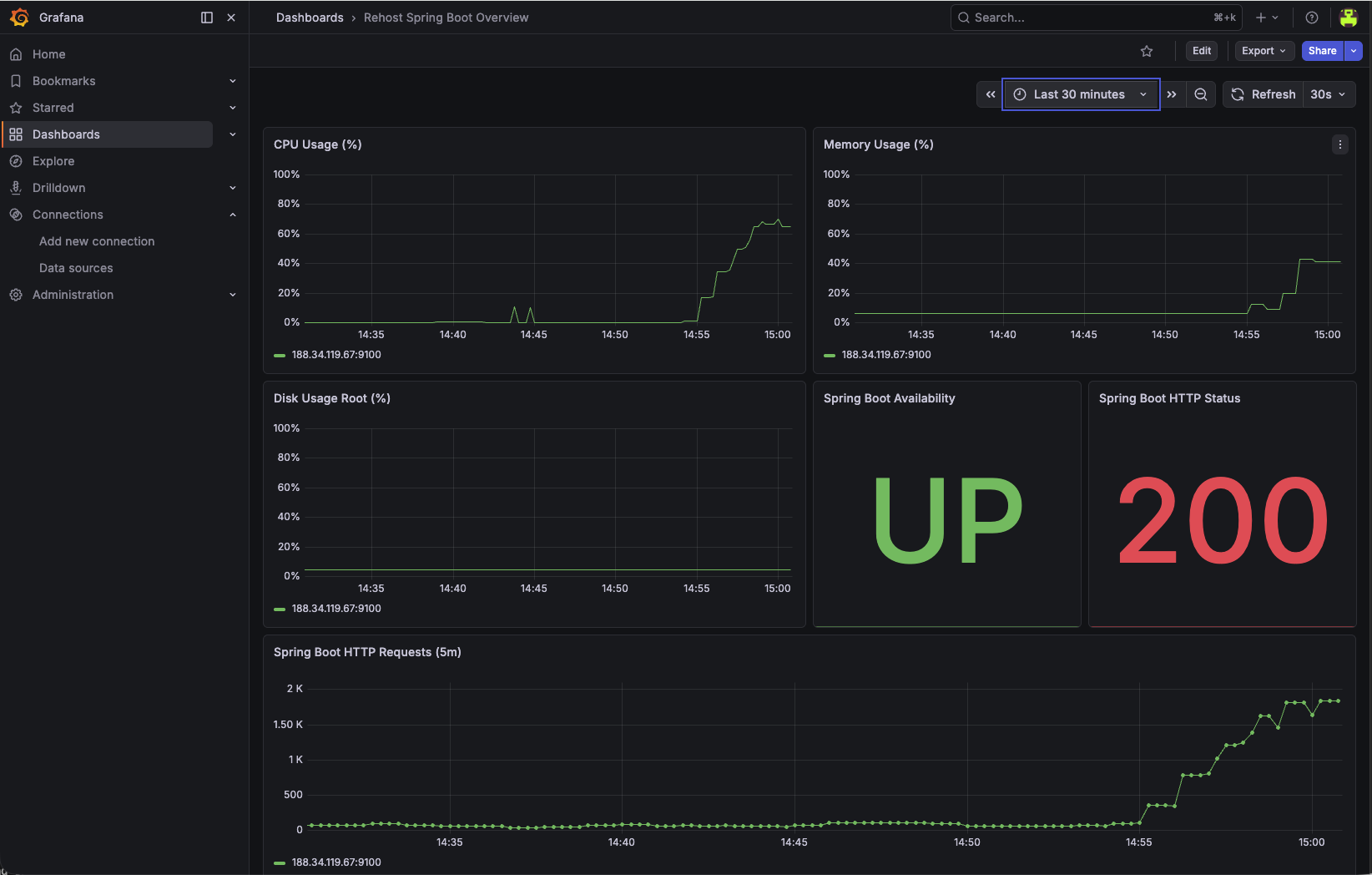
Define technical thresholds before changing capacity.
Keep thresholds workload-specific and validate with business traffic patterns.
For stateful Rehost workloads, include database signals in the same dashboard review cycle.
Use these metrics together with VM signals to avoid CPU-only or memory-only optimization decisions.
If the Rehost workload later moves its database tier to PostgreSQL Flex, include database-tier rightsizing and tuning in the same optimize cycle.
Use the offered Flex combinations and storage performance limits to assess a database-tier change. Keep the VM thresholds above workload-specific; the product catalog does not supply acceptance criteria or prove that an infrastructure change is reversible.
| Description | ID | CPU | RAM | max_connections | shared_buffers | work_mem | maintenance_work_mem | effective_cache_size |
|---|---|---|---|---|---|---|---|---|
| Small, Compute optimized | 2.4 | 2 | 4 GB | 95 | 950 MB | 14 MB | 380 MB | 2660 MB |
| Small, Memory optimized | 2.16 | 2 | 16 GB | 385 | 3950 MB | 14 MB | 1580 MB | 11060 MB |
| Medium, Compute optimized | 4.8 | 4 | 8 GB | 195 | 1950 MB | 14 MB | 780 MB | 5460 MB |
| Medium, Memory optimized | 4.32 | 4 | 32 GB | 785 | 7950 MB | 14 MB | 3180 MB | 22260 MB |
| Large, Processor optimized | 8.16 | 8 | 16 GB | 385 | 3950 MB | 14 MB | 1580 MB | 11060 MB |
| X-Large, Compute optimized | 16.32 | 16 | 32 GB | 785 | 7950 MB | 14 MB | 3180 MB | 22260 MB |
| X-Large, Memory optimized | 16.128 | 16 | 128 GB | 3170 | 31950 MB | 14 MB | 12780 MB | 89460 MB |
max_connections limit.This section is copied from the STACKIT docs automatically, several times a day. It cannot be changed here. Changes belong in the STACKIT docs.
| Description | ID | Max. IOPS | Max. throughput (MB/s) |
|---|---|---|---|
| Performance class 2 | premium-perf2-stackit | 1000 | 100 |
| Performance class 4 | premium-perf4-stackit | 2000 | 150 |
| Performance class 6 | premium-perf6-stackit | 5000 | 200 |
| Performance class 8 | premium-perf8-stackit | 10000 | 250 |
| Performance class 10 | premium-perf10-stackit | 15000 | 300 |
| Performance class 12 | premium-perf12-stackit | 20000 | 350 |
Currently, we offer three types of instances. For each type there is a different set of flavors available.
This section is copied from the STACKIT docs automatically, several times a day. It cannot be changed here. Changes belong in the STACKIT docs.
Update VM sizing in env.tfvars:
machine_type = "g3i.2"Apply and inspect plan output:
terraform plan -var-file=env.tfvarsterraform apply -var-file=env.tfvarsThen validate:
systemctl status, synthetic checks)Update VM sizing in env.tfvars:
machine_type = "g3i.4"Apply and validate with the same post-change checks.
If SLOs regress after rightsizing, roll back by restoring the previous machine_type and re-applying IaC.
Treat rollback as a standard runbook step, not as an emergency-only path.
terraform plan before apply.In Rehost scenarios, CPU and memory are only one side of rightsizing. Storage performance can also become the limiting factor.
A Block Storage performance class defines the maximum IOPS and throughput available to the complete volume. Application, database, operating-system, and backup access share this performance envelope. Select the class from measured peak demand, latency requirements, backup activity, and explicit growth headroom before creating the volume.
The following table lists currently available performance classes for the EU01 region:
| Performance class | Name | Max. IOPS | Max. Throughput (MB/s) |
|---|---|---|---|
| Performance class 0 | storage_premium_perf0 | 120 | 25 |
| Performance class 1 | storage_premium_perf1 | 500 | 50 |
| Performance class 2 | storage_premium_perf2 | 1000 | 100 |
| Performance class 4 | storage_premium_perf4 | 2000 | 150 |
| Performance class 6 | storage_premium_perf6 | 5000 | 200 |
| Performance class 8 | storage_premium_perf8 | 10000 | 250 |
| Performance class 10 | storage_premium_perf10 | 15000 | 300 |
| Performance class 12 | storage_premium_perf12 | 20000 | 350 |
| Performance class 13 | storage_premium_perf13 | 20000 | 700 |
| Performance class 14 | storage_premium_perf14 | 25000 | 400 |
| Performance class 15 | storage_premium_perf15 | 25000 | 800 |
| Performance class 16 | storage_premium_perf16 | 30000 | 450 |
| Performance class 17 | storage_premium_perf17 | 30000 | 900 |
| Performance class 18 | storage_premium_perf18 | 35000 | 500 |
| Performance class 19 | storage_premium_perf19 | 35000 | 1000 |
| Performance class 20 | storage_premium_perf20 | 40000 | 550 |
| Performance class 21 | storage_premium_perf21 | 40000 | 1100 |
| Performance class 29 | storage_premium_perf29 | 60000 | 1500 |
IOPS - Input/Output Operations per second
Throughput - Throughput in Megabytes per second
Thus, the classes used can be distinguished in detail based on the naming. Example: “Block Storage Premium - Performance Class 2” corresponds to SSD hard disks with max. 1000 IOPS and max. 100 Mbyte/s throughput.
This section is copied from the STACKIT docs automatically, several times a day. It cannot be changed here. Changes belong in the STACKIT docs.
For the Rehost baseline, the operating system, Spring Boot application, and PostgreSQL data share the boot volume. Changing its performance class therefore requires a controlled replacement target:
Use a separate data volume when storage capacity or performance must evolve independently from the VM lifecycle. To change its performance class, create a new volume in the required availability model with sufficient capacity, stop writes, migrate and verify the data, switch the attachment or mount, and retain the source volume until acceptance and rollback gates have passed.
Migrate data from Block StorageTreat storage checks as part of the same Optimize loop and validate latency, error behavior, recovery, and cost impact after any change.
This asset continues the same Spring Boot and PostgreSQL reference implementation used for provisioning, migration, cutover, and stabilization. It does not introduce another example or repository. The existing Terraform variables, Ansible configuration, Observability instance, and validation workflows remain the technical baseline for Optimize.
The Optimize extension answers one practical question: how to detect overprovisioning or underprovisioning and then change VM or storage capacity through a controlled IaC workflow.
STACKIT CMF Rehost Spring Boot repository Continue with the same Terraform and Ansible reference implementation used by the preceding Rehost migration steps. Open the repository Rehost implementation assetUse the managed STACKIT Observability stack as evidence source.
Architecture reference:
Use the dashboard to review infrastructure saturation, application health, request behavior, and alert history together before changing VM capacity.
Define technical thresholds before changing capacity.
Keep thresholds workload-specific and validate with business traffic patterns.
For stateful Rehost workloads, include database signals in the same dashboard review cycle.
Use these metrics together with VM signals to avoid CPU-only or memory-only optimization decisions.
If the Rehost workload later moves its database tier to PostgreSQL Flex, include database-tier rightsizing and tuning in the same optimize cycle.
Use the offered Flex combinations and storage performance limits to assess a database-tier change. Keep the VM thresholds above workload-specific; the product catalog does not supply acceptance criteria or prove that an infrastructure change is reversible.
| Description | ID | CPU | RAM | max_connections | shared_buffers | work_mem | maintenance_work_mem | effective_cache_size |
|---|---|---|---|---|---|---|---|---|
| Small, Compute optimized | 2.4 | 2 | 4 GB | 95 | 950 MB | 14 MB | 380 MB | 2660 MB |
| Small, Memory optimized | 2.16 | 2 | 16 GB | 385 | 3950 MB | 14 MB | 1580 MB | 11060 MB |
| Medium, Compute optimized | 4.8 | 4 | 8 GB | 195 | 1950 MB | 14 MB | 780 MB | 5460 MB |
| Medium, Memory optimized | 4.32 | 4 | 32 GB | 785 | 7950 MB | 14 MB | 3180 MB | 22260 MB |
| Large, Processor optimized | 8.16 | 8 | 16 GB | 385 | 3950 MB | 14 MB | 1580 MB | 11060 MB |
| X-Large, Compute optimized | 16.32 | 16 | 32 GB | 785 | 7950 MB | 14 MB | 3180 MB | 22260 MB |
| X-Large, Memory optimized | 16.128 | 16 | 128 GB | 3170 | 31950 MB | 14 MB | 12780 MB | 89460 MB |
max_connections limit.This section is copied from the STACKIT docs automatically, several times a day. It cannot be changed here. Changes belong in the STACKIT docs.
| Description | ID | Max. IOPS | Max. throughput (MB/s) |
|---|---|---|---|
| Performance class 2 | premium-perf2-stackit | 1000 | 100 |
| Performance class 4 | premium-perf4-stackit | 2000 | 150 |
| Performance class 6 | premium-perf6-stackit | 5000 | 200 |
| Performance class 8 | premium-perf8-stackit | 10000 | 250 |
| Performance class 10 | premium-perf10-stackit | 15000 | 300 |
| Performance class 12 | premium-perf12-stackit | 20000 | 350 |
Currently, we offer three types of instances. For each type there is a different set of flavors available.
This section is copied from the STACKIT docs automatically, several times a day. It cannot be changed here. Changes belong in the STACKIT docs.
Update VM sizing in env.tfvars:
machine_type = "g3i.2"Apply and inspect plan output:
terraform plan -var-file=env.tfvarsterraform apply -var-file=env.tfvarsThen validate:
systemctl status, synthetic checks)Update VM sizing in env.tfvars:
machine_type = "g3i.4"Apply and validate with the same post-change checks.
If SLOs regress after rightsizing, roll back by restoring the previous machine_type and re-applying IaC.
Treat rollback as a standard runbook step, not as an emergency-only path.
terraform plan before apply.In Rehost scenarios, CPU and memory are only one side of rightsizing. Storage performance can also become the limiting factor.
A Block Storage performance class defines the maximum IOPS and throughput available to the complete volume. Application, database, operating-system, and backup access share this performance envelope. Select the class from measured peak demand, latency requirements, backup activity, and explicit growth headroom before creating the volume.
The following table lists currently available performance classes for the EU01 region:
| Performance class | Name | Max. IOPS | Max. Throughput (MB/s) |
|---|---|---|---|
| Performance class 0 | storage_premium_perf0 | 120 | 25 |
| Performance class 1 | storage_premium_perf1 | 500 | 50 |
| Performance class 2 | storage_premium_perf2 | 1000 | 100 |
| Performance class 4 | storage_premium_perf4 | 2000 | 150 |
| Performance class 6 | storage_premium_perf6 | 5000 | 200 |
| Performance class 8 | storage_premium_perf8 | 10000 | 250 |
| Performance class 10 | storage_premium_perf10 | 15000 | 300 |
| Performance class 12 | storage_premium_perf12 | 20000 | 350 |
| Performance class 13 | storage_premium_perf13 | 20000 | 700 |
| Performance class 14 | storage_premium_perf14 | 25000 | 400 |
| Performance class 15 | storage_premium_perf15 | 25000 | 800 |
| Performance class 16 | storage_premium_perf16 | 30000 | 450 |
| Performance class 17 | storage_premium_perf17 | 30000 | 900 |
| Performance class 18 | storage_premium_perf18 | 35000 | 500 |
| Performance class 19 | storage_premium_perf19 | 35000 | 1000 |
| Performance class 20 | storage_premium_perf20 | 40000 | 550 |
| Performance class 21 | storage_premium_perf21 | 40000 | 1100 |
| Performance class 29 | storage_premium_perf29 | 60000 | 1500 |
IOPS - Input/Output Operations per second
Throughput - Throughput in Megabytes per second
Thus, the classes used can be distinguished in detail based on the naming. Example: “Block Storage Premium - Performance Class 2” corresponds to SSD hard disks with max. 1000 IOPS and max. 100 Mbyte/s throughput.
This section is copied from the STACKIT docs automatically, several times a day. It cannot be changed here. Changes belong in the STACKIT docs.
For the Rehost baseline, the operating system, Spring Boot application, and PostgreSQL data share the boot volume. Changing its performance class therefore requires a controlled replacement target:
Use a separate data volume when storage capacity or performance must evolve independently from the VM lifecycle. To change its performance class, create a new volume in the required availability model with sufficient capacity, stop writes, migrate and verify the data, switch the attachment or mount, and retain the source volume until acceptance and rollback gates have passed.
Migrate data from Block StorageTreat storage checks as part of the same Optimize loop and validate latency, error behavior, recovery, and cost impact after any change.
STACKIT
The sovereign European cloud provider behind the framework, delivering IaaS and PaaS from German and Austrian data centers with full digital independence.
This asset continues the same Spring Boot and PostgreSQL reference implementation used for provisioning, migration, cutover, and stabilization. It does not introduce another example or repository. The existing Terraform variables, Ansible configuration, Observability instance, and validation workflows remain the technical baseline for Optimize.
The Optimize extension answers one practical question: how to detect overprovisioning or underprovisioning and then change VM or storage capacity through a controlled IaC workflow.
STACKIT CMF Rehost Spring Boot repository Continue with the same Terraform and Ansible reference implementation used by the preceding Rehost migration steps. Open the repository Rehost implementation assetUse the managed STACKIT Observability stack as evidence source.
Architecture reference:
Use the dashboard to review infrastructure saturation, application health, request behavior, and alert history together before changing VM capacity.
Define technical thresholds before changing capacity.
Keep thresholds workload-specific and validate with business traffic patterns.
For stateful Rehost workloads, include database signals in the same dashboard review cycle.
Use these metrics together with VM signals to avoid CPU-only or memory-only optimization decisions.
If the Rehost workload later moves its database tier to PostgreSQL Flex, include database-tier rightsizing and tuning in the same optimize cycle.
Use the offered Flex combinations and storage performance limits to assess a database-tier change. Keep the VM thresholds above workload-specific; the product catalog does not supply acceptance criteria or prove that an infrastructure change is reversible.
| Description | ID | CPU | RAM | max_connections | shared_buffers | work_mem | maintenance_work_mem | effective_cache_size |
|---|---|---|---|---|---|---|---|---|
| Small, Compute optimized | 2.4 | 2 | 4 GB | 95 | 950 MB | 14 MB | 380 MB | 2660 MB |
| Small, Memory optimized | 2.16 | 2 | 16 GB | 385 | 3950 MB | 14 MB | 1580 MB | 11060 MB |
| Medium, Compute optimized | 4.8 | 4 | 8 GB | 195 | 1950 MB | 14 MB | 780 MB | 5460 MB |
| Medium, Memory optimized | 4.32 | 4 | 32 GB | 785 | 7950 MB | 14 MB | 3180 MB | 22260 MB |
| Large, Processor optimized | 8.16 | 8 | 16 GB | 385 | 3950 MB | 14 MB | 1580 MB | 11060 MB |
| X-Large, Compute optimized | 16.32 | 16 | 32 GB | 785 | 7950 MB | 14 MB | 3180 MB | 22260 MB |
| X-Large, Memory optimized | 16.128 | 16 | 128 GB | 3170 | 31950 MB | 14 MB | 12780 MB | 89460 MB |
max_connections limit.This section is copied from the STACKIT docs automatically, several times a day. It cannot be changed here. Changes belong in the STACKIT docs.
| Description | ID | Max. IOPS | Max. throughput (MB/s) |
|---|---|---|---|
| Performance class 2 | premium-perf2-stackit | 1000 | 100 |
| Performance class 4 | premium-perf4-stackit | 2000 | 150 |
| Performance class 6 | premium-perf6-stackit | 5000 | 200 |
| Performance class 8 | premium-perf8-stackit | 10000 | 250 |
| Performance class 10 | premium-perf10-stackit | 15000 | 300 |
| Performance class 12 | premium-perf12-stackit | 20000 | 350 |
Currently, we offer three types of instances. For each type there is a different set of flavors available.
This section is copied from the STACKIT docs automatically, several times a day. It cannot be changed here. Changes belong in the STACKIT docs.
Update VM sizing in env.tfvars:
machine_type = "g3i.2"Apply and inspect plan output:
terraform plan -var-file=env.tfvarsterraform apply -var-file=env.tfvarsThen validate:
systemctl status, synthetic checks)Update VM sizing in env.tfvars:
machine_type = "g3i.4"Apply and validate with the same post-change checks.
If SLOs regress after rightsizing, roll back by restoring the previous machine_type and re-applying IaC.
Treat rollback as a standard runbook step, not as an emergency-only path.
terraform plan before apply.In Rehost scenarios, CPU and memory are only one side of rightsizing. Storage performance can also become the limiting factor.
A Block Storage performance class defines the maximum IOPS and throughput available to the complete volume. Application, database, operating-system, and backup access share this performance envelope. Select the class from measured peak demand, latency requirements, backup activity, and explicit growth headroom before creating the volume.
The following table lists currently available performance classes for the EU01 region:
| Performance class | Name | Max. IOPS | Max. Throughput (MB/s) |
|---|---|---|---|
| Performance class 0 | storage_premium_perf0 | 120 | 25 |
| Performance class 1 | storage_premium_perf1 | 500 | 50 |
| Performance class 2 | storage_premium_perf2 | 1000 | 100 |
| Performance class 4 | storage_premium_perf4 | 2000 | 150 |
| Performance class 6 | storage_premium_perf6 | 5000 | 200 |
| Performance class 8 | storage_premium_perf8 | 10000 | 250 |
| Performance class 10 | storage_premium_perf10 | 15000 | 300 |
| Performance class 12 | storage_premium_perf12 | 20000 | 350 |
| Performance class 13 | storage_premium_perf13 | 20000 | 700 |
| Performance class 14 | storage_premium_perf14 | 25000 | 400 |
| Performance class 15 | storage_premium_perf15 | 25000 | 800 |
| Performance class 16 | storage_premium_perf16 | 30000 | 450 |
| Performance class 17 | storage_premium_perf17 | 30000 | 900 |
| Performance class 18 | storage_premium_perf18 | 35000 | 500 |
| Performance class 19 | storage_premium_perf19 | 35000 | 1000 |
| Performance class 20 | storage_premium_perf20 | 40000 | 550 |
| Performance class 21 | storage_premium_perf21 | 40000 | 1100 |
| Performance class 29 | storage_premium_perf29 | 60000 | 1500 |
IOPS - Input/Output Operations per second
Throughput - Throughput in Megabytes per second
Thus, the classes used can be distinguished in detail based on the naming. Example: “Block Storage Premium - Performance Class 2” corresponds to SSD hard disks with max. 1000 IOPS and max. 100 Mbyte/s throughput.
This section is copied from the STACKIT docs automatically, several times a day. It cannot be changed here. Changes belong in the STACKIT docs.
For the Rehost baseline, the operating system, Spring Boot application, and PostgreSQL data share the boot volume. Changing its performance class therefore requires a controlled replacement target:
Use a separate data volume when storage capacity or performance must evolve independently from the VM lifecycle. To change its performance class, create a new volume in the required availability model with sufficient capacity, stop writes, migrate and verify the data, switch the attachment or mount, and retain the source volume until acceptance and rollback gates have passed.
Migrate data from Block StorageTreat storage checks as part of the same Optimize loop and validate latency, error behavior, recovery, and cost impact after any change.
STACKIT
The sovereign European cloud provider behind the framework, delivering IaaS and PaaS from German and Austrian data centers with full digital independence.
This asset continues the same Spring Boot and PostgreSQL reference implementation used for provisioning, migration, cutover, and stabilization. It does not introduce another example or repository. The existing Terraform variables, Ansible configuration, Observability instance, and validation workflows remain the technical baseline for Optimize.
The Optimize extension answers one practical question: how to detect overprovisioning or underprovisioning and then change VM or storage capacity through a controlled IaC workflow.
STACKIT CMF Rehost Spring Boot repository Continue with the same Terraform and Ansible reference implementation used by the preceding Rehost migration steps. Open the repository Rehost implementation assetUse the managed STACKIT Observability stack as evidence source.
Architecture reference:
Use the dashboard to review infrastructure saturation, application health, request behavior, and alert history together before changing VM capacity.
Define technical thresholds before changing capacity.
Keep thresholds workload-specific and validate with business traffic patterns.
For stateful Rehost workloads, include database signals in the same dashboard review cycle.
Use these metrics together with VM signals to avoid CPU-only or memory-only optimization decisions.
If the Rehost workload later moves its database tier to PostgreSQL Flex, include database-tier rightsizing and tuning in the same optimize cycle.
Use the offered Flex combinations and storage performance limits to assess a database-tier change. Keep the VM thresholds above workload-specific; the product catalog does not supply acceptance criteria or prove that an infrastructure change is reversible.
| Description | ID | CPU | RAM | max_connections | shared_buffers | work_mem | maintenance_work_mem | effective_cache_size |
|---|---|---|---|---|---|---|---|---|
| Small, Compute optimized | 2.4 | 2 | 4 GB | 95 | 950 MB | 14 MB | 380 MB | 2660 MB |
| Small, Memory optimized | 2.16 | 2 | 16 GB | 385 | 3950 MB | 14 MB | 1580 MB | 11060 MB |
| Medium, Compute optimized | 4.8 | 4 | 8 GB | 195 | 1950 MB | 14 MB | 780 MB | 5460 MB |
| Medium, Memory optimized | 4.32 | 4 | 32 GB | 785 | 7950 MB | 14 MB | 3180 MB | 22260 MB |
| Large, Processor optimized | 8.16 | 8 | 16 GB | 385 | 3950 MB | 14 MB | 1580 MB | 11060 MB |
| X-Large, Compute optimized | 16.32 | 16 | 32 GB | 785 | 7950 MB | 14 MB | 3180 MB | 22260 MB |
| X-Large, Memory optimized | 16.128 | 16 | 128 GB | 3170 | 31950 MB | 14 MB | 12780 MB | 89460 MB |
max_connections limit.This section is copied from the STACKIT docs automatically, several times a day. It cannot be changed here. Changes belong in the STACKIT docs.
| Description | ID | Max. IOPS | Max. throughput (MB/s) |
|---|---|---|---|
| Performance class 2 | premium-perf2-stackit | 1000 | 100 |
| Performance class 4 | premium-perf4-stackit | 2000 | 150 |
| Performance class 6 | premium-perf6-stackit | 5000 | 200 |
| Performance class 8 | premium-perf8-stackit | 10000 | 250 |
| Performance class 10 | premium-perf10-stackit | 15000 | 300 |
| Performance class 12 | premium-perf12-stackit | 20000 | 350 |
Currently, we offer three types of instances. For each type there is a different set of flavors available.
This section is copied from the STACKIT docs automatically, several times a day. It cannot be changed here. Changes belong in the STACKIT docs.
Update VM sizing in env.tfvars:
machine_type = "g3i.2"Apply and inspect plan output:
terraform plan -var-file=env.tfvarsterraform apply -var-file=env.tfvarsThen validate:
systemctl status, synthetic checks)Update VM sizing in env.tfvars:
machine_type = "g3i.4"Apply and validate with the same post-change checks.
If SLOs regress after rightsizing, roll back by restoring the previous machine_type and re-applying IaC.
Treat rollback as a standard runbook step, not as an emergency-only path.
terraform plan before apply.In Rehost scenarios, CPU and memory are only one side of rightsizing. Storage performance can also become the limiting factor.
A Block Storage performance class defines the maximum IOPS and throughput available to the complete volume. Application, database, operating-system, and backup access share this performance envelope. Select the class from measured peak demand, latency requirements, backup activity, and explicit growth headroom before creating the volume.
The following table lists currently available performance classes for the EU01 region:
| Performance class | Name | Max. IOPS | Max. Throughput (MB/s) |
|---|---|---|---|
| Performance class 0 | storage_premium_perf0 | 120 | 25 |
| Performance class 1 | storage_premium_perf1 | 500 | 50 |
| Performance class 2 | storage_premium_perf2 | 1000 | 100 |
| Performance class 4 | storage_premium_perf4 | 2000 | 150 |
| Performance class 6 | storage_premium_perf6 | 5000 | 200 |
| Performance class 8 | storage_premium_perf8 | 10000 | 250 |
| Performance class 10 | storage_premium_perf10 | 15000 | 300 |
| Performance class 12 | storage_premium_perf12 | 20000 | 350 |
| Performance class 13 | storage_premium_perf13 | 20000 | 700 |
| Performance class 14 | storage_premium_perf14 | 25000 | 400 |
| Performance class 15 | storage_premium_perf15 | 25000 | 800 |
| Performance class 16 | storage_premium_perf16 | 30000 | 450 |
| Performance class 17 | storage_premium_perf17 | 30000 | 900 |
| Performance class 18 | storage_premium_perf18 | 35000 | 500 |
| Performance class 19 | storage_premium_perf19 | 35000 | 1000 |
| Performance class 20 | storage_premium_perf20 | 40000 | 550 |
| Performance class 21 | storage_premium_perf21 | 40000 | 1100 |
| Performance class 29 | storage_premium_perf29 | 60000 | 1500 |
IOPS - Input/Output Operations per second
Throughput - Throughput in Megabytes per second
Thus, the classes used can be distinguished in detail based on the naming. Example: “Block Storage Premium - Performance Class 2” corresponds to SSD hard disks with max. 1000 IOPS and max. 100 Mbyte/s throughput.
This section is copied from the STACKIT docs automatically, several times a day. It cannot be changed here. Changes belong in the STACKIT docs.
For the Rehost baseline, the operating system, Spring Boot application, and PostgreSQL data share the boot volume. Changing its performance class therefore requires a controlled replacement target:
Use a separate data volume when storage capacity or performance must evolve independently from the VM lifecycle. To change its performance class, create a new volume in the required availability model with sufficient capacity, stop writes, migrate and verify the data, switch the attachment or mount, and retain the source volume until acceptance and rollback gates have passed.
Migrate data from Block StorageTreat storage checks as part of the same Optimize loop and validate latency, error behavior, recovery, and cost impact after any change.
The Migration Framework defines the strategy, design, landing-zone, migration, and operations principles for Rehost workloads. This asset applies those principles to one concrete, runnable Spring Boot and PostgreSQL implementation on STACKIT.
The maintained repository is the source of truth for Terraform, Ansible, application artifacts, migration scripts, validation, and runtime configuration. This asset explains how to use that implementation without duplicating its complete source code.
STACKIT CMF Rehost Spring Boot repository Open the runnable Terraform and Ansible reference implementation for the Spring Boot and PostgreSQL Rehost path. Open the repositoryThis example represents an application Rehost path for a Spring Boot workload (Spring Music sample). The migration focus is the runtime relocation of the application to STACKIT:
systemd without changing the application runtime model.The validated baseline deliberately does not include an application load balancer, DNS switch, multiple VMs, Kubernetes, Cloud Foundry, or PostgreSQL Flex. Add those only as separately designed and tested extensions; they are not implied by this Rehost example.
To keep automation behavior consistent across CMF examples, use this common flag model in your Terraform variable set:
setup_project: create/use project context.setup_observability: enable/disable observability resources.setup_database: enable/disable optional VM-local PostgreSQL path.setup_workload: enable/disable workload installation on VM.setup_loadgen: enable/disable optional synthetic load generation.setup_dns: accepted by the shared wrapper but unsupported in this baseline.In the current Rehost repository, these map to existing switches (create_project, enable_observability, enable_local_postgresql, and load-generation related flags).
The following diagram shows the implemented and tested target, not a future high-availability variant.
Use an isolated Linux lab with Git, Terraform, Ansible, ShellCheck, SSH/SCP, curl, jq,
and PostgreSQL server/client tools including pg_config. The sample dump scripts use
runuser and the local postgres OS account and require root privileges in that lab.
When Server Backup is enabled, the cutover workflow also needs an authenticated STACKIT CLI.
Use the Terraform version that created an existing saved plan; plan files are version-specific.
Start in a parent directory without an existing checkout of the same name. This revision contains the migration workflows and declarative Observability management. Its JAR is unchanged from the artifact pinned by the Replatform reference:
umask 077 && git clone https://github.com/stackitcloud/stackit-cmf-Rehost-springboot.git && git -C stackit-cmf-Rehost-springboot checkout --detach b9225eb35c64b9ef4761c208fadb9a2356431793 && test -f stackit-cmf-Rehost-springboot/scripts/run_cutover.sh && cd stackit-cmf-Rehost-springboot && printf '%s\n' "Workspace ready. Continue from this Rehost checkout." || { printf '%s\n' "Preparation failed. Resolve the error before continuing." >&2 false }Run the following steps from that checkout only after preparation succeeds. Preserve an existing checkout, state and evidence rather than replacing them. Keep credentials, plans, state, dumps, inventory and evidence private and outside version control; do not enable shell tracing.
Create the private variable file only when it does not already exist:
umask 077test -e env.tfvars || cp env.tfvars.example env.tfvarschmod 600 env.tfvarsEdit the file before planning. Configure the approved existing project or project-creation scope,
service-account key path, SSH key pair, available image, availability zone, VM flavor and storage.
Restrict SSH and application ingress to the source CIDRs actually observed on the target path.
Verify the SSH host key through a trusted channel before migration scripts use strict host checking.
Set SSH_KEY and SSH_USER for those scripts when they differ from ~/.ssh/id_rsa and ubuntu;
keep them consistent with Terraform’s private_ssh_key_path and ssh_user.
Enable VM-local PostgreSQL, Observability and Server Backup for this walkthrough. For the initial
runtime deployment, leave postgresql_restore_after_copy = false and the source dump path empty:
provisioning must not import the source before rehearsal and cutover approval. Supply the database
password through the approved secret mechanism as TF_VAR_postgresql_app_password and retain it
securely for subsequent plans; do not put it in the variable file, shell history or documentation.
Confirm permissions, quota, cost approval and the private Terraform backend before initialization. This workflow assumes a prepared execution host, not a complete lab installation procedure.
Create a custom-format source dump and record its SHA-256 checksum, expected row count, and a workload-specific deterministic fingerprint. The repository includes a reproducible eight-row sample:
./scripts/create_source_dump.sh./scripts/validate_source_dump.shThe validation script restores into a separate local PostgreSQL cluster before the dump can enter a migration rehearsal. These scripts generate the bundled sample in temporary local clusters; they do not export a running application or the STACKIT VM. Use a fresh artifact directory and do not overwrite a dump already approved for migration. For a real source, export it under the agreed write-freeze procedure and record equivalent checksum, count and fingerprint evidence.
Configure an existing STACKIT project or project creation, restrict SSH and application ingress to
approved source CIDRs, and pass the database password through TF_VAR_postgresql_app_password rather
than a variable file. Review a saved plan before apply.
terraform init && ./scripts/check.sh && terraform plan -input=false -var-file=env.tfvars -out=tfplanStop if initialization, checks or planning fail. Review resource changes, target project, ingress, cost and the disabled initial restore before explicitly applying that saved plan:
terraform apply tfplanTerraform runs Ansible after provisioning. A successful apply proves completion of that orchestration, not acceptance of migrated data. Check the runtime before beginning rehearsal:
./scripts/validate_deployment.shRun the rehearsal against a temporary database on the target VM:
./scripts/run_migration_rehearsal.shThe rehearsal checks the source evidence, restores the dump, compares row count and fingerprint, and
removes its temporary database without changing the production springmusic database.
Set the expected source evidence in env.tfvars:
enable_local_postgresql = truepostgresql_source_dump_local_path = "artifacts/source-postgresql.dump"postgresql_restore_after_copy = truepostgresql_expected_album_count = 8postgresql_expected_album_fingerprint = "<source-fingerprint>"Then execute the explicit approval gate:
./scripts/run_cutover.sh --confirmThe script requires a fully available Server Backup no older than 24 hours, creates a saved Terraform plan that replaces only the Ansible orchestration resource, rejects unrelated infrastructure changes, applies the restore, validates data and runtime behavior, and requires a final no-op Terraform plan. Retries of the same source-dump hash preserve the original database rollback point.
Validation checks the source row count and fingerprint, table ownership, a transactionally rolled-back write as the application role, application reachability, services, and the protected rollback dump.
./scripts/validate_migration.sh./scripts/validate_deployment.sh./scripts/verify_rollback.shIf an approved rollback trigger is met during the rollback window, preserve the current target database and restore the original pre-cutover dump:
./scripts/rollback_postgresql.sh --confirmWith enable_server_backup = true, Terraform enables STACKIT Server Backup and a daily schedule for
the VM boot volume. The default retention is 14 days. Cutover requires a fully available backup no older
than 24 hours. Backup creation and status were validated against the real target; an in-place Server
Backup restore remains a disruptive disaster-recovery operation and must be rehearsed in a separate
recovery environment.
The Server Backup complements the PostgreSQL pre-restore dump. It does not replace database-level consistency checks or the application rollback procedure.
Follow workspace preparation, private target configuration, source evidence and reviewed provisioning
in that order. Rehearse before the approved cutover and retain the acceptance evidence afterwards.
The repository scripts invoke terraform explicitly; an OpenTofu-only execution host needs a
separately reviewed adaptation, not just replacement of commands in this page.
The implementation provisions STACKIT Observability and scrapes node exporter. The Grafana provider
manages the included dashboard in the SCF Rehost folder with the existing Thanos datasource,
waiting for instance readiness instead of silently skipping dashboard creation.
Verify live VM, Spring Boot and PostgreSQL metrics through grafana_dashboard_url, then require a
no-op plan. Seven panels cover the active baseline; the synthetic request panel is included only
when the local load generator is enabled. Synthetic requests do not represent all application traffic.
The deployment validation also checks exporter metrics and service health after apply and database restore.
Initial Grafana admin credentials remain a temporary authentication dependency. Protect state and saved plans. Notification receivers, alert-routing ownership, application logs and distributed tracing require separate configuration and acceptance before production use.
This example can be run in two valid setup modes.
create_project = false and project_id = "...") and the service account JSON configured for that landing zone scope.create_project = true and provide parent_container_id with an existing folder/container where the service account has sufficient permissions.For landing-zone design guidance, see Application Landing Zone.
Use this as a minimal starting point in env.tfvars.
create_project = truetarget_project_name = "cmf-rehost-springboot"target_project_owner_email = "owner@example.com"parent_container_id = "cmf-xxxxxxxx"service_account_key_path = "~/.ssh/cmf-sa.json"public_ssh_key_path = "~/.ssh/id_rsa.pub"private_ssh_key_path = "~/.ssh/id_rsa"availability_zone = "eu01-1"machine_type = "g2i.2"ssh_allowed_cidr = "203.0.113.10/32"app_allowed_cidr = "203.0.113.10/32"enable_local_postgresql = trueenable_observability = trueenable_server_backup = trueansible/files/springboot-app.jarjar_local_path points to the same file.jar_local_path.When the artifact changes, Terraform detects the checksum difference and re-runs the Ansible deployment step.
Every rehearsal, cutover, and rollback writes an evidence.env file below
artifacts/evidence/<timestamp>-<mode>/. Accept a cutover only when the evidence records the expected
checksum, row count, fingerprint, target VM, successful runtime validation, and final Terraform no-op.
./scripts/validate_migration.sh./scripts/validate_deployment.shterraform plan -var-file=env.tfvars -detailed-exitcodeUse the same approved source path, restore flag, expected count and fingerprint as the completed
cutover. Exit code 0 means no changes, 2 means changes are proposed, and 1 means an error.
A plan alone is not proof of apply. The cutover workflow records status=passed and
terraform_noop=true only after applying its saved plan and completing data and runtime validation.
The Replatform reference reuses this repository’s pinned Spring Music JAR and sample-data generator. Its sample walkthrough therefore needs this checkout and validated dump artifacts, but not a newly provisioned Rehost VM. Do not create another VM solely to generate the local sample.
For an actual migration from the Rehost VM to SKE and PostgreSQL Flex, verify that the VM is currently healthy, freeze its application writes, export its real PostgreSQL database and qualify that export. A historical successful Rehost apply does not establish current reachability or make the local sample equivalent to live VM data. Source export, acceptance and source failback need their own approved procedure.
Lukas WeberrußHead of STACKIT Cloud Migration Framework · STACKITOwnerActive 10 of the last 12 weeks · 47 updateswww.linkedin.com/in/lukas-weberruß-a360b081Lukas WeberrußHead of STACKIT Cloud Migration Framework · STACKITOwnerActive 10 of the last 12 weeks · 47 updatesSTACKITwww.linkedin.com/in/lukas-weberruß-a360b081Contributed in STACKITLukas WeberrußLukas WeberrußHead of STACKIT Cloud Migration Framework · STACKITOwnerActive 10 of the last 12 weeks · 47 updatesSTACKITwww.linkedin.com/in/lukas-weberruß-a360b081
· Oct 4, 2026