Software
STACKIT Landing Zone Configurator
STACKIT
Last updated on


Guide Application Owners from a published Configurator template through project ordering, Plan review, deployment, and handover to workload migration.
Use discovery findings and the chosen migration strategy to identify the project environment, network relationships, service needs, and owning team.
Application landing zones are not designed in isolation. They require validated discovery input for dependencies, data sensitivity, runtime behavior, and operational constraints.
Typical discovery-driven design inputs:
STACKIT
The sovereign European cloud provider behind the framework, delivering IaaS and PaaS from its own data centers in Germany and Austria.
Open the hosted Configurator and establish the context for the work before choosing a configuration or project offering.
| Confirm | Platform Engineer | Application Owner |
|---|---|---|
| Working environment | Select the organization and platform workspace | Select the workspace offering the application’s project templates |
| Responsibility | Identify the platform owner and reviewers | Identify the application owner and platform contact |
| Access | Confirm configuration, publication, and execution responsibilities | Confirm the available catalog and application execution path |
| First task | Create or reopen the platform configuration | Find the appropriate published project template |
Ready to continue: The team knows where it is working, who owns the result, and which delivery workflow to follow.
Open the ConfiguratorUse a published project template as the reviewed platform offering. Identify its version, fixed settings, allowed parameters, and intended target before placing the order.
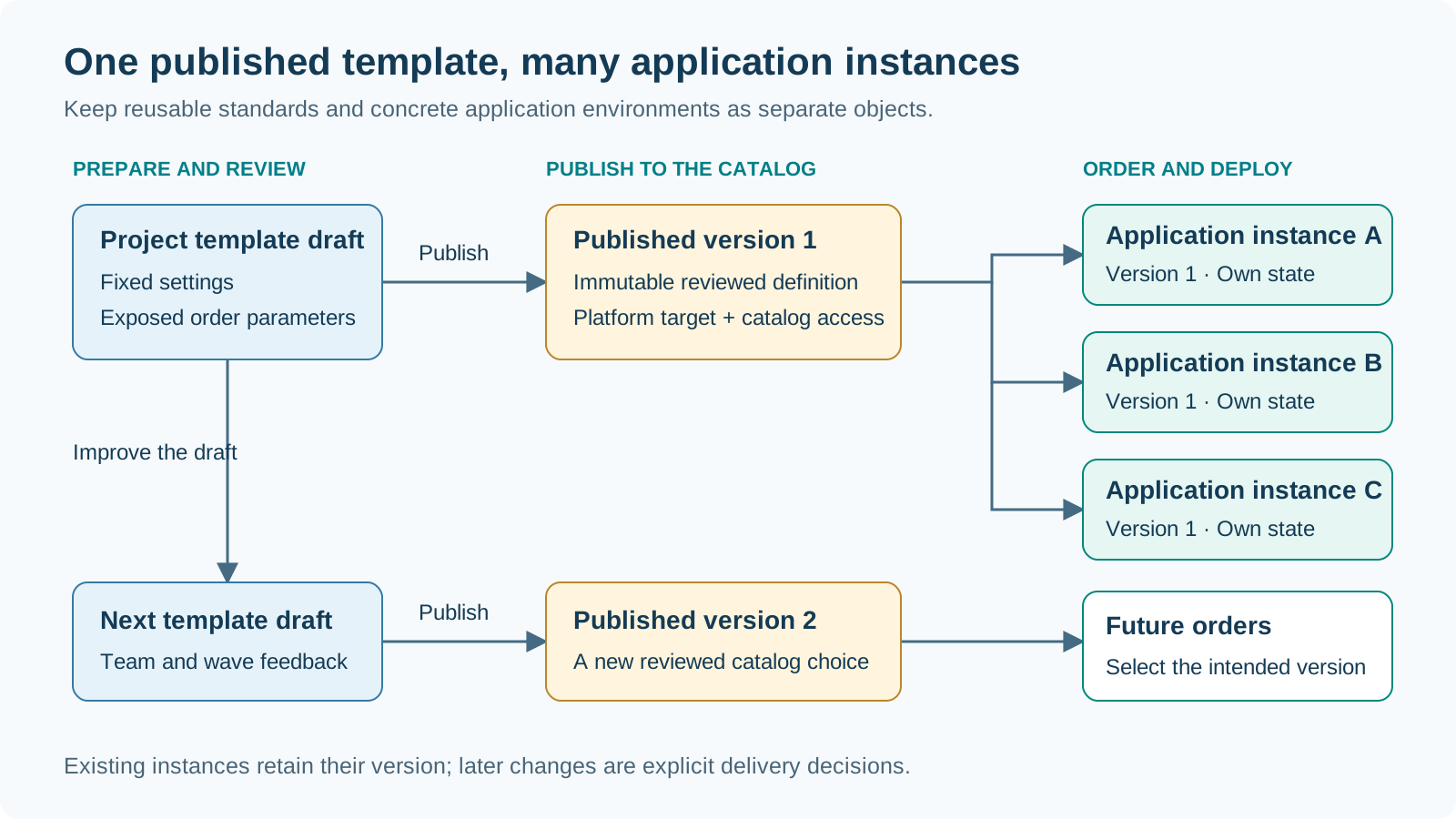
An Application Owner selects a published template available in their working environment. They review its platform target and fixed settings, enter the exposed project parameters, and place an order. The order identifies the selected version and the intended application environment.
| Selection criterion | What to check in the offering |
|---|---|
| Workload fit | Project type and service baseline match the application delivery plan |
| Platform relationship | Region and network relationship match the intended target architecture |
| Version and settings | The published version and its fixed values are the baseline you want to use |
| Application choices | The exposed parameters let you describe the concrete project environment |
Decision: Select one offering and version for the intended application environment, then provide the project-specific values.
Use the parameters exposed by the selected template to describe this particular application environment. For example, a finance application may need a clearly named development project before its production environment is delivered.
| Review point | Application Owner action | Illustrative value |
|---|---|---|
| Project identity | Choose a recognizable project name and abbreviation | Finance Development / fin-dev |
| Exposed choices | Set the parameters offered by the template | Development environment, when exposed |
| Inherited baseline | Review the fixed region, network, and service settings | The corporate baseline chosen by the platform team |
| Responsibility | Verify the intended owner and team contact | The finance application team |
Output: A complete set of project values reviewed against the selected template version. Use the same identity and environment description in the later workload runbook.
STACKIT
The sovereign European cloud provider behind the framework, delivering IaaS and PaaS from its own data centers in Germany and Austria.
An order turns a reusable catalog offering into a concrete application instance with a traceable delivery record.
Output: An identifiable application order binding the selected version, project values, and delivery status. Use that order when following jobs and coordinating the handover.
Follow the order’s Plan and use its resource preview to review the intended application environment before starting Apply.
| Plan review | Application Owner decision |
|---|---|
| Project and environment | Confirm the project identity and intended application environment |
| Region and networking | Confirm the platform target and network relationship |
| Service baseline | Confirm the services and access arrangements chosen for this project |
| Resource changes | Review the proposed additions, changes, replacements, and deletions |
Decision: Explicitly start Apply of the reviewed saved Plan through the authorized execution path, then follow the job to its result.
Turn the reviewed resource preview into an explicit deployment decision.
Next checkpoint: Validate the project and agreed access, then pass the environment references to the workload delivery team.
STACKIT
The sovereign European cloud provider behind the framework, delivering IaaS and PaaS from its own data centers in Germany and Austria.
Accept the delivered environment against the order and the requirements for workload delivery. Application instances have their own lifecycle and state, separate from the shared platform.
| Acceptance check | Record for the handover |
|---|---|
| Delivery result | Application instance and deployment reference |
| Project and ownership | Project reference, owning team, and operational contact |
| Network and access | Agreed network references and verified access for the intended users |
| Services and next stage | Available service references and the workload delivery owner |
Output: An accepted application environment and a handover record the workload team can use without rediscovering the platform decisions.
STACKIT
The sovereign European cloud provider behind the framework, delivering IaaS and PaaS from its own data centers in Germany and Austria.
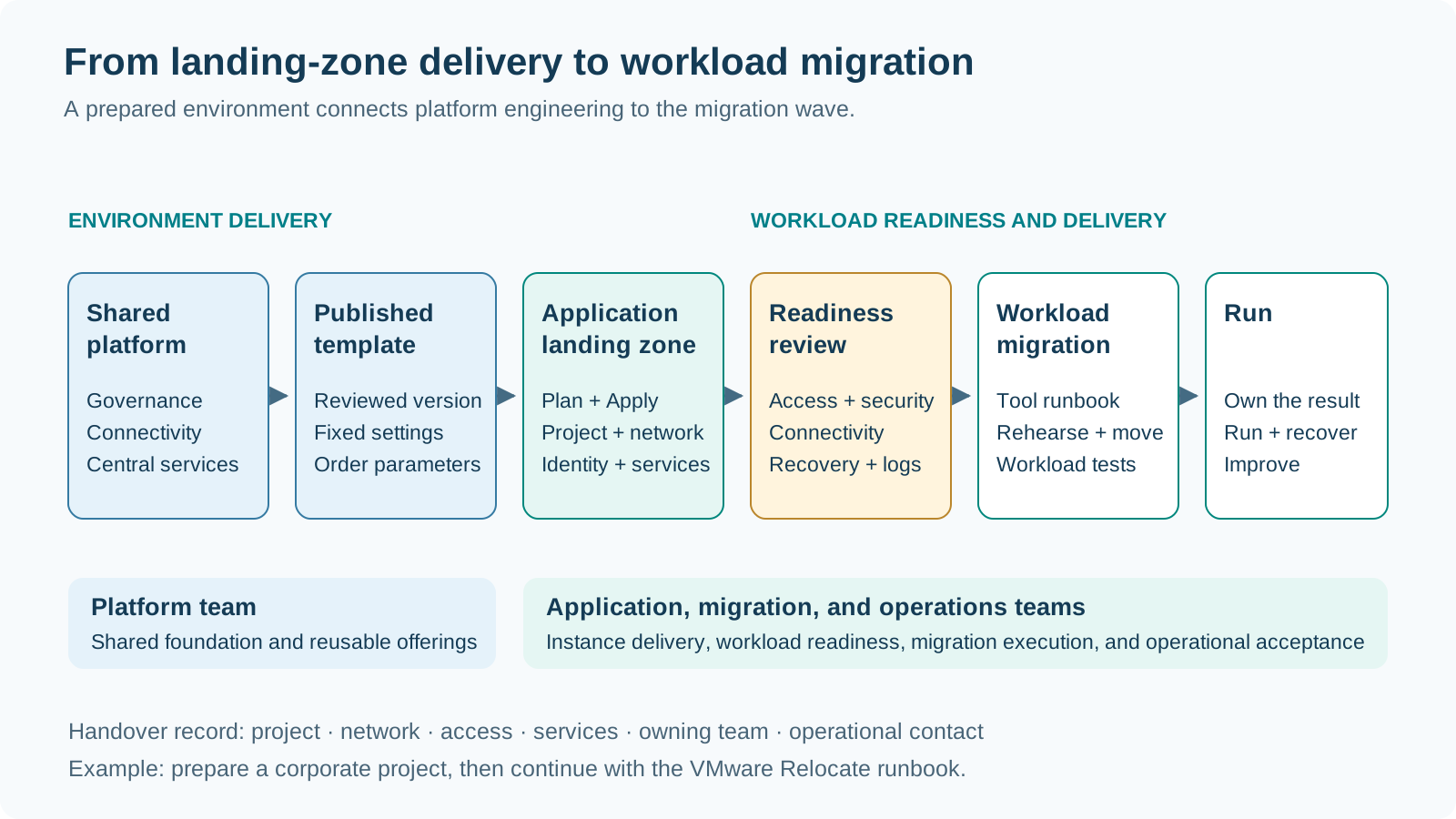
The Application Landing Zone is the target environment for the next delivery stage. Bring its project, network, identity, and service references into the workload runbook. Review workload-specific access, connectivity, observability, and recovery arrangements with the migration team before starting the wave.
For VMware Relocate, connect the prepared environment to the existing VM landing-zone and migration-tool runbooks. For other workload types, use the relevant target architecture and delivery workflow. Keep the environment acceptance and workload acceptance as identifiable milestones with named owners.
VM Application Landing Zone for RelocateSTACKIT
The sovereign European cloud provider behind the framework, delivering IaaS and PaaS from its own data centers in Germany and Austria.
The Platform Landing Zone supplies organization-wide governance, connectivity, identity, audit, and automation capabilities. The STACKIT Landing Zone Accelerator then creates one Application Landing Zone project for the workload and environment. Security Groups form an explicit manual approval gate before migration tooling or VMs enter that project.
The boundary is deliberate:
STACKIT
The sovereign European cloud provider behind the framework, delivering IaaS and PaaS from its own data centers in Germany and Austria.
Use instance and job history to retain the relationship between configuration, selected template version, execution, and outcome. Review drift as a separate maintenance activity. Treat a version change as a reviewed delivery decision, and use an explicit deletion workflow when retiring an application environment.
Feed lessons from pilot workloads and migration waves into the next platform configuration and template versions. This closes the loop from platform standards to application delivery and back into continuous improvement.
| Lifecycle activity | Review with the responsible team | Retain |
|---|---|---|
| Observe and investigate | Check instance status, job results, and drift findings | Instance and execution references |
| Improve the offering | Bring recurring application needs into the next template draft | Feedback, design decision, and template owner |
| Plan a change | Agree the desired version and resource changes | Reviewed Plan and explicit delivery decision |
| Retire the environment | Confirm application dependencies and the deletion decision | Retirement record and operational handover |
Outcome: A repeatable lifecycle in which the current environment stays understandable and improvements become reusable for the next application team.
Lukas WeberrußHead of STACKIT Cloud Migration Framework · STACKITOwnerActive 12 of the last 12 weeks · 58 updateswww.linkedin.com/in/lukas-weberruß-a360b081Lukas WeberrußHead of STACKIT Cloud Migration Framework · STACKITOwnerActive 12 of the last 12 weeks · 58 updatesSTACKITwww.linkedin.com/in/lukas-weberruß-a360b081Contributed in STACKITLukas WeberrußLukas WeberrußHead of STACKIT Cloud Migration Framework · STACKITOwnerActive 12 of the last 12 weeks · 58 updatesSTACKITwww.linkedin.com/in/lukas-weberruß-a360b081
· Nov 10, 2026