Overview
Section titled “Overview”The STACKIT Landing Zone Configurator turns reusable infrastructure building blocks into a guided workflow for platform and application teams. Platform Engineers configure the shared foundation and publish project templates. Application Owners use those templates to provision their Application Landing Zones through a common catalog.
The result is a repeatable path from platform design to migration-ready application environments: shared standards, visible ownership, reviewed changes, and explicit deployment decisions.
Open the Landing Zone Configurator Use the hosted Configurator to prepare your platform foundation and application landing zones. Open the documentationAccelerator and Configurator
Section titled “Accelerator and Configurator”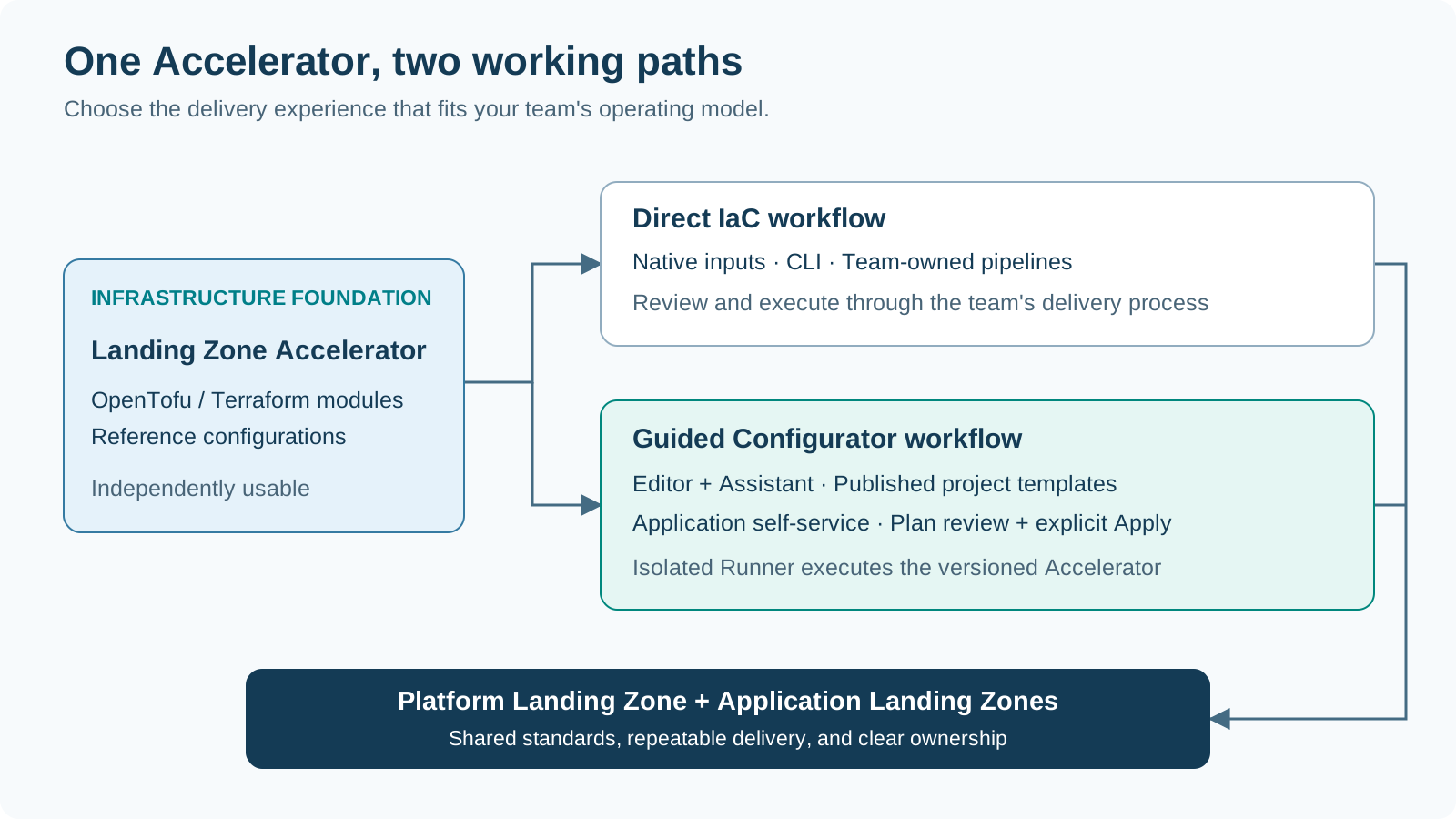
The Landing Zone Accelerator supplies the OpenTofu/Terraform modules and reference configurations. It is the infrastructure foundation for governance, identity, networking, shared services, and application projects.
The Landing Zone Configurator adds the working experience around that foundation: a visual editor, an Assistant, versioned project templates, and controlled infrastructure execution. Both direct IaC use and the guided Configurator workflow build on the Accelerator. Teams choose the working approach that fits their operating model.
Explore the Landing Zone AcceleratorHow the Configurator works
Section titled “How the Configurator works”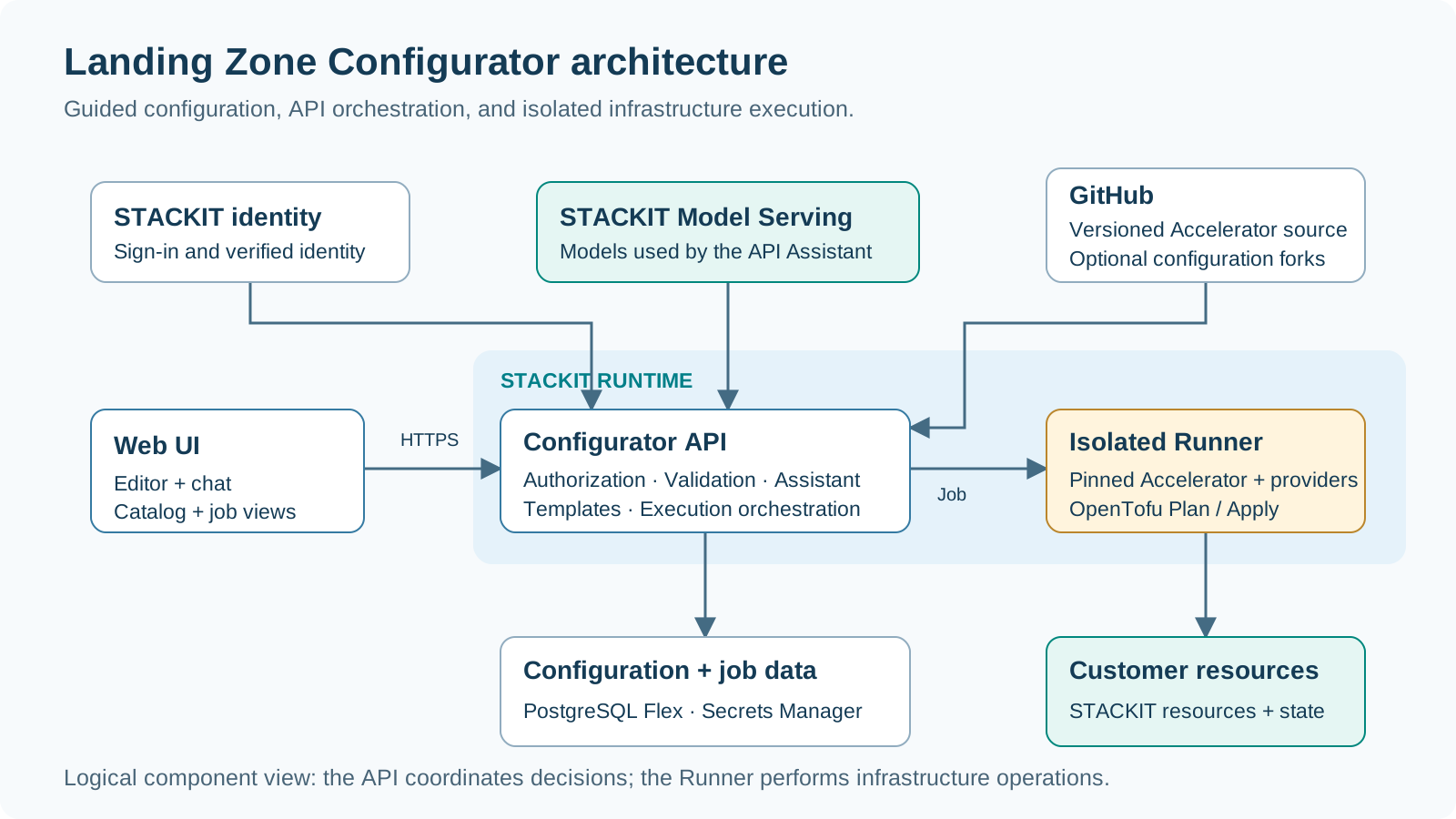
The browser brings editor, chat, catalog, and job views together. The Configurator API coordinates identity, validation, Assistant proposals, versioned templates, and deployment jobs. STACKIT Model Serving supplies the models used by the Assistant.
An isolated Runner performs the authorized infrastructure operation with the versioned Accelerator. Configuration and job records support continuity across the workflow, while technical credentials are handled through the separate credential-management path.
Roles and responsibilities
Section titled “Roles and responsibilities”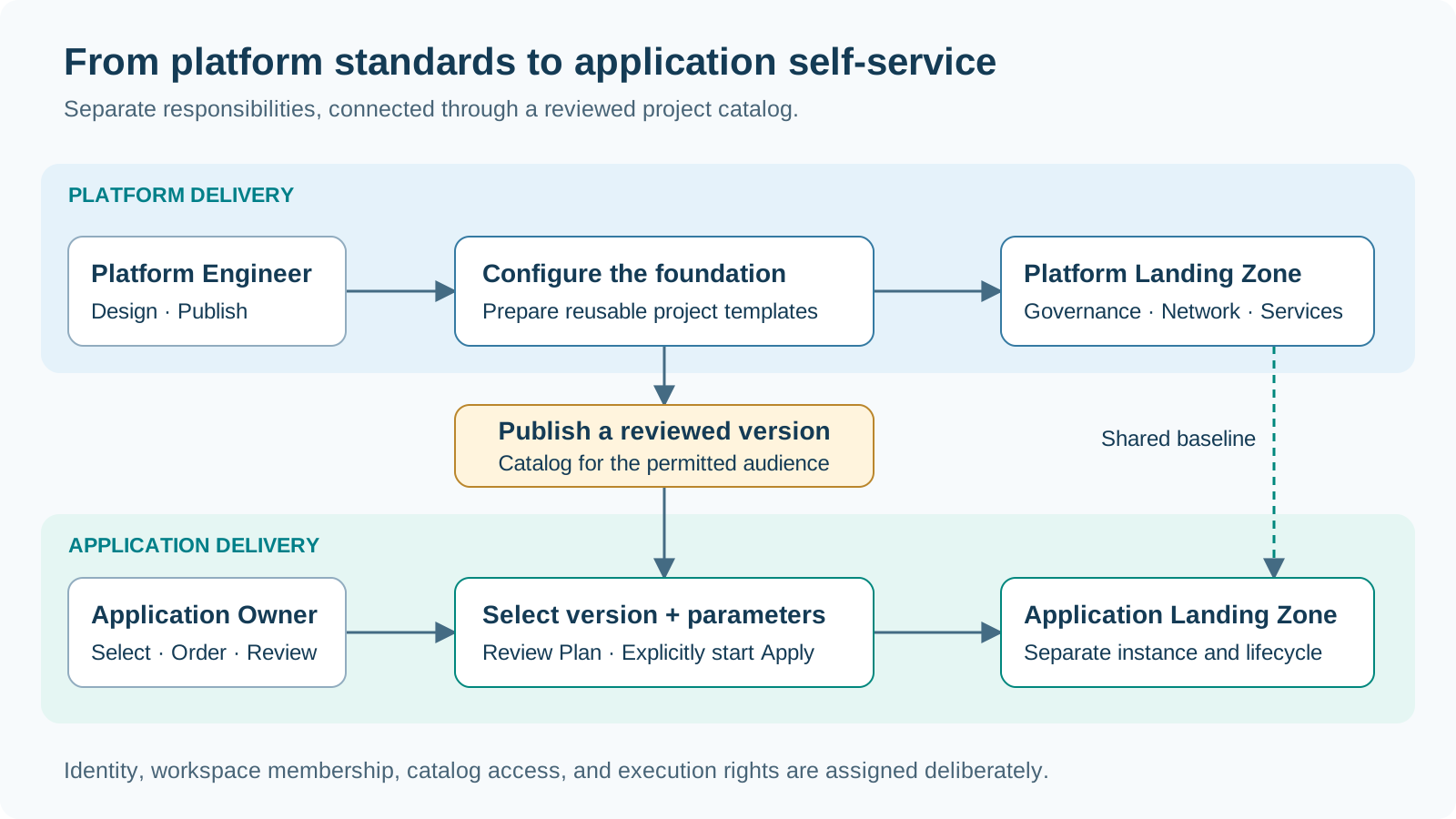
| Responsibility | Platform Engineer | Application Owner |
|---|---|---|
| Design shared governance, networks, and platform services | Defines and maintains the baseline | Provides workload requirements |
| Prepare reusable application project templates | Sets fixed values and exposed parameters | Provides feedback from application delivery |
| Publish reviewed template versions | Publishes versions for the permitted audience | Selects an available version |
| Request an Application Landing Zone | Enables the catalog and its target bindings | Supplies the project parameters and places the order |
| Review and execute changes | Reviews platform changes with the authorized execution path | Reviews and starts authorized application deployment |
| Accept the environment and hand it into operations | Owns the shared platform baseline | Owns the application’s environment and workload handover |
Select the organization and working environment for the task. STACKIT sign-in establishes identity; workspace membership, catalog access, and technical execution permissions establish what each person can do. Assign membership administration and credential delegation to the appropriate responsible people.
Start in your workspace
Section titled “Start in your workspace”Open the hosted Configurator and establish the context for the work before choosing a configuration or project offering.
| Confirm | Platform Engineer | Application Owner |
|---|---|---|
| Working environment | Select the organization and platform workspace | Select the workspace offering the application’s project templates |
| Responsibility | Identify the platform owner and reviewers | Identify the application owner and platform contact |
| Access | Confirm configuration, publication, and execution responsibilities | Confirm the available catalog and application execution path |
| First task | Create or reopen the platform configuration | Find the appropriate published project template |
Ready to continue: The team knows where it is working, who owns the result, and which delivery workflow to follow.
Open the ConfiguratorConfigure the platform
Section titled “Configure the platform”Start with a reference configuration that matches your target architecture: a small standalone foundation, shared hub-and-spoke connectivity, or a topology with separate organizational, environment, tenant, or regional domains.
Use the editor to review foundations, folders, networking, platform services, project templates, and operations settings. Work from the enterprise ownership model, address plan, security requirements, and migration discovery findings. Select the capabilities needed for the organization, then review the resulting configuration as a whole.
Configuration decisions
Section titled “Configuration decisions”| Editor focus | Decisions to capture |
|---|---|
| Foundations and folders | Organization, ownership, project structure, and environment boundaries |
| Networking | Regions, Network Areas, address plan, DNS, and connectivity relationships |
| Shared platform services | The central services needed by application and operations teams |
| Project templates | Reusable project types, fixed settings, and application parameters |
| Operations and review | Delivery ownership, execution context, and configuration consistency |
Output: A coherent platform draft connecting the reference topology to the organization’s requirements. Save the reviewed configuration as the basis for platform delivery and template preparation.
Set the platform mandate
Section titled “Set the platform mandate”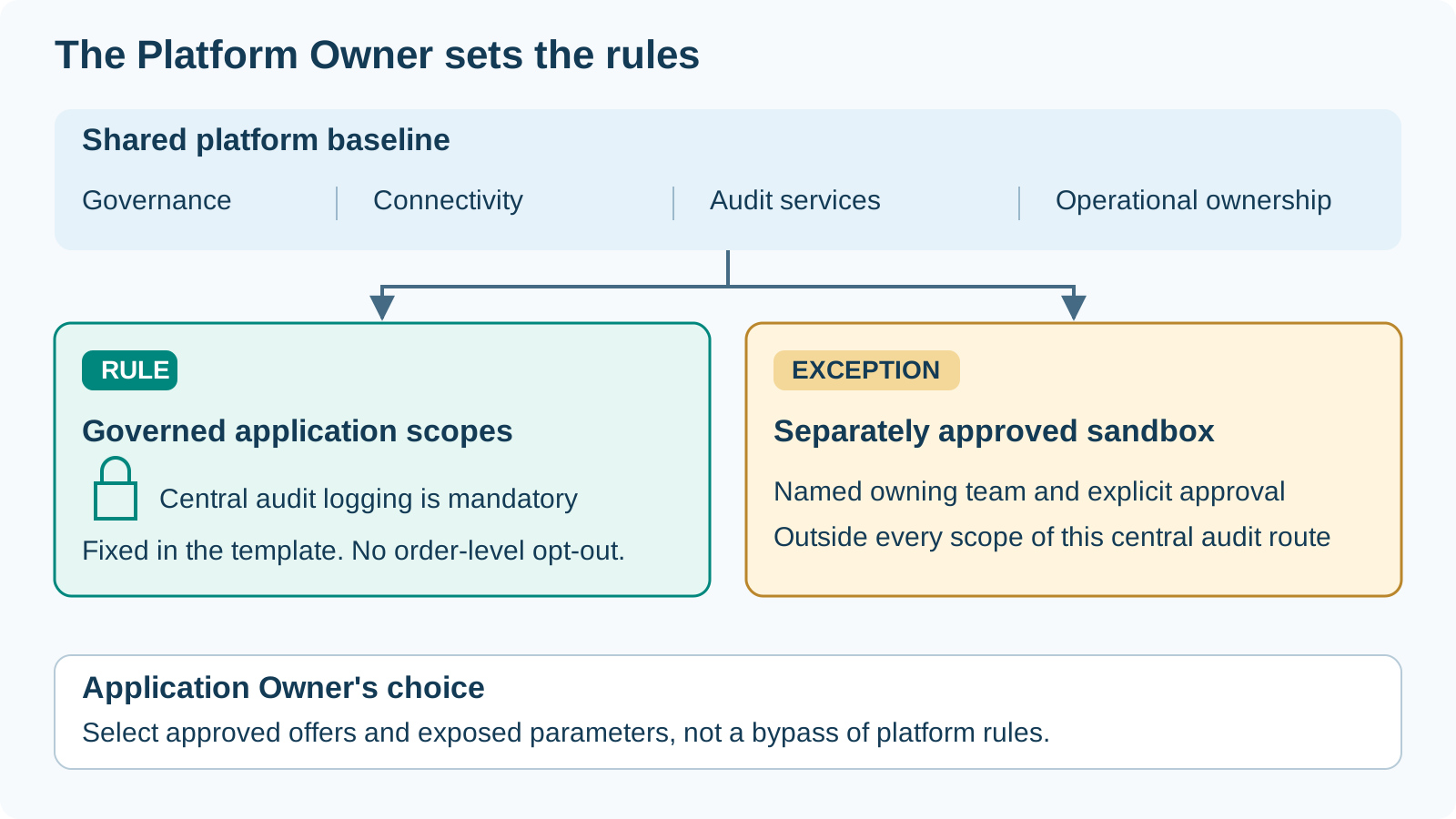
The Platform Owner decides the platform’s operating rules; Platform Engineers translate them into a reviewed Configurator configuration. This is an ownership responsibility, not an additional Configurator login role.
Use audit logging as the running example: a governed application environment must send its STACKIT control-plane audit events to the central platform. An experimental sandbox may sit outside that collection scope when the Platform Owner explicitly approves the exception.
| Platform decision | Result to capture in the Configurator workflow |
|---|---|
| What is shared? | Governance, connectivity, central audit services and operational responsibility |
| What is mandatory? | Application folders or projects covered by the central audit policy |
| Where is experimentation allowed? | A separately approved sandbox scope and its owning team |
| What can an Application Owner choose? | Approved project offers and exposed parameters, not a bypass of platform rules |
Demo question: How does the platform make the governed path repeatable while keeping the sandbox exception deliberate?
Choose the platform topology in the Configurator
Section titled “Choose the platform topology in the Configurator”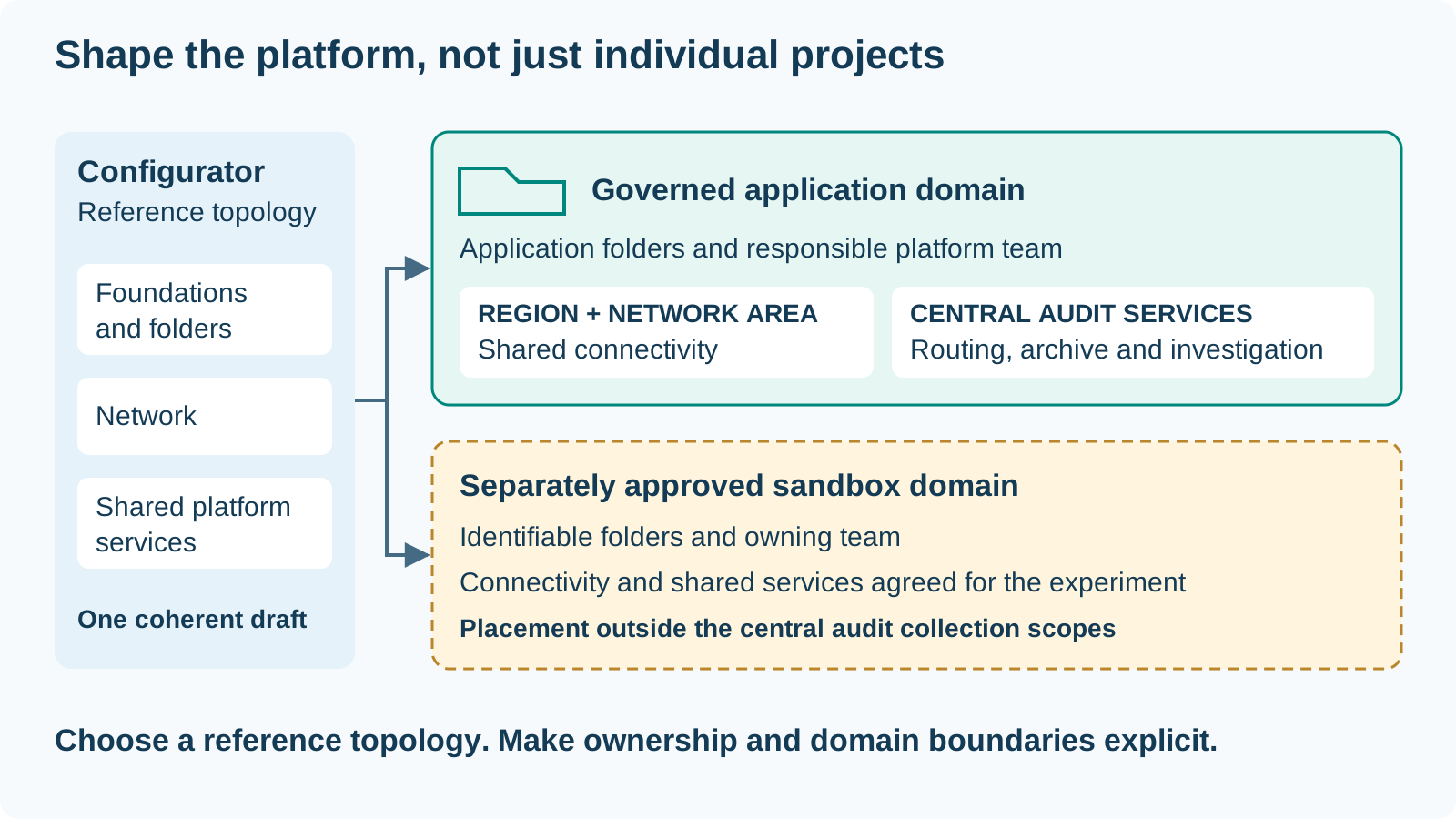
Select the reference configuration in the Configurator, then adapt it to the platform mandate rather than treating the example as the final design.
| Editor decision | Governed application path | Approved sandbox path |
|---|---|---|
| Foundations and folders | Identify the application domain and its responsible platform team | Keep the experimental domain separately identifiable |
| Network | Choose the region, shared Network Area and connectivity relationships | Choose the connectivity appropriate to the experiment |
| Platform services | Prepare central audit routing, archive and investigation | Record which shared services the sandbox is intended to use |
Output: A platform draft with visible application and sandbox boundaries. Next, configure the central services and the audit collection scope.
Define mandatory audit logging and sandbox scope
Section titled “Define mandatory audit logging and sandbox scope”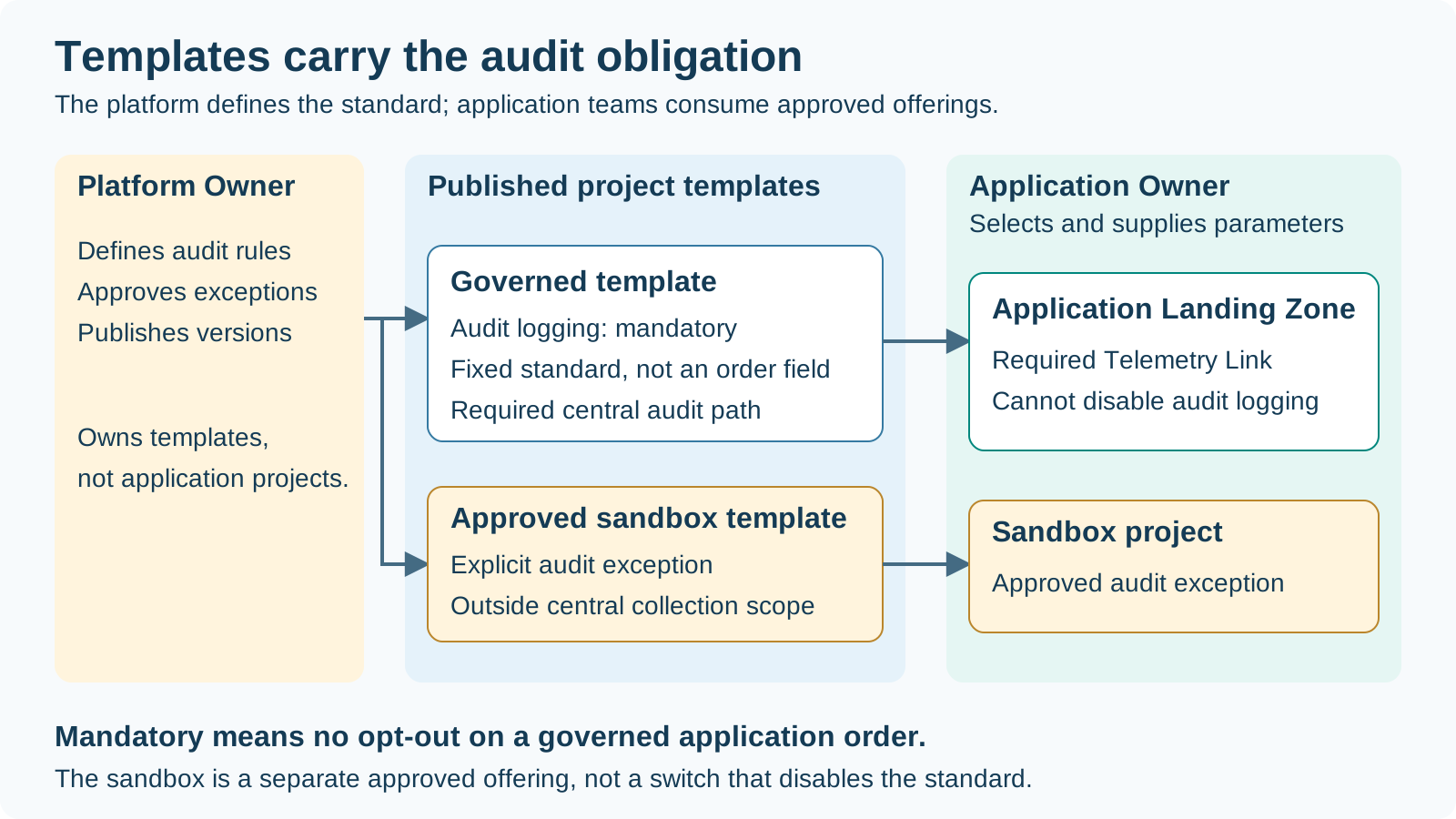
The Platform Owner translates the audit rule into the approved project template. For the governed offering, the Telemetry Link and its central destination are part of the fixed standard, not optional order parameters. The Application Owner consumes the published version and cannot disable mandatory audit logging.
| Offering | Template-defined rule | Application Owner choice |
|---|---|---|
| Governed application project | Required Telemetry Link and central audit path | Supply exposed parameters; no audit opt-out |
| Approved sandbox | Explicit exception with placement outside central collection scope | Select this separate offering only when approved for the team |
An organization-wide Telemetry Link covers sandbox projects in that organization too. To demonstrate an exempt sandbox, use the selected folder/project scope: an included parent scope still includes its projects. A sandbox label is not an audit opt-out.
Decision: Keep the audit obligation in the platform-owned template and target placement. Do not expose it as a per-order “disable audit logging” choice. Record the approved exception, responsible team and review point alongside the configuration.
Trace the central audit logging path
Section titled “Trace the central audit logging path”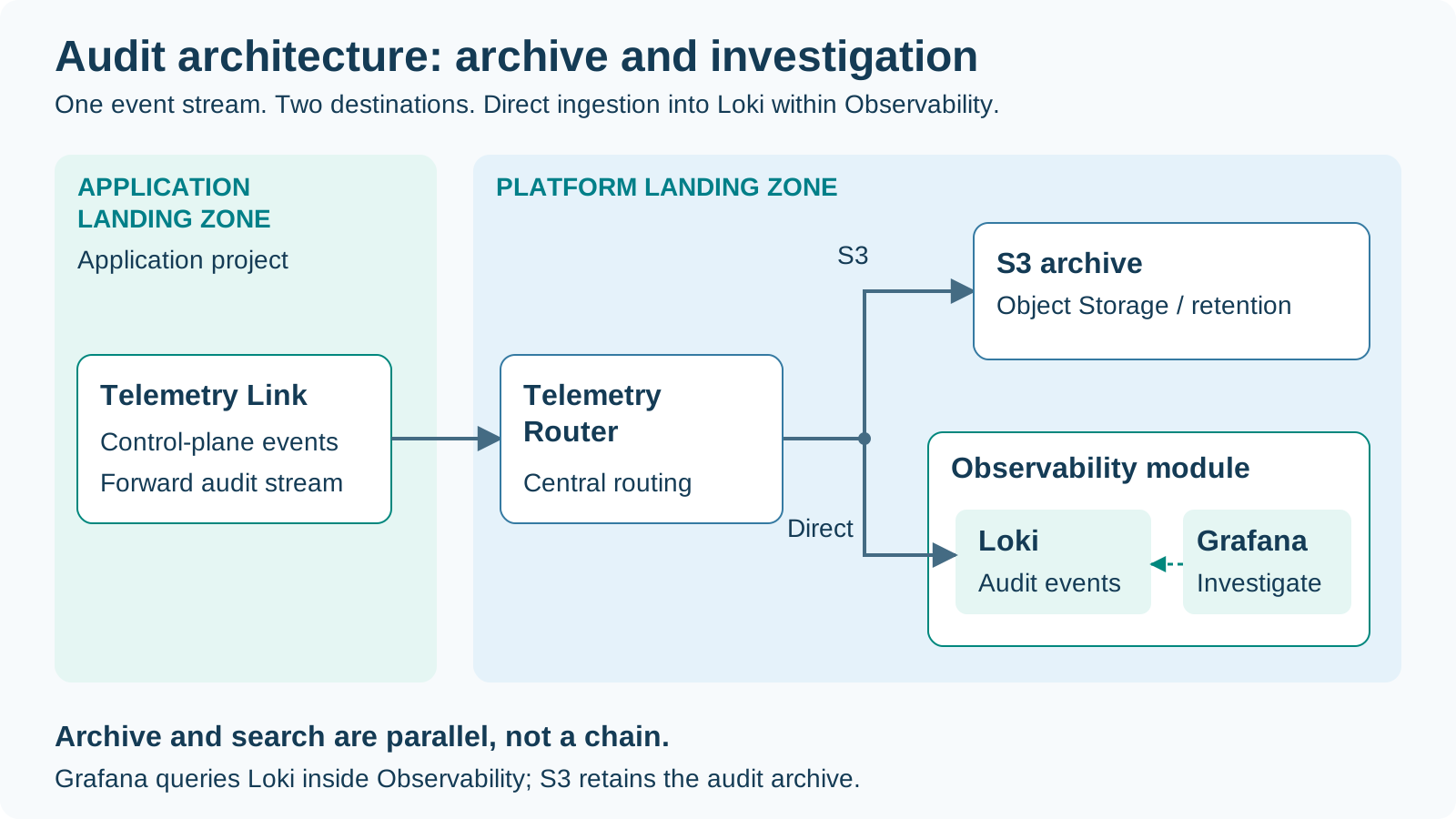
This example illustrates the platform audit design with direct Loki ingestion.
- A Telemetry Link in the governed application project sends audit events.
- The Telemetry Router in the Platform Landing Zone receives the control-plane audit events.
- The router sends them to two destinations: S3-compatible Object Storage for the archive, and directly to Loki within the Observability module for querying.
- Grafana, also part of Observability, queries Loki to investigate the events.
Archive and query serve different purposes. The application team uses the shared audit path; the platform team owns routing, retention, reader access and the investigation view.
Work with the Assistant
Section titled “Work with the Assistant”Describe the intended outcome in the context of the configuration: for example, a shared corporate network with application projects for development and production. The Assistant helps explain the available configuration and proposes changes for review.
- Describe the requirement and the choices already agreed with the platform team.
- Review the field-by-field differences and answer any clarification questions.
- Accept the desired changes into the configuration draft.
- Review the full configuration and save it explicitly.
- Continue with the deployment review when you are ready to provision.
Human decisions remain visible throughout: accepting a proposal updates the draft, saving records the configuration, and approving deployment starts the infrastructure change.
Review an audit logging proposal
Section titled “Review an audit logging proposal”Use the Assistant to turn the Platform Owner’s rule into a reviewable configuration proposal. Begin with the agreed scope and the intended central services:
Prepare central audit logging for our governed application scope, with an S3 archive and direct ingestion into Loki within Observability. Keep the approved sandbox outside that collection scope. Ask me to confirm retention, reader access and Object Lock choices.
Review the proposal against this platform design and the chosen scope. Check the router’s two destinations, the Observability/Loki ingestion path and reader access. Keep mandatory audit behavior fixed in the governed project template; publish the approved sandbox as a separate offering. Accept, save, Plan and Apply remain separate actions.
Save and version configuration
Section titled “Save and version configuration”Keep configuration revisions aligned with your team’s review process. Save work in the Configurator, optionally connect GitHub for fork-based versioning, or export native inputs for an independent OpenTofu/Terraform workflow.
Agree which workflow owns changes for each environment. Record the reviewed configuration and source version together with the delivery decision so platform and application teams can identify the baseline they are using.
Versioning choices
Section titled “Versioning choices”| Working path | What the team retains | Next delivery step |
|---|---|---|
| Configurator revisions | A saved configuration that can be reopened and reviewed | Prepare the platform Plan from the saved revision |
| Optional GitHub fork | Versioned configuration alongside the team’s repository workflow | Review the repository change through the agreed process |
| Native input export | Inputs for independent OpenTofu/Terraform use | Continue through the team’s CLI or pipeline delivery path |
Review checkpoint: Confirm the saved revision, intended target, and change owner before moving from configuration work to infrastructure execution.
Review and deploy the platform
Section titled “Review and deploy the platform”Create a Plan from the saved platform configuration, intended deployment target, and authorized credential profile. Follow the execution output and use the proposed resource changes as the basis for the deployment decision.
| Review area | Questions for the platform reviewer |
|---|---|
| Configuration and target | Is this the intended revision, organization, environment, and source version? |
| Resource changes | Do additions, updates, replacements, and deletions match the agreed design? |
| Ownership and access | Are folders, project ownership, and role assignments appropriate? |
| Connectivity and services | Do the networks, DNS relationships, and shared services match the baseline? |
Decision: Accept the reviewed saved Plan for explicit Apply, or return to the configuration with a clear change request.
Deploy the audit baseline
Section titled “Deploy the audit baseline”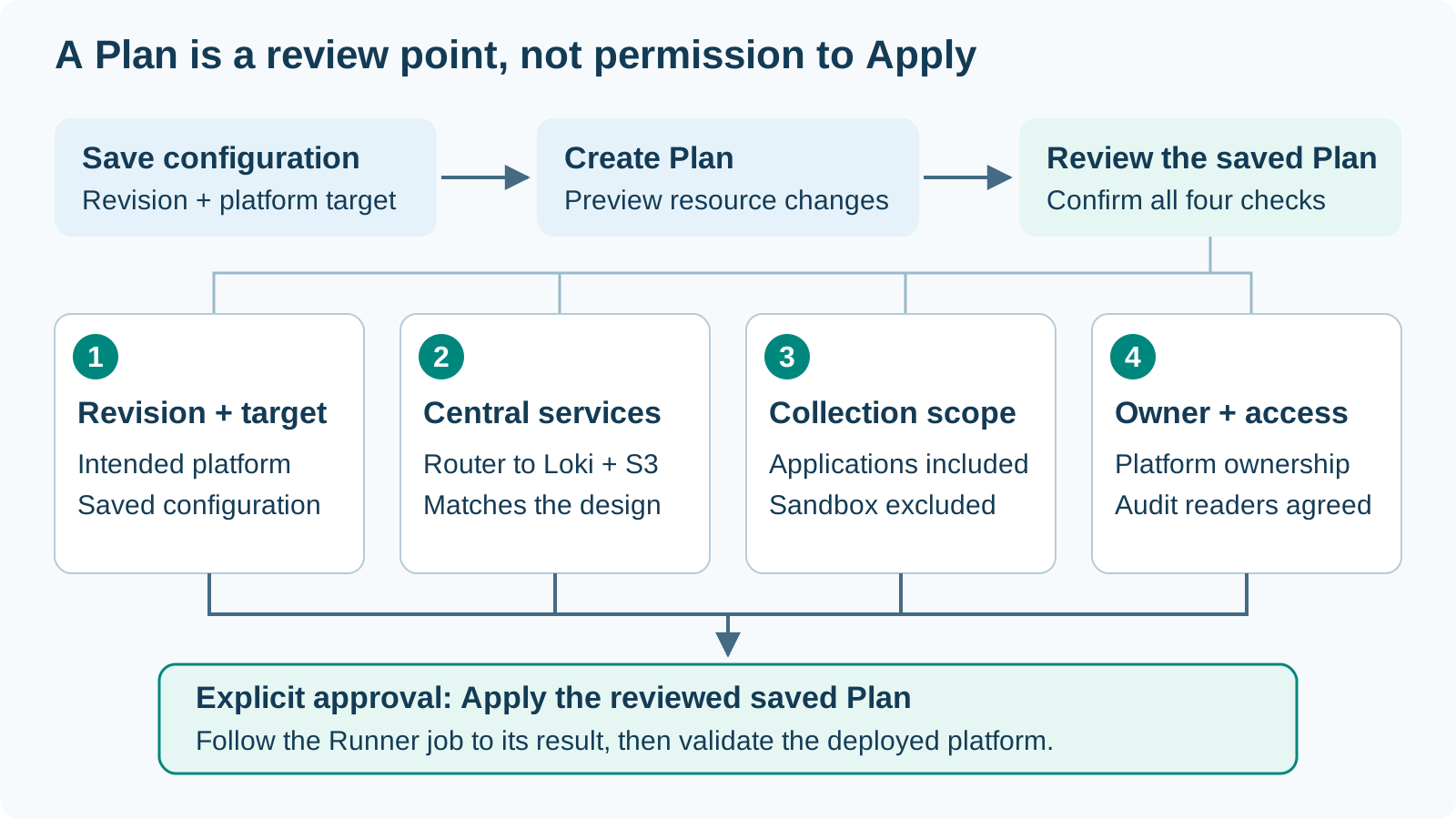
Save the reviewed configuration and prepare its Plan with the intended platform target and authorized credential profile. Use the resource preview to connect the platform decision to the proposed infrastructure.
| Review checkpoint | Confirm before Apply |
|---|---|
| Revision and target | The saved configuration belongs to the intended platform |
| Central services | Router, direct Observability/Loki destination and S3 archive match the design |
| Collection scope | Application scopes are included and the approved sandbox stays outside |
| Ownership and access | Platform responsibilities and audit readers are agreed |
Authorize Apply of the reviewed saved Plan explicitly and follow the Runner job to its result. Then validate the event path and the sandbox boundary before accepting the platform.
Output: A deployed audit baseline ready for the controlled demonstration.
Apply and validate the platform
Section titled “Apply and validate the platform”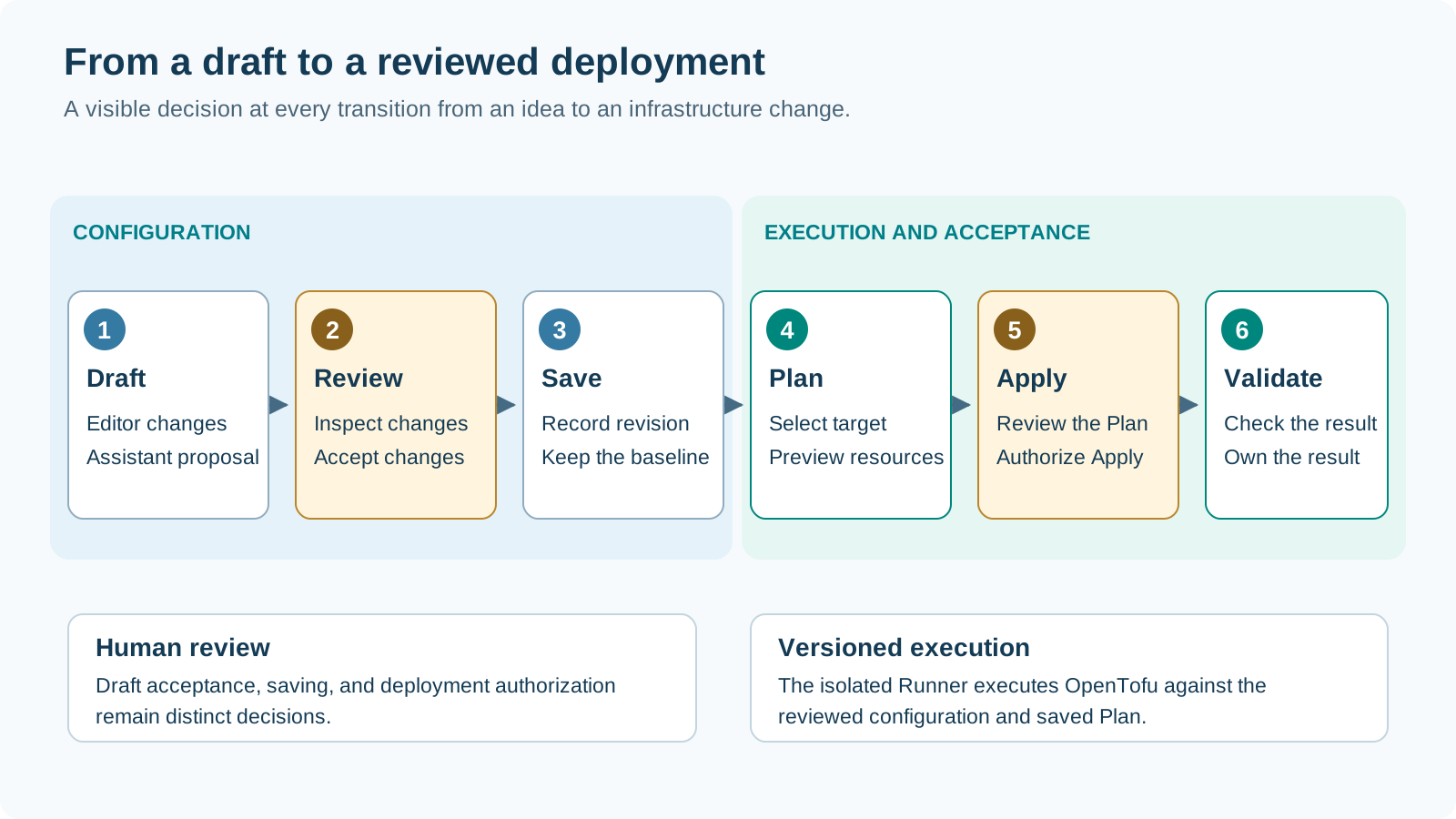
The Configurator coordinates the job; the isolated Runner executes the versioned Accelerator with OpenTofu. Authorize Apply of the reviewed saved Plan and follow the job to its result.
- Validate the foundation: Check the delivered organization structure, shared connectivity, and selected platform services against the reviewed design.
- Record the baseline: Retain the configuration revision, deployment reference, and platform target for later application delivery.
- Accept ownership: Identify the responsible platform team and agree operational handover.
Output: An accepted shared foundation from which the team can publish application project offerings.
Validate the audit policy end to end
Section titled “Validate the audit policy end to end”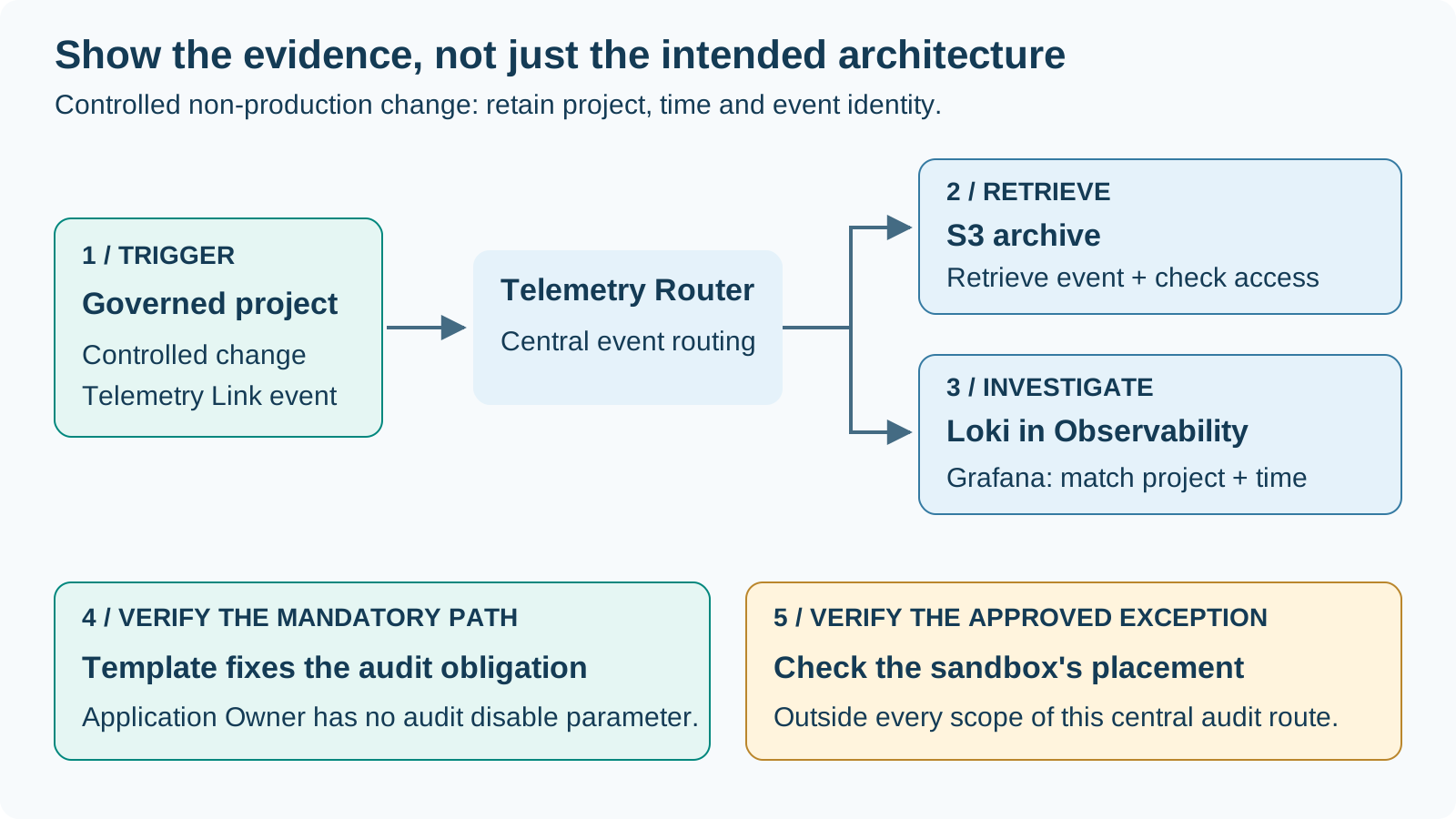
Make the platform rule observable before offering it to application teams.
| Demonstration checkpoint | Evidence to retain |
|---|---|
| Governed project | A controlled project change produces an audit event from an included scope |
| Central routing | The event reaches Loki inside Observability and the S3 archive |
| Investigation | Grafana queries Loki for the intended project and time range |
| Template enforcement | The governed template fixes the audit path; the Application Owner cannot disable it |
| Sandbox exception | The approved sandbox is outside every scope attached to this central audit route |
Use a controlled non-production demonstration and confirm scope, archive retrieval and reader access with the platform team. The sandbox exception concerns this central audit route; it is not a promise that no other logging exists.
Output: A demonstrated platform policy, with named audit readers, an archive owner and an accepted sandbox boundary.
See the audit logs in Grafana
Section titled “See the audit logs in Grafana”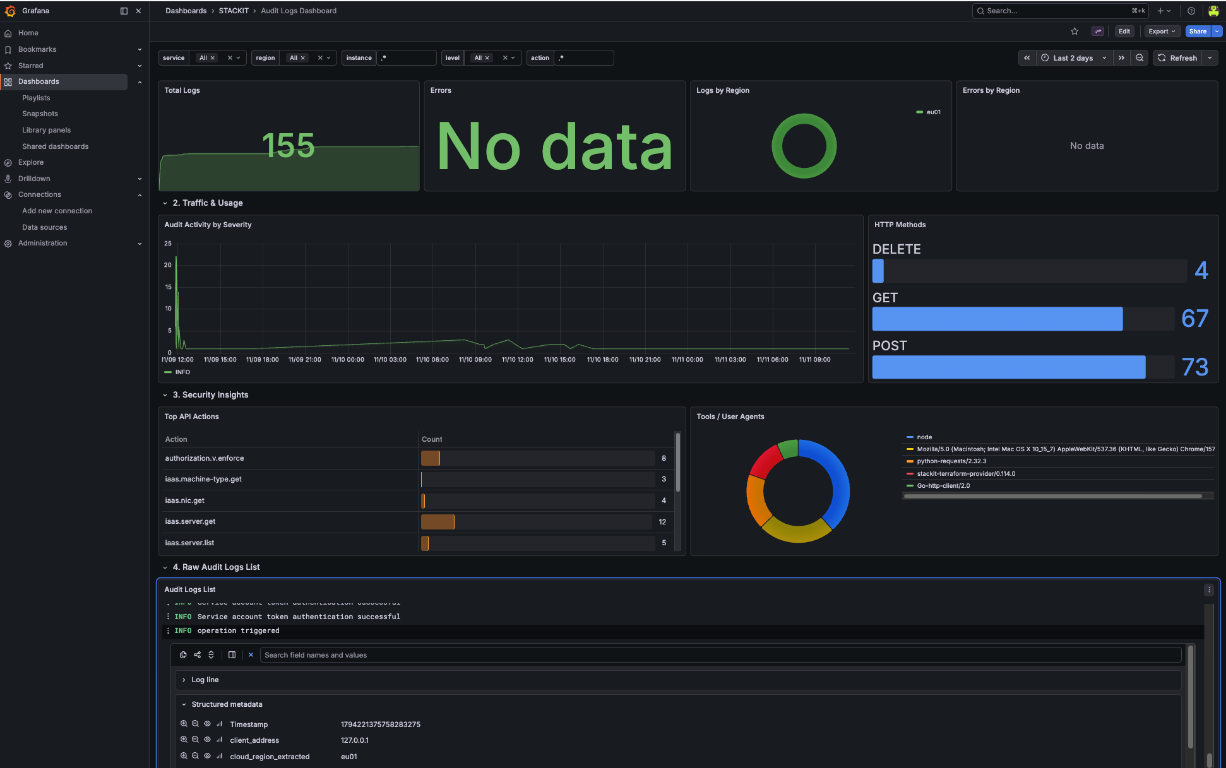
The screenshot shows the investigation view of the central audit path. It combines event volume and regional activity with API actions and an individual event’s details.
- Orient: Use the event count and activity timeline to identify the relevant period.
- Narrow: Filter by service, region, instance, level or action.
- Investigate: Open a matching event in the raw audit log list and inspect its metadata.
This is the visible outcome of shared collection, not another step in the routing chain. The template rule and sandbox exception remain separate platform decisions.
Prepare the Platform Contract
Section titled “Prepare the Platform Contract”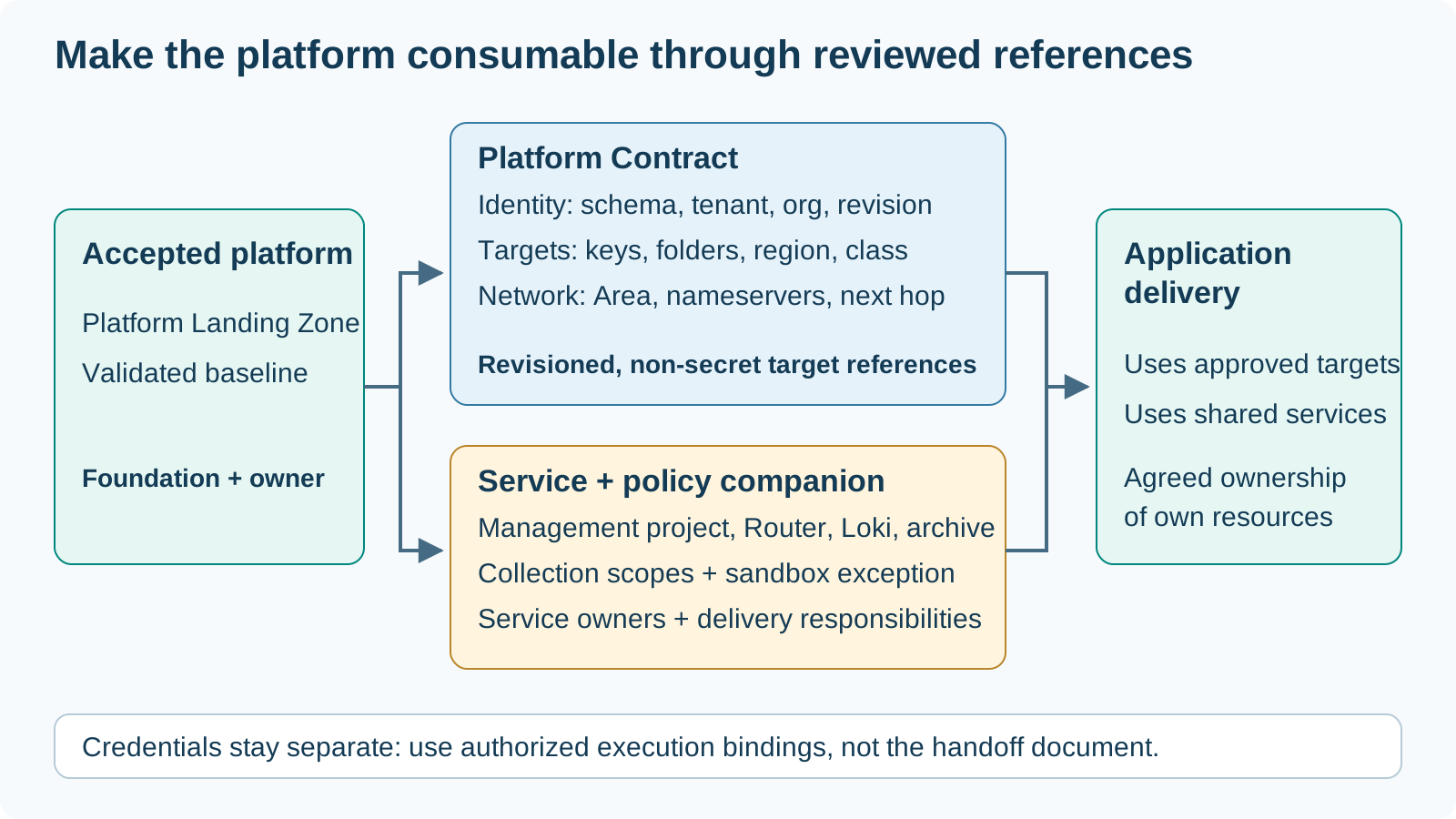
The deployed Platform Landing Zone is the shared foundation. Its Platform Contract provides the reviewed, non-secret references that an application delivery workflow uses instead of rediscovering that foundation.
| Handoff item | What it identifies |
|---|---|
| Contract identity | Schema version, tenant, organization and platform revision |
| Approved targets | Target keys, folders, regions and public/corporate classification |
| Network references | Network Area, nameservers and firewall next hop where applicable |
| Audit service references | Management project, Telemetry Router, Observability/Loki and archive references supplied alongside the contract |
| Policy and ownership | Covered application scopes, approved sandbox exception, service owners and authorized execution bindings |
Keep audit-service references and the governance decision as companion information to the contract’s target references. Technical credentials stay in their authorized binding path, separate from the handoff document.
Output: An accepted foundation, a revisioned Platform Contract and a small service/policy handoff package. Agree which delivery workflow owns each application’s resources.
Design project templates
Section titled “Design project templates”Turn the platform design into a small set of project offerings that application teams can understand and reuse.
| Template decision | Platform responsibility | Example |
|---|---|---|
| Project type and target | Choose the project kind and intended platform relationship | Corporate project using the agreed regional Network Area |
| Fixed settings | Define the standard network and service choices | An approved project baseline with selected platform services |
| Exposed parameters | Decide which values belong to each application order | Project naming and the parameters exposed by the template |
| Audience and ownership | Agree who can use the offering and who maintains it | Application teams in the intended working environment |
Output: A reviewed project template draft with a clear purpose, target, parameter contract, and owning platform team.
Publish project templates
Section titled “Publish project templates”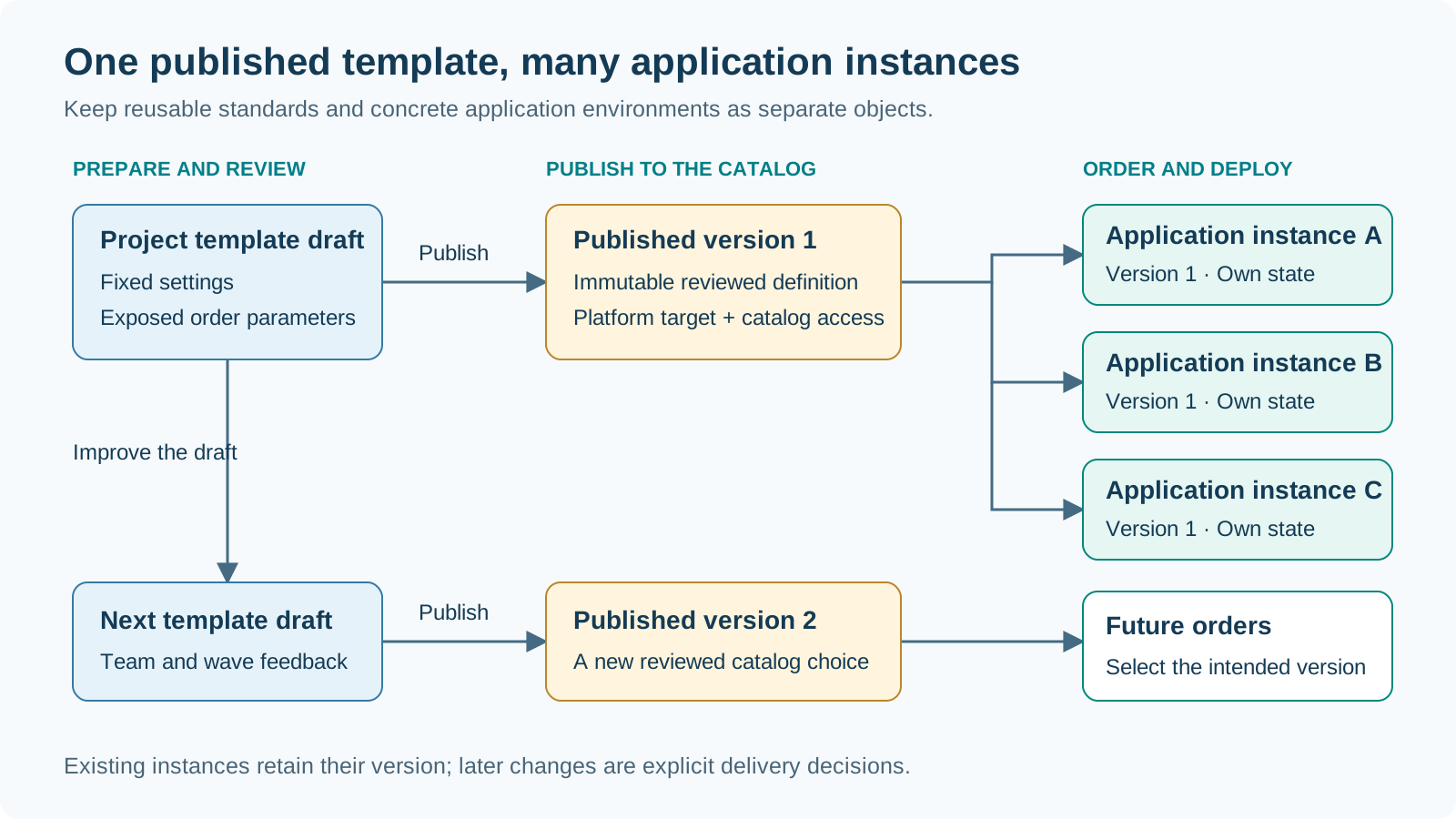
Project templates translate platform standards into reusable application project offerings. Choose the project type, region, network relationship, and service settings. Decide which values are fixed by the platform and which parameters an Application Owner supplies.
Publication decisions
Section titled “Publication decisions”Review the template, bind it to the intended platform target, and publish a version for the permitted catalog audience.
| Publication checkpoint | Confirm |
|---|---|
| Reviewed offering | Project type, fixed settings, and exposed parameters |
| Target and audience | Intended platform binding and permitted catalog users |
| Published version | An immutable definition that each application order can select |
Outcome: A reusable catalog offering. Existing instances retain their selected version; subsequent publications become new choices for application delivery.
Pilot application self-service
Section titled “Pilot application self-service”Validate the offering with an Application Owner before repeating it across teams and migration waves.
| Pilot milestone | What the team demonstrates |
|---|---|
| Discover and select | The intended Application Owner can find the right published template version |
| Parameterize and order | Fixed settings are clear and exposed parameters describe the concrete project |
| Review and deploy | The team can review the resource Plan and explicitly start the authorized Apply |
| Accept and hand over | The resulting project, access, and environment references are ready for workload delivery |
Output: A demonstrated self-service path and a short feedback list for the next template version. Agree the owner of each improvement before expanding the catalog.
Follow the Application Owner workflowApplication Owner in one minute
Section titled “Application Owner in one minute”The Application Owner consumes the platform offering, rather than configuring the platform.
- Choose: Select an approved project offer and provide its exposed parameters.
- Review: Confirm the project target and Plan, then explicitly start the authorized Apply.
- Accept: Validate the environment and its platform-defined audit path before workload delivery.
A sandbox is a separate approved choice, not an audit bypass switch on a governed project. The detailed application workflow remains in the dedicated self-service Trail.
Order an Application Landing Zone
Section titled “Order an Application Landing Zone”An Application Owner selects a published template available in their working environment. They review its platform target and fixed settings, enter the exposed project parameters, and place an order. The order identifies the selected version and the intended application environment.
| Selection criterion | What to check in the offering |
|---|---|
| Workload fit | Project type and service baseline match the application delivery plan |
| Platform relationship | Region and network relationship match the intended target architecture |
| Version and settings | The published version and its fixed values are the baseline you want to use |
| Application choices | The exposed parameters let you describe the concrete project environment |
Decision: Select one offering and version for the intended application environment, then provide the project-specific values.
Provide project parameters
Section titled “Provide project parameters”Use the parameters exposed by the selected template to describe this particular application environment. For example, a finance application may need a clearly named development project before its production environment is delivered.
| Review point | Application Owner action | Illustrative value |
|---|---|---|
| Project identity | Choose a recognizable project name and abbreviation | Finance Development / fin-dev |
| Exposed choices | Set the parameters offered by the template | Development environment, when exposed |
| Inherited baseline | Review the fixed region, network, and service settings | The corporate baseline chosen by the platform team |
| Responsibility | Verify the intended owner and team contact | The finance application team |
Output: A complete set of project values reviewed against the selected template version. Use the same identity and environment description in the later workload runbook.
Place and approve the order
Section titled “Place and approve the order”An order turns a reusable catalog offering into a concrete application instance with a traceable delivery record.
- Confirm the selected template version and platform target.
- Review the project parameters and intended ownership together.
- Place the order and follow its configured approval policy.
- Continue with the order’s Plan and resource preview.
Output: An identifiable application order binding the selected version, project values, and delivery status. Use that order when following jobs and coordinating the handover.
Review and create the application environment
Section titled “Review and create the application environment”Follow the order’s Plan and use its resource preview to review the intended application environment before starting Apply.
| Plan review | Application Owner decision |
|---|---|
| Project and environment | Confirm the project identity and intended application environment |
| Region and networking | Confirm the platform target and network relationship |
| Service baseline | Confirm the services and access arrangements chosen for this project |
| Resource changes | Review the proposed additions, changes, replacements, and deletions |
Decision: Explicitly start Apply of the reviewed saved Plan through the authorized execution path, then follow the job to its result.
Apply the application Plan
Section titled “Apply the application Plan”Turn the reviewed resource preview into an explicit deployment decision.
- Confirm that the saved Plan represents the intended application environment.
- Explicitly start Apply through the authorized execution path.
- Follow the execution job and record its result against the application order.
Next checkpoint: Validate the project and agreed access, then pass the environment references to the workload delivery team.
Validate the application environment
Section titled “Validate the application environment”Accept the delivered environment against the order and the requirements for workload delivery. Application instances have their own lifecycle and state, separate from the shared platform.
| Acceptance check | Record for the handover |
|---|---|
| Delivery result | Application instance and deployment reference |
| Project and ownership | Project reference, owning team, and operational contact |
| Network and access | Agreed network references and verified access for the intended users |
| Services and next stage | Available service references and the workload delivery owner |
Output: An accepted application environment and a handover record the workload team can use without rediscovering the platform decisions.
Use cases in migration programs
Section titled “Use cases in migration programs”| Use case | Platform preparation | Application outcome |
|---|---|---|
| Start with a small foundation | Configure a standalone platform and a focused project template | Give a pilot team a consistent first environment |
| Prepare a corporate migration wave | Establish the shared connectivity baseline and corporate templates | Provision application projects against the agreed platform target |
| Scale delivery across teams | Publish reviewed template versions and catalog access | Repeat project delivery with application-specific parameters |
| Separate development and production | Design the target domains and publish appropriate template choices | Make the environment and its ownership explicit for each order |
| Improve a platform configuration | Review Assistant proposals and save the agreed configuration | Turn recurring requirements into reusable platform and template changes |
Hand over to workload migration
Section titled “Hand over to workload migration”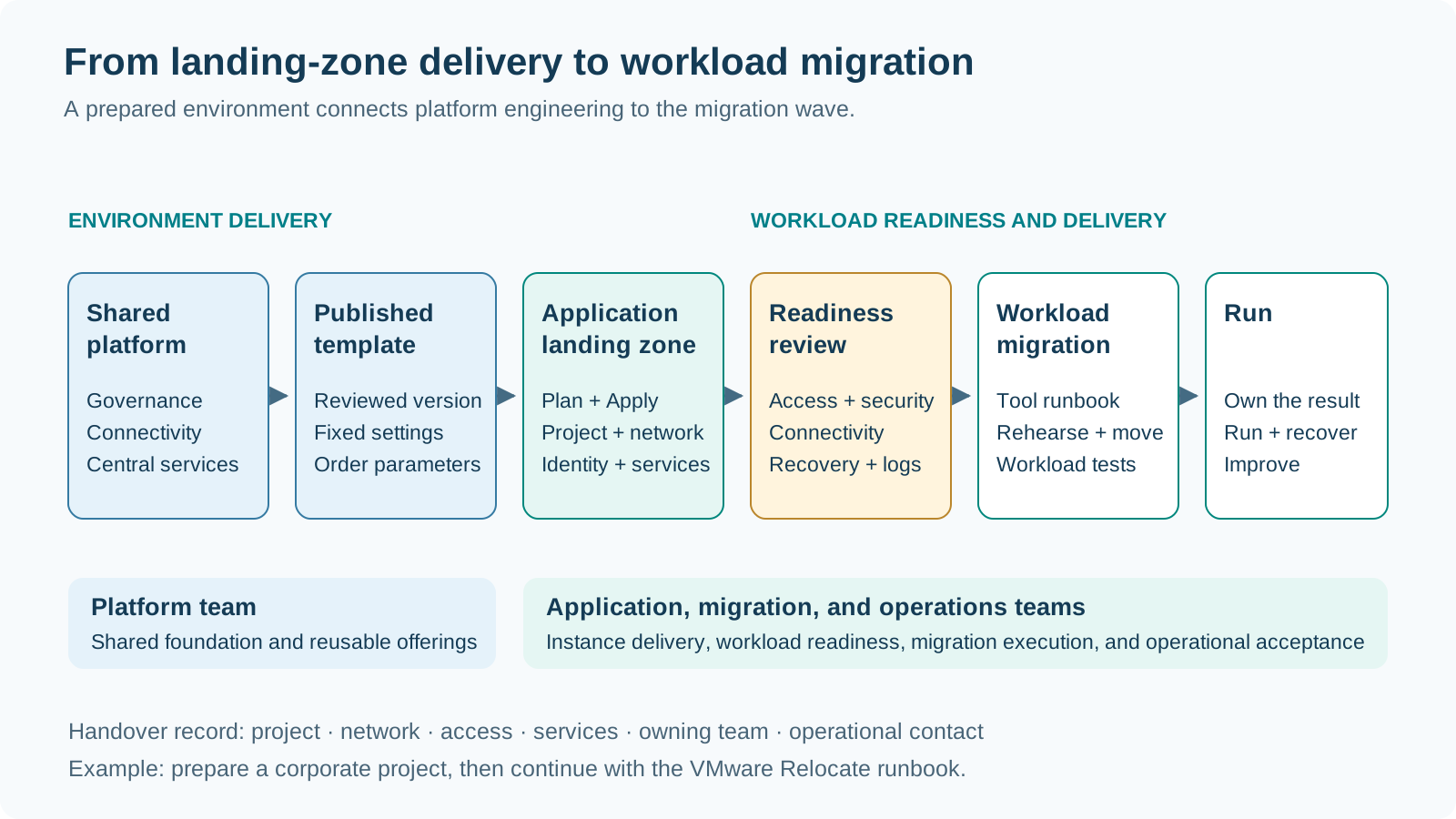
Prepare the workload handover
Section titled “Prepare the workload handover”The Application Landing Zone is the target environment for the next delivery stage. Bring its project, network, identity, and service references into the workload runbook. Review workload-specific access, connectivity, observability, and recovery arrangements with the migration team before starting the wave.
For VMware Relocate, connect the prepared environment to the existing VM landing-zone and migration-tool runbooks. For other workload types, use the relevant target architecture and delivery workflow. Keep the environment acceptance and workload acceptance as identifiable milestones with named owners.
VM Application Landing Zone for RelocateOperate and evolve
Section titled “Operate and evolve”Use instance and job history to retain the relationship between configuration, selected template version, execution, and outcome. Review drift as a separate maintenance activity. Treat a version change as a reviewed delivery decision, and use an explicit deletion workflow when retiring an application environment.
Feed lessons from pilot workloads and migration waves into the next platform configuration and template versions. This closes the loop from platform standards to application delivery and back into continuous improvement.
| Lifecycle activity | Review with the responsible team | Retain |
|---|---|---|
| Observe and investigate | Check instance status, job results, and drift findings | Instance and execution references |
| Improve the offering | Bring recurring application needs into the next template draft | Feedback, design decision, and template owner |
| Plan a change | Agree the desired version and resource changes | Reviewed Plan and explicit delivery decision |
| Retire the environment | Confirm application dependencies and the deletion decision | Retirement record and operational handover |
Outcome: A repeatable lifecycle in which the current environment stays understandable and improvements become reusable for the next application team.
Guided workflows
Section titled “Guided workflows”Source documentation
Section titled “Source documentation”Use the maintained source documentation for product details, access setup, and operational procedures.
Landing Zone Configurator documentation on GitHub Find the user guide, architecture, and maintained technical references alongside the Configurator source. Open the repositoryAsset historyActive 2 of the last 12 weeksLWUpdatedNo updates · 1 bar = 1 week i
- LWLukas WeberrußHead of STACKIT Cloud Migration Framework · STACKITOwner

 Lukas WeberrußHead of STACKIT Cloud Migration Framework · STACKITOwnerActive 12 of the last 12 weeks · 58 updateswww.linkedin.com/in/lukas-weberruß-a360b081
Lukas WeberrußHead of STACKIT Cloud Migration Framework · STACKITOwnerActive 12 of the last 12 weeks · 58 updatesSTACKITwww.linkedin.com/in/lukas-weberruß-a360b081Contributed in STACKITLukas Weberruß
Lukas WeberrußHead of STACKIT Cloud Migration Framework · STACKITOwnerActive 12 of the last 12 weeks · 58 updatesSTACKITwww.linkedin.com/in/lukas-weberruß-a360b081
· Nov 17, 2026Lukas Weberruß
Lukas WeberrußHead of STACKIT Cloud Migration Framework · STACKITOwnerActive 12 of the last 12 weeks · 58 updatesSTACKITwww.linkedin.com/in/lukas-weberruß-a360b081
· Nov 10, 2026