Software
STACKIT Landing Zone Configurator
STACKIT
Last updated on


Guide Platform Engineers from landing-zone requirements through reviewed platform deployment to reusable project templates and application self-service.
Bring organization structure, ownership, compliance, connectivity, and workload discovery into one baseline. Start this platform stream early enough to support the first migration wave.
To design a landing zone effectively, enterprises usually provide:
STACKIT
The sovereign European cloud provider behind the framework, delivering IaaS and PaaS from its own data centers in Germany and Austria.
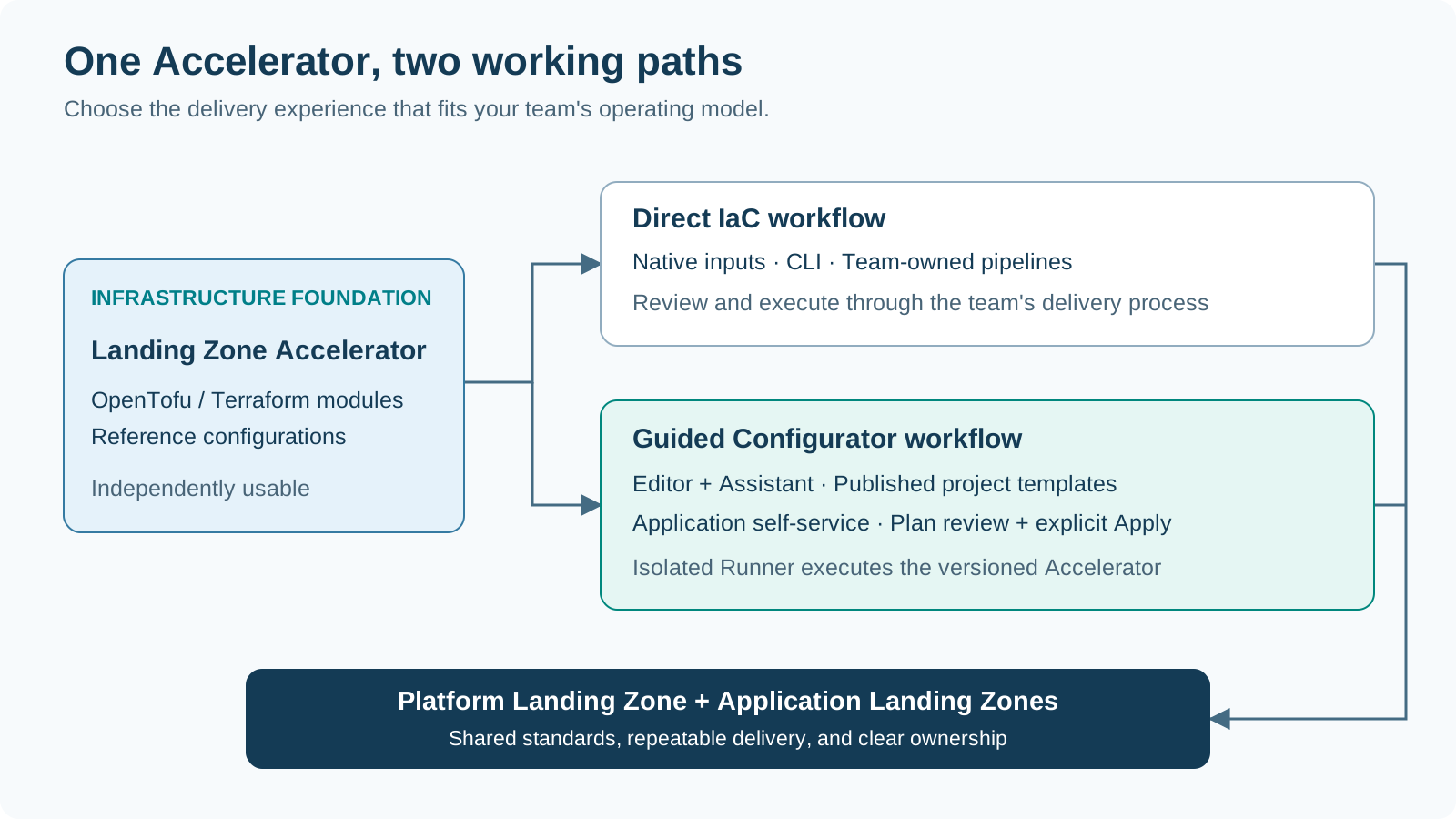
The Landing Zone Accelerator supplies the OpenTofu/Terraform modules and reference configurations. It is the infrastructure foundation for governance, identity, networking, shared services, and application projects.
The Landing Zone Configurator adds the working experience around that foundation: a visual editor, an Assistant, versioned project templates, and controlled infrastructure execution. Both direct IaC use and the guided Configurator workflow build on the Accelerator. Teams choose the working approach that fits their operating model.
Explore the Landing Zone AcceleratorSTACKIT
The sovereign European cloud provider behind the framework, delivering IaaS and PaaS from its own data centers in Germany and Austria.
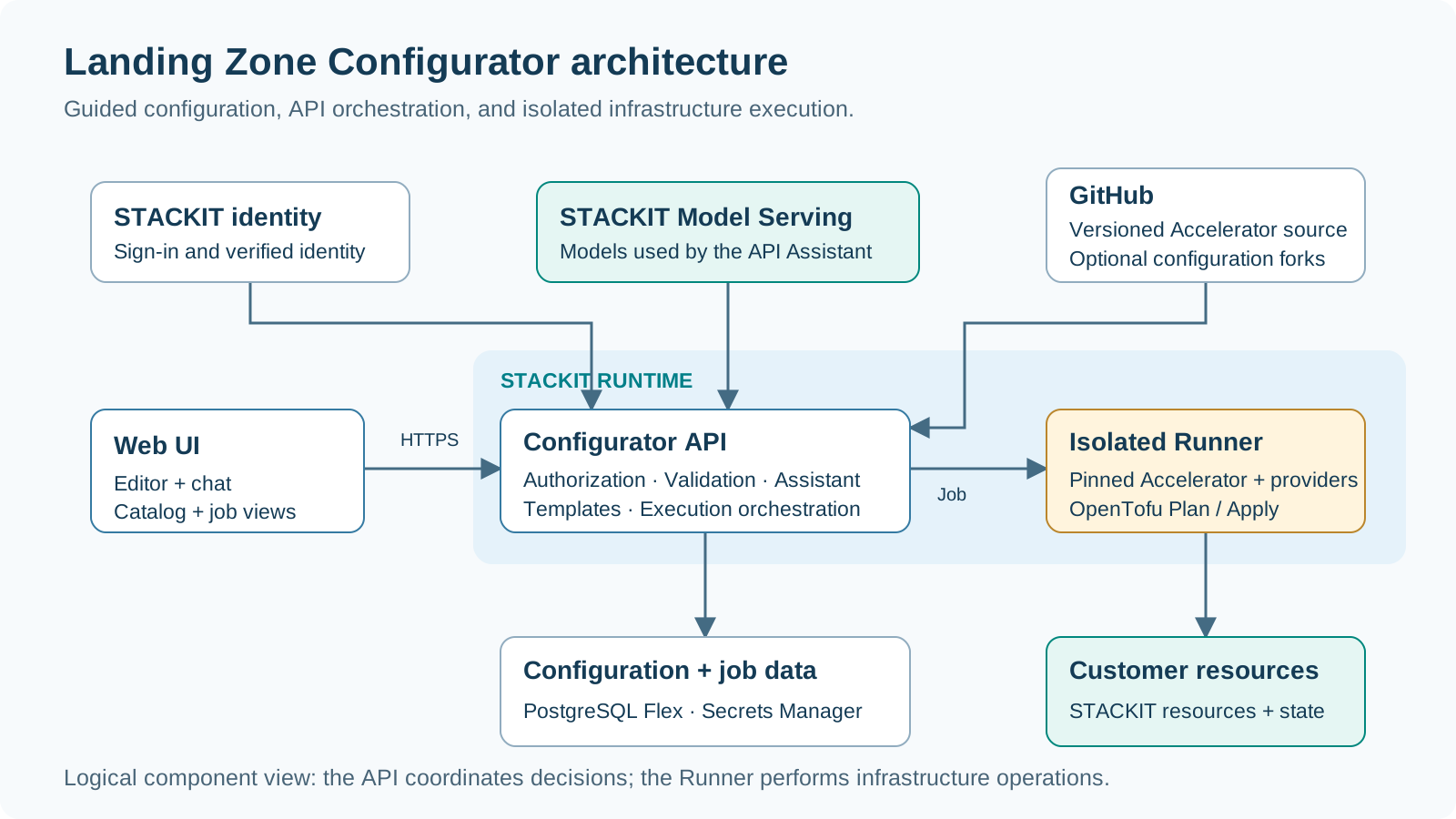
The browser brings editor, chat, catalog, and job views together. The Configurator API coordinates identity, validation, Assistant proposals, versioned templates, and deployment jobs. STACKIT Model Serving supplies the models used by the Assistant.
An isolated Runner performs the authorized infrastructure operation with the versioned Accelerator. Configuration and job records support continuity across the workflow, while technical credentials are handled through the separate credential-management path.
STACKIT
The sovereign European cloud provider behind the framework, delivering IaaS and PaaS from its own data centers in Germany and Austria.
Open the hosted Configurator and establish the context for the work before choosing a configuration or project offering.
| Confirm | Platform Engineer | Application Owner |
|---|---|---|
| Working environment | Select the organization and platform workspace | Select the workspace offering the application’s project templates |
| Responsibility | Identify the platform owner and reviewers | Identify the application owner and platform contact |
| Access | Confirm configuration, publication, and execution responsibilities | Confirm the available catalog and application execution path |
| First task | Create or reopen the platform configuration | Find the appropriate published project template |
Ready to continue: The team knows where it is working, who owns the result, and which delivery workflow to follow.
Open the ConfiguratorSTACKIT
The sovereign European cloud provider behind the framework, delivering IaaS and PaaS from its own data centers in Germany and Austria.
The repository provides eight reference configurations in src/config/. Choose the simplest
topology that satisfies the required network, security, organizational, tenant, and regional
boundaries.
| Design question | Reference configurations | Choose this when |
|---|---|---|
| Does the pilot need its own independent network? | Standalone | A small foundation and public application environment are the right starting point |
| Do corporate workloads share private connectivity? | Hub-and-spoke | Application projects need a common Network Area and shared DNS |
| Does corporate egress need a central inspection point? | Hub-and-spoke with firewall | The network design calls for shared firewall inspection and controlled egress |
| Which domains need separate foundations? | Finance/research, regulated/shared, production/non-production, tenant isolation, or regional hubs | Ownership, network, environment, tenant, or regional boundaries determine the topology |
Decision: Record the reference configuration, domain boundaries, address plan, and owning teams. Carry those choices into the Configurator before adding optional platform services.
| Editor focus | Decisions to capture |
|---|---|
| Foundations and folders | Organization, ownership, project structure, and environment boundaries |
| Networking | Regions, Network Areas, address plan, DNS, and connectivity relationships |
| Shared platform services | The central services needed by application and operations teams |
| Project templates | Reusable project types, fixed settings, and application parameters |
| Operations and review | Delivery ownership, execution context, and configuration consistency |
Output: A coherent platform draft connecting the reference topology to the organization’s requirements. Save the reviewed configuration as the basis for platform delivery and template preparation.
| Working path | What the team retains | Next delivery step |
|---|---|---|
| Configurator revisions | A saved configuration that can be reopened and reviewed | Prepare the platform Plan from the saved revision |
| Optional GitHub fork | Versioned configuration alongside the team’s repository workflow | Review the repository change through the agreed process |
| Native input export | Inputs for independent OpenTofu/Terraform use | Continue through the team’s CLI or pipeline delivery path |
Review checkpoint: Confirm the saved revision, intended target, and change owner before moving from configuration work to infrastructure execution.
STACKIT
The sovereign European cloud provider behind the framework, delivering IaaS and PaaS from its own data centers in Germany and Austria.
Describe the intended outcome in the context of the configuration: for example, a shared corporate network with application projects for development and production. The Assistant helps explain the available configuration and proposes changes for review.
Human decisions remain visible throughout: accepting a proposal updates the draft, saving records the configuration, and approving deployment starts the infrastructure change.
STACKIT
The sovereign European cloud provider behind the framework, delivering IaaS and PaaS from its own data centers in Germany and Austria.
Create a Plan from the saved platform configuration, intended deployment target, and authorized credential profile. Follow the execution output and use the proposed resource changes as the basis for the deployment decision.
| Review area | Questions for the platform reviewer |
|---|---|
| Configuration and target | Is this the intended revision, organization, environment, and source version? |
| Resource changes | Do additions, updates, replacements, and deletions match the agreed design? |
| Ownership and access | Are folders, project ownership, and role assignments appropriate? |
| Connectivity and services | Do the networks, DNS relationships, and shared services match the baseline? |
Decision: Accept the reviewed saved Plan for explicit Apply, or return to the configuration with a clear change request.
STACKIT
The sovereign European cloud provider behind the framework, delivering IaaS and PaaS from its own data centers in Germany and Austria.
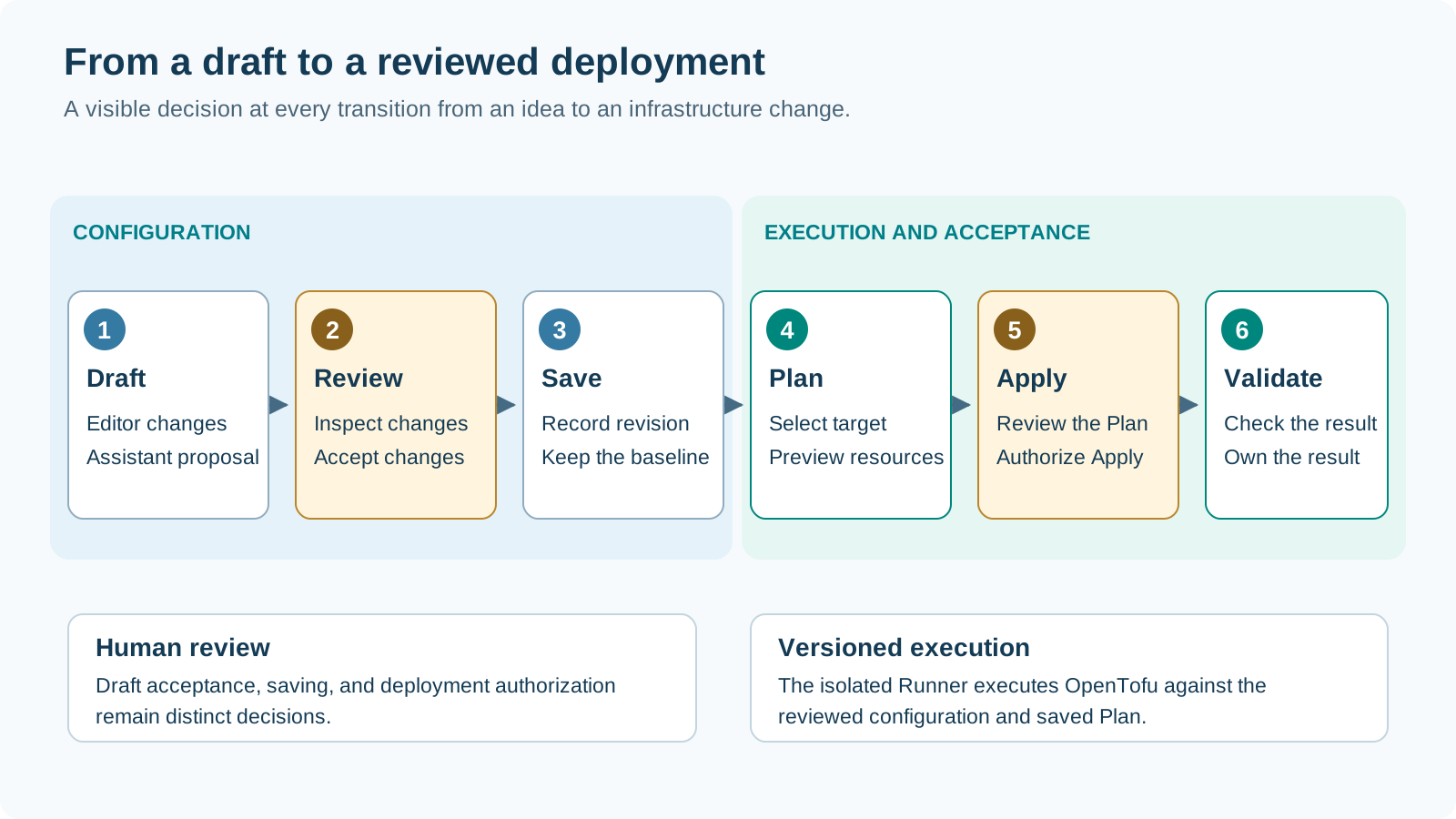
The Configurator coordinates the job; the isolated Runner executes the versioned Accelerator with OpenTofu. Authorize Apply of the reviewed saved Plan and follow the job to its result.
Output: An accepted shared foundation from which the team can publish application project offerings.
Turn the platform design into a small set of project offerings that application teams can understand and reuse.
| Template decision | Platform responsibility | Example |
|---|---|---|
| Project type and target | Choose the project kind and intended platform relationship | Corporate project using the agreed regional Network Area |
| Fixed settings | Define the standard network and service choices | An approved project baseline with selected platform services |
| Exposed parameters | Decide which values belong to each application order | Project naming and the parameters exposed by the template |
| Audience and ownership | Agree who can use the offering and who maintains it | Application teams in the intended working environment |
Output: A reviewed project template draft with a clear purpose, target, parameter contract, and owning platform team.
Review the template, bind it to the intended platform target, and publish a version for the permitted catalog audience.
| Publication checkpoint | Confirm |
|---|---|
| Reviewed offering | Project type, fixed settings, and exposed parameters |
| Target and audience | Intended platform binding and permitted catalog users |
| Published version | An immutable definition that each application order can select |
Outcome: A reusable catalog offering. Existing instances retain their selected version; subsequent publications become new choices for application delivery.
STACKIT
The sovereign European cloud provider behind the framework, delivering IaaS and PaaS from its own data centers in Germany and Austria.
Validate the offering with an Application Owner before repeating it across teams and migration waves.
| Pilot milestone | What the team demonstrates |
|---|---|
| Discover and select | The intended Application Owner can find the right published template version |
| Parameterize and order | Fixed settings are clear and exposed parameters describe the concrete project |
| Review and deploy | The team can review the resource Plan and explicitly start the authorized Apply |
| Accept and hand over | The resulting project, access, and environment references are ready for workload delivery |
Output: A demonstrated self-service path and a short feedback list for the next template version. Agree the owner of each improvement before expanding the catalog.
Follow the Application Owner workflowSTACKIT
The sovereign European cloud provider behind the framework, delivering IaaS and PaaS from its own data centers in Germany and Austria.
Use instance and job history to retain the relationship between configuration, selected template version, execution, and outcome. Review drift as a separate maintenance activity. Treat a version change as a reviewed delivery decision, and use an explicit deletion workflow when retiring an application environment.
Feed lessons from pilot workloads and migration waves into the next platform configuration and template versions. This closes the loop from platform standards to application delivery and back into continuous improvement.
| Lifecycle activity | Review with the responsible team | Retain |
|---|---|---|
| Observe and investigate | Check instance status, job results, and drift findings | Instance and execution references |
| Improve the offering | Bring recurring application needs into the next template draft | Feedback, design decision, and template owner |
| Plan a change | Agree the desired version and resource changes | Reviewed Plan and explicit delivery decision |
| Retire the environment | Confirm application dependencies and the deletion decision | Retirement record and operational handover |
Outcome: A repeatable lifecycle in which the current environment stays understandable and improvements become reusable for the next application team.
Lukas WeberrußHead of STACKIT Cloud Migration Framework · STACKITOwnerActive 12 of the last 12 weeks · 58 updateswww.linkedin.com/in/lukas-weberruß-a360b081Lukas WeberrußHead of STACKIT Cloud Migration Framework · STACKITOwnerActive 12 of the last 12 weeks · 58 updatesSTACKITwww.linkedin.com/in/lukas-weberruß-a360b081Contributed in STACKITLukas WeberrußLukas WeberrußHead of STACKIT Cloud Migration Framework · STACKITOwnerActive 12 of the last 12 weeks · 58 updatesSTACKITwww.linkedin.com/in/lukas-weberruß-a360b081
· Nov 10, 2026