Migrate PostgreSQL to STACKIT PostgreSQL Flex with pgcopydb
Last updated on
Purpose and scope
Section titled “Purpose and scope”Use this example to move the databases of a self-managed PostgreSQL server, for example in an on-premises data center, into STACKIT PostgreSQL Flex. It uses pgcopydb to make one consistent copy during a write freeze. A verification step then shows whether source and target are identical before you decide on the cutover.
The repository builds the complete path as a demo, including a stand-in for the customer data center with an enterprise firewall in front of the database. Terraform only builds the infrastructure. The migration itself is a sequence of scripts that you run deliberately, because it contains a write freeze and ends with a cutover decision. Adapt the scripts to your source environment before you use them for a real migration.
What the example builds
Section titled “What the example builds”| Stage | Creates |
|---|---|
01-source | A STACKIT project, network, VM with PostgreSQL in Podman, seed data, and a security group that acts as the enterprise firewall |
02-postgres-flex | A second project, a PostgreSQL Flex instance, users, empty databases, and an ACL that admits only the source |
03-migration | The firewall opening to PostgreSQL Flex and the pgcopydb runner on the source VM |
How the migration works
Section titled “How the migration works”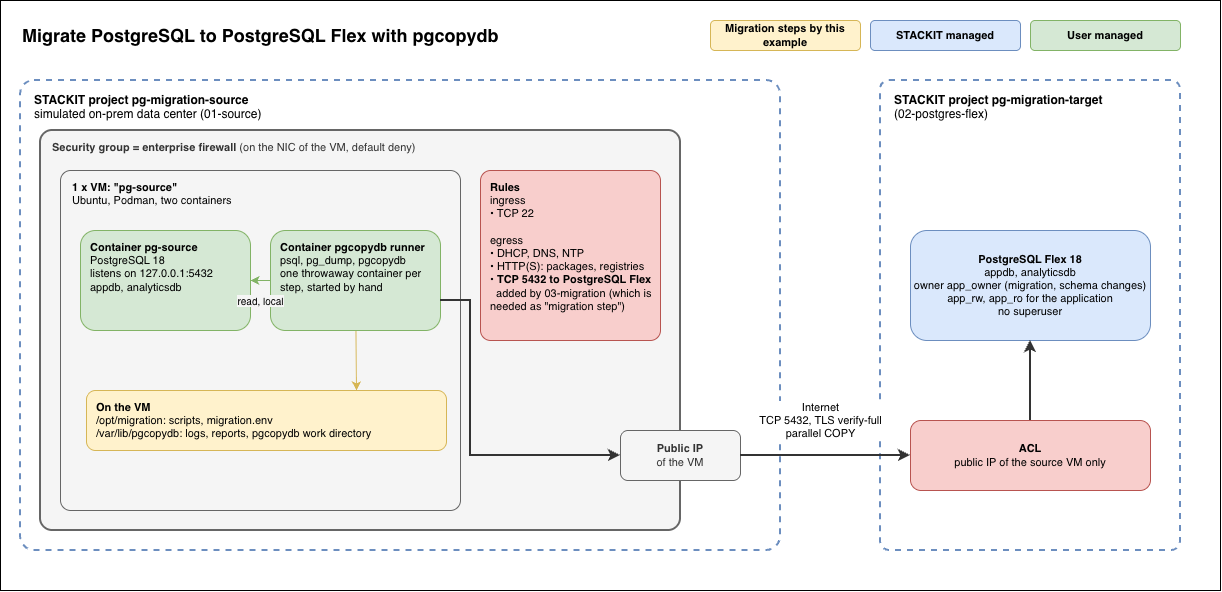
Two gates sit on the path, one per side, as in a real migration:
- Source side, the enterprise firewall. It denies all traffic by default. The migration stage adds the one rule it needs: egress to PostgreSQL Flex on TCP port 5432. In a real environment this is the change request to the firewall team.
- Target side, the PostgreSQL Flex ACL. It admits only the public address of the source.
pgcopydb runs on a migration host next to the source database. It reads the source locally,
streams the data with parallel COPY into PostgreSQL Flex, and builds indexes and constraints
on the target afterwards. Nothing is staged on disk.
Why one copy with a write freeze
Section titled “Why one copy with a write freeze”PostgreSQL Flex cannot currently open outbound connections, so native logical replication,
where the target subscribes to the source, is not possible. Continuous synchronization with
pgcopydb clone --follow needs privileges on replication-origin functions that PostgreSQL Flex
does not currently grant. Plain pgcopydb clone works with the default roles. The cost is a
write freeze for the duration of the copy, so rehearse the copy time with representative data
volume.
The target major version must be at least the source major version. The runner image is built with the client tools of the target version, and the preflight step checks this.
Run the migration
Section titled “Run the migration”Run the scripts on the migration host once per database:
| Step | Does | Writes to |
|---|---|---|
10-preflight.sh | Checks connectivity, TLS, versions, empty target, encoding and collation, extensions, roles, capacity, and timing | Nothing |
20-prepare-target.sh | Creates the source extensions on the target | Target |
30-freeze-source.sh <db> on | Sets the source database read-only and ends open sessions | Source |
40-clone.sh | Records the source fingerprint and grants, then runs pgcopydb clone | Target |
45-progress.sh | Shows workers, TLS, COPY, and index progress while the clone runs | Nothing |
50-post.sh | Refreshes materialized views and applies the source grants to the application users | Target |
60-verify.sh | Compares the target fingerprint with the source and reports IDENTICAL | Nothing |
The fingerprint compares objects, exact row counts, sequence values, constraints, triggers,
functions, and privileges. It counts rows but does not compare their content. For a full
content check, run 60-verify.sh <db> --compare-data, which reads every table on both sides.
Plan that time inside the write freeze (costs more time and is using the default pgcopydb --compare-data)
Use it with a real source
Section titled “Use it with a real source”The PostgreSQL Flex and migration stages do not depend on the demo VM. For a real data center,
skip 01-source, set the source egress addresses and database list for PostgreSQL Flex, and run
the runner on a Linux host next to the database with Podman or Docker. Use a read-only
migration user and verified TLS to the source and request the firewall opening to the
PostgreSQL Flex addresses.
If a Kubernetes cluster already runs next to the source database, pgcopydb can also run there, for example with a Kubernetes operator.
Sources
Section titled “Sources”Asset historyActive 1 of the last 12 weeksTMUpdatedNo updates · 1 bar = 1 week i
- ?Name not public?Name not publicThe Cloud Framework team knows who this is. The name is not shown on the site.

 Tobias M.Head of STACKIT Cloud Framework · STACKITOwnerActive 11 of the last 12 weeks · 196 updatesSTACKITwww.linkedin.com/in/tobias-müller-011304172??Name not publicThe Cloud Framework team knows who this is. The name is not shown on the site.Contributed in STACKIT
Tobias M.
Tobias M.Head of STACKIT Cloud Framework · STACKITOwnerActive 11 of the last 12 weeks · 196 updatesSTACKITwww.linkedin.com/in/tobias-müller-011304172
· Nov 10, 2026