Card one
Body text of the first card, long enough to wrap onto a second line.
Last updated on


Sample trail that walks through every common Starlight and framework component, used to verify correct rendering in the presentation deck and the trail timeline view.


TM Solutions Corp. Inc.
Core contributor and technical product owner of the framework, focused on sovereign cloud architecture, automation, and production-ready DevOps pipelines.
Card one
Card two
code.The card reads its kind from the link target, so the same component covers a page on this site, a STACKIT product, the documentation, a repository and a third-party source. Only the last one carries the “leads off the trail” note.
A link card With a description line. Open page CAF Landing Zone Foundation A managed landing zone, bookable through the STACKIT Marketplace. Open in the Marketplace STACKIT Kubernetes Engine Product documentation for the managed Kubernetes offering. Open the documentation A third-party source An external site that STACKIT does not vet. Open external site Leads off the trail A link buttonA reference that sits inside a sentence uses the chip instead of the card, so the line keeps reading. It marks the same five kinds with the same colours, and the label says where you land rather than repeating the URL.
Several chips in one sentence stay legible because each one is labelled by its destination: the SDKs exist for Go , Python and Java .
Inline badge: New
# a shell snippet with syntax highlightingexport FOO=barecho "hello $FOO"| Layer | Component | Sovereign option |
|---|---|---|
| Data | S3-compatible storage | STACKIT Object Storage |
| Compute | Managed Kubernetes | STACKIT SKE |
| Metadata | Managed PostgreSQL | STACKIT PostgreSQL |
A blockquote to check quote styling in the deck.
Assets are the equipment in the backpack: blueprints, guides, runbooks and more. Each is shown as a card with its contributor, category, tags, license model, and whether STACKIT recommends it. The card on the right is the real component.
Trails chain assets and pages into a guided journey up the mountain. A trail card previews where a route leads before you open it. This is the real trail card component, so it themes with the deck.
Relocate moves existing virtualization stacks to STACKIT with minimal redesign when speed and low-change delivery are the primary goals.
Relocate moves workloads with minimal architectural change, typically by transferring virtualization estates to a STACKIT-compatible target setup. The goal is fast transition with controlled risk, not immediate cloud-native modernization.
In practical terms, Relocate keeps the existing VM operating pattern largely intact. The main change is the runtime location and surrounding platform controls, not the workload runtime model itself.
Relocate and Rehost are both low-change paths, but they differ in migration depth and adaptation scope.
Relocate can be delivered in two operational variants, depending on estate size, heterogeneity, and cutover risk profile.
Landing zone compatibility
Validate network segmentation, IAM model, and security controls before migration starts.
Performance and sizing
Re-baseline VM sizing and storage profiles to avoid overprovisioning after move.
Operational controls
Preserve monitoring, backup, and recovery controls from day one in the target environment.
Large data volume handling
For very large VM data sets, define pre-seeding, delta-sync windows, and transfer throttle rules before cutover to avoid extended outage windows.
Future modernization path
Record explicit trigger points for follow-up replatform/refactor decisions.
In Relocate, the data path is often implicit because the full VM (including attached storage) is moved. Even so, large data footprints still require explicit design decisions:
Define the target landing zone controls for the Relocate wave before run start. Confirm account boundaries, network segmentation, and baseline controls so existing VM operating patterns can be transferred without violating platform governance.
Define the tool-assisted run path for scalable and repeatable Relocate waves. Set execution roles, migration batches, and rollback checkpoints up front so large VM estates can be moved with consistent controls across waves.


Describe manual installation steps for workloads that are not migrated with tools. Include OS baseline, package dependencies, and host preparation criteria to keep exception paths compatible with standard operations.
Prepare target VM and storage: Create target VM, attach required disks, and align CPU/memory sizing with measured source behavior.
Install required base components: Install hypervisor guest tools, OS packages, and runtime prerequisites needed to boot and operate the workload.
Transfer workload artifacts: Copy disk images, boot files, and service units/scripts using a controlled transfer path.
Validate boot and host baseline: Verify successful boot, filesystem mount integrity, and core network reachability before configuration.
Document manual target-side configuration and parameter alignment. Record security policies, IAM assignments, backup defaults, and monitoring baselines so moved workloads are operationally equivalent from day one.
Align system and application parameters: Apply hostname, DNS, time sync, and environment settings required by the workload.
Configure security and access model: Apply access policies, service credentials, and administrative boundaries for the target environment.
Enable operations baseline: Configure monitoring agents, log forwarding, backup jobs, and restore-test hooks.
Run configuration parity checks: Compare key runtime parameters with source baseline and document accepted differences.
Define manual deployment sequencing and handover checks. Define freeze windows, acceptance checks, and ownership transfer steps to prevent ambiguous handover during cutover.
Execute cutover sequence: Stop source writes, run final delta sync, and activate the target workload in the approved order.
Validate service behavior: Run smoke and critical-path tests, including connectivity to dependent systems.
Stabilize and monitor: Observe key metrics, error rates, and operational alerts during the agreed Hypercare window.
Finalize ownership transfer: Confirm support responsibilities, escalation paths, and rollback closure criteria.
Specify how Relocate outputs enter the common validation gate. Bundle technical evidence, risk log updates, and operational acceptance status so downstream wave governance can decide release without rework.
Rehost migrates applications with minimal code change and prioritizes delivery speed, operational continuity, and predictable wave throughput.
Rehost (lift-and-shift) migrates workloads with minimal application change. It is primarily a run strategy to reduce transition risk and accelerate migration throughput.
In practical terms, Rehost is application-wave oriented: each workload gets a defined target runtime mapping, cutover path, and runbook package for repeatable factory delivery.
Relocate and Rehost are often used interchangeably, but in this framework they are separated on purpose.
Infrastructure mapping
Define target compute, storage, and network profiles with explicit compatibility checks.
Data and cutover path
Design transfer windows, consistency checks, and rollback triggers.
Stateful workload handling
Separate application artifact rollout from database migration sequencing to reduce cutover risk.
Security and compliance
Map identity controls, encryption requirements, and evidence checkpoints.
Operational handover
Ensure runbooks cover Day-1 operations and incident workflows after migration.
In Rehost scenarios, the data migration path depends on whether the workload is stateless or stateful:
For stateful migration waves, split the path into two streams:
Define landing zone requirements and controls as the start point for Rehost run. Clarify network, identity, backup, and monitoring prerequisites before migration sequencing is approved so Rehost waves can run with predictable operations quality.
Define the automated Rehost path used for repeatable wave throughput. In the automated Rehost path, infrastructure and application setup are provisioned as code so wave delivery stays repeatable and auditable.
Provision VM target with IaC: Create networks, security groups, compute instances, and base storage through Terraform or OpenTofu.
Install and configure application with automation: Use Ansible playbooks for package install, service setup, and baseline configuration.
Apply environment-specific parameters: Inject target variables, secrets references, and endpoint mappings in a controlled automation run.
Run automated validation and cutover gates: Execute health checks, migration pre-checks, rollback checkpoints, and release approvals before live switch.
The runbook asset documents the PostgreSQL flags and the optional dump-based data restore path.
Describe manual installation steps for exception workloads.
Create and prepare target VM manually: Provision the VM through Portal or CLI, attach required storage, and apply OS hardening and patch baseline.
Install runtime and dependencies manually: Install required runtime packages, system libraries, and service users/groups according to product installation guidance.
Install application in the classic way: Perform guided installation steps (for example installer or setup wizard flow) to reproduce the source deployment model on the target VM.
Validate base install readiness: Confirm service startup, file permissions, required ports, DNS reachability, and outbound connectivity.
Define manual runtime configuration and controls.
Mirror source configuration for target context: Recreate application settings from the source environment and adapt them to target endpoints, DNS, certificates, and service integrations.
Apply security and access settings: Configure service credentials, secret handling, and least-privilege access for target operation.
Align operational defaults: Configure logging targets, metrics exporters, backup schedules, and retention baselines.
Validate configuration parity: Run smoke checks to confirm the target instance behaves as a functional equivalent of the source baseline.
Define manual deployment sequencing and release checks.
Plan final migration window: Align freeze windows, communication checkpoints, and rollback authority for production switch.
Run final data migration: Execute last data sync or restore steps and confirm consistency checks before go-live.
Activate production traffic: Perform controlled live switch to the target environment and verify critical user and integration paths.
Confirm handover readiness: Record evidence, close open risks, and transfer ownership for Day-1 operations.
Replatform introduces targeted platform changes during migration to improve operations, scalability, and cost without full application redesign.
Replatform keeps core application behavior but changes selected platform components to gain operational or economic benefits. It sits between Rehost and Refactor in change intensity.
These are Replatform changes as long as the core product behavior and major code paths remain mostly stable.
Platform component selection
Identify which layers should change (for example runtime, database operations, integration controls).
Compatibility boundaries
Validate technical constraints and fallback options before introducing platform changes.
Risk-managed sequencing
Stage changes to avoid coupling too many unknowns in one cutover window.
Evidence and acceptance
Define measurable improvements for performance, resilience, and operational load.
For stateful workloads, define source and target data platform responsibilities before runtime cutover.
For a runnable example of a platform swap from VM to Kubernetes with Spring Boot, use:


Use the asset for the runnable VM-to-Kubernetes and VM-to-managed-database implementation details.
Define landing zone controls and guardrails as the start condition for the Replatform path. Confirm platform prerequisites for runtime, data, and integration layers so substitutions can be introduced without breaking governance or operability.
Define the target platform mapping for the Replatform path across runtime, data, and integration services. Make dependencies explicit, including identity, networking, and data responsibilities, so each change can be validated before cutover.
Specify required platform prerequisite changes and sequencing for controlled transition. Define rollback guardrails, readiness checks, and run ownership so wave delivery stays predictable when multiple platform layers change together.
Refactor redesigns application architecture and delivery model to unlock strategic cloud-native value in resilience, agility, and long-term efficiency.
Refactor redesigns parts of the application and delivery model for cloud-native operation. It is the most change-intensive path and should be applied selectively to strategic workloads.
Architecture target state
Define decomposition boundaries, service interactions, and reliability patterns.
Engineering and delivery model
Align CI/CD, testing strategy, and release governance with the new architecture.
Data and integration refactoring
Plan schema transitions, interface versioning, and coexistence strategy.
Operational model
Define observability, SRE responsibilities, and incident response for the new runtime.
Define the redesigned architecture baseline and transition boundaries. Describe domain decomposition, target runtime decisions, and interim coexistence states so refactor increments can be delivered without destabilizing dependent systems.
Define implementation scope and change packaging for the redesigned architecture. Define increment boundaries, test strategy, and release criteria per slice so code changes remain deployable within migration wave constraints.
Define delivery pipeline, quality gates, and release governance model. Align branch strategy, automated checks, and approval gates with security and compliance evidence requirements before production cutover.
Define integration transition, compatibility handling, and final handover controls. Specify API contract versioning, rollback behavior, and cross-team cutover communication to reduce integration regression risk.
Repurchase replaces existing solutions with fit-for-purpose offerings from the STACKIT ecosystem when business value is higher than technical migration effort.
Repurchase replaces existing systems with alternative solutions instead of migrating the old stack as-is. In migration programs, this is often the best path when the current solution has high modernization cost and low strategic value.
Repurchase is not a pure software procurement decision. In most cases, it requires redesigning and adopting a new target operating process, including roles, controls, integrations, and governance.
For this phase, evaluate repurchase options explicitly for these STACKIT-related solutions:
Other repurchase targets can be added in later iterations.
In this framework, Repurchase means process migration, not only product replacement.
Workspace by STACKIT
Assess collaboration and workplace process migration, identity integration, and user adoption planning.
ServiceNow on STACKIT
Evaluate ITSM/ITOM process fit, workflow migration, data mapping, and integration boundaries.
RISE with SAP on STACKIT
Evaluate SAP landscape transition path, governance model, and business continuity requirements.
STACKIT Domain Solutions
Evaluate domain-specific fit, regulatory alignment, and operational handover requirements.
Define the selected replacement solution, licensing model, and governance boundaries. Include operating responsibilities, sovereignty constraints, and contractual checkpoints so target solution decisions remain executable in delivery waves.
Describe the business-process transition and operational adoption path. Define process ownership transfer, coexistence period controls, and user enablement milestones so the organization can adopt the new solution model without service disruption.
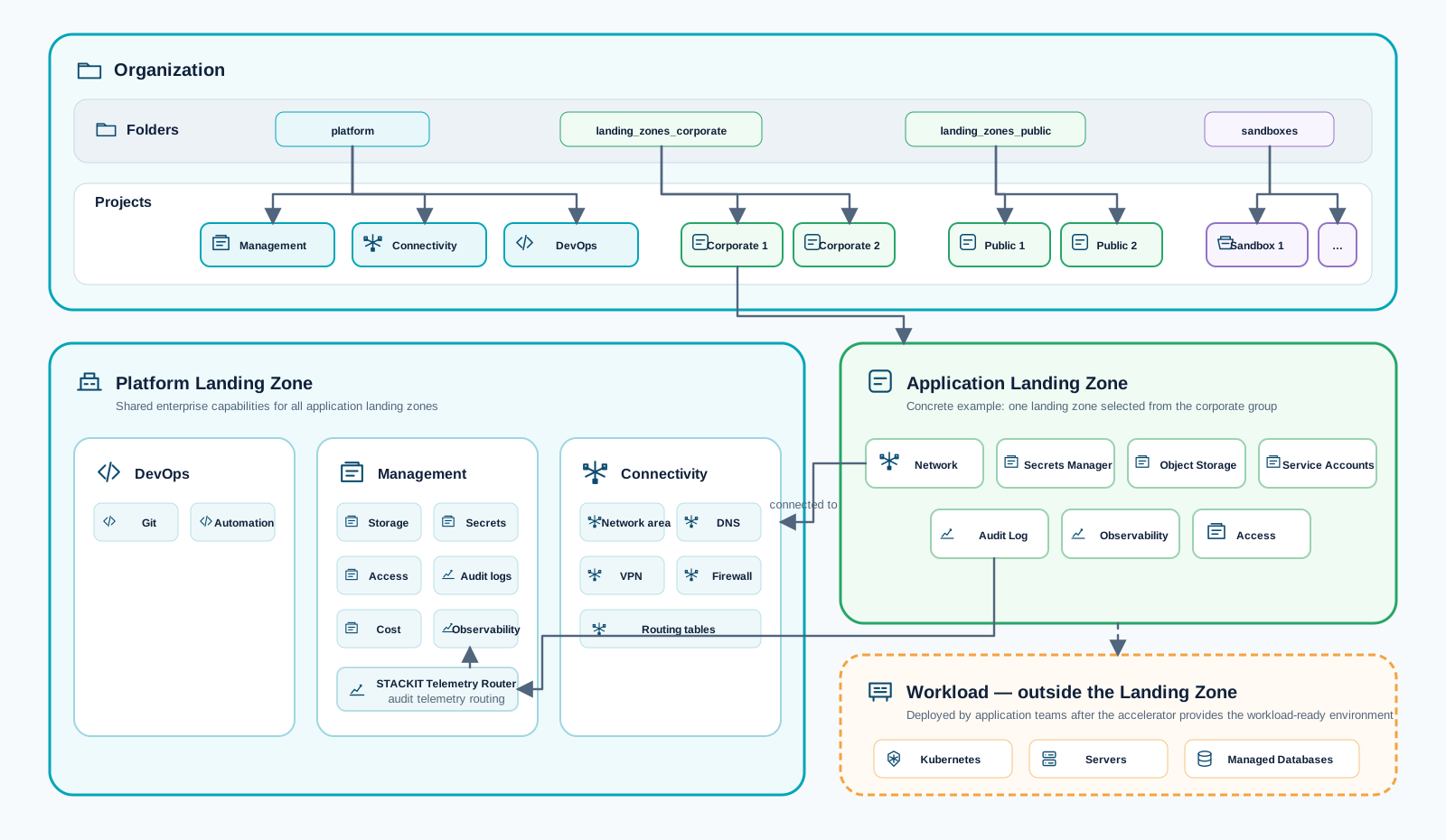
This asset provides a reusable foundation for implementing a STACKIT platform landing zone. It is designed for enterprise environments that need a structured baseline for governance, security, networking, cost controls, and automation.
Repository:
This repository is a single root-module accelerator with modular submodules.
src/main.tf orchestrates all platform and landing-zone building blocks.src/config/.The repository provides eight reference configurations in src/config/. Choose the simplest
topology that satisfies the required network, security, organizational, tenant, and regional
boundaries.
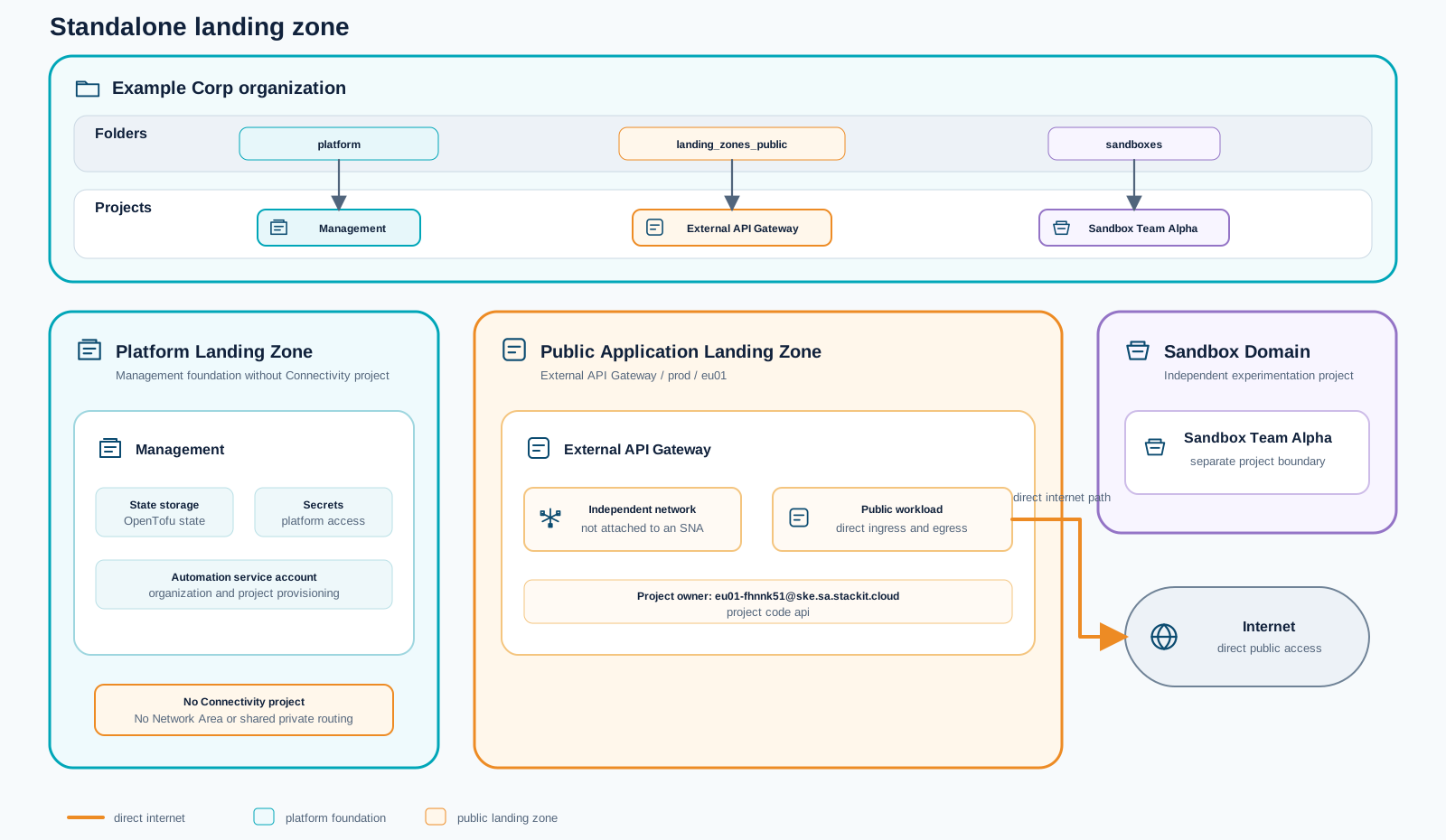
Use standalone.tfvars for the smallest foundation: governance, management, a sandbox, and a
public application landing zone with its own network and direct internet access. It creates no
shared Network Area or connectivity hub, making it suitable when workloads do not require private
east-west connectivity or central DNS.
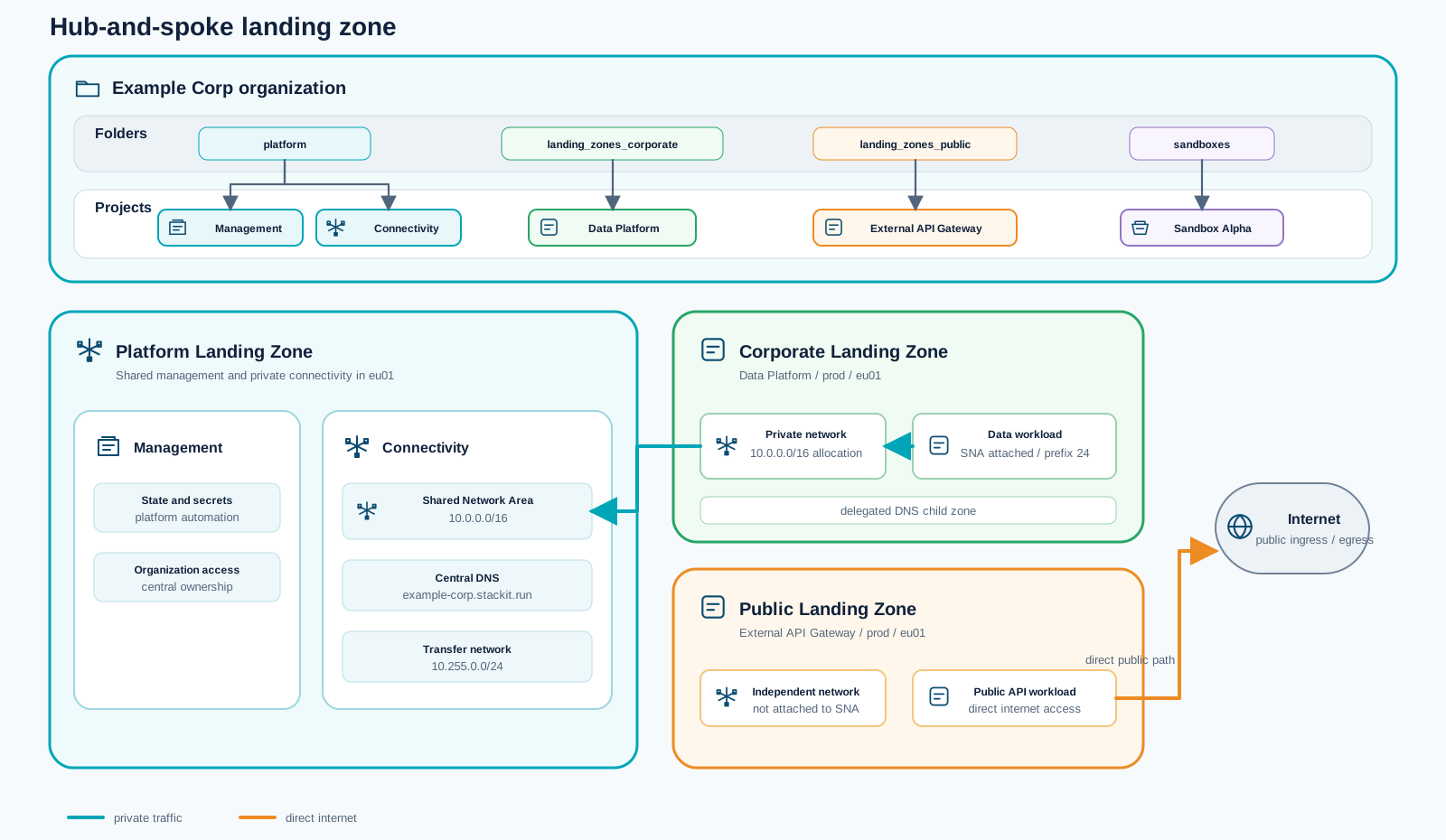
Use hub-and-spoke.tfvars when corporate workloads need shared private connectivity. A central
connectivity project provides the Network Area and DNS, the corporate data platform joins that
private domain, and public workloads retain independent networks with direct internet access.
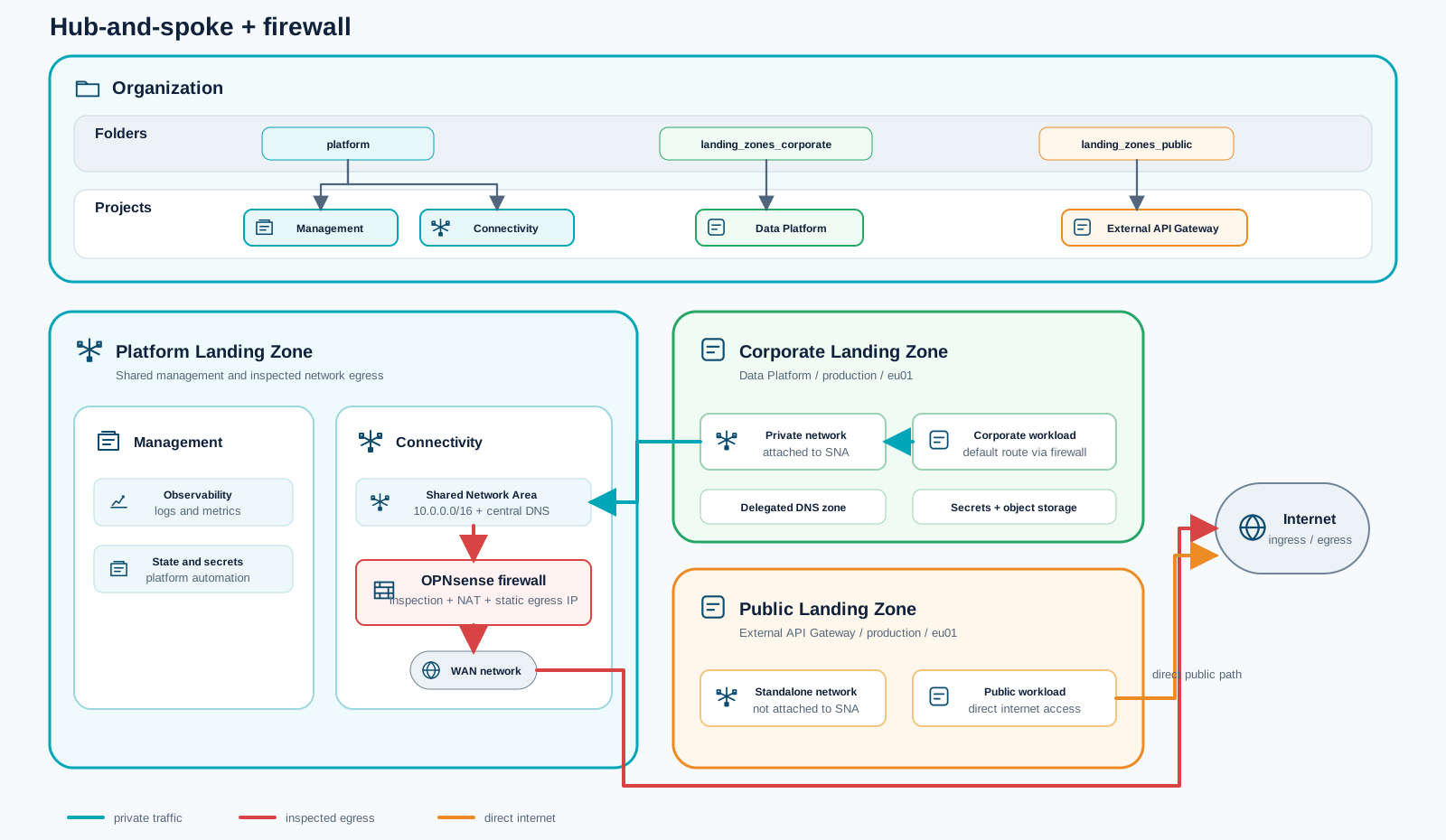
Use hub-and-spoke-firewall.tfvars when corporate egress needs a consistent inspection and control
point. It extends the shared Network Area with an OPNsense firewall and steers corporate default
routes through the appliance, while public landing zones remain directly connected.
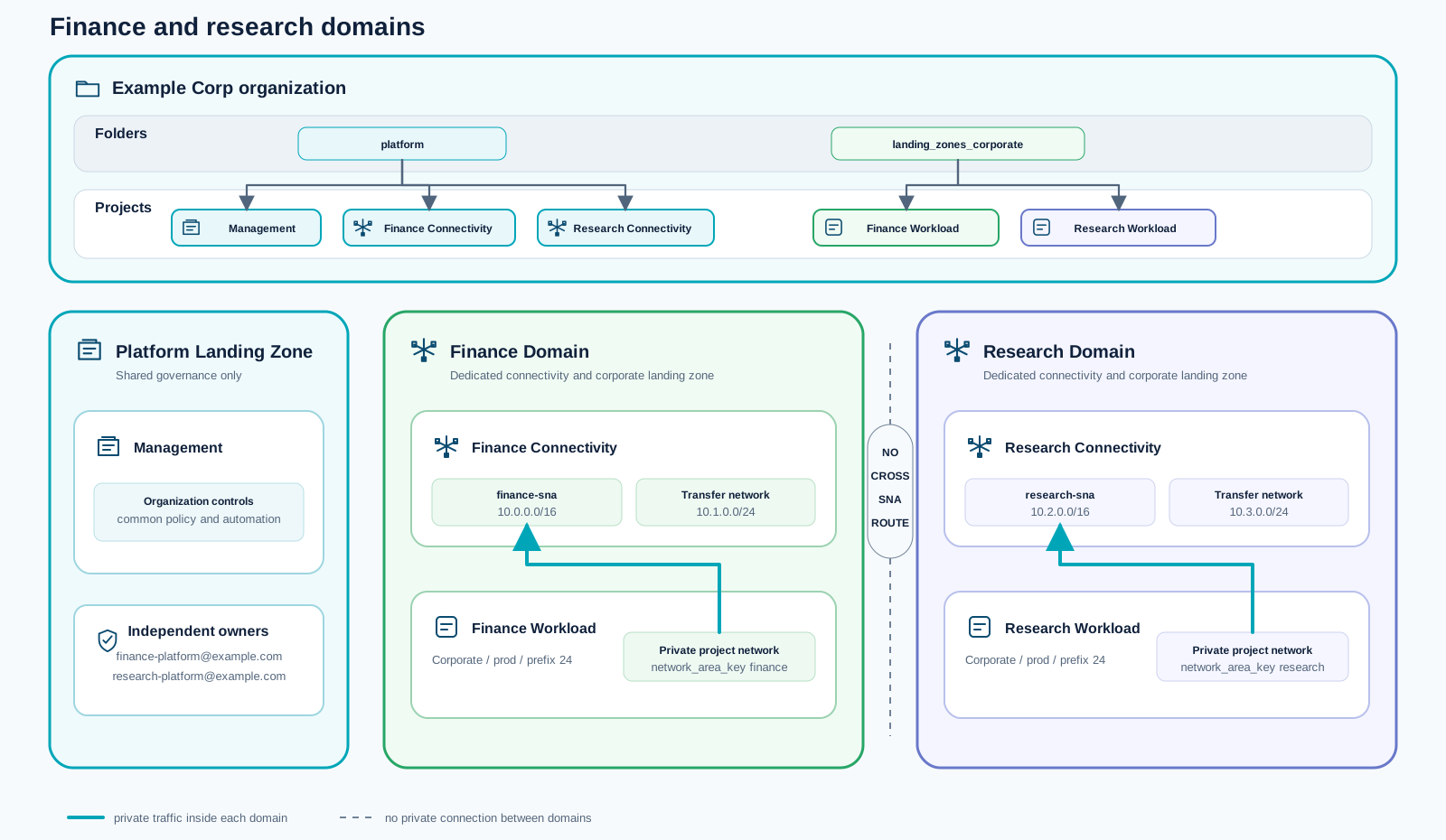
Use hub-and-spoke-finance-research.tfvars when business units require independent ownership and
private connectivity. Finance and research each receive their own address plan, connectivity
project, Network Area, and workload landing zone within the same STACKIT organization.
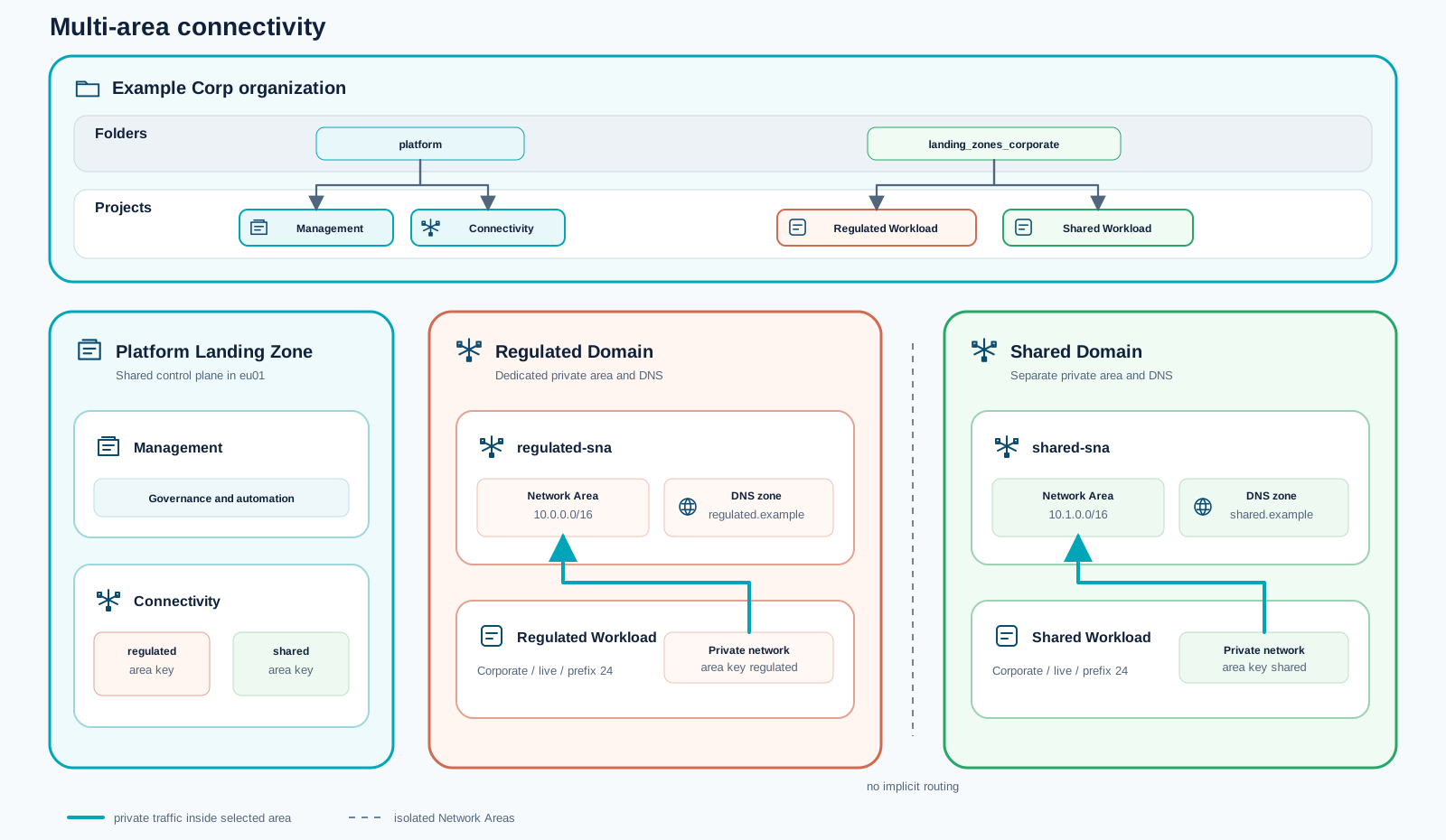
Use hub-and-spoke-multi-area.tfvars when regulated and shared workloads must occupy separate
private connectivity domains. Each domain has its own Network Area and DNS zone, with no implicit
routing between them.
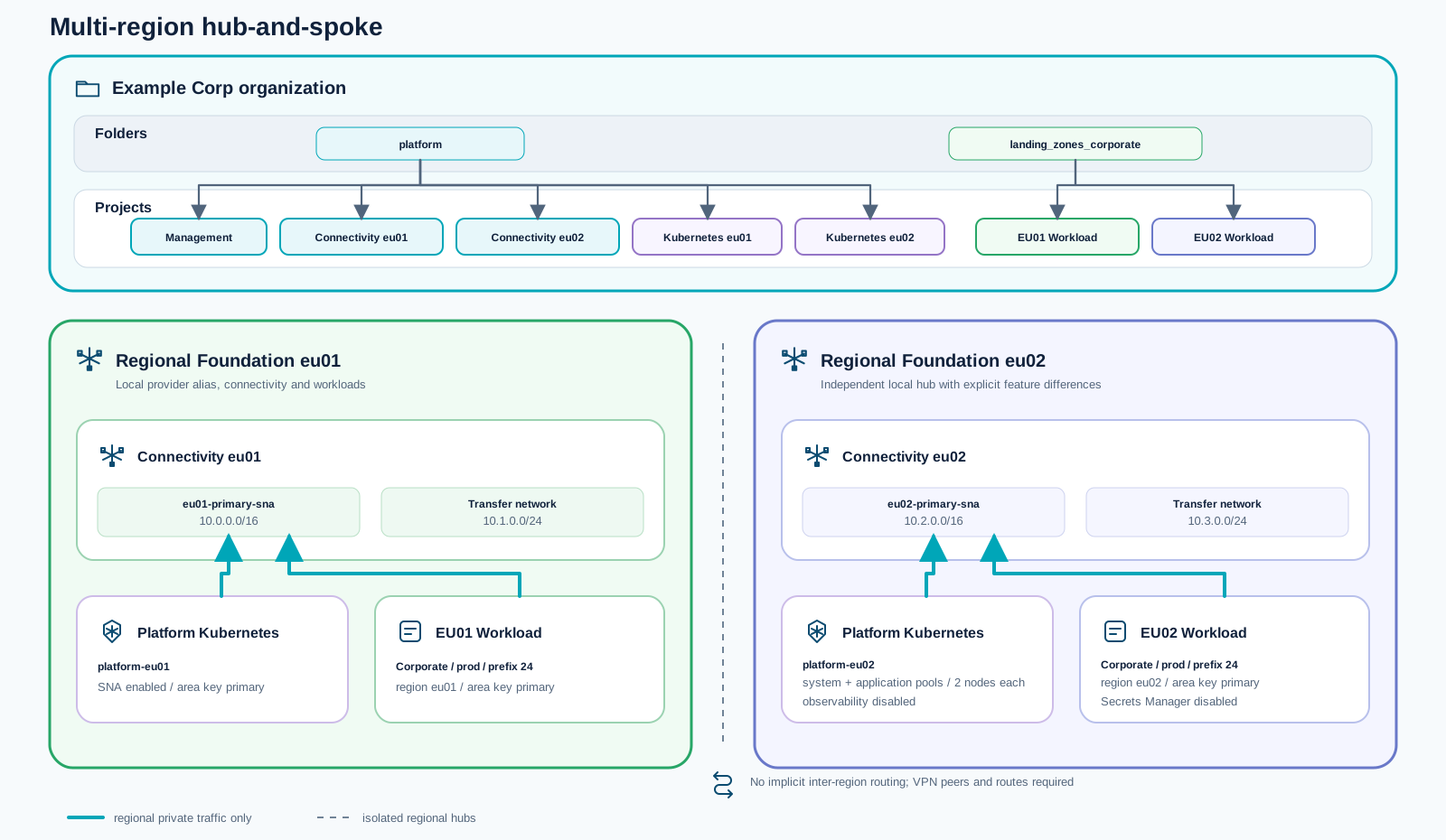
Use hub-and-spoke-multi-region.tfvars for regional foundations in eu01 and eu02. Each region
receives an independent hub, Network Area, workload landing zone, and optional platform Kubernetes
cluster. Inter-region connectivity is deliberately not created and must be designed explicitly.
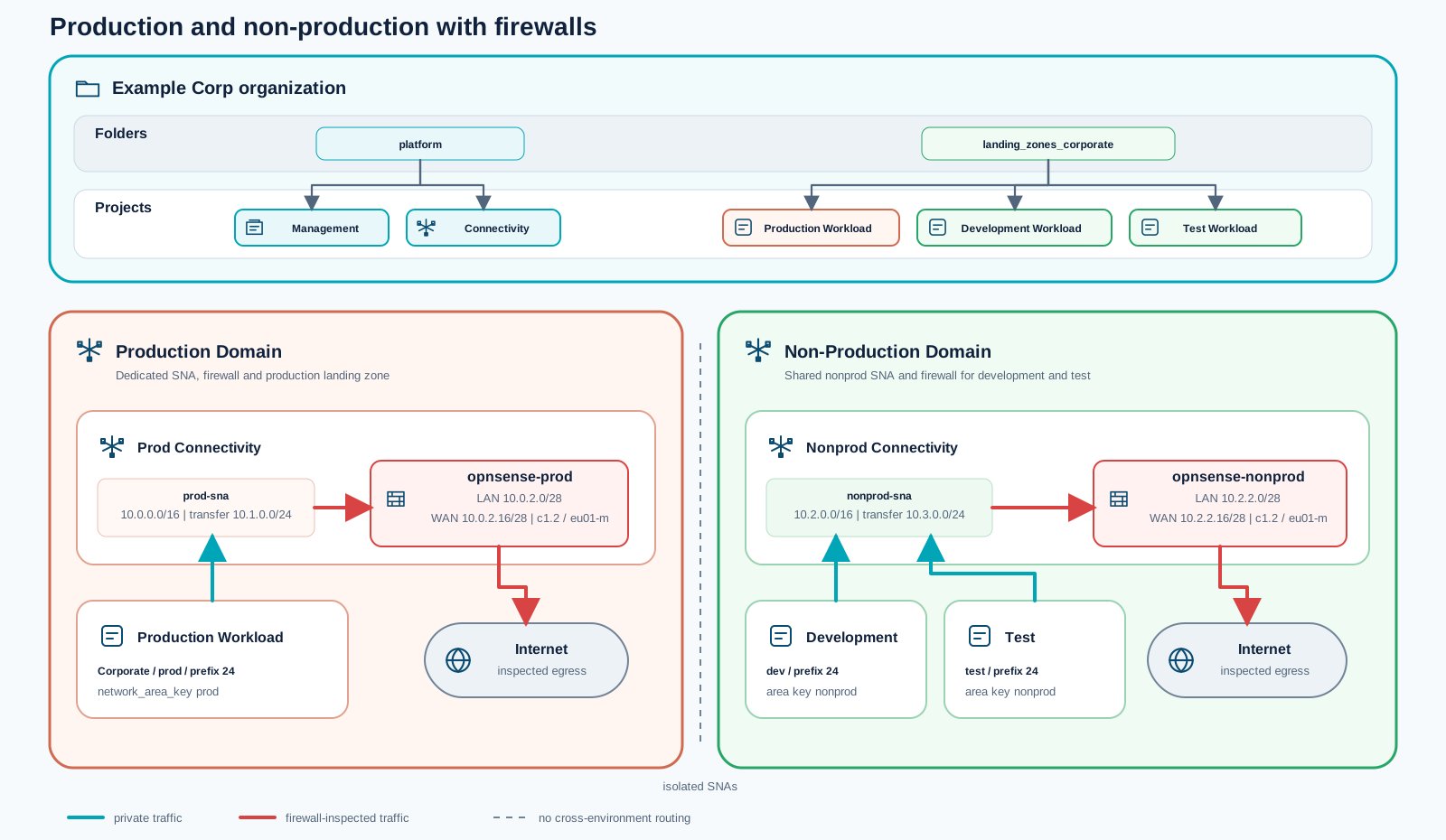
Use hub-and-spoke-prod-nonprod-firewall.tfvars when production must be isolated from
non-production. Each domain receives a dedicated Network Area and OPNsense firewall; development
and test share the non-production domain while remaining separate landing zones.
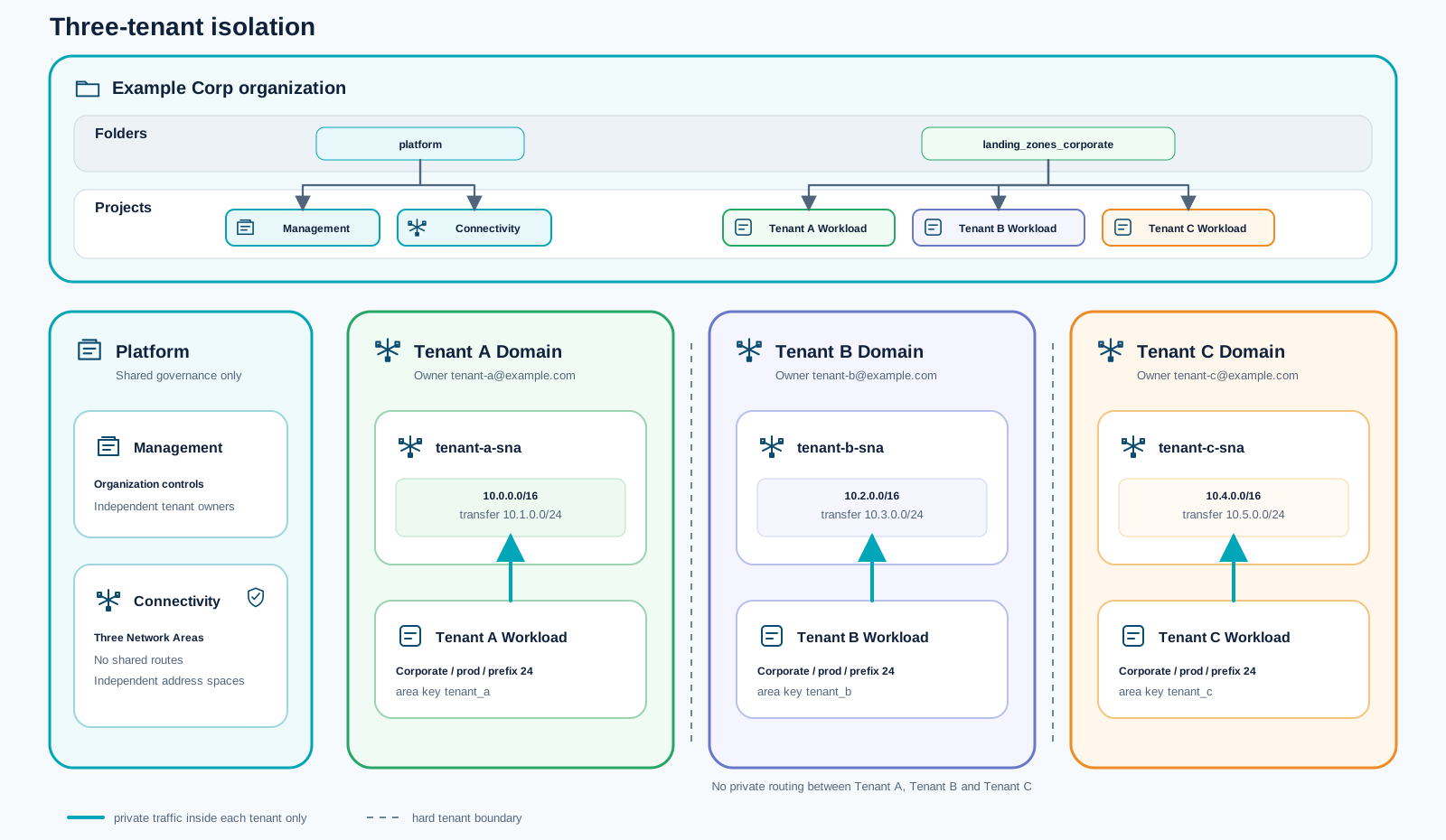
Use hub-and-spoke-tenant-isolation.tfvars for multiple tenants inside one organization. Every
tenant receives an independent owner, address plan, Network Area, connectivity project, and
workload landing zone, without private routing to the other tenant domains.
src/modules/governance)Purpose:
platform, landing_zones_corporate, landing_zones_public, sandboxes).Landing-zone classification:
src/modules/management)Purpose:
Landing-zone classification:
src/modules/connectivity)Purpose:
Landing-zone classification:
src/modules/devops)Purpose:
Landing-zone classification:
src/modules/landing-zone)Purpose:
for_each).Landing-zone classification:
src/modules/sandboxes)Purpose:
sandboxes folder.Landing-zone classification:
The current implementation now includes an end-to-end path for a central Kubernetes platform and namespace-based application onboarding.
The platform scope now includes a dedicated central Kubernetes foundation that can be operated as a shared platform service.
Application landing zones can now consume namespace service from the central Kubernetes platform cluster.
governancemanagementconnectivitydevopslanding-zone (core ALZ provisioning)sandboxes (supporting ALZ-adjacent environments)This means the repository delivers a strong platform baseline first, while ALZ capabilities are intentionally focused on project landing-zone provisioning and team sandbox enablement.
landing-zone map in your variable files.
This asset provides a reusable foundation for implementing a STACKIT platform landing zone. It is designed for enterprise environments that need a structured baseline for governance, security, networking, cost controls, and automation.
Repository:
This repository is a single root-module accelerator with modular submodules.
src/main.tf orchestrates all platform and landing-zone building blocks.src/config/.The repository provides eight reference configurations in src/config/. Choose the simplest
topology that satisfies the required network, security, organizational, tenant, and regional
boundaries.
Use standalone.tfvars for the smallest foundation: governance, management, a sandbox, and a
public application landing zone with its own network and direct internet access. It creates no
shared Network Area or connectivity hub, making it suitable when workloads do not require private
east-west connectivity or central DNS.
Use hub-and-spoke.tfvars when corporate workloads need shared private connectivity. A central
connectivity project provides the Network Area and DNS, the corporate data platform joins that
private domain, and public workloads retain independent networks with direct internet access.
Use hub-and-spoke-firewall.tfvars when corporate egress needs a consistent inspection and control
point. It extends the shared Network Area with an OPNsense firewall and steers corporate default
routes through the appliance, while public landing zones remain directly connected.
Use hub-and-spoke-finance-research.tfvars when business units require independent ownership and
private connectivity. Finance and research each receive their own address plan, connectivity
project, Network Area, and workload landing zone within the same STACKIT organization.
Use hub-and-spoke-multi-area.tfvars when regulated and shared workloads must occupy separate
private connectivity domains. Each domain has its own Network Area and DNS zone, with no implicit
routing between them.
Use hub-and-spoke-multi-region.tfvars for regional foundations in eu01 and eu02. Each region
receives an independent hub, Network Area, workload landing zone, and optional platform Kubernetes
cluster. Inter-region connectivity is deliberately not created and must be designed explicitly.
Use hub-and-spoke-prod-nonprod-firewall.tfvars when production must be isolated from
non-production. Each domain receives a dedicated Network Area and OPNsense firewall; development
and test share the non-production domain while remaining separate landing zones.
Use hub-and-spoke-tenant-isolation.tfvars for multiple tenants inside one organization. Every
tenant receives an independent owner, address plan, Network Area, connectivity project, and
workload landing zone, without private routing to the other tenant domains.
src/modules/governance)Purpose:
platform, landing_zones_corporate, landing_zones_public, sandboxes).Landing-zone classification:
src/modules/management)Purpose:
Landing-zone classification:
src/modules/connectivity)Purpose:
Landing-zone classification:
src/modules/devops)Purpose:
Landing-zone classification:
src/modules/landing-zone)Purpose:
for_each).Landing-zone classification:
src/modules/sandboxes)Purpose:
sandboxes folder.Landing-zone classification:
The current implementation now includes an end-to-end path for a central Kubernetes platform and namespace-based application onboarding.
The platform scope now includes a dedicated central Kubernetes foundation that can be operated as a shared platform service.
Application landing zones can now consume namespace service from the central Kubernetes platform cluster.
governancemanagementconnectivitydevopslanding-zone (core ALZ provisioning)sandboxes (supporting ALZ-adjacent environments)This means the repository delivers a strong platform baseline first, while ALZ capabilities are intentionally focused on project landing-zone provisioning and team sandbox enablement.
landing-zone map in your variable files.
This asset provides a reusable foundation for implementing a STACKIT platform landing zone. It is designed for enterprise environments that need a structured baseline for governance, security, networking, cost controls, and automation.
Repository:
This repository is a single root-module accelerator with modular submodules.
src/main.tf orchestrates all platform and landing-zone building blocks.src/config/.The repository provides eight reference configurations in src/config/. Choose the simplest
topology that satisfies the required network, security, organizational, tenant, and regional
boundaries.
Use standalone.tfvars for the smallest foundation: governance, management, a sandbox, and a
public application landing zone with its own network and direct internet access. It creates no
shared Network Area or connectivity hub, making it suitable when workloads do not require private
east-west connectivity or central DNS.
Use hub-and-spoke.tfvars when corporate workloads need shared private connectivity. A central
connectivity project provides the Network Area and DNS, the corporate data platform joins that
private domain, and public workloads retain independent networks with direct internet access.
Use hub-and-spoke-firewall.tfvars when corporate egress needs a consistent inspection and control
point. It extends the shared Network Area with an OPNsense firewall and steers corporate default
routes through the appliance, while public landing zones remain directly connected.
Use hub-and-spoke-finance-research.tfvars when business units require independent ownership and
private connectivity. Finance and research each receive their own address plan, connectivity
project, Network Area, and workload landing zone within the same STACKIT organization.
Use hub-and-spoke-multi-area.tfvars when regulated and shared workloads must occupy separate
private connectivity domains. Each domain has its own Network Area and DNS zone, with no implicit
routing between them.
Use hub-and-spoke-multi-region.tfvars for regional foundations in eu01 and eu02. Each region
receives an independent hub, Network Area, workload landing zone, and optional platform Kubernetes
cluster. Inter-region connectivity is deliberately not created and must be designed explicitly.
Use hub-and-spoke-prod-nonprod-firewall.tfvars when production must be isolated from
non-production. Each domain receives a dedicated Network Area and OPNsense firewall; development
and test share the non-production domain while remaining separate landing zones.
Use hub-and-spoke-tenant-isolation.tfvars for multiple tenants inside one organization. Every
tenant receives an independent owner, address plan, Network Area, connectivity project, and
workload landing zone, without private routing to the other tenant domains.
src/modules/governance)Purpose:
platform, landing_zones_corporate, landing_zones_public, sandboxes).Landing-zone classification:
src/modules/management)Purpose:
Landing-zone classification:
src/modules/connectivity)Purpose:
Landing-zone classification:
src/modules/devops)Purpose:
Landing-zone classification:
src/modules/landing-zone)Purpose:
for_each).Landing-zone classification:
src/modules/sandboxes)Purpose:
sandboxes folder.Landing-zone classification:
The current implementation now includes an end-to-end path for a central Kubernetes platform and namespace-based application onboarding.
The platform scope now includes a dedicated central Kubernetes foundation that can be operated as a shared platform service.
Application landing zones can now consume namespace service from the central Kubernetes platform cluster.
governancemanagementconnectivitydevopslanding-zone (core ALZ provisioning)sandboxes (supporting ALZ-adjacent environments)This means the repository delivers a strong platform baseline first, while ALZ capabilities are intentionally focused on project landing-zone provisioning and team sandbox enablement.
landing-zone map in your variable files../scripts/run_migration_rehearsal.sh against a temporary target database../scripts/run_cutover.sh --confirm with the approved source evidence../scripts/rollback_postgresql.sh --confirm to stop Spring Boot and preserve the current target database.| Checkpoint | Owner | Timestamp | Result | Evidence Link |
|---|---|---|---|---|
| Target VM runtime prepared | Platform engineer | YYYY-MM-DD HH:MM | Pass/Fail | link |
| Rehearsal completed | DB owner | YYYY-MM-DD HH:MM | Pass/Fail | link |
| DB restore and integrity check | DB owner | YYYY-MM-DD HH:MM | Pass/Fail | link |
| Terraform no-op confirmed | Platform engineer | YYYY-MM-DD HH:MM | Pass/Fail | link |
| Post-cutover business checks | Application owner | YYYY-MM-DD HH:MM | Pass/Fail | link |
| Handover accepted | Operations owner | YYYY-MM-DD HH:MM | Pass/Fail | link |
This asset continues the same Spring Boot and PostgreSQL reference implementation used for provisioning, migration, cutover, and stabilization. It does not introduce another example or repository. The existing Terraform variables, Ansible configuration, Observability instance, and validation workflows remain the technical baseline for Optimize.
The Optimize extension answers one practical question: how to detect overprovisioning or underprovisioning and then change VM or storage capacity through a controlled IaC workflow.
STACKIT CMF Rehost Spring Boot repository Continue with the same Terraform and Ansible reference implementation used by the preceding Rehost migration steps. Open the repository Rehost implementation assetUse the managed STACKIT Observability stack as evidence source.
Architecture reference:
Use the dashboard to review infrastructure saturation, application health, request behavior, and alert history together before changing VM capacity.
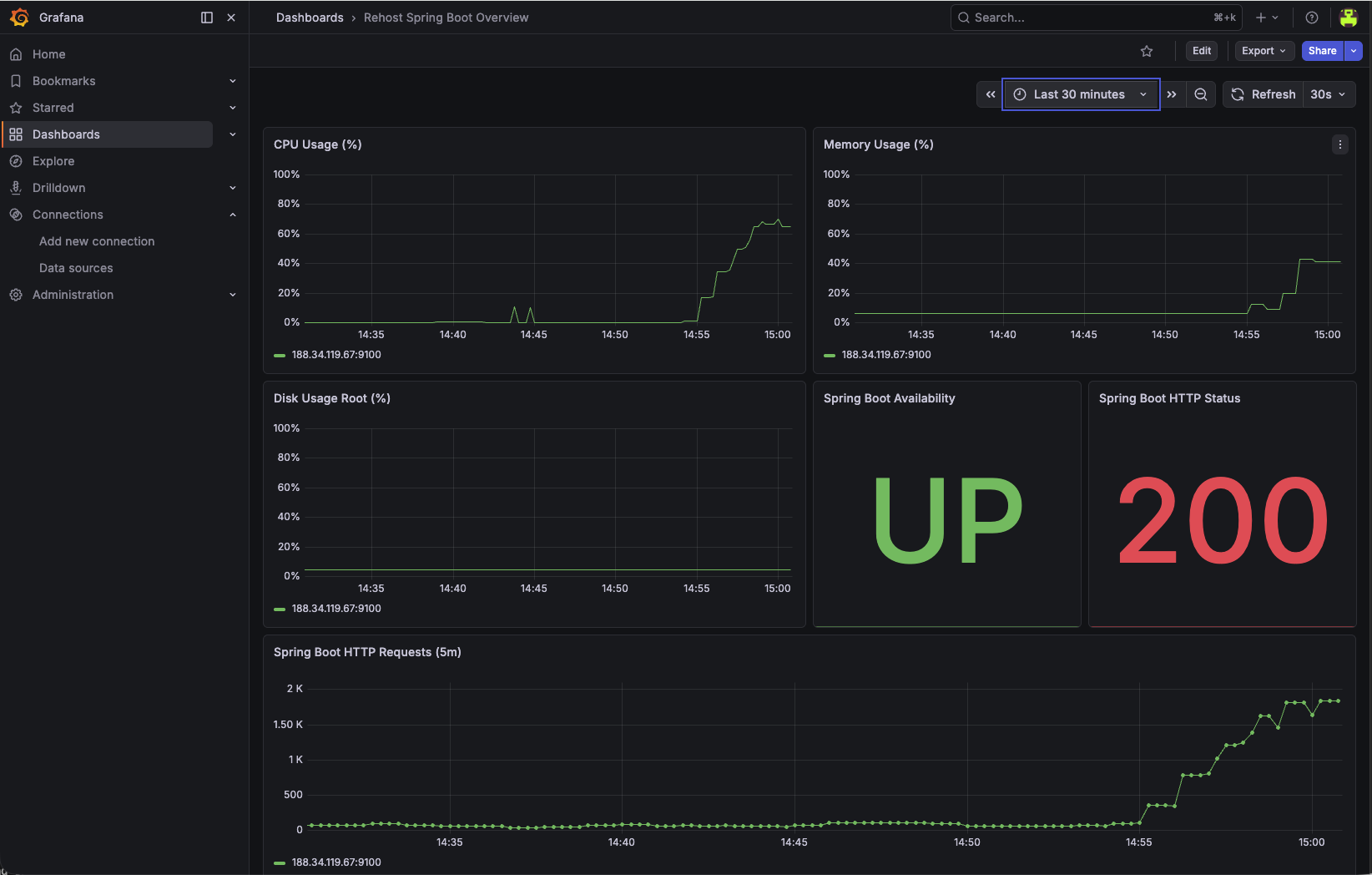
Define technical thresholds before changing capacity.
Keep thresholds workload-specific and validate with business traffic patterns.
For stateful Rehost workloads, include database signals in the same dashboard review cycle.
Use these metrics together with VM signals to avoid CPU-only or memory-only optimization decisions.
If the Rehost workload later moves its database tier to PostgreSQL Flex, include database-tier rightsizing and tuning in the same optimize cycle.
Use the offered Flex combinations and storage performance limits to assess a database-tier change. Keep the VM thresholds above workload-specific; the product catalog does not supply acceptance criteria or prove that an infrastructure change is reversible.
| Description | ID | CPU | RAM | max_connections | shared_buffers | work_mem | maintenance_work_mem | effective_cache_size |
|---|---|---|---|---|---|---|---|---|
| Small, Compute optimized | 2.4 | 2 | 4 GB | 95 | 950 MB | 14 MB | 380 MB | 2660 MB |
| Small, Memory optimized | 2.16 | 2 | 16 GB | 385 | 3950 MB | 14 MB | 1580 MB | 11060 MB |
| Medium, Compute optimized | 4.8 | 4 | 8 GB | 195 | 1950 MB | 14 MB | 780 MB | 5460 MB |
| Medium, Memory optimized | 4.32 | 4 | 32 GB | 785 | 7950 MB | 14 MB | 3180 MB | 22260 MB |
| Large, Processor optimized | 8.16 | 8 | 16 GB | 385 | 3950 MB | 14 MB | 1580 MB | 11060 MB |
| X-Large, Compute optimized | 16.32 | 16 | 32 GB | 785 | 7950 MB | 14 MB | 3180 MB | 22260 MB |
| X-Large, Memory optimized | 16.128 | 16 | 128 GB | 3170 | 31950 MB | 14 MB | 12780 MB | 89460 MB |
max_connections limit.This section is copied from the STACKIT docs automatically, several times a day. It cannot be changed here. Changes belong in the STACKIT docs.
| Description | ID | Max. IOPS | Max. throughput (MB/s) |
|---|---|---|---|
| Performance class 2 | premium-perf2-stackit | 1000 | 100 |
| Performance class 4 | premium-perf4-stackit | 2000 | 150 |
| Performance class 6 | premium-perf6-stackit | 5000 | 200 |
| Performance class 8 | premium-perf8-stackit | 10000 | 250 |
| Performance class 10 | premium-perf10-stackit | 15000 | 300 |
| Performance class 12 | premium-perf12-stackit | 20000 | 350 |
Currently, we offer three types of instances. For each type there is a different set of flavors available.
This section is copied from the STACKIT docs automatically, several times a day. It cannot be changed here. Changes belong in the STACKIT docs.
Update VM sizing in env.tfvars:
machine_type = "g3i.2"Apply and inspect plan output:
terraform plan -var-file=env.tfvarsterraform apply -var-file=env.tfvarsThen validate:
systemctl status, synthetic checks)Update VM sizing in env.tfvars:
machine_type = "g3i.4"Apply and validate with the same post-change checks.
If SLOs regress after rightsizing, roll back by restoring the previous machine_type and re-applying IaC.
Treat rollback as a standard runbook step, not as an emergency-only path.
terraform plan before apply.In Rehost scenarios, CPU and memory are only one side of rightsizing. Storage performance can also become the limiting factor.
A Block Storage performance class defines the maximum IOPS and throughput available to the complete volume. Application, database, operating-system, and backup access share this performance envelope. Select the class from measured peak demand, latency requirements, backup activity, and explicit growth headroom before creating the volume.
The following table lists currently available performance classes for the EU01 region:
| Performance class | Name | Max. IOPS | Max. Throughput (MB/s) |
|---|---|---|---|
| Performance class 0 | storage_premium_perf0 | 120 | 25 |
| Performance class 1 | storage_premium_perf1 | 500 | 50 |
| Performance class 2 | storage_premium_perf2 | 1000 | 100 |
| Performance class 4 | storage_premium_perf4 | 2000 | 150 |
| Performance class 6 | storage_premium_perf6 | 5000 | 200 |
| Performance class 8 | storage_premium_perf8 | 10000 | 250 |
| Performance class 10 | storage_premium_perf10 | 15000 | 300 |
| Performance class 12 | storage_premium_perf12 | 20000 | 350 |
| Performance class 13 | storage_premium_perf13 | 20000 | 700 |
| Performance class 14 | storage_premium_perf14 | 25000 | 400 |
| Performance class 15 | storage_premium_perf15 | 25000 | 800 |
| Performance class 16 | storage_premium_perf16 | 30000 | 450 |
| Performance class 17 | storage_premium_perf17 | 30000 | 900 |
| Performance class 18 | storage_premium_perf18 | 35000 | 500 |
| Performance class 19 | storage_premium_perf19 | 35000 | 1000 |
| Performance class 20 | storage_premium_perf20 | 40000 | 550 |
| Performance class 21 | storage_premium_perf21 | 40000 | 1100 |
| Performance class 29 | storage_premium_perf29 | 60000 | 1500 |
IOPS - Input/Output Operations per second
Throughput - Throughput in Megabytes per second
Thus, the classes used can be distinguished in detail based on the naming. Example: “Block Storage Premium - Performance Class 2” corresponds to SSD hard disks with max. 1000 IOPS and max. 100 Mbyte/s throughput.
This section is copied from the STACKIT docs automatically, several times a day. It cannot be changed here. Changes belong in the STACKIT docs.
For the Rehost baseline, the operating system, Spring Boot application, and PostgreSQL data share the boot volume. Changing its performance class therefore requires a controlled replacement target:
Use a separate data volume when storage capacity or performance must evolve independently from the VM lifecycle. To change its performance class, create a new volume in the required availability model with sufficient capacity, stop writes, migrate and verify the data, switch the attachment or mount, and retain the source volume until acceptance and rollback gates have passed.
Migrate data from Block StorageTreat storage checks as part of the same Optimize loop and validate latency, error behavior, recovery, and cost impact after any change.
Tobias M.Head of STACKIT Cloud Framework · STACKITOwnerActive 12 of the last 12 weeks · 168 updateswww.linkedin.com/in/tobias-müller-011304172Lukas WeberrußHead of STACKIT Cloud Migration Framework · STACKITOwnerActive 10 of the last 12 weeks · 47 updatesSTACKITwww.linkedin.com/in/lukas-weberruß-a360b081TMTobias M.Head of STACKIT Cloud Framework · STACKITOwnerActive 12 of the last 12 weeks · 168 updatesSTACKITwww.linkedin.com/in/tobias-müller-011304172Contributed in STACKITLukas WeberrußLukas WeberrußHead of STACKIT Cloud Migration Framework · STACKITOwnerActive 10 of the last 12 weeks · 47 updatesSTACKITwww.linkedin.com/in/lukas-weberruß-a360b081
· Sep 25, 2026
Tobias M.Tobias M.Head of STACKIT Cloud Framework · STACKITOwnerActive 12 of the last 12 weeks · 168 updatesSTACKITwww.linkedin.com/in/tobias-müller-011304172
· Sep 7, 2026
Tobias M.Tobias M.Head of STACKIT Cloud Framework · STACKITOwnerActive 12 of the last 12 weeks · 168 updatesSTACKITwww.linkedin.com/in/tobias-müller-011304172
· Aug 31, 2026
Tobias M.Tobias M.Head of STACKIT Cloud Framework · STACKITOwnerActive 12 of the last 12 weeks · 168 updatesSTACKITwww.linkedin.com/in/tobias-müller-011304172
· Aug 26, 2026
Tobias M.Tobias M.Head of STACKIT Cloud Framework · STACKITOwnerActive 12 of the last 12 weeks · 168 updatesSTACKITwww.linkedin.com/in/tobias-müller-011304172
· Jul 29, 2026
Tobias M.Tobias M.Head of STACKIT Cloud Framework · STACKITOwnerActive 12 of the last 12 weeks · 168 updatesSTACKITwww.linkedin.com/in/tobias-müller-011304172
· Jul 24, 2026
Tobias M.Tobias M.Head of STACKIT Cloud Framework · STACKITOwnerActive 12 of the last 12 weeks · 168 updatesSTACKITwww.linkedin.com/in/tobias-müller-011304172
· Jul 23, 2026
Tobias M.Tobias M.Head of STACKIT Cloud Framework · STACKITOwnerActive 12 of the last 12 weeks · 168 updatesSTACKITwww.linkedin.com/in/tobias-müller-011304172
· Jul 22, 2026
Tobias M.Tobias M.Head of STACKIT Cloud Framework · STACKITOwnerActive 12 of the last 12 weeks · 168 updatesSTACKITwww.linkedin.com/in/tobias-müller-011304172
· Jul 20, 2026