The Referral Journey: Co-Selling with STACKIT
Last updated on


The Referral Journey: Co-Selling with STACKIT
Expand your enterprise reach without deep technical marketplace integration. The Referral Track is designed for software vendors who want to partner with STACKIT through joint sales activities. By leveraging our established sales force, your solutions are directly recommended to STACKIT enterprise accounts, backed by a transparent lead-sharing model and agreed commission structures. Follow the tailored milestones below to navigate your path from initial contact to active co-selling.
Make Contact and Qualify the Fit
One form on the Marketplace assigns you a dedicated Partner Manager, and a 30-to-45-minute discovery call establishes mutual fit before either side invests engineering or legal time. Bring a business owner and a technical lead — the call covers both.
The first phase establishes contact and mutual fit. It is deliberately lightweight: one email, one call, and a shared decision on whether a partnership is worth pursuing before either side invests engineering or legal time.
How to Initiate Contact
Section titled “How to Initiate Contact”Getting started with a partnership is simple and streamlined:
- Reach out to us via email at
isv-sales@digits.schwarzto express your interest in discussing a general partnership. - Once contacted, a dedicated Partner Manager will reach out to you to schedule a 30-minute Discovery Call.
What to Expect in the Discovery Call
Section titled “What to Expect in the Discovery Call”The goal of this initial call is to discuss a potential partnership, establish a mutual fit, and align on expectations before moving forward.
Agenda & Focus Areas:
- Intro & Vision: A brief introduction to Digits and our overall vision.
- STACKIT Value Proposition: An overview of the key advantages and capabilities that STACKIT provides.
- Company Presentation: A short presentation of your company and offering.
- Fit & Qualification:
- Is there direct customer demand?
- What is your current cloud strategy?
- What are your specific sovereignty requirements?
- Expectations: Alignment on what both sides expect from a joint partnership.
How to Prepare for the Call
Section titled “How to Prepare for the Call”To keep the interaction efficient, please ensure the right stakeholders are involved and prepared.
Recommended stakeholders from your side:
- Business / Product Owner: To discuss market fit, customer demand, and strategic goals.
- Technical / Strategy Lead: To speak to your cloud strategy and sovereignty requirements.
Preparation checklist:
- Brief Presentation: Be ready to give a short overview of your company and core product offering.
- Customer Demand Insights: Have an overview of any current or potential customer interest.
- Cloud & Sovereignty Strategy: Be prepared to outline your current cloud footprint and requirements regarding digital sovereignty.
Mutual Value & Qualification Criteria
Section titled “Mutual Value & Qualification Criteria”Qualification runs in both directions. The table below states what each side brings and expects from a potential partnership:
| What Digits / STACKIT can offer you | What we expect from partners |
|---|---|
| Sovereign Cloud Capabilities: Access to STACKIT’s secure, European cloud infrastructure and ecosystem. | Company Alignment: Clear insight into your company background and offering. |
| Strategic Vision: Collaboration backed by Digits’ long-term vision and backing. | Defined Cloud Strategy: Clear understanding of your cloud roadmap and sovereignty requirements. |
| Mutual Growth: Opportunities to address joint customer demand together. | Direct Customer Demand: Existing or potential market demand for a combined solution. |
Phase Completion Criteria
Section titled “Phase Completion Criteria”- Initial contact made by email and a dedicated Partner Manager assigned.
- Discovery Call completed with named business and technical leads on the ISV side.
- Mutual fit confirmed against the qualification criteria above.
- Milestone achieved: Qualified opportunity ready to schedule the KickOff.
Support & Contact
Section titled “Support & Contact”For questions before or during the Discovery Call, contact the ISV Factory team directly at
isv-sales@digits.schwarz.
Build the Joint Business Case
Pricing model, resource footprint, target verticals and revenue expectations turn a conversation into a business case. The same commercial parameters agreed here become billing SKUs much later, which is why loose answers are expensive.
The KickOff phase transitions the partnership from initial qualification into concrete strategy execution. In this step, both teams align on the business model, compute resources, go-to-market approach, and support programs to ensure a viable, scalable product release on the STACKIT Marketplace.
Objectives & Key Stakeholders
Section titled “Objectives & Key Stakeholders”The primary goal of the KickOff meeting is to validate mutual financial and technical feasibility before signing formal contracts.
- STACKIT roles: Partner Manager, Partner Solution Architect
- ISV roles: Business Lead / Product Manager, Lead Architect / CTO
Business Case Inputs Required from the ISV
Section titled “Business Case Inputs Required from the ISV”To construct a realistic business case and define the resource baseline, the ISV provides key parameters regarding product architecture and commercial goals:
| Category | Required information | Purpose |
|---|---|---|
| Pricing & Licensing Model | SaaS subscription, usage-based, BYOL (Bring Your Own License), or tiered pricing. | Defines transaction handling on the STACKIT Marketplace. |
| Resource Footprint | Estimated average and peak compute (vCPU, RAM), storage (NVMe/S3), network bandwidth, and managed services (e.g., STACKIT Postgres/Kubernetes). | Calculates estimated STACKIT infrastructure costs and margin models. |
| Target Audience & Verticals | Specific industries (e.g., public sector, healthcare, finance) or enterprise segments. | Aligns GTM campaigns and compliance/certification requirements. |
| Sales & Revenue Expectations | Projected onboarding pipeline and expected customer sign-ups over 12–24 months. | Validates business viability and eligibility for STACKIT funding programs. |
Partnering & Go-to-Market Models
Section titled “Partnering & Go-to-Market Models”During the KickOff, both parties agree on the structure of the joint go-to-market approach:
1. Co-Selling & Referral
- Joint sales activity where STACKIT field sales recommend the ISV solution to existing enterprise accounts.
- Lead sharing and commission/referral structures agreed upon per transaction type.
2. Marketplace Resell
- STACKIT acts as the merchant of record (or facilitator) on the Marketplace.
- Billing and metering are fully integrated and automated via STACKIT.
Available Funding & Support Incentives
Section titled “Available Funding & Support Incentives”STACKIT supports qualifying ISVs during the onboarding journey to reduce initial development risks:
- PoC Infrastructure Credits: Cloud credits provided to cover STACKIT infrastructure costs during development, testing, and Technical Quality Gates.
- Architectural Support: Direct access to STACKIT Solution Architects for review of cloud-native design, Kubernetes deployment, and security compliance.
- Co-Marketing Support: Joint PR, blog posts, and featured placement opportunities on the STACKIT Marketplace upon launch.
Phase Completion Criteria
Section titled “Phase Completion Criteria”At the end of the KickOff, clear ownership is assigned for the immediate next phase:
- ISV task: Business case inputs finalized and the completed onboarding questionnaire returned.
- STACKIT task: Tailored Partnership Agreement drafted and the Signing phase prepared.
- Joint task: Technical PoC alignment call scheduled following contract execution.
- Milestone achieved: Business case validated — ready to proceed to Signing & Legal Alignment.
Support & Contact
Section titled “Support & Contact”For questions on the business case, funding programs, or go-to-market models, contact your
dedicated STACKIT Partner Manager or the ISV Factory team at
isv-sales@digits.schwarz.
Sign the Partnership
The Partner Base Agreement plus a sales model addendum, a DPA and the SLA framework. Annex 2 is not a legal footnote: the TOMs you commit to here are validated technically in the quality gate.
The Signing phase formalizes the partnership, legal terms, and operational framework established during the KickOff. Executing these agreements sets up the official business relationship and unlocks access to the STACKIT Partner Portal and technical onboarding resources.
Key Agreement Components
Section titled “Key Agreement Components”To ensure a fast, standardized legal process, STACKIT provides pre-structured contracts tailored to cloud software partnerships:
| Document / Module | Description & scope |
|---|---|
| Partner Base Agreement (PBA) | The overarching master agreement defining general terms and conditions, IP ownership protection, confidentiality (NDA terms), and liability boundaries. |
| Sales Model Addendum | Formalizes the commercial distribution model selected during KickOff. Reselling: Marketplace billing, payout schedules, and automated invoicing via STACKIT. Referral: Commission structures, lead registration, and co-selling mechanics. |
| Data Protection & Compliance (DPA) | Standardized EU GDPR and data processing addendums ensuring compliance with European sovereign cloud standards. |
| SLA & Support Framework | Defines operational boundaries, escalation paths, and support obligations (e.g., Tier-2/Tier-3 application support provided by the ISV vs. Tier-1/infrastructure support provided by STACKIT). |
| Marketing Appendix | Governs the use of word and figurative marks in the partnership’s communications via public media such as the website, portal, and marketplace. |
Legal Review & Workflow
Section titled “Legal Review & Workflow”To maintain the “factory” approach and keep interaction minimal and efficient:
- Standardized Templates: STACKIT utilizes standardized PBA and addendum templates optimized for European ISVs to minimize legal negotiation cycles.
- Support & Coordination: Your dedicated STACKIT Partner Manager acts as the primary point of contact to guide you through the legal alignment, coordinate internal legal approvals, and manage execution.
Phase Completion Criteria
Section titled “Phase Completion Criteria”- Final review and execution of the Partner Base Agreement and chosen Sales Model Addendum.
- Registration and credential issuance for the STACKIT Partner Portal.
- Milestone achieved: Contracts executed — ready to proceed to Partner Portal & Enablement.
Support & Contact
Section titled “Support & Contact”For questions on the Partner Base Agreement, addendums, or the legal review workflow, contact your
dedicated STACKIT Partner Manager or the ISV Factory team at isv-sales@digits.schwarz.
Get Portal Access and Enablement
Credentials for the Partner Portal, the capabilities that differ between the referral and reselling models, and the STACKIT University modules your business and technical leads complete before the build starts.
Following contract execution, your organization transitions into the operational phase of the framework. All detailed workflows for account activation, user management, and portal navigation are maintained in our central partner documentation.
Partner Portal Documentation & Setup
Section titled “Partner Portal Documentation & Setup”Review the official documentation to set up your team and access relevant enablement resources:
- Official Portal Documentation: docs.stackit.cloud — Partner Portal
The documentation guides your team through the following key areas:
- Account Access & IAM: Instructions for activating credentials, assigning permissions, and managing organization users in the STACKIT Partner Portal.
- Enablement & Training: Direct paths to STACKIT University modules for business, sales, and technical leads.
- GTM & Co-Selling Tools: Guidelines for deal registration and opportunity tracking (Referral Model), or tenant management and consumption dashboards (Reselling Model).
Direct entry points:
- STACKIT Partner Portal: partner-portal.stackit.cloud
- STACKIT University: university.stackit.cloud
Phase Completion Criteria
Section titled “Phase Completion Criteria”This phase is officially completed when:
- Documentation Reviewed: Partner Portal documentation has been reviewed by your team.
- Users Registered: Key team members are registered with active user roles in the STACKIT Partner Portal.
- Enablement Finished: Required enablement and training modules have been completed.
- Phase Milestone: Partner Portal access verified and enablement completed — ready to initiate STACKIT Onboarding.
Support & Contact
Section titled “Support & Contact”For questions on Partner Portal access, user roles, or enablement content, contact the ISV Factory
team at isv-sales@digits.schwarz.
Set Up the Cloud Tenant
Organisation, projects and IAM on the STACKIT Portal — and one decision that delays more onboardings than any other: making sure the registered Account Owner is someone who can actually assign permissions to engineers.
The STACKIT Onboarding phase provides your technical teams with direct access to the STACKIT Cloud Platform and equips them with all necessary knowledge and templates. In this phase, you will set up your cloud tenant, familiarize your team with our cloud fundamentals, and prepare the core architectural documents required for the upcoming Technical PoC.
Account Registration & Tenant Setup
Section titled “Account Registration & Tenant Setup”To start provisioning cloud resources, your organization must register a STACKIT Cloud account via the STACKIT Portal.
- STACKIT Portal: portal.stackit.cloud
Initial setup steps:
- Create Account: Register and log in via the STACKIT Portal.
- Organization & Project Setup: Create your root organization and dedicated development/testing projects.
- Identity & Access Management (IAM): Use STACKIT IAM to invite developers and assign granular, role-based access control (RBAC). Single Sign-On (SSO) integration via your company’s identity provider (e.g., Microsoft Entra ID or Google Cloud Identity) is also supported.
Key Technical Resources & Enablement
Section titled “Key Technical Resources & Enablement”Before building your Proof of Concept (PoC), review STACKIT’s cloud infrastructure offerings and documentation:
- STACKIT Docs — technical guides, API specifications, CLI reference, and step-by-step tutorials (verify the latest onboarding guides here): docs.stackit.cloud
- Product Portfolio — overview of core IaaS and PaaS services (STACKIT Kubernetes Engine, Object Storage, Postgres, Cloud DNS, and more): stackit.com/en/products
- STACKIT University — self-paced training modules for technical staff and system architects: university.stackit.cloud
Navigating the STACKIT Ecosystem
Section titled “Navigating the STACKIT Ecosystem”Before building your solution, familiarize your team with the essential tools and portals available within the STACKIT ecosystem:
- STACKIT Cloud Portal: Your central hub for resource management, cost overviews, and switching between projects.
- STACKIT Calculator: Estimate your monthly infrastructure costs, configure product combinations, and export estimations as PDF/CSV.
- STACKIT Status Page: Subscribe to updates and monitor the real-time operational status of all STACKIT services.
- STACKIT Help Center: Raise incidents or service requests. The portal also features an “Assume Role” function, allowing you to grant STACKIT Support Agents temporary (24-hour) access to your project for hands-on troubleshooting.
- Developer Tools: Access the STACKIT Terraform Provider, CLI, Go/Python SDKs, and the STACKIT GIT repository to automate your Infrastructure-as-Code (IaC) deployments.
Direct links:
- Calculator: calculator.stackit.cloud
- Status Page: status.stackit.cloud
- Help Center: support.stackit.cloud
- Terraform Provider: registry.terraform.io
Cloud Readiness & Architecture Guidelines
Section titled “Cloud Readiness & Architecture Guidelines”Before executing your deployment, it is crucial to evaluate your application’s architecture. A true cloud-native application is essential for maximizing scalability and cost-efficiency. If you are unsure where your application stands, we provide several frameworks to guide you:
- New to the cloud? Read our Cloud Adoption Framework to understand the foundational concepts and benefits of cloud computing.
- Moving from on-premises? If you currently install your solution locally at the customer’s site and want to transition to a SaaS model, our Migration Framework provides the necessary strategies.
- Optimizing for cloud-native? To ensure your application is highly scalable and cost-efficient, consult our Architecture Framework for best practices on cloud-native software design.
Phase Completion Criteria
Section titled “Phase Completion Criteria”- STACKIT Cloud account, organization, and initial projects created.
- IAM roles assigned and, where applicable, SSO integration configured.
- Technical team has reviewed the key resources and STACKIT ecosystem tooling.
- Application architecture assessed against the Cloud Adoption, Migration, or Architecture Framework as applicable.
- Milestone achieved: Cloud tenant ready — ready to proceed to the Technical Proof of Concept.
Support & Contact
Section titled “Support & Contact”For onboarding support, manual account creation, or technical portal inquiries, reach out to the
dedicated team at isv-sales@digits.schwarz.
Deploy the Proof of Concept
Tenancy strategy, landing zone, resilience requirements and a formal architectural blueprint mapped to STACKIT services — then automate it. Manual provisioning through the portal does not survive the quality gate.
The Technical Proof of Concept (PoC) phase is where your architectural planning becomes reality. The goal of this phase is to deploy a working version of your application on STACKIT to validate technical feasibility, performance, and cost-efficiency before moving toward a production-ready state.
Deployment Strategy & Landing Zone
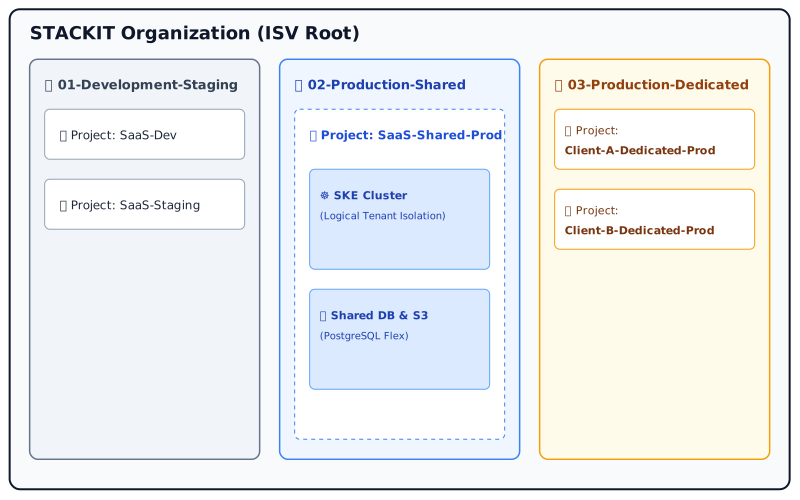
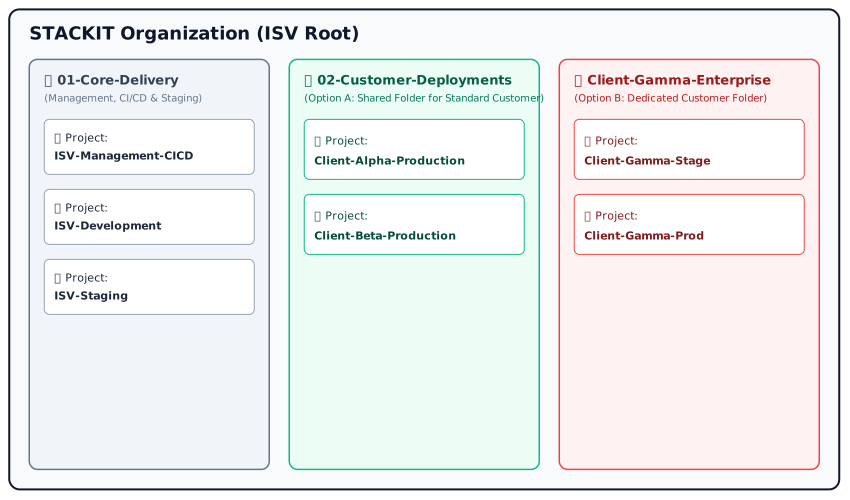
Section titled “Deployment Strategy & Landing Zone”A critical decision before rolling out your infrastructure is defining your tenant strategy. This decision heavily impacts your STACKIT Organization, Folder, and Project structure:
-
Multitenant Strategy: Multiple customers share the same infrastructure and application instance, separated logically.
-
Customer Dedicated (Single Tenant): Each customer receives an isolated STACKIT Project and infrastructure environment.
Accelerate your setup. To support a fast, automated, and standardized rollout of your cloud environment, STACKIT provides Infrastructure-as-Code (IaC) assets:
- Landing Zone Accelerator — best-practice templates for setting up your STACKIT environment. Dedicated Landing Zone repositories tailored specifically for Multitenant and Customer Dedicated models are planned: github.com/stackitcloud/stackit-landing-zone
- STACKIT GitHub Repositories — open-source projects, Terraform providers, and SDKs: github.com/stackitcloud
Resilience, Scaling, and Compliance
Section titled “Resilience, Scaling, and Compliance”When building your PoC, you must design for growth, stability, and security:
- Scaling: How does your application architecture scale to handle sudden user growth or increased workloads without performance degradation?
- Redundancy & High Availability (HA): Define your availability requirements. Does your application require a Single-Region setup, or do you need a Multi-Region architecture to prevent downtime?
- Compliance (TOMs): By signing the Partner Base Agreement (PBA), your organization technically committed to the Technical and Organizational Measures (TOMs) outlined in Annex 2. Your PoC architecture must reflect and implement these security and data protection standards.
Architectural Blueprinting & Target Design
Section titled “Architectural Blueprinting & Target Design”Once you have defined your deployment model, isolation strategy, and resilience requirements, translate these specifications into a formal Architectural Blueprint.
Mapping your software components (microservices, stateful data, caching layers, external interfaces) directly to STACKIT services — such as SKE, PostgreSQL Flex, Object Storage and STACKIT Network Area — creates a clear target architecture. This blueprint serves as the essential foundation for precise infrastructure cost modeling and subsequent automation via IaC.
Infrastructure Calculation & Cost Tracking
Section titled “Infrastructure Calculation & Cost Tracking”With your Architectural Blueprint defined, model and track your resource consumption against your initial business case estimations:
- Computing Calculator — model your estimated monthly compute, network, and storage footprint for the target PoC architecture: calculator.stackit.cloud/computing
- STACKIT Price List — reference for a complete overview of all SKUs, as some newer platform services may not yet be reflected in the calculator.
Infrastructure as Code (IaC) & CI/CD Pipelines
Section titled “Infrastructure as Code (IaC) & CI/CD Pipelines”To achieve high reliability and low operational overhead, manual infrastructure provisioning via the portal should be avoided for production-grade software. Infrastructure as Code (IaC) is the state-of-the-art industry standard for cloud-native deployment.
Infrastructure as Code
Section titled “Infrastructure as Code”Using declarative tools ensures your infrastructure is repeatable, version-controlled, and audit-ready:
- Primary Tooling: Use the official STACKIT Terraform Provider to declare compute, storage, network, SKE (Kubernetes), and database resources: registry.terraform.io
- Automation-First: Maintain all IaC scripts within version control (e.g., GitHub, GitLab, STACKIT GIT).
- STACKIT Git Pipelines: If you host your repositories on STACKIT Git, the built-in pipelines run your IaC and build workflows next to the code — the first-steps guide walks through the initial runner and workflow setup: docs.stackit.cloud — Pipelines first steps
Recommended CI/CD Pipeline Architecture
Section titled “Recommended CI/CD Pipeline Architecture”A standardized Continuous Integration / Continuous Deployment (CI/CD) pipeline automates the lifecycle of both your infrastructure and application workloads.
- Code Commit & Trigger: Changes to application code or IaC templates trigger the automated pipeline.
- Linting & Static Security Analysis: Validate Terraform configurations (
terraform validate,tflint) and scan container images for vulnerabilities — either by running Trivy directly as a pipeline step, or by relying on the vulnerability scans the STACKIT Container Registry performs on pushed images. Running both gives you a gate in the pipeline and continuous rescanning of images already stored. - Infrastructure Provisioning (IaC Step): Run
terraform planfor automated verification, followed byterraform applyto provision or update STACKIT resources in the target PoC environment. - Workload Deployment: Deploy application containers to STACKIT Kubernetes Engine (SKE) with Helm as the packaging format — either driven by the pipeline through the Terraform Helm provider (keeping infrastructure and workload in one declarative run), or pull-based via a GitOps engine such as Argo CD or Flux that reconciles the chart from your Git repository. Avoid imperative
kubectl applysteps, as they leave no reconcilable desired state. PaaS applications are deployed via Cloud Foundry (cf push). - Automated Integration Testing: Execute smoke tests against the freshly deployed endpoints to verify service availability.
- Secrets Management: Ensure pipeline runners access STACKIT service accounts via short-lived API tokens or integration with STACKIT Secrets Manager — never hardcode API keys or credentials in repositories.
- STACKIT Container Registry: Central registry for your build artifacts, including vulnerability scanning of pushed images: docs.stackit.cloud — Container Registry
Phase Completion Criteria
Section titled “Phase Completion Criteria”The PoC phase is complete when the following milestones are verified:
- Target Architectural Blueprint established and mapped to STACKIT services.
- Application is successfully deployed and running in the STACKIT PoC project.
- Infrastructure provisioning is automated using IaC (e.g., Terraform / Landing Zone Accelerator).
- Tenant isolation strategy (Multitenant or Customer Dedicated) is implemented in the folder/project hierarchy.
- PoC environment costs calculated and discussed with the Partner Manager.
- Automated CI/CD deployment pipeline is established.
- Security and compliance controls (PBA Annex 2 TOMs) are technically validated.
- Milestone achieved: PoC validated — ready to proceed to the ES³ Self Assessment.
Support & Contact
Section titled “Support & Contact”Throughout the PoC phase, use the following resources to support your development:
- STACKIT Knowledge Base — technical documentation, API references, and practical tutorials: docs.stackit.cloud
- STACKIT Status Page — real-time information on platform availability and system maintenance: status.stackit.cloud
Need assistance? If you encounter technical blockers during your PoC, contact your Partner
Manager or the ISV Factory team at isv-sales@digits.schwarz.
Pass the ES3 Self Assessment
Nine sovereignty dimensions, each checked contractually, organizationally, and technically, and condensed into one of four maturity levels from Initial to Future-Proof. The minimum principle applies: your overall level is the lowest level you reach in any single dimension.
The European Sovereign Stack Standard (ES³) is STACKIT’s digital sovereignty program. It makes the otherwise vague concept of digital sovereignty objectively measurable, in a market where “sovereignty washing” and vague marketing promises are common. Its operational engine is the Sovereignty Maturity Level (SML) Framework, an auditable assessment framework whose criteria have been verified by the independent auditing firm BDO.
The framework follows three guiding principles:
- Auditability: assessments must be evidence-based, comprehensible, and reproducible.
- SML classification: maturity levels are assigned based on defined mandatory controls per level.
- Comparability: results are comparable between services and providers, and over time.
The Nine Sovereignty Dimensions
Section titled “The Nine Sovereignty Dimensions”The SML framework builds on the eight sovereignty objectives of the official EU Cloud Sovereignty Framework (CSF) and adds a ninth, future-critical dimension: Artificial Intelligence.
| ID | Dimension | What it assesses |
|---|---|---|
| SML 1 | Strategic | Corporate governance architecture, ownership dependencies, transparency of ownership structures, and executive oversight of service substitution and exit readiness. |
| SML 2 | Legal & Jurisdictional | Applicable legal frameworks, geographic processing boundaries, and legal protection against extraterritorial third-party claims or conflicting access requests. |
| SML 3 | Data | Customer-controlled access management, cross-environment data portability, purpose-bound usage constraints, and long-term cryptographic resilience. |
| SML 4 | Operational | Allocation of day-to-day operational responsibility, restriction and auditing of privileged access, autonomous incident response, and disaster recovery. |
| SML 5 | Supply Chain | Transparency of subprocessors and software components (SBOM), vendor risk governance, critical dependency mitigation, and vendor substitution workflows. |
| SML 6 | Technology | Deployment within approved geographic boundaries, adoption of open standards against vendor lock-in, architectural transparency, and component portability. |
| SML 7 | Security & Compliance | Least-privilege identity and access control, lifecycle data encryption, customer visibility into security logs, and isolation of high-risk operational tasks. |
| SML 8 | Environmental Sustainability | Infrastructure energy dependency profiles, hardware and cooling supply-chain exposure, environmental risk planning, and sustainability metric disclosure. |
| SML 9 | AI | Corporate accountability models, system explainability, reliance on external software providers, and protection of training data and model components. |
Each dimension is assessed on three mandatory implementation levels, so a requirement is never satisfied on paper alone:
- Level 1 — Contractual (Regulatory): contractual regulations and assurances, such as service agreements, SLAs, and legal arrangements.
- Level 2 — Governance & Operations (Organization): organizational responsibilities, policies, procedures, and operational processes.
- Level 3 — Technical (Technology): technical implementation and system configuration, such as security measures, configurations, and automation.
The Four Sovereignty Maturity Levels
Section titled “The Four Sovereignty Maturity Levels”| Level | Short form | Description |
|---|---|---|
| 1 Initial | Ad hoc, not standardized | Heavy reliance on external providers. Processes are reactive, digital dependencies are not managed and not embedded in risk management. |
| 2 Managed | Documented, rule-based | Digital dependencies are identified and documented in risk management. Initial contingency and restoration plans exist, but are not yet fully tested. |
| 3 Advanced | Structured, consistent | Sovereignty is anchored as a strategic objective. At least one alternative sourcing option or a documented migration path exists for every business-critical service. Data is predominantly processed within the EU/EEA. |
| 4 Future-Proof | Optimized, robust | Near-complete digital autonomy on self-operated or sovereign-controlled infrastructure, open standards, and European supply chains. Remaining dependencies are deliberate and substitutable at any time. |
What Is Assessed — and Who Is Responsible
Section titled “What Is Assessed — and Who Is Responsible”The object of assessment is always the combination of a client-facing service and its service provider, including the underlying services it is built on. Before the assessment starts, the service is classified by Service Name, Service Provider, and Service Type (IaaS, PaaS, SaaS, Managed Service, AI Service). The Service Type determines only which controls are applicable — it has no influence on the resulting maturity level.
Every control is assigned to exactly one Control Scope, which defines who is responsible for it:
| Scope | Abbr. | Meaning for an ISV |
|---|---|---|
| Underlying Service | US | The platform you build on — for a Marketplace ISV, typically STACKIT. |
| Service Provider | SP | Your organization, which develops, operates, and is accountable for the service. |
| Client-facing Service | CFS | The specific product you deliver to your customer. |
This split exists to prevent duplicate audits and to make inherited capabilities auditable:
- Controls at SP level are assessed once and inherited across all of your services.
- Controls at US level are not implemented by you. They are covered by suitable evidence from the platform provider (certificates, audit reports) and are considered inherited — which means the sovereignty maturity of the platform you build on directly shapes the level your own service can reach.
- Controls at CFS level apply to the specific product you deliver to your customer and must be assessed individually for each service — they are neither inherited from your SP-level controls nor from the underlying platform.
Evidence Requirements
Section titled “Evidence Requirements”The framework is hierarchical: Dimension → Control Objective → Control → Question → Evidence. You answer at the Control level, not the question level — the questions listed underneath each control in the catalogue are illustrative example questions that help you interpret its intent, not a separate checklist to work through. Each control is answered binary — “Yes”, “No”, or “N/A” — and backed by evidence; a control counts as fulfilled only when it is answered “Yes” and the evidence substantiates it. An “N/A” is accepted only where it is objectively not applicable and justified.
Evidence must be specific, verifiable, and directly assignable to a control. Blanket statements such as “documentation available” or “process exists” are not sufficient; an independent third party must be able to fully comprehend the assessment. Permissible evidence types:
- Contracts or legal agreements
- Policies and procedural documentation
- Technical configurations or system extracts
- Audit reports or certifications
- Architecture diagrams
How to Approach the Assessment
Section titled “How to Approach the Assessment”The entire assessment process chain — service classification, working through the control catalogue, uploading evidence, and tracking your target level — is mapped in the ES³ Tool:
- ES³ Tool: es3.runs.onstackit.cloud
- Determine your starting point: Use the ES³ Lens, the interactive presales assessment tool, to get an instant maturity scorecard for your infrastructure before committing to a target level.
- Study the framework and catalogue: Read the SML Framework specification and the downloadable framework catalogue, in which every assessment question is listed with its dimension, control, service type, expected evidence type, and evidence example.
- Classify your service: Fix Service Name, Service Provider, and Service Type. This classification is binding for the entire assessment and determines which controls apply.
- Collect evidence per control: Work through the applicable controls along all three implementation levels, answer each one directly, and assign exactly one piece of specific, verifiable evidence to substantiate your answer.
- Agree your target level: Discuss the maturity level your solution should carry with your STACKIT Partner Manager — it determines which controls are mandatory for you via the separate SML mapping table.
- Validation: Your results are reviewed as part of the Technical Quality Gate, which is also where the sovereignty seal shown on your Marketplace listing is established.
- ES³ program overview: stackit.com — ES³
- SML Framework specification (PDF): Framework and Criteria Specification
- ES³ Tool: es3.runs.onstackit.cloud
- STACKIT Partner Portal: partner-portal.stackit.cloud
Phase Completion Criteria
Section titled “Phase Completion Criteria”- Framework Reviewed: SML framework specification and criteria catalogue reviewed by your security or technical lead.
- Service Classified: Service Name, Service Provider, and Service Type fixed for the assessment.
- Assessment Completed: All applicable controls answered across the contractual, organizational, and technical levels, each backed by specific evidence.
- Target Level Agreed: The intended Sovereignty Maturity Level is aligned with your STACKIT Partner Manager.
- Results Submitted: Assessment results handed over for validation in the Technical Quality Gate.
Support & Contact
Section titled “Support & Contact”For questions on specific controls, sovereignty criteria, or the assessment tooling, contact the ES³
Program team at ES3@digits.schwarz. For questions about how the assessment fits into your ISV
onboarding, reach out to the ISV Factory team at isv-sales@digits.schwarz.
Clear the Technical Quality Gate
Because STACKIT holds zero access to your environments under BSI C5, the gate shifts left: an IaC compliance scanner runs in your own pipeline, produces a signed report, and your Technical Lead attests to the result.
To guarantee enterprise-grade resilience, security, and digital sovereignty for our customers, every application must pass the STACKIT Technical Quality Gate before being listed on the Marketplace.
At STACKIT, we strictly adhere to BSI C5 compliance, meaning we have zero access to your project environments or customer data. Therefore, our Quality Gate operates on architectural compliance, robust security validation, and binding self-attestation.
The STACKIT Quality Framework (4 Pillars)
Section titled “The STACKIT Quality Framework (4 Pillars)”Your software is evaluated against the STACKIT Certified Sovereign ISV framework, which consists of four core pillars.
Pillar A — Sovereignty (ES³) Your application must pass the ES³ assessment (completed in Phase 7), proving data residency and immunity against third-country access.
Pillar B — Technical Resilience & Cloud-Native Your architecture must be designed for failure. This includes mandatory Multi-AZ deployments across at least two STACKIT Availability Zones and a stateless architecture, preferably utilizing the STACKIT Kubernetes Engine (SKE).
Pillar C — Factory-Readiness (Standardization) You should leverage STACKIT’s predefined Infrastructure-as-Code (IaC) templates. Implementations should be based on the STACKIT Landing Zone repository and our Terraform Blueprints for services like PostgreSQL and Object Storage.
Pillar D — Enterprise Security & Compliance Enforced encryption (at rest and in transit), strict IAM policies without excessive administrative privileges, and systematic vulnerability management.
Security Validation & Recommended Penetration Testing (Pentest)
Section titled “Security Validation & Recommended Penetration Testing (Pentest)”To protect both your customers and the reputation of the STACKIT platform, we strongly recommend conducting a comprehensive Penetration Test (Pentest) prior to commissioning your application.
Contractual Obligations (PBA Annex 2 TOMs)
Section titled “Contractual Obligations (PBA Annex 2 TOMs)”While STACKIT cannot directly inspect your live infrastructure or enforce a specific third-party audit, please note your contractual commitment:
Regulatory Alignment in the EU
Section titled “Regulatory Alignment in the EU”For ISVs targeting European enterprise and regulated markets, aligning your security testing with European standards is critical. A penetration test in the EU context serves as an authorized security audit aligned with strict regulatory frameworks:
- TIBER-EU: A framework for threat-led penetration testing under real-world conditions.
- DORA (Digital Operational Resilience Act): Mandates rigorous and regular security testing for software vendors serving the financial sector in the EU.
- NIS-2 & Cyber Resilience Act (CRA): Broaden obligations for digital service providers and software manufacturers to identify, manage, and report software vulnerabilities.
Executing a structured pentest ensures your application meets these evolving European compliance requirements.
Self-Attestation & Formal Confirmation
Section titled “Self-Attestation & Formal Confirmation”Until full integration into the STACKIT Partner Portal is available, the Technical Quality Gate concludes with a formal email-based Technical Self-Attestation.
Submission Process
Section titled “Submission Process”The Technical Lead or CTO of your organization must send a formal confirmation email to the ISV
Factory team at isv-sales@digits.schwarz.
Required Confirmation Content: By submitting this email, your technical management explicitly confirms that:
- The application architecture adheres to the 4 Pillars of the STACKIT Quality Framework.
- All Technical and Organizational Measures (TOMs) defined in PBA Annex 2 have been technically validated and fully implemented in your production deployment.
- Appropriate security validation (e.g., vulnerability scans or penetration testing) has been conducted to verify the software’s resilience prior to launch.
Phase Completion Criteria
Section titled “Phase Completion Criteria”- Architecture complies with the 4 Pillars of the STACKIT Quality Framework.
- Security controls and PBA Annex 2 TOMs technically validated.
- Pre-commissioning Penetration Test (Pentest) conducted (strongly recommended).
- Formal Technical Self-Attestation email sent to
isv-sales@digits.schwarzby the ISV Technical Lead. - Milestone achieved: Solution is granted the “STACKIT Sovereign Factory Approved” status and is ready for Placement & Marketplace Enablement.
Support & Contact
Section titled “Support & Contact”If you encounter blockers or have questions regarding this phase, reach out to the ISV Factory team:
- Contact Email:
isv-sales@digits.schwarz - Documentation & Knowledge Base: docs.stackit.cloud
- Platform Status: status.stackit.cloud
Turn the Product Into an Offer
The Product Delivery Sheet is the single document the storefront entry and the billing SKUs are built from. Then choose your depth: a standard listing with manual fulfilment, or API integration with automated provisioning and metering.
The Placement phase transitions your validated software solution into a commercially available product on the STACKIT Marketplace. In this phase, commercial structures are established, product SKUs are generated, and your storefront presence is created.
Discovering the STACKIT Marketplace
Section titled “Discovering the STACKIT Marketplace”To get a clear overview of how software solutions are featured and delivered to enterprise customers, watch the official STACKIT Marketplace introduction:
- STACKIT Marketplace Overview: youtu.be/9FK_SIQAgwM
Marketplace Vendor Documentation & Onboarding
Section titled “Marketplace Vendor Documentation & Onboarding”All technical, operational, and commercial guidelines for listing and integrating your product are maintained in our central vendor documentation.
- STACKIT Documentation for Marketplace Vendors: docs.stackit.cloud — for marketplace vendors
Please review this documentation to guide you through the following steps:
- Commercial & Operational Onboarding: Requirements for setting up your vendor profile and commercial structures.
- Product Submission: Completing the required product details, pricing models, and marketing assets.
- Listing & Integration Options: Guidance on standard storefront listings as well as automated provisioning and metering via Marketplace APIs.
Commercial Onboarding & SKU Creation
Section titled “Commercial Onboarding & SKU Creation”Before a listing can go live, the commercial parameters agreed upon during KickOff and Signing must be operationalized:
- Product Delivery Sheet: The ISV provides final product details, marketing assets, pricing tiers, and descriptions via the standardized Product Delivery Sheet.
- SKU Generation: STACKIT creates the official Stock Keeping Units (SKUs) in the billing engine to enable transaction processing, invoicing, or referral tracking.
Marketplace Listing vs. Integration
Section titled “Marketplace Listing vs. Integration”Commercial placement is divided into two distinct levels depending on your chosen integration depth:
| Level | Scope & execution |
|---|---|
| Stage 1: Marketplace Listing (standard) | Listing Creation: STACKIT Partner Managers (PDMs, ISV Sales, and ISV GTM teams) use the Marketplace Listing Wizard to build your storefront entry using your Product Delivery Sheet. Lead / Inquiry Handling: Customers can discover your product, request quotes, or trigger manual fulfillment. |
| Stage 2: Marketplace Integration (optional) | Automated Provisioning & Metering: Deep API integration between your software and STACKIT Marketplace APIs. Usage-Based Billing: Automated meter tracking and single-click customer provisioning. |
Phase Completion Criteria
Section titled “Phase Completion Criteria”- Vendor documentation reviewed by your commercial and technical teams.
- Product details and commercial structures submitted according to vendor guidelines.
- Product Delivery Sheet completed and submitted by the ISV.
- Billing SKUs created in the STACKIT system.
- Storefront draft generated via the Marketplace Listing Wizard and approved by both teams.
- Milestone achieved: Commercial listing approved — ready to proceed to Ready for Production.
Support & Contact
Section titled “Support & Contact”For questions on vendor documentation, SKU creation, or the Marketplace Listing Wizard, contact
your STACKIT Partner Manager or the ISV Factory team at isv-sales@digits.schwarz.
Go Live and Operate
Activation switches the listing to live and starts the joint go-to-market. What determines whether the partnership works is what follows: support routed by inquiry type, with commercial questions and platform questions going to different owners.
The Ready for Production phase marks the official launch of your solution on the STACKIT Marketplace. Your product becomes visible to all STACKIT enterprise customers, and operational governance transitions into ongoing joint maintenance and sales.
Go-Live & Public Launch
Section titled “Go-Live & Public Launch”With technical quality gates passed and commercial setup completed, your STACKIT Partner Manager executes the final release:
- Listing Activation: Your storefront page switches to LIVE status on the STACKIT Marketplace.
- Co-Marketing Kickoff: Execution of joint GTM activities agreed upon during onboarding, for example social media announcements and partner portal highlights.
Phase Completion Criteria
Section titled “Phase Completion Criteria”- Partner listing is live on the STACKIT Marketplace.
- Co-marketing activities executed.
- Milestone achieved: Solution is generally available to all STACKIT enterprise customers.
Support & Contact
Section titled “Support & Contact”Once live, operational responsibilities are handled based on the inquiry type to ensure quick response times:
-
Commercial & Sales Support: Contact your dedicated STACKIT Partner Manager / Partner Sales Lead for deal registration, co-selling opportunities, and contract updates.
-
Technical & Platform Support: Contact the ISV Factory team at
isv-sales@digits.schwarzor use the STACKIT Help Center for platform-related issues, API support, or technical maintenance. -
STACKIT Help Center: support.stackit.cloud
Trail historyActive 2 of the last 12 weeksTBUpdatedNo updates · 1 bar = 1 week i
- TBTimo BergenSTACKITOwnerTimo BergenSTACKITOwnerActive 3 of the last 12 weeks · 4 updatestimo.bergen@digits.schwarz
Timo BergenSTACKITOwnerActive 3 of the last 12 weeks · 4 updatesSTACKITtimo.bergen@digits.schwarzContributed in STACKITTimo Bergen
Timo BergenSTACKITOwnerActive 3 of the last 12 weeks · 4 updatesSTACKITtimo.bergen@digits.schwarz
· Sep 4, 2026Timo Bergen
Timo BergenSTACKITOwnerActive 3 of the last 12 weeks · 4 updatesSTACKITtimo.bergen@digits.schwarz
· Sep 1, 2026