Shared File Storage for STACKIT Kubernetes Engine
Last updated on
Use case and benefits
Section titled “Use case and benefits”Several replicas of an application need the same uploaded files, generated reports, or working directory, even when Kubernetes schedules them on different nodes. Files stored only inside a container do not provide that shared directory. This blueprint connects STACKIT Kubernetes Engine (SKE) to STACKIT File Storage (SFS) over NFS and exposes the share through a ReadWriteMany (RWX) PersistentVolumeClaim.
The application keeps using filesystem paths instead of implementing an object-storage API. Suitable use cases include a replicated web application serving shared media and worker processes exchanging files. The application must support concurrent access to those files: RWX provides a shared mount, not application locking or transactional writes.
Architecture and data flow
Section titled “Architecture and data flow”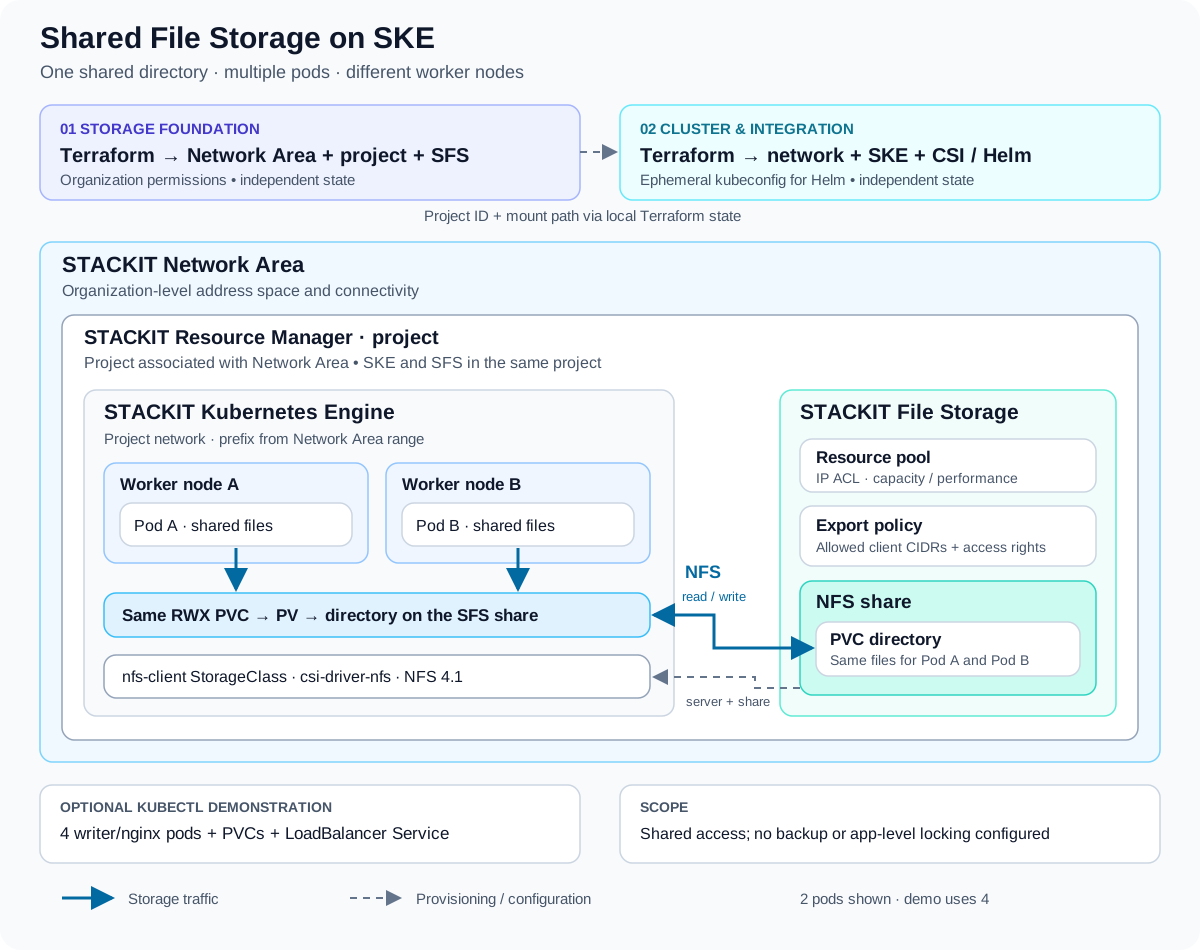
The diagram shows two representative pods; the bundled demonstration deploys four replicas across at least two nodes. Network Area supplies the address space and network connectivity. The project is associated with that Network Area, so the SKE network receives a prefix from its configured range. The SFS pool IP ACL and export policy allow clients from that range by default.
Inside SKE, the Helm-installed csi-driver-nfs exposes the existing SFS endpoint through the nfs-client StorageClass. Its server and share parameters come from the SFS mount path. Dynamic provisioning creates a directory on that share for each PVC; pods referencing the same PVC share that directory. Separate PVCs do not automatically share the same files. See the NFS CSI driver parameters for the directory provisioning model.
| Component | Role in this blueprint |
|---|---|
| STACKIT Resource Manager project | Contains SFS and SKE; created directly under the organization in this example |
| STACKIT Network Area and project network | Provide the address range and network path between SKE nodes and SFS |
| STACKIT File Storage | Resource pool, export policy and NFS share hold the shared files |
| STACKIT Kubernetes Engine | Runs the application on a node pool starting at two nodes |
| NFS CSI driver and StorageClass | Integrate the existing share with Kubernetes PVs and PVCs; these are cluster components |
What is provisioned
Section titled “What is provisioned”Terraform is split into two independently managed stages. This separates organization-level setup and the slower storage pool creation from cluster operations.
01-storage: Creates the Network Area and regional address ranges, a project associated with it, an SFS resource pool, export policy and share. Outputs include the project ID, mount path and network information.02-cluster: Reads the project ID and mount path from the first stage’s local state, creates the project network and SKE cluster, then installs the NFS CSI Helm chart and StorageClass. An ephemeral kubeconfig supplies Helm credentials without storing that kubeconfig in Terraform state.- Optional demonstration: Kubernetes manifests create a test PVC, followed by a second PVC, four writer/nginx pods and a
LoadBalancerService. The writers append their hostnames to a shared file, which nginx serves. These objects are applied withkubectl, outside Terraform.
Requirements and deployment
Section titled “Requirements and deployment”Use Terraform 1.10 or later for the complete blueprint: stage 1 requires 1.5, stage 2 requires 1.10 for the ephemeral resource. The example declares STACKIT provider >= 0.116.0 and Helm provider >= 3.1.1. SFS beta resources and the SKE experiment are enabled in the respective provider configurations.
You need organization permissions for the first stage, a service account key accessible to Terraform, and an authenticated STACKIT CLI. The example places the project directly below the organization because its README documents a restriction on SKE clusters in folder-nested projects. Check the current SKE documentation before adapting that hierarchy. kubectl is needed for the demonstration. Plan for the provisioned storage capacity, worker nodes and optional load balancer to incur costs.
- Prepare the storage configuration. Clone the source repository and enter
examples/ske-stackit-sfs-integration/01-storage. Copyterraform.tfvars.exampletoterraform.tfvars, set organization, parent container and owner email, and configure credentials and non-overlapping network ranges. - Review and create storage. Run
terraform init,terraform validateandterraform plan, then apply the reviewed plan. Wait for a usable IPv4 NFS mount endpoint. Pool operations default to a 60-minute timeout; the stage README explains how to inspect a timeout before deciding on recovery. - Review and create the cluster. Enter
../02-cluster, optionally configure its variables, then runterraform init,terraform validate,terraform planand apply the reviewed plan. Keep both stages in the expected directory layout for the default local-state handover. - Verify shared access. Follow the stage 2 README to obtain a kubeconfig, select the cluster context and apply
PersistentVolumeClaim.yamlandexample-rwx-deployment.yaml. Check that the PVCs bind and all four pods run across at least two distinct nodes. Read/data/index.htmlfrom writer containers on different nodes and confirm entries from multiple pod hostnames.
The demonstration proves shared access across nodes. It does not prove that Kubernetes enforces RWX access modes, nor does it measure application consistency, throughput or recovery behavior.
What you can adapt
Section titled “What you can adapt”| Area | Exposed configuration and implications |
|---|---|
| Placement and naming | Organization, project parent, owner email, names and region. Keep both stages in the same intended region; align SFS and SKE availability-zone settings with it. |
| Network | Network Area transfer CIDR and workload range; SKE network prefix length and DNS servers. Allocate non-overlapping ranges with sufficient room for SFS and cluster networks. |
| Storage capacity | sfs_pool_size_gigabytes defaults to 512; validation requires at least 500. sfs_share_size_gigabytes defaults to 128. These are pool capacity and share hard limit, not per-PVC reservations. |
| Storage placement and performance | sfs_availability_zone defaults to eu01-m; sfs_performance_class to Standard. Confirm supported combinations and limits in the current File Storage documentation. |
| Access and lifecycle | sfs_ip_acl, labels and pool-operation timeout. The default ACL admits the whole Network Area range; narrow it to the required clients where practical. |
| Cluster | Cluster name, minimum Kubernetes version, machine type, node availability zones and autoscaling bounds. Defaults are c2i.2, eu01-3 and two to three nodes. The demo requires at least two nodes. |
| CSI integration | Chart version (default 4.13.4), StorageClass name and mount options (default nfsvers=4.1). If you rename nfs-client, update both bundled YAML manifests too. |
| Existing infrastructure | Supply both stackit_project_id and sfs_mount_path to skip reading stage 1 state. Stage 2 still creates a network and cluster; using an existing cluster requires code changes. Ensure the chosen project has the required Network Area association and access to the share. |
Export rules, root-squash behavior, additional shares, backup policies and the application’s pod security settings require changes to the Terraform or manifests; they are not all exposed as variables. Treat region and placement changes as architecture changes and review the resulting Terraform plan.
Boundaries and production decisions
Section titled “Boundaries and production decisions”- Concurrent writes: Shared storage does not make an application safe for concurrent writers. Check file locking, permissions and update semantics. Do not infer database suitability from the append-only demo.
- Capacity and isolation: The generic NFS CSI driver provisions subdirectories of an existing share. A PVC request is not an independently provisioned SFS share or a per-directory quota configured by this blueprint. Plan shared capacity and tenant separation explicitly.
- Access control: IP ACLs identify network clients, not individual pods. Review export-policy rights and matching container UID/GID settings. The example omits
super_user; its source notes that the API default grants root access. Explicitly review root squashing before using this pattern across trust boundaries. - Availability and recovery: The default worker pool uses one availability zone. Two nodes demonstrate cross-node access, not zone resilience. The blueprint does not configure backup schedules, restore tests, application failover or monitoring; visible snapshots alone do not provide a backup strategy.
- State and credentials: The default handover reads a local state file. Protect both states and credentials; adapt the backend and access model for team operation. Ephemeral Helm authentication keeps that kubeconfig out of state, but does not remove the need to protect state generally. The stage 2 README documents import restrictions while the cluster does not exist.
- Demo workload: The nginx endpoint and writers demonstrate functionality. They do not include production authentication, TLS, resource sizing or application hardening. The Deployment uses
Recreate, so it does not demonstrate uninterrupted rollouts.
Cleanup and retained data
Section titled “Cleanup and retained data”Remove the demonstration with the stage 2 README’s cleanup procedure before destroying Terraform resources. Terraform does not manage its LoadBalancer Service. The StorageClass uses reclaimPolicy: Retain: deleting a PVC keeps its PV and data. Deleting the retained PV object also leaves its directory on the share; decide deliberately whether to archive or remove those files.
Destroy 02-cluster before 01-storage. Destroying stage 1 also removes the SFS share and pool, so Kubernetes Retain is not protection against destruction of the storage infrastructure.
Source and service documentation
Section titled “Source and service documentation”The implementation and stage READMEs remain the reference for commands, defaults and troubleshooting. Consult the STACKIT File Storage documentation for current service capabilities and limits. The source example names Markus Brunsch as its technical maintainer in MAINTAINERS.md.
Asset historyActive 2 of the last 12 weeksLWUpdatedNo updates · 1 bar = 1 week i
- LWLukas WeberrußHead of STACKIT Cloud Migration Framework · STACKITOwner

 Lukas WeberrußHead of STACKIT Cloud Migration Framework · STACKITOwnerActive 12 of the last 12 weeks · 58 updateswww.linkedin.com/in/lukas-weberruß-a360b081
Lukas WeberrußHead of STACKIT Cloud Migration Framework · STACKITOwnerActive 12 of the last 12 weeks · 58 updatesSTACKITwww.linkedin.com/in/lukas-weberruß-a360b081Contributed in STACKITLukas Weberruß
Lukas WeberrußHead of STACKIT Cloud Migration Framework · STACKITOwnerActive 12 of the last 12 weeks · 58 updatesSTACKITwww.linkedin.com/in/lukas-weberruß-a360b081
· Oct 26, 2026Lukas Weberruß
Lukas WeberrußHead of STACKIT Cloud Migration Framework · STACKITOwnerActive 12 of the last 12 weeks · 58 updatesSTACKITwww.linkedin.com/in/lukas-weberruß-a360b081
· Oct 20, 2026